
MAJORITY HDMI DVD Player
4.1Editor score
HDMI projector connection
DVD and CD playback
Remote and cables included
Our DVD Player for Projectors guide compares 10 models for HDMI support, video upscaling, disc compatibility, remote control, and simple setup for home viewing.
A DVD player for a projector should deliver a clean HDMI signal, support the discs you actually own, and remain easy to operate from across the room. Compact models can work well in tight media cabinets, while dedicated Blu-ray players add broader format support for viewers who want more flexibility.
We compared all 10 products by examining projector connectivity, maximum output resolution, regional disc support, included cables, remote controls, USB capabilities, and practical features such as resume playback and CD copying. The list covers dedicated DVD players, region-free compact models, and Blu-ray/DVD combinations rather than only the most recently released products.
Each review identifies the product's strongest use case and important limitations, including where a player may need a separate audio connection or will not support newer file formats. Ratings and specifications reflect the supplied product information, while current prices and availability can change at any time.
4.1Editor score

4.4Editor score

4.4Editor score
The comparison below covers every player in the guide, highlighting the distinctions that matter most for projector use: signal type, output resolution, disc format support, physical size, and included accessories.




The MEGATEK Region-Free DVD Player is a strong all-around choice for a projector setup, combining a 4.4 rating with 1080p upscaling and broad disc compatibility. It connects to a projector through the included HDMI cable, while a coaxial digital audio output and RCA video output provide additional ways to integrate it with a home theater system. Its combination of useful connectivity, region-free playback, and a compact metal body makes it especially versatile.
We may earn a commission when you buy through this link, at no additional cost to you.
Picture quality benefits from progressive-scan processing and upscaling of standard-definition DVD content to Full HD. Because a projector often displays a much larger image than a television, using a player with a capable upscaler is important. The MEGATEK supports DVDs across regions 1 through 6, PAL and NTSC standards, recorded DVD formats, SVCD, VCD, audio CDs, and common MP3, WMA, and JPEG files. That breadth makes it practical for a mixed collection of physical media and simple digital files.
There are some sensible trade-offs. It is a standard DVD player rather than a Blu-ray player, and its USB port is limited to FAT32 drives up to 128GB. The coaxial output also requires a compatible cable that is not included. Although the remote and primary HDMI and RCA leads are supplied, an older projector without HDMI may require additional wiring. These are understandable limitations for a focused DVD-focused unit, but they matter if your media library includes modern high-definition discs.
The MEGATEK is best for someone who wants a dependable projector source for region-free DVDs, CDs, and basic media files without paying for a full Blu-ray player. Its fast disc reading, anti-shock construction, error correction, resume playback, CD-to-USB recording, and slide-show support make it more versatile than a basic disc reader. For most projector users centered on DVDs, it offers the most balanced combination of features, size, and connectivity in this guide.
A projector's large screen makes the source player's image processing more noticeable. Upscaling converts standard-definition DVD video to a Full HD output, which can produce a cleaner picture and better match the projector's native resolution. The result will not create detail that was never recorded, but it can provide a more suitable signal for modern projection systems.
The player accepts DVDs, several recorded disc formats, CDs, MP3, WMA, and JPEG files. USB playback supports drives up to 128GB when formatted as FAT32, while HDMI handles video and digital audio. RCA and coaxial outputs offer additional compatibility for older displays and external audio systems.
We may earn a commission when you buy through this link, at no additional cost to you.
The DESOBRY Mini DVD Player is aimed particularly at small spaces, portable setups, and users who want a source device that will not dominate a media shelf. Its 4.2 rating reflects a capable package that includes 1080p upscaling, HDMI output, region-free DVD support, a remote, and both HDMI and RCA cables. At only 6.1 by 5.9 by 1.2 inches and 1.1 pounds, it is easier to position behind or beside a projector than a conventional full-size player.
We may earn a commission when you buy through this link, at no additional cost to you.
The upgraded drive core is designed for quick and quiet disc reading, while error correction and anti-shock features help maintain stable playback. A breakpoint memory function resumes a movie from the last stopping point, which is useful for long films and casual viewing sessions. Projector installation is straightforward through the supplied HDMI cable, and the player can also connect to traditional televisions with the included RCA lead. The remote is designed to be simple enough for children and older users.
Media support is reasonably broad for a compact DVD unit. It accepts region-free standard discs, DVD plus and minus recordable formats, CD-R and CD-RW, VCD, SVCD, and photo CDs. USB and TF inputs can handle several MPEG-family video types, MP3, MP2, WMA, AC3, PCM, and JPG files, with storage up to 32GB in FAT32 format. It does not support Blu-ray discs or MP4 files, so it should not be viewed as a universal modern media hub.
This player is a good choice for a compact bedroom, classroom, travel, or secondary-room projector installation where DVD is the primary source. The package also includes a USB cable, adapter, manual, and one-year warranty. Buyers seeking the smallest dedicated option will appreciate the physical design, but those with a broad collection of newer video files should choose a model with more flexible file support.
The DESOBRY's small footprint makes it useful near portable projectors or inside crowded media cabinets. It can be moved without awkwardly repositioning a larger player, and the low-profile remote-operated design keeps the viewing experience familiar. The included HDMI cable also means the core projector connection is available immediately.
This player supports several established MPEG and audio formats, but it does not accept MP4 files and cannot play Blu-ray discs. Checking the file types in your library before purchasing avoids disappointment. For viewers centered on DVDs, CDs, photos, and older video files, the supported range is adequate.
We may earn a commission when you buy through this link, at no additional cost to you.
The Sony BDP-S1700U is a straightforward choice for viewers who want more than a DVD-only source. It carries a 4.3 rating, plays Full HD Blu-ray movies and standard DVDs, and can upscale DVDs to near-HD quality. An included HDMI cable makes it easy to link to a projector, while quick-start mode and a user-friendly interface reduce the friction often associated with home theater components.
We may earn a commission when you buy through this link, at no additional cost to you.
Its main advantage over the compact region-free models is format support. A Blu-ray library can deliver much higher-resolution source video than standard DVD, and this player is designed to take advantage of that material. Because projectors are often used on large screens, the difference between a decent DVD source and a high-definition Blu-ray source can be especially noticeable. The player remains a Full HD model rather than a 4K unit, so it should be matched to the projector's actual capabilities.
The region limitation is the most important consideration. Its Blu-ray discs are Region A and DVDs are Region 1, meaning it is not the right choice for someone who needs unrestricted international disc playback. It also lacks the dual HDMI arrangement and higher-resolution features found in more advanced premium models. Nevertheless, for a projector setup centered on Region 1 DVDs and Region A Blu-rays, those restrictions may have little practical effect.
Choose the BDP-S1700U when you want a simple, recognized brand-name player that handles both DVDs and Full HD Blu-rays without the complexity of a high-end home theater unit. It is especially suitable for a new projector installation that should have a dedicated source device capable of Full HD video. Verify your disc regions and desired streaming or file options before finalizing the purchase.
A larger projected image reveals the benefits of higher-resolution source material more readily than a smaller television display. Full HD Blu-ray gives the projector a detailed 1080p signal, while DVD upscaling cannot add the missing resolution. For viewers who own Blu-rays, this Sony model is more future-oriented than a DVD-only player.
The included HDMI cable removes the need to source a separate cable for the basic connection. Fast-start mode is useful for spontaneous movie sessions, and the simplified interface makes navigation less intimidating. It is a practical option for households that want Blu-ray capability without numerous advanced menus.
We may earn a commission when you buy through this link, at no additional cost to you.
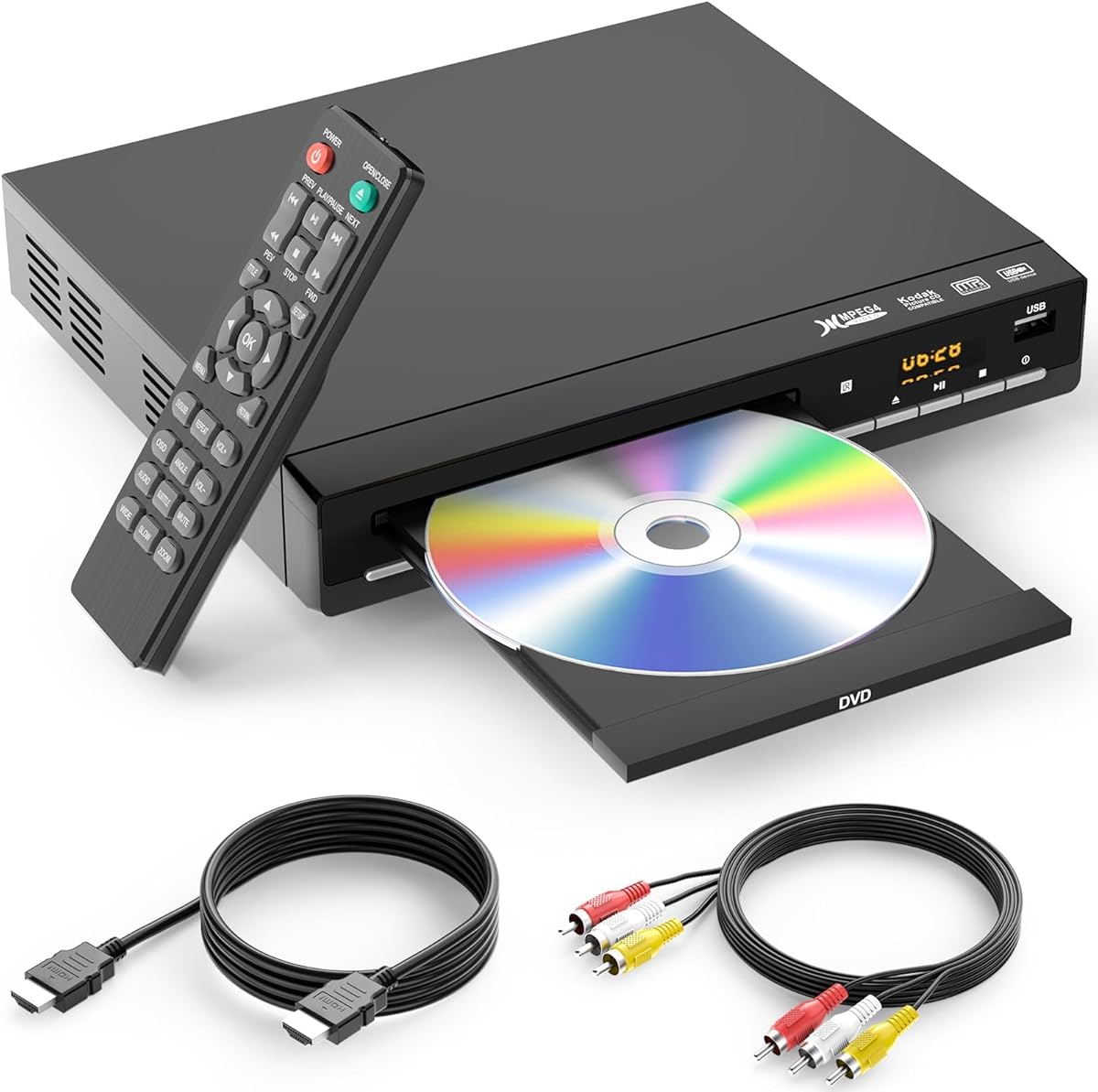
The MAJORITY HDMI DVD Player offers one of the most approachable packages in this guide, with a 4.1 rating, a projector-ready HDMI connection, and region-free DVD support. It also includes AV cables, a power cable, a remote control, and a user manual. That generous accessory list makes it useful for a new setup because the most common projector connection is ready to use out of the box.
We may earn a commission when you buy through this link, at no additional cost to you.
It supports DVD, DVD-R, DVD-RW, and CD media, while a USB port expands the options for compatible video and audio files. The player advertises 1080p output, fast loading, memory playback, and quiet operation. Additional remote functions include rewind, zoom, slow motion, and visual and audio customization, allowing the picture and sound to be adjusted to suit different projectors and rooms.
The main compromise is physical size. Its listed dimensions of 28.86 by 7.48 by 1.77 inches are considerably larger than the compact models in this guide. That can be inconvenient for a shelf above a projector or in a tight entertainment center. It also does not offer Blu-ray playback, and the product information does not identify the broad set of modern file formats supported by more specialized media players.
For a straightforward home projector installation centered on DVDs and CDs, this model delivers the essentials without unnecessary complexity. It is best for buyers who want region-free playback, HDMI convenience, a remote, and included cables at an approachable cost. Those with a need for the smallest footprint or extensive digital-file support should compare one of the mini players or a Blu-ray-capable alternative.
Having both HDMI and RCA cables included is valuable when you are building a projector system and do not yet know which connection the equipment requires. The remote and power cable complete the core setup. Even if you use HDMI, the AV lead provides a backup for older displays or troubleshooting.
Before buying, measure the shelf or cabinet where the player will sit. Its elongated design may fit comfortably beside a conventional television but could be less suitable for a compact ceiling-mounted or portable projector arrangement. Adequate ventilation and clear access to the disc tray are also important.
We may earn a commission when you buy through this link, at no additional cost to you.
This all-region HDMI DVD player combines a 4.3 rating with a broad set of physical and file formats, making it a flexible source for a projector. It supports region-free DVD playback across standard, plus, and minus recordable formats, as well as CD, CD-R/RW, VCD, SVCD, MP3, and JPEG content. The included HDMI and RCA cables provide suitable connections for both modern projectors and older displays.
We may earn a commission when you buy through this link, at no additional cost to you.
The player uses 1080p technology to provide a higher-definition signal, while an imported movement is designed for fast disc loading, error correction, and anti-shock performance. Its USB input is an especially useful feature for a projector setup because it can handle MP3, WMA, and JPEG files from a flash drive. It can accommodate drives up to 128GB, provided they are formatted in FAT32.
Users who need modern file flexibility may find the limitations important. It is not a Blu-ray player, and USB compatibility stops at FAT32, excluding NTFS and exFAT. The format list also does not promise support for the wide range of high-definition video files commonly found on modern computers. For a collection built around physical discs, music, and photographs, however, the supported media are practical and easy to organize.
This model is a strong choice for an international or mixed-format DVD collection, particularly if you want a full-size-looking player with a wide region-free feature set. The 12-month warranty and 24-hour customer support add reassurance. It is less suitable for users who expect extensive streaming, modern downloaded-video support, or Blu-ray discs.
For collectors who own discs from different regions, region-free playback simplifies setup and avoids disc-compatibility concerns. The player supports common DVD and CD variants rather than limiting itself to one pressed-DVD standard. That makes it a practical bridge between physical collections and a modern projector display.
A flash drive can supply music and photographs without involving a computer or network connection. Formatting the drive as FAT32 before use helps ensure compatibility, and staying within the stated capacity limit reduces the chance of files being overlooked. This is a convenient way to create a lightweight slideshow or music session for a gathering.
We may earn a commission when you buy through this link, at no additional cost to you.
The Sony DVPSR510H is a polished traditional DVD player with a 4.4 rating, an ultra-slim mid-size design, and 1080p upscaling through HDMI. It is a natural fit for a projector setup where clean presentation and a straightforward interface matter more than broad modern format support. Features such as multi-disc resume, a multi-band television remote, and playback of common DVD and recorded-disc formats add everyday convenience.
We may earn a commission when you buy through this link, at no additional cost to you.
The HDMI output makes connection to a modern projector straightforward, and upscaling can improve the presentation of standard-definition material. The player supports DVD, DVD plus R, DVD plus RW, DVD-R, and DVD-RW media, along with CD, CD-R, CD-RW, JPEG, and MPEG1 files. Its slim proportions can be easier to accommodate than oversized budget players, while Energy Star designation and standby consumption below 0.5 watts suit a home media installation.
The player remains limited to Region 1 DVDs and does not support Blu-ray. Its file support is also narrower than that of several compact competitors, which include USB playback and additional MPEG variants. These restrictions make it most appropriate for viewers with a Region 1 physical DVD collection who want a simple dedicated player rather than a broad file-based media system.
Choose the DVPSR510H for a refined, uncomplicated projector source with useful upscaling and resume playback. It is a particularly good option for a living-room system where a low-profile component looks more appropriate than a mini model or a large generic deck. Confirm that your discs are Region 1 and that USB-based media is not a requirement before purchase.
This model focuses on the core jobs of a dedicated DVD player: clean disc playback, straightforward HDMI output, remote operation, and convenient resume behavior. Its mid-size design balances screen presence with a relatively slim profile. That makes it visually and physically suited to a conventional home theater cabinet.
A projector is often switched off while the source device remains connected, making low standby consumption useful. The stated standby draw of less than 0.5 watts helps reduce unnecessary energy use. For a home setup, this is a practical benefit alongside the player's familiar Sony design and straightforward operation.
We may earn a commission when you buy through this link, at no additional cost to you.
The Mini All-Region DVD Player is built for portability, with dimensions of 6.1 by 5.4 by 1.06 inches and a weight of 0.62 pounds. Despite its small size, it offers a 4.0 rating, 1080p HDMI output, region-free disc playback, USB media support, a remote, and a useful headphone jack. It is a good match for portable projectors, dorm rooms, travel kits, and other installations where every inch of shelf space matters.
We may earn a commission when you buy through this link, at no additional cost to you.
The upgraded drive is designed for fast, quiet reading, with error correction for scratched discs, anti-shock protection, and a resume function. USB playback supports MP3 music, JPEG photographs, and compatible MPEG video files, including MP4, VOB, and AVI files when encoded appropriately. The player also includes CD-to-USB copying, allowing a music CD to be transferred to a flash drive without a computer. The included HDMI cable makes the primary projector connection simple.
Its digital-file limitations deserve careful attention. H.264 and MPEG-4 AVC are unsupported, and the product information recommends USB video around 480p for best results. It also does not support Blu-ray discs. These restrictions mean it should be treated as a portable DVD, CD, photo, and basic USB player rather than a modern high-definition file hub. The remote guidance also notes an effective range of up to 10 feet within 30 degrees.
This model is most attractive to someone who values a very small footprint and audio flexibility over advanced video-file support. The headphone output and dedicated volume control make it useful as a personal CD player as well as a projector source. For travel or temporary installations, its compact body, light weight, resume playback, and region-free support offer a compelling combination of convenience and capability.
The lightweight enclosure is easy to pack, position, and carry between rooms. Its small size also makes it practical beside projectors that have limited shelf space. Resume playback is especially helpful for users who watch movies in shorter sessions or stop and start films while traveling.
A dedicated headphone output turns the player into a personal CD player, and the included USB cable supports direct CD-to-USB copying. This makes the device more useful when the projector is not the focus of the session. It is an unusual combination in a compact unit and expands its value for music listening.
We may earn a commission when you buy through this link, at no additional cost to you.
The Sony UBP-X700U is the premium projector companion in this lineup, offering 4K Ultra HD Blu-ray playback, 4K upscaling up to 60p, DVD support, and a 4.4 rating. It is designed for modern 4K projectors and larger home theater screens where a high-end source device can make a meaningful difference. The included HDMI cable and familiar Sony presentation keep the basic setup approachable despite its advanced capabilities.
We may earn a commission when you buy through this link, at no additional cost to you.
Its dual HDMI outputs provide a notable advantage for home theater installations. One output can handle video while the other is used for audio, allowing the player to connect more flexibly to an amplifier or receiver and potentially produce clearer sound. The player also supports numerous disc and file formats and can upscale lower-resolution content to 4K. These are particularly useful features for viewers who own a mixed collection or want a dedicated source for a high-end display.
As with the other Sony Blu-ray models, regional compatibility is limited to Region A Blu-ray and Region 1 DVD. It should not be purchased as a region-free solution for an international collection. It also remains a disc-based player rather than a comprehensive streaming device, and its premium capabilities make it less necessary for a modest projector or a setup used mainly for standard-definition DVDs.
The UBP-X700U is best for an enthusiast installation with a 4K projector, serious Blu-ray library, and a separate audio system. Its dual-HDMI arrangement, 60p 4K upscaling, and broad playback capabilities justify the premium position for users who can take advantage of them. For a basic bedroom projector or DVD-only collection, one of the less expensive models will usually be a more rational fit.
Native 4K Ultra HD Blu-ray playback provides substantially more source detail than standard-definition DVD. The player's ability to upscale video to 4K at up to 60p can also improve the presentation of lower-resolution content. The result is most meaningful when paired with a capable 4K projector and appropriate source material.
Separating audio and video over two HDMI outputs gives home theater builders more connection choices. The video output can go directly to the projector while another route carries sound to an amplifier or receiver. This arrangement can reduce the need for additional video processing and supports a cleaner, more flexible system design.
We may earn a commission when you buy through this link, at no additional cost to you.
The Sony DVP-NS90V stands out for its emphasis on picture processing and audiophile features. Its 4.2 rating is supported by 720p and 1080i upscaling over HDMI, SACD playback, and Precision Cinema Progressive Technology. The player is a strong fit for a projector system where careful image processing, dedicated music playback, and reliable handling of warped or imperfect discs matter more than modern streaming features.
We may earn a commission when you buy through this link, at no additional cost to you.
Precision Drive 3 moves the lens rather than the entire optical block when addressing warped discs, enabling faster and more accurate error correction. At the picture level, the player detects image changes at the pixel level and applies algorithms intended to sharpen backgrounds and reduce motion artifacts. Those capabilities can make standard-definition DVDs look more refined, although the 1080i output is below the 1080p capability of many competitors in this guide.
SACD and MP3 playback give the device an unusual audio focus. For a home theater enthusiast with a compatible amplifier and SACD collection, that support can outweigh a lack of newer network features. The design is also optimized for physical media rather than serving as a general streaming platform, so buyers should be comfortable connecting and controlling a traditional disc component.
Choose the DVP-NS90V when your projector setup benefits from advanced progressive-scan processing and you also value high-quality physical-media audio. It is particularly relevant to dedicated home theater rooms and established systems with good amplifiers. For a basic setup or a collection dominated by modern files, a newer multi-format player may be more convenient.
Precision Cinema Progressive Technology analyzes image changes at the pixel level and optimizes the picture as scenes change. That focus can improve perceived sharpness and reduce motion artifacts. Even so, a 1080i upscaled source cannot match the detail available from a Full HD or 4K Blu-ray player.
The Precision Drive 3 system is designed to react to warped discs by repositioning the lens rather than the complete optical assembly. That approach supports more accurate error correction and can improve reliability with older or imperfectly stored media. It is a useful feature for collectors whose discs have not always been stored in ideal conditions.
We may earn a commission when you buy through this link, at no additional cost to you.
The Toshiba HD-A35 is included as a specialist option for viewers who still own HD DVD discs. It carries a 3.8 rating and supports HD DVD, standard DVD, and CD playback, with output resolution reaching 1080p. For a projector setup built around an HD DVD collection, that uncommon format support gives it a clear purpose that the other players in this guide do not provide.
We may earn a commission when you buy through this link, at no additional cost to you.
Its HDMI output includes Deep Color support, which can represent a wider range of colors when paired with compatible displays and source material. HDMI CEC also provides a way to control certain functions across compatible connected devices, reducing the need to switch between multiple remotes. The combination of 1080p video and these HDMI features suits a larger screen where color and detail are more visible.
HD DVD is the decisive limitation. The format is not supported by any of the other models listed here, and a modern collection is far more likely to center on standard DVDs or Blu-rays. The player does not offer broad file playback, streaming features, or a region-free design in the supplied specifications. Its lower rating also indicates less of an all-around recommendation compared with the other options.
Buy the HD-A35 only if you have a meaningful HD DVD library and understand that it is a format-specific choice. It can provide a straightforward projector connection at up to 1080p, with Deep Color and CEC as useful additions. Everyone else should prioritize one of the region-free DVD players, the Full HD Sony BDP-S1700U, or the premium UBP-X700U.
HD DVD discs require a player that explicitly supports the format, and the HD-A35 provides that capability. If your collection includes a meaningful number of these discs, the specialized support can outweigh newer features found elsewhere. If you are starting a new physical-media library, standard DVD and Blu-ray players are more versatile.
Deep Color HDMI support can produce smoother color gradients when the projector and content are compatible. HDMI CEC offers basic control between connected devices, which can make operation more convenient. Neither feature overcomes the limited format ecosystem, but both improve the experience when the right equipment is used.
We may earn a commission when you buy through this link, at no additional cost to you.
The right projector source depends on your disc collection, display capability, audio system, available space, and tolerance for region restrictions. HDMI compatibility is essential, but resolution, media support, and connection design determine whether a player feels versatile or restrictive.
Start by confirming that the projector has a compatible HDMI input and that the player includes or supports the necessary cable. A full HD 1080p output is a sensible target for a modern projector because it can provide a sharper image than standard-definition output. Blu-ray-capable players add a higher-quality source when the projector is 4K, while upscaling can improve the appearance of DVDs but cannot recreate missing source detail. Match the output to the projector rather than assuming the largest advertised number is always necessary.
In short, prioritize a clean HDMI connection and the highest output your projector can actually use.
Decide whether you need standard DVD only, Full HD Blu-ray, 4K Blu-ray, or the uncommon HD DVD format. The dedicated DVD players in this guide support conventional discs and many recorded formats, while the Sony models expand compatibility to Blu-ray and the Toshiba adds HD DVD. Check whether CD, SVCD, VCD, recordable DVDs, and photo discs matter to you as well. A broader format list is useful only when it matches media you already own or expect to buy.
In short, choose the narrowest format set that comfortably covers your collection without paying for features you will never use.
Region-free players can read discs intended for multiple regions and often support both PAL and NTSC standards, which is valuable for international collections. Region-locked models are more restrictive: the Sony BDP-S1700U and UBP-X700U support Region A Blu-ray and Region 1 DVD, while the Sony DVPSR510H is DVD Region 1. Before purchasing a locked model, check the markings on the discs you intend to play. Region-free capability is particularly helpful for secondhand purchases and older collections.
In short, verify disc regions first, because a region mismatch can prevent otherwise compatible DVDs or Blu-rays from playing.
Consider where the player will sit. Mini models such as the DESOBRY and the Mini All-Region DVD Player are easy to place beside portable or ceiling-mounted projectors, whereas elongated decks may require a larger shelf. A slim mid-size unit can be easier to integrate into a finished entertainment cabinet, and a metal housing may provide better cooling than plastic construction. Leave clearance around vents and ensure that the disc tray and remote sensor remain accessible.
In short, measure the installation space and choose a chassis that fits without blocking airflow or access.
HDMI can carry digital audio and video together, but some systems benefit from a separate digital or analog audio route. The MEGATEK includes RCA and coaxial digital outputs, the DESOBRY provides RCA fallback, and the Sony UBP-X700U uses dual HDMI outputs to separate video and sound. A separate connection can give an amplifier or receiver more control over audio routing. If you rely on the projector's built-in speakers, the player's supported audio formats and HDMI capabilities should be sufficient for most viewing.
In short, plan the complete audio path before purchase, especially if an external amplifier or receiver is part of the system.
USB support can provide a convenient way to play photographs, music, or compatible video from a flash drive. File support varies substantially: some players accept only basic MPEG formats, while others mention MP4, VOB, AVI, and additional codecs. Storage requirements also matter. FAT32 is specified for the MEGATEK and the all-regions player, with capacities up to 128GB, while the DESOBRY supports up to 32GB in FAT32. H.264 and MPEG-4 AVC are explicitly unsupported by the Mini All-Region DVD Player.
In short, check file extension, codec, drive format, and capacity requirements before relying on USB playback.
Features such as fast or slow playback, zoom, repeat, parental controls, resume memory, and slide shows can improve everyday use. Error correction and anti-shock mechanisms are especially helpful with older or scratched discs. CD-to-USB recording appears in the MEGATEK and Mini All-Region models, while the DESOBRY offers breakpoint memory. A remote is standard across the lineup, but compact models may also suit manual control more easily. Consider which conveniences match how you actually watch rather than selecting on feature count alone.
In short, prioritize the convenience features you will use regularly, particularly reliable resume playback and easy disc loading.
Place the player on a stable, level surface with enough room around its vents and disc tray. Connect the HDMI output to the projector's matching input, connect audio through the same cable or a separate output if needed, and then attach power. Turn on the projector, select its HDMI input, and configure the projector's aspect ratio and picture mode before making extensive adjustments on the player. If the picture is stretched, use the player's setup menu or the projector's controls to select the correct 16:9, 4:3, or other supported ratio.
Use a clean, soft cloth to wipe the enclosure and a lint-free cloth for the disc surface. Do not use aggressive chemicals, and avoid pushing on the lens or opening the housing. Store discs in their cases, preferably upright in a dry environment, and handle them by the edges. If a disc will not load, check that it is clean and fully seated, then confirm that its format is supported before attempting repeated playback. For USB media, format the drive as FAT32 when required and avoid pulling it out while files are being accessed.
For the best viewing experience, use the correct original-video aspect ratio and avoid stretching a 4:3 DVD to fill a widescreen projector. Black bars are normal when preserving the original composition. Match the projector to the room, control ambient light during daytime viewing, and adjust focus and screen size at the primary seating position. After the initial setup, save the preferred picture, audio, subtitle, and resume settings, and update them whenever the projector or source arrangement changes.
Most modern projectors include an HDMI input, so a player with HDMI output is usually the simplest and most reliable connection. The included HDMI cable should be used only if the player and projector do not already provide one, and the projector must be switched to the correct input. Older projectors may instead require RCA video and a separate audio connection.
No. Upscaling converts a standard-definition DVD signal to a larger output resolution, but it cannot restore details that were never recorded. The process can still produce a cleaner-looking image and a more appropriate signal for a modern projector. A native high-definition source such as Full HD or 4K Blu-ray offers a more substantial visual improvement.
A region-free player is designed to play DVD discs from multiple regions, which is useful for international collections. Region-locked models work only with the coded regions stated in their specifications, and some combine separate Blu-ray and DVD region codes. Check the region marking on your discs before choosing a locked model.
The supplied information does not identify built-in streaming applications for the models in this guide. Their documented strengths are disc playback, video upscaling, USB media support, and related physical-media functions. If streaming is a priority, verify network features and application availability separately before making a projector-source purchase.
Yes. HDMI normally carries both video and digital audio, so it is usually the simplest arrangement. Some models also offer RCA or coaxial digital audio outputs, while the Sony UBP-X700U has dual HDMI outputs for separating video and audio. The correct choice depends on whether sound comes from the projector, an amplifier, or a receiver.
Players can differ in supported codecs, file extensions, drive capacities, and filesystem formats. FAT32 is specified for several models, while NTFS and exFAT are excluded on some. A drive may therefore be recognized by one player and ignored by another, so check the exact format requirements and test the files before an important viewing session.
A mini model is usually easier to transport and position beside a portable projector. Devices such as the DESOBRY and Mini All-Region DVD Player are notably smaller than conventional decks. The trade-off may be reduced file-format support, so buyers should confirm that disc and digital media requirements are still met.
A Blu-ray-capable player is preferable if you own Blu-ray discs or want access to higher-resolution source material for a 4K projector. A DVD-only unit remains suitable for viewers centered on standard-definition discs, international DVD collections, or compact installations. Also check regional codes, since the Sony Blu-ray models listed here are not region-free.
The MEGATEK Region-Free DVD Player is the most balanced overall recommendation because it combines 1080p upscaling, region-free playback, useful file support, and flexible audio outputs in a compact metal housing. The MAJORITY model stands out as the budget-focused option, while the Sony UBP-X700U is the clear premium choice for 4K projectors and advanced home theater audio.
Prioritize the connection path first: a projector with HDMI should be paired with a player offering the resolution and media formats you actually use. Next, check region restrictions, USB requirements, physical size, and audio outputs. A simpler player can serve a simple bedroom setup better than an advanced model, while collectors benefit from broader disc support and reliable error correction.
Ratings, specifications, product availability, and prices can change, so confirm the current listing and compatibility details before buying. Check the projector input, your disc regions, the desired file formats, and the included cables at the time of purchase. Those quick checks can prevent most common compatibility issues and help you select a source device that fits the entire home theater system.