
TOMLOV DM9
4.4Editor score
7-inch LCD viewing screen
12MP still-image capture
16GB included storage
Flexible dual-side lighting
Windows and Mac connectivity
A microscope camera for documenting samples must balance magnification, image clarity, lighting, and repeatable capture controls. The right setup helps preserve fine details in photos and videos, support comparisons, and make observations easier to review or share. The best option depends heavily on the samples, workflow, and whether you need a handheld unit or an eyepiece camera.
This guide compares ten microscope cameras and complete microscope systems for documenting natural specimens, coins, circuit boards, prepared slides, and small objects. We evaluated the supplied specifications for magnification, sensor and video resolution, lighting, storage, computer connectivity, stand design, focus control, and documentation features. The list includes budget handheld models, screen-equipped microscopes, and attachable camera solutions.
The top three picks represent distinct priorities: the TOMLOV DM9 offers useful all-around value, the Elikliv EM4K-AF provides advanced imaging and comparison tools, and the TOMLOV DM10 combines a large display with flexible lighting. Product configurations and availability can change, and current prices should be checked before making a purchase.
4.4Editor score

4.4Editor score
4.4Editor score
As an Amazon Associate we earn from qualifying purchases.
The comparison covers standalone digital microscopes, binocular systems, trinocular microscopes, and an eyepiece camera, with emphasis on image capture, magnification, lighting, storage, focus control, and computer compatibility.


The Skybasic Wireless Digital Microscope is a lightweight handheld option for people who need to photograph small natural objects without setting up a bench-mounted system. Its 4.2 rating reflects a practical mix of portability, magnification, and device flexibility. The advertised 50X to 1000X range, two-megapixel sensor, one-button photo and video controls, and adjustable LEDs make it especially approachable for field observations and casual sample records.
We may earn a commission when you buy through this link, at no additional cost to you.
Its strongest advantage is the choice of wireless and wired connections. A phone or tablet can join the microscope's WiFi hotspot through the Max-see application, while Windows and Mac computers can use the included USB cable. Eight adjustable LEDs help reveal surface texture, although they are positioned within the handheld body rather than on independently flexible arms. The 3 to 60 millimeter working range helps keep small subjects within the area where the fixed-focus lens can produce a sharp image.
There are important limits. This is a digital magnifier with fixed focus rather than a compound microscope with interchangeable optics. The device is explicitly not intended for serious professional biology, and computer mode does not support the same plus, minus, and photo-button functions listed for WiFi operation. Users may also need to update the application and adjust camera or privacy settings for reliable connectivity. A USB adapter is not included.
It is best suited to teachers, students, hobbyists, and travelers who want a compact image-capture tool for leaves, coins, fabrics, insects, minerals, and other small subjects. Choose it for convenience rather than laboratory-grade optical performance. For repeatable research records or specimens requiring multiple objective levels, a screen-equipped or traditional microscope system will be more dependable.
The small handheld body and included stand make this microscope easy to carry between locations. It can move from a tabletop to an outdoor sample with little setup, while the application supports direct wireless image and video transfer to a mobile device.
Eight adjustable LEDs provide illumination for close inspection, while the stated 3 to 60 millimeter focal range helps users maintain clarity. Correct working distance and removal of the protective film are essential before attempting a serious capture session.
We may earn a commission when you buy through this link, at no additional cost to you.
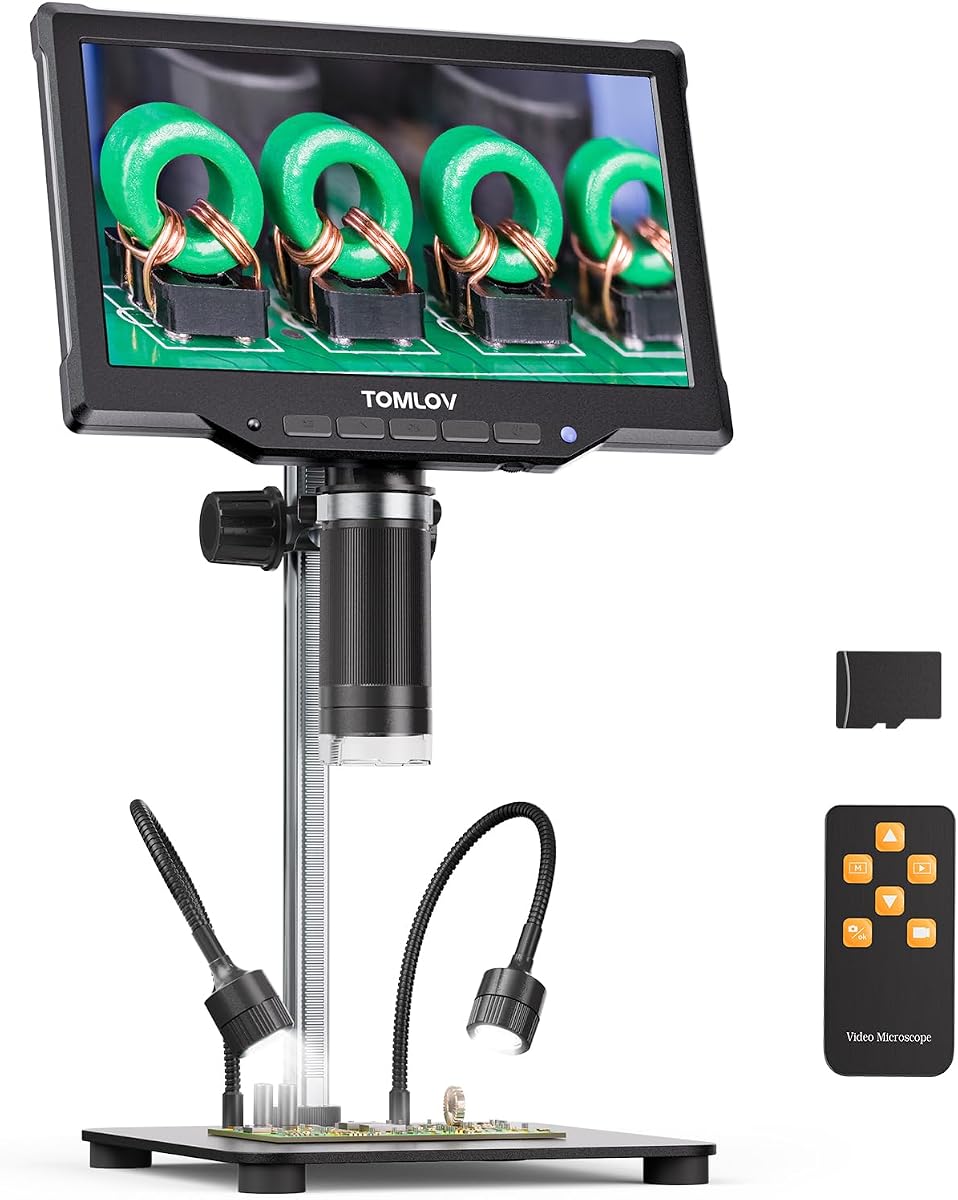
The TOMLOV DM9 combines a 7-inch display, 1200X magnification, 12-megapixel photo capture, and 1080P video in a well-balanced standalone microscope. Its 4.4 rating and feature set make it an appealing documentation option for coins, solder joints, watch parts, plants, rocks, textiles, and small mechanical components without requiring a separate computer for routine viewing.
We may earn a commission when you buy through this link, at no additional cost to you.
The stable metal base and height-adjustable stand support consistent observation, which is valuable when a sample needs to remain in the same position while focus is refined. Eight integrated LEDs and two flexible gooseneck lights allow users to vary brightness and reduce shadows from different directions. A wired remote supports capture without touching the unit, reducing the chance that a delicate or moving specimen will shift.
Documentation is handled by the 12-megapixel camera, 1080P recording, and included 16GB microSD card. The screen allows immediate review, and USB connection to a Windows or Mac computer provides a larger live view for demonstrations and closer analysis. Those features create a more organized workflow than a basic handheld magnifier, even though the 7-inch panel is smaller than the displays on the premium picks.
The DM9 is not a laboratory-grade compound microscope and does not provide interchangeable objective lenses. Its maximum magnification is digital and should not be treated as equivalent to a high-powered optical objective. Nevertheless, for a hobbyist, educator, technician, or collector who wants repeatable close-up photos and videos with a stable stand, it is the strongest value option in this guide.
The built-in display, storage card, wired remote, and adjustable stand create a self-contained workflow. Users can inspect, frame, capture, and review a sample without connecting to a computer for every task.
Eight adjustable ring lights and two flexible side lights make it easier to reduce glare, lift shadows, and reveal scratches, texture, solder joints, or specimen boundaries. Independent light positioning is especially useful for uneven surfaces.
We may earn a commission when you buy through this link, at no additional cost to you.
The Elikliv EM4K-AF is the most feature-focused microscope camera in this roundup for users who need sharp video, rapid focus acquisition, and side-by-side sample comparison. It carries a 4.4 rating and combines a 52-megapixel still-image capability with 4K UHD video on an 8-inch IPS screen. Its AI-assisted autofocus continuously assesses clarity and can readjust while a sample moves.
We may earn a commission when you buy through this link, at no additional cost to you.
The time-of-flight sensor supports distance measurement and focal changes in about two seconds, which reduces the repeated manual adjustment that can interrupt documentation. The 1280 by 800 IPS panel offers a wide viewing angle, while HDMI and USB outputs let users move the image to a larger monitor for teaching, review, or recording. A smart controller provides photo capture, video recording, and zoom controls without touching the display.
Two workflow features distinguish it from the other models. Freeze can lock an image for close analysis, and split-screen can place samples beside one another for rapid comparison. These functions are useful for documenting changes over time, comparing clean and treated surfaces, or checking multiple specimens without constantly resetting the view. The 16GB card supports stored findings, and the rechargeable battery offers freedom from a fixed power lead.
The trade-off is the more substantial investment and the fact that 2000X remains a digital magnification figure rather than a promise of laboratory-grade resolving power. Autofocus is also most effective when the sample is initially framed well and the lens is close enough. For detailed electronics work, coin analysis, collecting, teaching demonstrations, and serious visual comparison, the EM4K-AF is the strongest all-around choice in this guide.
The AI-assisted autofocus and time-of-flight sensor are particularly useful when a specimen moves or the ideal working distance changes. This reduces focus hunting and makes short documentation sessions more consistent.
Freeze and split-screen functions make it possible to inspect details and compare two views directly. These tools reduce the need to keep a mental record of earlier images or switch repeatedly between separate files.
We may earn a commission when you buy through this link, at no additional cost to you.
The TOMLOV DM10 prioritizes a large viewing area and straightforward image capture. Its 10.1-inch IPS screen, 178-degree viewing angle, 5X to 1200X magnification range, and selection of photo resolutions make it well suited to detailed visual inspection and sample records. The 4.4 rating reflects a capable feature set without the autofocus complexity of the Elikliv model.
We may earn a commission when you buy through this link, at no additional cost to you.
Its 16-megapixel maximum still resolution is useful for preserving fine detail, while 1080FHD video provides a familiar format for demonstrations and close-up recordings. One-touch photo and video controls simplify the workflow. A wireless remote lets users capture without touching the microscope, which can improve stability when examining small components, coins, watch parts, rocks, minerals, or plants.
Lighting is one of the DM10's clearest advantages. Eight adjustable LEDs around the lens work together with two flexible gooseneck side lights, and their brightness can be adjusted independently. This is helpful for revealing texture, solder joints, scratches, and specimen edges while controlling glare. USB output also enables a larger live view on a computer for more comfortable inspection or shared observation.
The premium feature is the large display, not laboratory-grade optics. The unit is bulkier than a handheld camera, and its 1200X maximum should be understood as a digital specification. It also lacks the EM4K-AF's freeze and split-screen tools. Even so, the DM10 offers an excellent balance of screen size, capture quality, lighting, remote operation, and battery convenience for careful documentation.
The 10.1-inch IPS panel provides more room to frame samples and review fine details. Its wide viewing angle also makes the screen practical for teaching, collaborative inspection, or a shared demonstration.
Wireless photo and video controls reduce accidental movement of the microscope or sample. This is particularly helpful when documenting a specimen that is already well positioned and only needs a careful capture.
We may earn a commission when you buy through this link, at no additional cost to you.
The Swift 5.0 Megapixel Digital Camera is designed for people who already own a compatible compound or stereo microscope. Instead of providing a complete microscope, it converts an existing eyepiece tube into a USB imaging system. Its 3.9 rating is modest, but the straightforward installation, 30-frame-per-second live feed, and inclusion of adapters for 23.2mm, 30mm, and 30.5mm tubes serve a clear purpose.
We may earn a commission when you buy through this link, at no additional cost to you.
The camera's Sony back-illuminated sensor is described as offering high sensitivity and signal-to-noise performance, which supports live display, video streaming, and still images. At its maximum 2592 by 1944 resolution, the live view can reach 30 frames per second. The included flash drive contains installation software, and online availability gives users another setup path.
Because this is an eyepiece camera, documentation quality also depends on the microscope attached to it. Its actual optical performance, working distance, stage control, lighting, and magnification are determined by that system. The camera is therefore most attractive to a lab, classroom, or clinic that wants to add digital capture without replacing a functional microscope.
There is no built-in screen, stand, or storage device, so a computer is required for viewing and recording. Its 5-megapixel output also trails newer cameras in the list. However, for an existing microscope with a matching eyepiece diameter, it is a focused and economical way to add live viewing, image capture, and presentation capability.
The eyepiece-style mount slides into a compatible microscope tube, allowing an existing optical instrument to become a digital documentation platform. This is particularly useful when replacing a complete microscope would be unnecessary.
A 30-frame-per-second live feed makes the camera useful for demonstrations, observation sessions, and live streaming. The included software and support for common Windows and Mac versions simplify the computer-based workflow.
We may earn a commission when you buy through this link, at no additional cost to you.
The Andonstar AD246S-M is the highest-rated product in this guide at 4.5, and its defining advantage is a set of three interchangeable lenses. Rather than forcing one viewing configuration onto every sample, Lens A supports broader views of coins, plants, and stones, Lens D is intended for biological slides, and Lens L targets close electronics work such as soldering and circuit-board inspection.
We may earn a commission when you buy through this link, at no additional cost to you.
The microscope supports 2160P video and HDMI output to a larger display. On the supplied screen, the listed working ranges vary by lens, with additional digital zoom available. The included measurement software can connect the microscope to a Windows computer and support length and area calculations, as well as photo and video capture. That makes the system useful for measurements that must accompany a visual record.
The adjustable metal boom stand has a larger working envelope and is positioned to support close repair work. A wireless remote allows capture from a distance, while eight LED intensity levels help reveal detail under changing conditions. The package also includes prepared slides, a slide holder, tweezers, an observation box, a microSD card, cables, and the three lenses.
This is a more involved system than a simple handheld magnifier, and swapping lenses requires removing and installing screws. It also needs a suitable display for the full HDMI workflow. Despite those considerations, it is the most versatile pick for users who document several sample categories, especially if biological slides, coins, and electronics are all part of the same household or educational workload.
The three lenses cover broad inspection, biological slides, and precision electronics work. That flexibility reduces the need for separate microscopes and helps each lens provide an appropriate working distance and field of view.
The Windows measurement software adds length and area calculations to the capture workflow. Recording a measurement beside the corresponding image can make collection records, teaching notes, and inspection reports more useful.
We may earn a commission when you buy through this link, at no additional cost to you.
The WF10x and WF25x Eyepiece Microscope is a traditional binocular microscope with a USB 2.0 electronic eyepiece for photos and video. Its 4.1 rating makes it a practical choice for studying biological tissues, chemistry, physics, prepared slides, and tiny objects when a conventional optical microscope experience is preferred.
We may earn a commission when you buy through this link, at no additional cost to you.
The supplied WF10x and WF25x eyepieces combine with 4x, 10x, 40x, and 100x achromatic objectives to create six magnification settings spanning 40X to 2000X. This multi-objective arrangement provides more flexibility than a fixed-optics digital magnifier. Coaxial coarse and fine focus controls allow quick positioning followed by precise refinement, which is valuable when examining a thin slide or a specimen at a different depth.
Two light sources support bright, even viewing across a variety of samples. The compound binocular format also allows comfortable direct observation before transferring a selected view to the computer for documentation. The included USB electronic eyepiece is intended for capturing still images and video, although it is a less advanced imaging option than the dedicated cameras with high-resolution sensors.
This microscope is best for students, teachers, home laboratories, and serious enthusiasts who value real binocular viewing, multiple optical objectives, and conventional slide preparation. It does not include a large screen, elaborate comparison software, or the high-resolution digital capture features found in the premium standalone systems. Its value lies in the optical instrument and the ability to add basic computer-based records.
Four objectives and two eyepiece options create six useful magnification combinations. Changing magnification levels is easier with a compound microscope than with a single-lens digital camera.
Coarse and fine adjustment knobs separate initial positioning from final sharpness. This is helpful when documenting a prepared slide whose useful details are not immediately visible at the lowest focus.
We may earn a commission when you buy through this link, at no additional cost to you.
The SWIFT SW320T is a compound trinocular microscope built for laboratory, classroom, and serious home-study use. Its 3.3 rating is the lowest in the list, so buyers should evaluate it primarily on its optical hardware and included accessories rather than expecting the convenience of the screen-equipped digital models. It supports visual observation, digital imaging, and external camera compatibility in one system.
We may earn a commission when you buy through this link, at no additional cost to you.
The 20:80 light split allows users to look through the binocular eyepieces while also sending an image to a computer or camera. Four DIN achromatic objectives, WF10x and WF25x eyepieces, and an included 2x Barlow lens create magnification settings from 40X up to 5000X. A dedicated C-mount adapter also allows more demanding digital cameras to be attached when the included 2MP camera is not sufficient.
Mechanical sample positioning is another strong feature. The double-layer stage includes X and Y translation scales, which makes it easier to return to a specific area during repeated observations. Coaxial coarse and fine controls, a 360-degree rotating Siedentopf head, adjustable interpupillary distance, and a tilted viewing arrangement support extended laboratory work. The 1W LED source and Abbe condenser support controlled illumination.
The package is extensive, including a carrying case, smartphone holder, software, coverslips, slides, immersion oil, and tools. However, the included 2MP camera is modest compared with dedicated 5MP, 25MP, or high-resolution digital alternatives. The SW320T is best for someone who needs a capable compound microscope and values simultaneous observation over a high-end bundled camera.
The third optical port divides light between direct viewing and a camera. A researcher can inspect a slide conventionally while another person sees the same field on a computer, or use the digital feed for capture.
X and Y scales on the mechanical stage support more controlled navigation and help users return to a specific specimen location. This is especially useful for multi-session documentation of a slide or prepared sample.
We may earn a commission when you buy through this link, at no additional cost to you.
The 5000X Trinocular Microscope earns the highest listed rating in this guide at 4.6. It is a traditional compound microscope built around a 1.3-megapixel USB camera, mechanical stage, LED illumination, and four achromatic objectives. Its strongest use is observing specimens through optical lenses while presenting and recording the image on a Windows or Mac computer.
We may earn a commission when you buy through this link, at no additional cost to you.
The four listed objectives are 4x, 10x, 60x, and 100x, providing a broad range of optical observation. The camera can feed a larger field of view to a computer or projector for live viewing, streaming, recording, and image capture. That arrangement suits classrooms, clinical or research discussions, breeding observations, biochemical work, and home studies where sharing a traditional microscope view matters.
A variable diaphragm, NA 1.25 spotting scope, and bright-field LED source give users meaningful control over the light reaching the specimen. The double-layer metal stage supports stable X and Y movement, which is useful for systematically scanning a slide and documenting selected regions. The trinocular format also preserves direct eyepiece observation rather than forcing every session through a screen.
The included 1.3-megapixel camera is the main limitation. It is adequate for teaching, demonstrations, and basic records, but users requiring high-resolution stills may need a separate higher-resolution camera if the trinocular port supports one. The microscope itself is well suited to serious optical work, and its rating reflects a strong balance of magnification, stage control, illumination, and computer-assisted viewing.
The USB camera sends a magnified view to a computer or projector, allowing one specimen to be discussed by a group. Live streaming and recording extend that shared view into a practical documentation format.
LED illumination, a variable diaphragm, and scaled X and Y movement support more deliberate sample examination. These controls help users manage transparency, reveal detail, and revisit specific regions consistently.
We may earn a commission when you buy through this link, at no additional cost to you.
The Swiftcam 25 Megapixel Camera is the highest-resolution dedicated camera in this roundup and is intended for users with a compatible microscope. Its 3.8 rating should be considered alongside that role: it is not a complete microscope or a portable viewer, but an imaging module designed to produce detailed full-color photographs and videos from an existing optical system.
We may earn a commission when you buy through this link, at no additional cost to you.
The camera can mount on a trinocular port or a regular eyepiece tube. A reduction lens supports a field of view consistent with the microscope's magnification, while included adapters fit 23.2mm, 30mm, and 30.5mm tube sizes. A calibration kit and eyetube adapters make it easier to set up an existing microscope for more serious image capture.
USB 3.0 provides fast file transfer between the camera and computer, which is valuable when moving large, high-resolution files. The included flash drive carries installation software for Windows, Mac, and Linux, giving the system broad platform support. Its 25-megapixel sensor can preserve more visible information than the lower-resolution bundled cameras included with some compound microscopes.
This is the best option for a laboratory, classroom collection, or serious enthusiast that already owns a suitable microscope and wants improved documentation without replacing the entire instrument. Users must confirm port size, microscope compatibility, and required software before buying. The camera offers a specialized path to high-resolution records, not the convenience of a built-in screen or stand.
The 25-megapixel sensor can capture substantially more visual information than basic eyepiece cameras. Attaching it to a quality microscope gives users a specialized way to preserve fine detail in sample records.
The reduction lens and three tube adapters support common microscope configurations, while USB 3.0 speeds the transfer of large files. A compatible mount remains the essential requirement before purchase.
We may earn a commission when you buy through this link, at no additional cost to you.
The right documentation microscope depends on the sample, required resolution, working environment, and recording method. Optical quality, illumination, focus, storage, and compatibility should be evaluated together rather than treating maximum magnification as the only important specification.
Optical magnification is produced by the microscope lenses, while digital magnification enlarges the captured image. A compound microscope with interchangeable objectives and a calibrated eyepiece camera is generally preferable for traditional biological slides and controlled laboratory work. Standalone digital microscopes are more convenient for coins, electronics, rocks, textiles, and other inspection tasks. Their advertised magnification may depend partly on screen size and software processing, so a very large number does not automatically mean better optical resolution.
Choose optical magnification for scientific slide work, and digital magnification for portable inspection. Compare usable working distance and fine detail rather than relying on one headline magnification figure.
Still-image resolution and video resolution should be considered separately. A higher still-image pixel count can preserve small surface details for reports, catalogs, and teaching materials, while smooth video is more important for demonstrations and live observation. The models in this guide range from simple live feeds to 4K UHD recording, and several offer multiple photo-resolution choices. A practical workflow should produce files that are large enough to inspect but still manageable for storage and transfer.
Match the capture format to the final use. Choose high-resolution stills for permanent records and capable video for movement, demonstrations, or teaching.
Samples often look flat or unclear when illuminated from one direction, especially transparent slides, reflective coins, shiny components, and uneven natural materials. Adjustable LEDs allow users to control brightness, while flexible gooseneck lights can reduce shadows and change the angle of illumination. A traditional compound microscope may also provide an adjustable condenser, diaphragm, or bright-field source for controlling transmitted light. The best setup offers enough control to reveal surface texture without washing out the image.
Prioritize adjustable and directional lighting. For transparent slides, transmitted illumination is important; for opaque objects, side lighting often reveals texture more effectively.
Documentation depends on keeping the sample still and the focal plane accurate. Coaxial coarse and fine focus controls are useful on compound microscopes, while digital models may rely on fixed focus, manual height adjustment, or automated focusing. The Elikliv EM4K-AF adds AI-assisted autofocus and a time-of-flight sensor, which can reacquire focus quickly. A mechanical stage with X and Y scales is also valuable because it allows a known area to be revisited without moving the slide unpredictably.
Choose automatic focus for speed and variable samples, or precise mechanical controls for fixed laboratory specimens. A stable stand and remote capture further reduce movement.
A built-in LCD can make a standalone microscope more convenient because users can frame, capture, and review images without opening computer software. Larger screens are easier on the eyes but make the device less portable. Computer-connected models offer a larger viewing area, live streaming, measurement tools, and easier integration with teaching or analysis software. Evaluate operating-system support, file formats, and whether the required application is included or must be downloaded separately.
Decide whether computer access is part of the routine. Use a built-in display for portability and a USB or HDMI workflow for larger views, streaming, and measurement.
Built-in storage with a microSD card is convenient for capturing samples without a computer nearby. Capacity matters when recording high-resolution images or 4K video, and users should confirm whether a card is included, preinstalled, or merely supported. USB-connected cameras can be convenient when files are transferred immediately to a computer, but a reliable workflow may still benefit from local storage. A remote control can also help prevent accidental movement during a capture.
Confirm included storage before purchasing. Add capacity when high-resolution photos, 4K video, or long sessions are expected.
An eyepiece camera is not automatically compatible with every microscope. Common eyepiece tube sizes include 23.2mm, 30mm, and 30.5mm, and some systems use a dedicated C-mount or trinocular port instead. Reduction lenses and adapters can broaden compatibility, but buyers should check the physical dimensions of the microscope and the intended output connection. Software support also matters: Windows and Mac are common, while Linux compatibility is less universal.
Measure the microscope port and verify the full hardware and software combination before ordering. An adapter included with the camera is not a guarantee of universal fit.
A coin collector needs clear surface relief and stable lighting, an electronics hobbyist benefits from a close working distance and flexible illumination, and a biology teacher may need prepared slides and a large shared display. Multi-lens systems can serve several sample categories, while a single specialized setup may be simpler and less expensive. Consider whether the microscope must be portable, whether samples are delicate, and whether records require measurements, side-by-side comparisons, or simply clear photographs.
Start with the sample and final deliverable. The most capable microscope is not necessarily the best fit if its size, stand, or controls complicate the task.
Begin by stabilizing the microscope and choosing a working distance that keeps the entire area of interest visible. Turn on the illumination and adjust brightness and direction before bringing the sample into final position. On a compound system, use coarse focus only to bring the specimen into general view, then use the fine control for sharpness. Digital models may require manual height adjustment, while autofocus units should be allowed time to evaluate and settle on the subject.
Create a repeatable capture routine. Clean the lens and sample, position the subject against a simple background, set the lighting, confirm magnification, and record the sample identifier before pressing the capture control. Use a remote where available to avoid touching the microscope. Take one wider contextual image, one centered detail view, and a short video when movement or spatial relationships matter. Consistent filenames and a simple log linking each file to its sample make the archive far more useful later.
For transport, power down digital microscopes, loosen or secure adjustable arms, and protect the lens and display. Keep compound microscopes in a stable case, with the stage and objectives protected from impact. Do not use aggressive cleaners on coated optics or screens; follow the manufacturer's guidance and use a soft, lint-free cloth. Update camera software when needed, preserve the included calibration or reduction accessories, and periodically verify that recorded images remain sharp, correctly exposed, and linked to the correct sample record.
No. Useful detail depends on optical resolution, sensor quality, lighting, focus stability, and the distance between the lens and sample. A lower magnification can produce a clearer, better-lit record than a higher digital setting. Choose the lowest magnification that reveals the feature you need, then improve focus and illumination before adding magnification.
A built-in screen is more convenient for portable work, immediate review, and sessions without a computer. A computer connection offers a larger live view, easier file transfer, live streaming, and more advanced software workflows. Choose based on where you work and whether you need to share views with a group or store files immediately on a computer.
An eyepiece camera attaches to an existing microscope and uses that microscope's optics and stage. A digital microscope is a complete standalone instrument with its own camera, lighting, stand, and often a built-in screen. An eyepiece camera is economical when you already own a compatible microscope, while a standalone unit is easier to start using.
A mechanical stage is not required for every close-up task, but it makes it easier to move a slide smoothly, locate a specific area, and return to the same position later. It is especially useful for prepared slides, multi-session observations, and records that need to be reproducible. Handheld digital microscopes are better suited to quick, less formal documentation.
Lighting is critical. A flat, overly bright, or poorly directed source can hide texture, create glare, or wash out color. Adjustable LEDs help with exposure, while flexible side lights can reveal relief on opaque samples. Transparent slides benefit from transmitted illumination through a compound microscope, often with condenser and diaphragm control.
Several models support computer viewing, live streaming, or HDMI output. The trinocular systems are especially suitable for sharing a magnified view while retaining direct eyepiece observation, and the Andonstar model can output to a larger display. Confirm the included software, operating-system requirements, and connection method before setting up a live teaching workflow.
Give every sample a unique identifier and record that identifier, date, magnification, lighting condition, and notes. Capture a general orientation image, a detailed image, and a video when relevant. Store files in a structured folder and back up important records, since a microSD card can be removed, lost, or overwritten during an extended project.
The most useful accessories depend on the instrument: adapters for eyepiece compatibility, a microSD card for local storage, a remote for stable captures, and a calibration or reduction lens for appropriate field of view. A stable stand, proper cleaning materials, slides and coverslips, and a computer or external display can also significantly improve the workflow.
The TOMLOV DM9 is the most practical all-around value pick, combining a 7-inch display, 12-megapixel capture, 1080P video, flexible lighting, and included storage. The Elikliv EM4K-AF is the strongest choice for demanding visual work because its autofocus, 4K video, 52-megapixel images, freeze function, and split-screen comparison tools support detailed and repeatable observations. The TOMLOV DM10 is the premium display option, with a large 10.1-inch IPS screen, high-resolution stills, wireless remote control, and ten lights.
Prioritize the sample and the documentation process rather than the largest magnification number. A traditional compound microscope is appropriate for biological slides and laboratory work, an attachable camera is useful when you already own suitable optics, and a standalone digital microscope is convenient for coins, electronics, natural objects, and field inspection. Resolution, focus stability, controllable lighting, storage, and software should shape the final decision alongside the physical design.
Before purchasing, verify the sample type, required file format, computer compatibility, included storage, and whether a separate monitor or microscope is needed. Product bundles and technical details can change, so check the current listing and latest software instructions. Compare the current cost with the workflow features that will actually be used, and select the model that can produce clear, organized records with the least friction.