
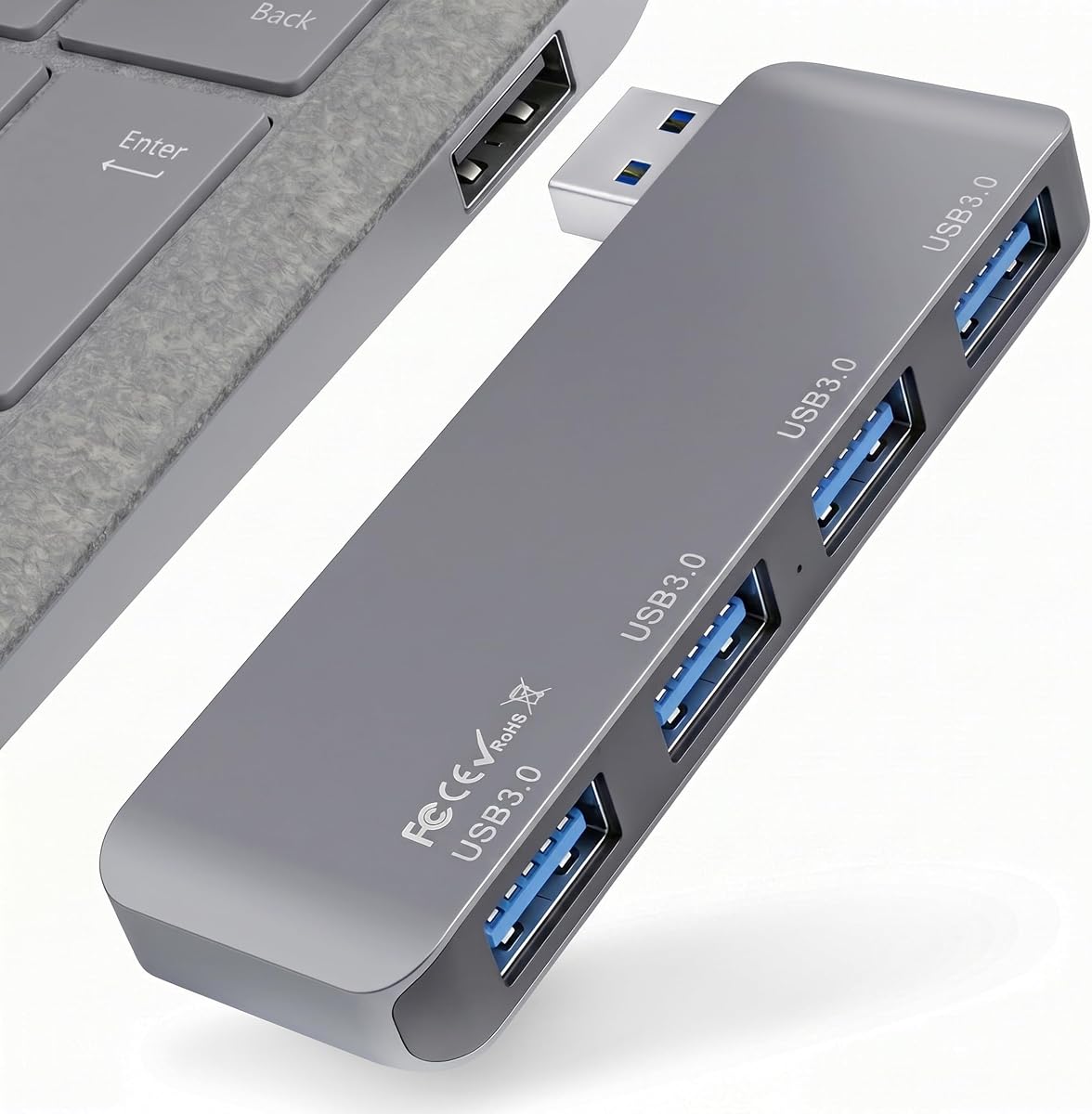
UGREEN 4-Port USB 3.0 Hub
4.7Editor score
Four USB-A ports
Up to 5Gbps transfer speed
Only 0.4 inches thick
Portable USB Hub guide comparing ten compact models for data speed, port count, power delivery, display support, compatibility, and travel convenience.
A portable USB hub adds essential connectivity without requiring users to carry bulky desk accessories. The right model should fit easily into a laptop bag, provide the ports your devices lack, and handle peripherals reliably. Useful options range from simple four-port adapters to travel docks with HDMI, USB-C, and power delivery.
The ten products in this guide were compared using the information supplied by their manufacturers and retailers. We examined port layouts, data standards, physical design, operating-system support, charging functions, display capabilities, and intended uses. The list includes basic USB-A expanders, compact Type-C hubs, and specialized options for portable storage or external displays.
Each review explains the strongest reasons to consider a particular hub, along with its limitations and best-fit user. Recommendations range from a lightweight budget expander to feature-rich travel and creator accessories. Product availability, specifications, and prices can change, so readers should verify the current listing and compatibility details before ordering.
4.7Editor score

4.6Editor score

4.6Editor score
This side-by-side comparison highlights each hub's connector layout, performance, portability, and specialized features so you can identify the most suitable option for your devices and routine.



The Acer USB Hub 4 Ports is a well-rounded portable expander with a 4.6 rating. Its primary attraction is a straightforward mix of four USB 3.0 ports, a compact housing, and a two-foot cable that gives the hub enough reach to sit comfortably beside a laptop. It suits users who need more room for everyday peripherals without investing in a display dock.
We may earn a commission when you buy through this link, at no additional cost to you.
Each of the four USB-A connections supports data transfer speeds up to 5Gbps, and the product supports simultaneous use across all four ports. An advanced GL3510 chip and thermal design are intended to promote stable operation. The auxiliary USB-C connection can provide 5V power, which may be helpful when connecting demanding hard drives, although it cannot transfer data or charge downstream devices.
The main limitation is that the USB-C port is input-only for hub power. Users who expect a full-featured USB-C docking station or want to charge a phone from the hub may need to look elsewhere. Some may also find the two-foot cable less convenient than the cable-free or very short designs in this list, but it also helps prevent awkward strain on the laptop's USB port.
This is a strong recommendation for a laptop or desktop that has too few USB-A sockets. It works particularly well for a keyboard, mouse, flash drive, and printer, while the optional power input offers extra stability for storage devices. Buyers wanting a full travel dock should look to the Anker or Lenovo models instead.
The USB-C connection accepts 5V power specifically to support the four USB-A ports. Although it is not a data connection or charging output, this feature can make the hub more dependable with power-hungry hard drives.
The hub works with macOS, Windows, ChromeOS, and Linux, and its USB-A ports accommodate common accessories. Plug-and-play operation removes the need to install drivers before getting started.
We may earn a commission when you buy through this link, at no additional cost to you.
The UGREEN USB 3.0 Hub combines a 4.7 rating with an exceptionally small form factor. It measures only 0.4 inches thick and weighs 33 grams, making it one of the easiest choices to carry in a laptop sleeve, tech pouch, or briefcase. Its simple four-port layout is aimed at users who need more USB-A connections for daily accessories.
We may earn a commission when you buy through this link, at no additional cost to you.
The USB 3.0 implementation supports transfer speeds up to 5Gbps, while the half-foot cable keeps the overall footprint modest. Plug-and-play operation is available across Windows, macOS, Linux, and ChromeOS. The product can also serve compatible USB-A devices such as Xbox Series consoles, PS5 systems, and compatible automotive systems.
There is no auxiliary power connection, so demanding external drives may be constrained by the host's available power. It also lacks USB-C, HDMI, and charging functions. Those omissions are understandable for a slim basic expander, but they narrow its usefulness for modern workflows that require display output or device charging.
Choose this hub when portability, affordability, and four-port USB 3.0 expansion matter most. It is particularly effective for a mouse, keyboard, flash drive, and lightweight card reader. Users moving regularly between devices will appreciate its tiny body, while high-power storage or monitor users should consider a hub with auxiliary power.
At just 0.4 inches thick and 33 grams, the UGREEN hub minimizes the space required for additional connectivity. Its short attached cable also reduces cable clutter compared with longer desktop-style adapters.
The four USB-A ports provide up to 5Gbps transfer speeds and can accommodate common peripherals. Support for major desktop and mobile operating systems makes the adapter convenient for temporary work setups.
We may earn a commission when you buy through this link, at no additional cost to you.
The VIENON 4-Port USB 3.0 Hub has a 4.2 rating and stands out through its 90- and 180-degree rotating design. That articulation can make the adapter easier to position beside a laptop, desktop, or compatible in-car system. It offers three USB-A connections and one USB-C connection rather than a conventional four-USB-A layout.
We may earn a commission when you buy through this link, at no additional cost to you.
One USB-A port delivers up to 5Gbps, while the other two USB-A ports support up to 480Mbps. The USB-C female port handles both 5V power input and data transfer, allowing it to connect with compatible phones and mobile hard drives. All listed connections can operate at the same time, and the rotating arrangement helps reduce bending forces on the host connector.
The most important restriction is that the USB-C port does not provide charging output. Video and audio transfer are also unsupported, so the product should not be confused with a media hub. Its mixed-speed USB-A layout may also disappoint users expecting all three ports to offer USB 3.0 performance.
This model is best for users who value connector positioning and need both USB-A and USB-C data access. It can be especially useful in a temporary mobile workstation, although compatibility should be checked carefully before using it in a vehicle. For four matching high-speed USB-A ports, the UGREEN or ANYPLUS hub is a more direct choice.
The adjustable connector can reduce strain and make the hub easier to reach when the computer is positioned close to a wall. It also helps protect the host port from excessive cable movement.
The combination of three USB-A ports and one USB-C data port supports both established accessories and newer devices. The USB-C input can also supply auxiliary power to the hub.
We may earn a commission when you buy through this link, at no additional cost to you.
The Anker 332 USB-C Hub is a feature-rich 5-in-1 adapter with a 4.4 rating. It is built for users who want more than basic USB expansion, adding HDMI output, several data connections, and laptop charging pass-through in one travel-oriented unit. It is a compelling premium option for professionals who regularly work between a laptop and an external monitor.
We may earn a commission when you buy through this link, at no additional cost to you.
The hub includes a 4K HDMI port, one 5Gbps USB-C data port, and two 5Gbps USB-A ports. It can mirror or stream content to an external display at up to 4K and 30Hz. A separate 100W Power Delivery input supports up to 85W of pass-through charging, allowing a compatible laptop to remain powered while the hub is in use.
Compatibility deserves attention. The USB-C data port does not provide video output, while the 100W input port handles only charging and not peripheral data. Linux is not supported, and the host computer must have the appropriate USB-C, DisplayPort Alt Mode, and Power Delivery capabilities.
This hub is a strong recommendation for compatible MacBook, Windows, or ChromeOS users who want display expansion and charging in one accessory. It is less suitable for older computers or Linux users. Verify the laptop's port capabilities before buying, and plan to use a separate compatible charger for pass-through charging.
The HDMI output supports resolutions up to 4K at 30Hz for a larger workspace or a second screen. It turns a single compatible USB-C connection into a more capable workstation.
Power Delivery pass-through lets the laptop charge through the hub while peripherals remain connected. A compatible charger is required, but it is not included with the product.
We may earn a commission when you buy through this link, at no additional cost to you.
The ANYPLUS USB 3.0 Hub is a compact four-port USB-A expander with a 4.6 rating. It focuses on a practical proposition: turn one host port into four connections for peripherals such as a keyboard, mouse, flash drive, card reader, printer, camera, or game controller. All four ports can work simultaneously, and no driver installation is required.
We may earn a commission when you buy through this link, at no additional cost to you.
The hub supports USB 3.0 transfer speeds up to 5Gbps, USB 2.0 speeds up to 480Mbps, and USB 1.1 speeds up to 12Mbps. It works with Windows versions back to older releases, Mac OS X, Linux, and ChromeOS. Its broad device support makes it useful for temporary setups involving desktops, laptops, Xbox systems, and PS4 consoles.
Power limitations are the main consideration. Maximum output is only 900mA, so the hub is not intended for charging and may struggle with hard drives that require more current. Such drives may need their own external power adapter. The lack of a dedicated auxiliary power input also limits the hub's suitability for heavier storage arrays.
This is a good general-purpose choice for a desk, dorm room, office, or travel bag when lightweight peripherals are the priority. It is less appropriate for charging phones, power-hungry external drives, or modern display workflows. Users with mixed storage needs should look for a hub with an auxiliary power input.
The four matching USB-A ports accept many everyday peripherals and legacy accessories. This makes the hub useful for quickly assembling a temporary workstation without rearranging several individual devices.
The 900mA maximum output is suitable for data accessories but not charging. Hard drives with greater power requirements need separate power, making the hub less appropriate for intensive storage workflows.
We may earn a commission when you buy through this link, at no additional cost to you.
The Direct Plug-In USB 3.0 Hub earns the highest rating in this guide at 4.8. Its defining feature is the integrated USB male connector, which eliminates a loose cable and allows the hub to sit flush against the side of a laptop. It is a particularly tidy solution for users who regularly move between USB-A-equipped computers.
We may earn a commission when you buy through this link, at no additional cost to you.
The hub includes four USB 3.0 ports with theoretical transfer speeds up to 5Gbps. It can connect flash drives, external hard drives, mice, keyboards, card readers, and external fans at the same time. Backward compatibility with USB 2.0 and USB 1.1 protocols allows older peripherals to be used as well.
Its dimensions are listed as 3.35 by 1.06 by 0.4 inches, and the aluminum alloy shell is designed for scratch resistance and heat dissipation. The direct plug avoids the bumps, wobbling, and strain sometimes associated with hubs that use a short cable. The trade-off is reduced positioning flexibility, and it cannot connect directly to a USB-C-only computer without an adapter.
Choose this hub for frequent travelers, students, and office users who value a minimal setup. It is also a good fit for computers that already have a convenient side-mounted USB-A port. For a USB-C host, a cabled Type-C hub with power delivery may be the better starting point.
The integrated plug makes the adapter easy to attach and remove with one hand. Because no cable dangles between the computer and hub, the setup remains compact and is less likely to place pressure on the host port.
The aluminum alloy body provides a smooth, scratch-resistant surface and assists with heat dissipation. That construction supports stable operation when several ports are active.
We may earn a commission when you buy through this link, at no additional cost to you.
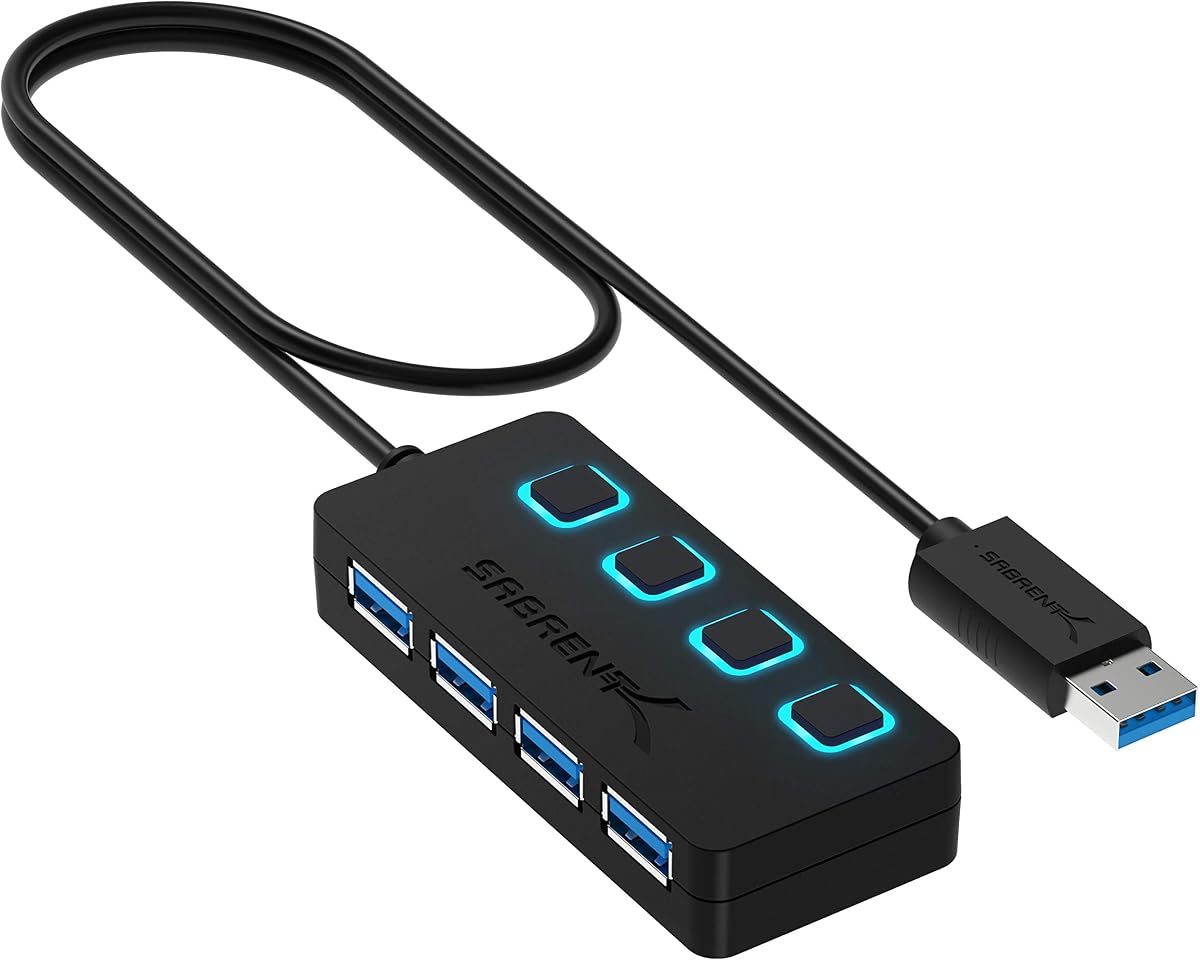
The SABRENT 4-Port USB 3.0 Hub is a controlled desktop-style expander with a 4.6 rating. Its individual on-and-off switches make it easy to disconnect devices without unplugging the entire hub, while separate LEDs clearly show the power status of each port. It is a practical choice for users who connect and remove several accessories throughout the day.
We may earn a commission when you buy through this link, at no additional cost to you.
The four USB-A ports support up to 5Gbps and can operate simultaneously. The product also supports USB 2.0 and USB 1.1 devices, covering older flash drives and peripherals. A two-foot cable provides flexibility and reaches ports positioned farther from the computer. Plug-and-play and hot-swappable operation simplify setup and device changes.
This hub is not designed for charging, so it should be viewed purely as a data and peripheral connection solution. Compared with ultra-slim travel hubs, its controls and two-foot cable make it somewhat less convenient to pack. There is also no listed auxiliary power input for devices with elevated power requirements.
SABRENT is best for a shared office desk, home workstation, or frequently changing peripheral setup where individual port control is valuable. Travelers who need the smallest possible accessory may prefer the direct-plug model. For display support or laptop charging, consider the Anker or Lenovo travel hubs instead.
Each port has its own switch, allowing a user to turn off one peripheral without disrupting the others. Per-port LEDs then make the active connections easy to identify at a glance.
The attached cable offers more placement freedom than a direct-plug adapter. It can help the hub sit farther from a crowded computer while retaining access to all four ports.
We may earn a commission when you buy through this link, at no additional cost to you.
The BERLAT 7-in-1 USB-C Hub is a broad port expander with a 3.9 rating. It is designed for USB-C-equipped computers and combines seven connections in a compact aluminum body, making it useful for users who want legacy peripherals and modern Type-C accessories to share a single laptop port.
We may earn a commission when you buy through this link, at no additional cost to you.
The layout includes one USB 3.0 port supporting up to 5Gbps, four USB 2.0 ports supporting up to 480Mbps, and two USB-C 2.0 ports. The single fast USB-A connection is ideal for a flash drive or other high-speed storage, while the slower ports are better suited to keyboards, mice, and other basic peripherals.
The product supports MacBook Pro, MacBook Retina, MacBook Air, Windows 10, macOS X, Android, ChromeOS, and updated Linux systems. Its lowest rating in the list may reflect the mixed-speed design, which can disappoint buyers expecting all USB-A ports to offer USB 3.0 performance. There is also no listed HDMI output, charging pass-through, or auxiliary power input.
BERLAT is most appropriate for a USB-C laptop that needs a high port count and has room for both fast and basic accessories. Users who need display output or reliable laptop charging should choose a more specialized travel dock. For consistent four-port speed, the UGREEN hub offers a cleaner alternative.
The mixture of USB-A and USB-C ports covers many peripheral types without requiring several separate adapters. It is useful for consolidating a keyboard, mouse, storage drive, and newer accessories.
Only one USB-A port offers the full 5Gbps USB 3.0 rate, while four others are limited to 480Mbps. High-speed storage should therefore be reserved for the dedicated USB 3.0 connection.
We may earn a commission when you buy through this link, at no additional cost to you.
The Lexar Go Portable Hub has a 4.6 rating and is purpose-built for creators working with portable storage. Its four USB-C ports and 10Gbps transfer capability distinguish it from conventional USB-A expanders, while the included adapters make it especially compatible with the Lexar Professional Go Portable SSD ecosystem.
We may earn a commission when you buy through this link, at no additional cost to you.
USB 3.2 Gen 2 technology provides the hub's headline data rate of 10Gbps. It can connect smartphones, computers, portable SSDs, lighting equipment, power banks, microphones, and other compatible USB-C devices. The package includes a male-to-male USB-C adapter and a USB-C cold-shoe adapter cable for more flexible rig arrangements.
Its Type-C-only design is intentional but limiting for users who still depend on legacy USB-A accessories. An appropriate adapter would be needed for those devices, and no HDMI or other display output is listed. The supplied cold-shoe cable and storage focus make it less broadly useful outside photography, video, and portable-production workflows.
This is an excellent choice for photographers, videographers, and mobile editors who want a compact hub for fast Type-C storage. It is less appropriate as a general-purpose office adapter. Users who need a mix of USB-A, USB-C, charging, and monitor support should consider the Anker or Lenovo models.
The 10Gbps rate is well suited to moving large files between compatible computers and portable SSDs. Its design is intended to integrate closely with the Lexar Professional Go Portable SSD.
A male-to-male adapter and cold-shoe cable support several connection arrangements. These accessories reduce the need to carry separate conversion pieces for a temporary production setup.
We may earn a commission when you buy through this link, at no additional cost to you.
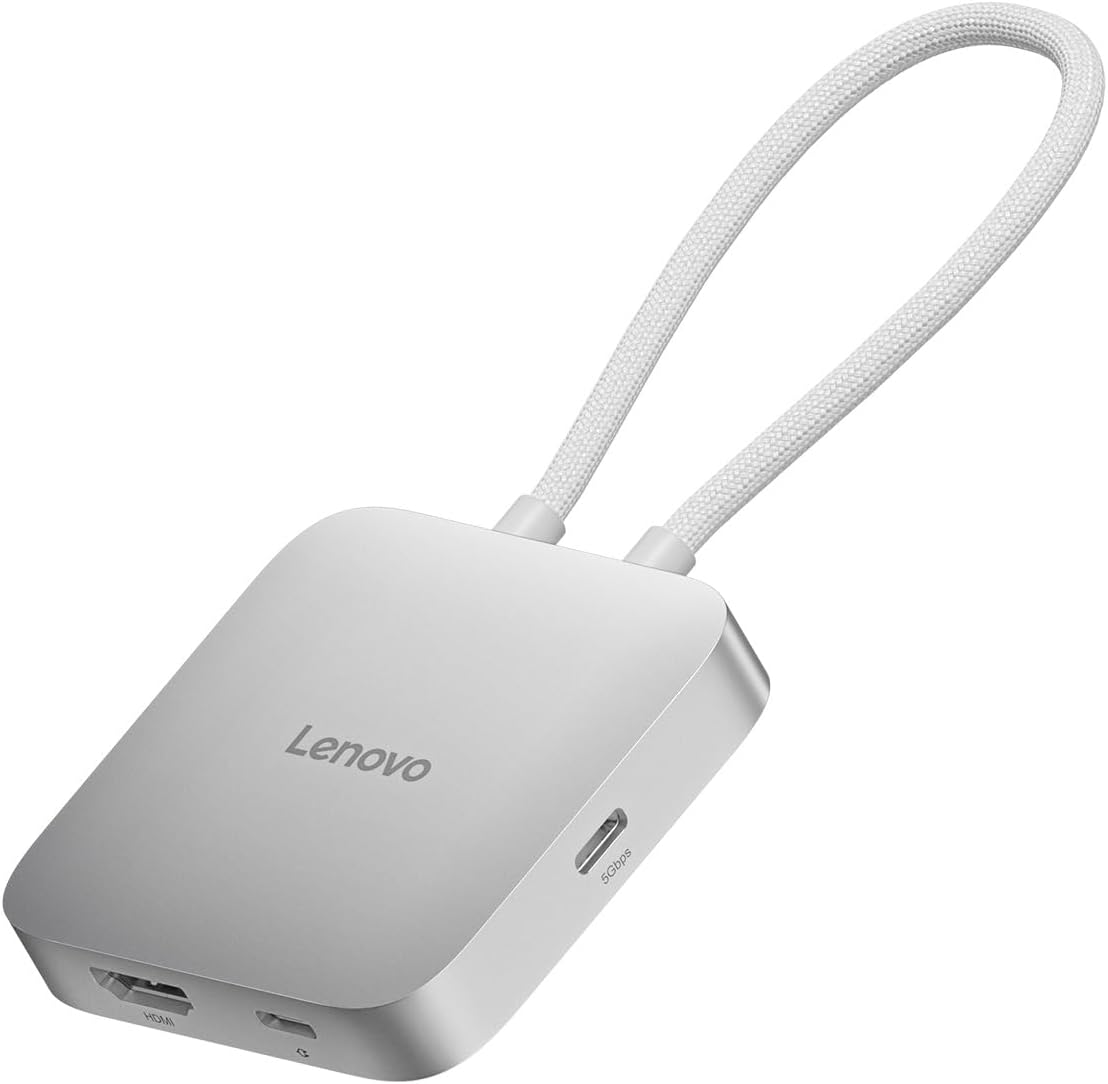
The Lenovo USB-C 5-in-1 Travel Hub is a polished productivity accessory with a 4.5 rating. It combines a 4K 60Hz HDMI output, 90W power delivery, two USB-C ports, and two USB-A ports. That balance makes it especially attractive for travelers and hybrid workers who want a single adapter to connect displays, storage, and everyday accessories.
We may earn a commission when you buy through this link, at no additional cost to you.
The HDMI output supports 4K resolution at 60Hz, a higher refresh rate than the Anker 332's listed 4K 30Hz capability. Power Delivery pass-through can provide up to 90W to the connected laptop, and the four USB data ports cover a mix of modern Type-C and legacy Type-A accessories. Setup requires no drivers with compatible USB-C devices.
Five total connections is less than some multipurpose hubs, and buyers should confirm whether their computer supports the necessary USB-C display and charging functions. No detailed operating-system list is provided, so platform support should be checked against the current product documentation. The hub also cannot replace an adapter for every legacy connector.
Lenovo is a strong recommendation for business travel, presentations, and desk-based work away from home. Choose it over simpler expanders when a smooth 4K external display and meaningful laptop charging are priorities. It is less compelling for users whose only need is additional low-speed USB-A sockets.
The 4K 60Hz HDMI output is well suited to productivity applications, presentations, and detailed media work. It offers a useful balance of resolution and refresh rate for a portable docking solution.
Up to 90W of power delivery helps sustain a compatible laptop while it is connected to the hub and other accessories. This makes the hub practical for extended work sessions away from an outlet.
We may earn a commission when you buy through this link, at no additional cost to you.
The best portable USB hub depends on your host ports, peripheral mix, power requirements, and need for display support. Review connector types, data speeds, charging behavior, physical size, and compatibility before choosing.
Begin with the ports built into the computer you use most. A USB-A host requires a hub with a matching male plug or cable, while a USB-C-only laptop requires a Type-C adapter. Some modern USB-C ports support only data, while others also support DisplayPort Alt Mode and Power Delivery. A physical connector fitting into the port is not enough if the intended display or charging function depends on a protocol the host does not provide.
Check the full system requirements before ordering. Pay particular attention to operating-system restrictions, display support, and whether the USB-C port is data-only, input-only, or bidirectional.
Count the peripherals you realistically need to connect, then leave room for a mouse, keyboard, and storage device. Four USB-A ports cover many basic office tasks, while a mixed hub with USB-C, HDMI, and power delivery is better for a complete mobile workstation. A larger total port count does not guarantee a better layout because several ports may share limited bandwidth or operate at slower speeds.
Choose connector types based on your actual equipment rather than the largest advertised number. A Type-C-only creator hub can be ideal for modern storage, but it may be inconvenient if you regularly use USB-A peripherals.
USB 3.0 performance is commonly listed as up to 5Gbps, while USB 3.2 Gen 2 reaches 10Gbps. These are theoretical interface rates, and actual transfer performance depends on the host, device, cable, file type, and other connected accessories. Multiple active drives can share the available bandwidth, so matching drive speed to the hub is important.
For ordinary documents and peripherals, 5Gbps is usually sufficient. Fast portable SSDs, large media files, and backup workflows benefit from 10Gbps. Check whether every advertised USB-A port actually supports the headline speed.
A portable hub may draw power entirely from the host or accept auxiliary power through a USB-C input. Auxiliary power can improve reliability with external hard drives, high-power card readers, and multiple connected accessories. By contrast, a hub with a 900mA limit may be unable to sustain demanding devices even when it supports their data protocol.
Prioritize auxiliary power for storage-heavy workflows. If your main goal is charging a phone or tablet, make sure the hub explicitly supports power output; a USB-C input used for hub power is not automatically a charging output.
Travel docks with HDMI can turn a compatible laptop into a workstation with an external monitor. Compare maximum resolution and refresh rate: 4K at 60Hz is generally more fluid than 4K at 30Hz. Display output also depends on the host supporting DisplayPort Alt Mode or an equivalent function. Charging pass-through keeps the laptop powered while the hub is connected, but a suitable charger may need to be supplied separately.
Treat advertised dock features as a complete system rather than isolated capabilities. A 4K label is not useful if the laptop's port cannot carry video, and a high wattage figure may represent input capability rather than the amount delivered to the laptop.
A slim hub with a short cable or direct plug is easy to carry and keeps a laptop setup visually clean. A longer attached cable offers placement flexibility and can reduce strain on the host port. Rotating designs are useful in confined spaces, while direct-plug models avoid dangling cables but require a compatible USB-A socket. Metal housings can improve durability and heat dissipation, while added switches and LEDs increase functionality but may make a model bulkier.
Consider the complete travel footprint, including cable length, connector direction, and the space needed to reach each port. The smallest model is not necessarily the most convenient if its ports are difficult to access.
Most basic hubs support Windows, macOS, ChromeOS, and Linux, but specialized docks may exclude some platforms. Game consoles, automotive systems, cameras, and other devices may also have narrower requirements. Plug-and-play operation is convenient, but it does not guarantee that every port function is available on every device.
Review the stated compatibility list and look for restrictions involving Linux, audio, video, charging, or specific host ports. For less common equipment, confirm that the hub's exact use case is explicitly supported.
Before connecting the hub, identify the correct host port and confirm that the connector and protocol match your device. For a USB-C hub, determine whether you need data, charging, display output, or all three. Connect the hub directly to the computer before attaching storage or other accessories, and allow the operating system to recognize the new hardware.
Add peripherals one at a time when possible, especially if you are using external drives. This makes it easier to identify a compatibility or power problem. Use the auxiliary power input when the manufacturer specifies it for high-power storage, and avoid connecting hubs or splitters in series unless the documentation explicitly permits that arrangement.
To keep the adapter in good condition, handle the connector rather than pulling on the attached cable. Keep the ports free of dust and protect the housing from moisture, excessive heat, and impact. Disconnect external drives safely before moving the computer or hub, and periodically check the current product listing for updated compatibility or firmware information.
A portable USB hub primarily expands USB-A or USB-C peripheral connections, while a dock usually adds display, charging, networking, or other workstation functions. Some products combine both approaches. Check the port layout and host requirements before deciding which category best describes the adapter you need.
Only hubs with explicit power output or charging support can charge connected devices. Some USB-C ports on hubs are input-only and provide power to the hub rather than accepting power from it. Look for a clearly stated charging function and compatible voltage and power-delivery requirements.
No. Five gigabits per second is a theoretical interface maximum, not guaranteed real-world throughput. The hard drive, host controller, file type, cable, and other connected devices can reduce the observed speed. Faster media such as 10Gbps portable SSDs is better matched to a 10Gbps hub.
The drive may require more power than the hub can provide from the computer. Connect the hub to a compatible auxiliary power source if it has a power input, or use a separately powered drive or powered hub. Confirm that the operating system supports the drive and that no other hub is chained between it and the computer.
No. The computer's USB-C port must support the required display protocol, usually DisplayPort Alt Mode. Some hubs also reserve specific ports for data or charging. A hub may include HDMI without working with a particular computer if the host lacks video-output capability.
Yes. USB 3.0 hubs are backward compatible with USB 2.0 and many USB 1.1 devices, although connected devices will operate at their own lower limits. Older accessories generally work without requiring a separate adapter, provided the hub uses compatible physical connectors.
A direct-plug hub is more compact and avoids a dangling cable, making it convenient for travel. A cabled hub offers more positioning flexibility and can reduce strain on the host connector. The better choice depends on where the computer's port is located and how much room is available around the setup.
It is useful when your computer has too few ports for your keyboard, mouse, storage, and other accessories. A basic expander handles peripherals, while a travel dock also suits users who need an external display or pass-through charging. Choose based on the connections you actually use rather than the number of ports alone.
The UGREEN 4-Port USB 3.0 Hub is the most streamlined value choice, offering four USB-A ports, a high rating, and a remarkably slim body. The Acer 4-Port USB 3.0 Hub takes the overall lead because its optional USB-C power input adds stability for storage while preserving a portable four-port layout. The Lexar Go Portable Hub is the premium creator-oriented option for fast Type-C storage workflows.
Prioritize the features your setup cannot work without. Basic users should focus on host compatibility, port count, and a body that fits their travel routine. Power-hungry storage users should look for auxiliary power, while mobile professionals may prefer 4K display output and meaningful pass-through charging. Specialized USB-C-only designs can be excellent for modern creator gear but less convenient for legacy accessories.
Ratings, specifications, compatibility details, and prices can change over time. Before purchasing, check the current listing, confirm that the hub supports the exact device and operating system involved, and consider whether a separate power adapter or charger is required. The right portable USB hub should fit the available ports, workflow, and travel conditions without adding unnecessary complexity.