
Redragon BM4195
3.9Editor score
Voice typing and translation
Three wireless connection modes
Five adjustable DPI levels
Discover the 10 best AI smart wireless mouse options, compared for voice typing, translation, connectivity, battery life, comfort, and smart features today.
AI smart wireless mice combine familiar pointing and clicking controls with voice dictation, translation, transcription, summaries, and other software-assisted tools. They can reduce repetitive typing and speed up note-taking, but the best choice depends on compatibility, privacy controls, connection options, battery design, and how comfortably you work.
We compared ten products using their supplied specifications, including voice features, supported languages, wireless modes, battery capacity, charging method, adjustable sensitivity, operating-system support, and physical design. The list covers conventional AI voice-typing mice, multilingual productivity tools, and a detachable presentation device with integrated AI functions.
Each review explains the standouts, trade-offs, and ideal user for all ten products. Rankings reflect the information available for this guide, while ratings are shown where Amazon provides one. Product availability, software behavior, and prices can change, so confirm the latest listing details before ordering.
3.9Editor score

4.1Editor score

5.0Editor score
The comparison below highlights each mouse's defining capabilities, connection flexibility, power system, and strongest use case, making it easier to identify the right option for dictation, multilingual work, presentations, or general productivity.




The Redragon BM4195 is an affordable entry into the AI smart wireless mouse category, combining an ordinary optical office mouse with voice typing, voice commands, and translation. Its supplied rating is 3.9, placing it below the strongest reviewed products, but its broad connection support and useful software customization make it a practical budget-oriented option for first-time users.
We may earn a commission when you buy through this link, at no additional cost to you.
The main attraction is hands-free input. After downloading the required software, users can dictate text and issue voice commands, while the mouse can also be used for normal pointing and clicking. Connectivity includes 2.4GHz plus two Bluetooth channels, allowing switching among up to three devices. Five-level DPI adjustment, a 250Hz polling rate, and a 500mAh rechargeable battery round out the core feature set.
The main limitation is dependence on software for its headline AI functionality. That adds setup complexity and means performance depends on the downloaded application and microphone conditions. Its 3.9 rating also suggests that some buyers may have encountered issues with the overall experience. Buyers who want simple wireless convenience plus voice tools may accept those trade-offs, but demanding users should investigate recent customer feedback.
This is a sensible choice for a student, home-office worker, or anyone seeking an inexpensive introduction to voice-controlled productivity. It is less appropriate for someone seeking a polished AI ecosystem, extensive language support, or a highly refined presentation experience. For basic dictation, multi-device office work, and customizable controls on a budget, the BM4195 remains a strong contender.
Voice typing can be useful for composing longer passages, starting a search, or reducing the strain of repeated keyboard entry. Because the AI features activate only after installing the supplied software, buyers should follow the setup instructions and confirm compatibility before committing to the mouse.
The combination of 2.4GHz, BT1, and BT2 is particularly useful for people moving between a desktop, laptop, and tablet. A physical mode button makes the transition direct, while adjustable DPI helps preserve practical control across different screen sizes and applications.
We may earn a commission when you buy through this link, at no additional cost to you.
The Ai Smart Mouse with Voice Typing is built for multilingual productivity, combining dictation, translation, transcription, summarization, and a large collection of AI-assisted creation tools. No Amazon rating was supplied, so its value assessment depends more heavily on the supplied specifications. Those specifications make it one of the most functionally expansive options in this roundup.
We may earn a commission when you buy through this link, at no additional cost to you.
The product claims voice-to-text accuracy up to 98 percent and speeds of up to 400 words per minute across Chinese, English, German, French, Spanish, Japanese, Korean, Russian, and other supported languages. Translation extends to more than 200 languages, while screenshot and highlighted-text translation broaden its usefulness. A 500mAh rechargeable battery, LED power display, five-minute auto sleep, and three connection modes support everyday productivity.
Local offline AI processing is a notable strength for buyers concerned about uploading recordings and text to cloud storage. At the same time, the product requires a specific app, a six-second scroll-wheel press to activate pairing, and manual configuration steps. Those elements create a more involved setup than a conventional wireless mouse, and the lack of a public rating makes long-term user feedback less transparent.
The mouse appears best suited to multilingual professionals, students, writers, and anyone who wants one peripheral to handle notes, translation, and content creation. It may be excessive for basic office navigation, but for users who will regularly use voice workflows, the broad feature set is the main reason to choose it.
Real-time voice translation, screenshot translation, and highlighted-word translation can be valuable in international meetings, language study, and research. Holding the mouse close to the mouth in noisy settings may improve the clarity of the captured audio before processing occurs.
The stated use of local offline processing helps distinguish this model from tools that require every recording or document to be sent to a cloud service. Buyers should still review permissions and software behavior on their own systems before handling confidential material.
We may earn a commission when you buy through this link, at no additional cost to you.
The Ai Mouse with Voice Typing & ChatGPT Assistant offers the most balanced combination of AI breadth, everyday ergonomics, and connectivity in this group. Its supplied rating of 4.1 is the highest among the conventional voice-typing models, and its feature list covers dictation, translation, summaries, writing help, code generation, image analysis, presentation creation, and other productivity tasks.
We may earn a commission when you buy through this link, at no additional cost to you.
Voice input is specified at up to 98 percent accuracy and 400 words per minute, with support for numerous major languages. The mouse offers real-time translation across more than 200 languages, while its software suite includes Q&A, painting design, article and script writing, novel writing, form creation, image-text extraction, and AI presentation tools. It also supports dual Bluetooth and 2.4GHz connections.
Its 600mAh battery is larger than the capacities cited for several competing models, and the LED display, two-hour charging claim, and five-minute sleep mode support frequent use. Silent clicks below 25dB make it suitable for libraries and shared offices. The trade-off is complexity: users must install the GAMINJA app, hold the scroll wheel for pairing, and configure some advanced functions, including the AI creation interface.
This is our top overall recommendation for someone who wants a genuine AI productivity mouse rather than a conventional pointing device with a single dictation feature. It suits writers, students, multilingual workers, and developers. Buyers who only need dependable wireless control may find it excessive, but the richer toolkit justifies the additional setup for users who will use those tools regularly.
The biggest strength is the range of workflows available from one device. Voice commands can support dictation, translation, summaries, Q&A, writing, code generation, and image analysis, reducing the need to move between separate software tools for common office tasks.
An ultra-thin shape and clicks stated at 25dB or less target offices, libraries, and shared workspaces. The ergonomic profile is more relevant for extended sessions, while the muted operation helps preserve concentration for nearby colleagues.
We may earn a commission when you buy through this link, at no additional cost to you.
The LTC OM021 is a conventional ergonomic office mouse upgraded with voice typing, translation, rechargeable power, and customizable controls. Its supplied rating is 3.8, slightly below the Redragon BM4195 and well below the strongest AI-toolkit models, but the product remains a straightforward option for users who want more than a standard wireless mouse.
We may earn a commission when you buy through this link, at no additional cost to you.
The mouse is specified to dictate at up to 300 words per minute with 98 percent accuracy and translate more than 100 languages. Bluetooth 5.0 and 2.4GHz connectivity support different computer setups, while five DPI levels and software-based key customization allow adaptation to office tasks. A 500mAh rechargeable battery, Type-C charging, and an optional five-minute sleep mode help manage power use.
Its quiet click mechanism and ergonomic shape are meaningful advantages for prolonged work in shared environments. However, the 300-word-per-minute figure is lower than the 400-word-per-minute rate stated by several competitors, and some translation functionality may depend on settings. As with other software-driven AI mice, the download process and six-second scroll-wheel activation add a learning curve.
The OM021 makes sense for office professionals, students, and travelers who want voice input, translation, and silent operation in one familiar shape. It is less compelling for users seeking advanced image analysis, extensive writing assistants, or highly multilingual support. If quiet operation and a restrained feature set matter most, it remains a practical choice.
The combination of voice typing and translation can reduce repetitive keyboard work during notes, email drafts, and research. Moving the mouse nearer the mouth may help the microphone capture clearer speech when the surrounding environment is noisy.
The lightweight ergonomic shell and silent click design target extended office sessions. These qualities can be more valuable than extra AI buttons for buyers who spend most of the day navigating documents, spreadsheets, and communication applications.
We may earn a commission when you buy through this link, at no additional cost to you.
The Logitech Signature AI Edition M750 is the most conventional wireless mouse in the roundup, even though its title includes the term AI. Unlike the other models, its supplied specifications do not mention voice dictation, translation, transcription, or an AI assistant. Its appeal instead comes from Logi Options+, strong battery claims, multi-platform support, and a supplied rating of 4.5.
We may earn a commission when you buy through this link, at no additional cost to you.
It works with Logi Options+ on Windows and macOS and supports either the included Logi Bolt USB receiver or Bluetooth Low Energy. The stated battery life reaches up to 24 months with the receiver and up to 20 months over Bluetooth. Its wireless range is listed as 32.81 feet, or 10 meters, which is appropriate for a desk-based office or home workspace.
The main limitation is the absence of listed voice and translation functions. Buyers searching specifically for an AI smart wireless mouse may expect the ability to dictate documents or record meeting notes, and those capabilities are not documented for this product. Its inclusion therefore serves as a useful reminder that a well-made wireless mouse can carry the AI label without providing an AI voice workflow.
The M750 is best for a buyer who values dependable conventional control, established desktop software, and long battery life more than dictation. It also works well for travel and multi-device users because it supports both Bolt and Bluetooth. It is not the strongest match for the core voice-first purpose of this guide, but it is a polished alternative for general productivity.
The stated battery durations make the M750 attractive for users who want minimal charging interruptions. Using the Logi Bolt receiver offers the longest listed battery life, while Bluetooth provides a convenient cable-free alternative for compatible systems.
Logi Options+ support on both Windows and macOS allows consistent customization across major desktop platforms. The included Logi Bolt receiver adds a dependable option for users who prefer a dedicated USB connection over Bluetooth pairing.
We may earn a commission when you buy through this link, at no additional cost to you.
The Cheerdots2 AI Mouse is the most unconventional product in the guide and the clear premium choice for presenters. It has a supplied rating of 5.0, the highest listed score, and combines a full-size mouse, air mouse, touchpad, presentation clicker, laser pointer, voice recorder, and AI assistant in a magnetic, detachable design.
We may earn a commission when you buy through this link, at no additional cost to you.
When attached to its base, it operates as a Bluetooth mouse with adjustable DPI. Detached, it becomes a presentation controller with a touch surface, side-swipe slide control, red laser, spotlight, and digital pointer. Double-tapping starts and stops recording, after which meetings, lectures, and ideas can be transcribed and saved to the computer. AI features also support summaries and question answering.
Its strongest advantage is versatility without carrying several separate presentation devices. The 70-gram stated weight and claimed battery life of up to 20 days make it highly portable, while USB-C charging reduces reliance on proprietary cables. The trade-off is specialization: the listed connectivity focuses on Bluetooth, and buyers interested only in voice dictation may find the physical design less conventional than a slim office mouse.
The Cheerdots2 is ideal for consultants, teachers, presenters, and frequent meeting participants who value mobility and consolidated tools. Its modular design also helps justify its premium positioning. It is less compelling as a permanent desktop mouse for someone who never presents, but for mobile professionals it offers an unusually complete solution.
The magnetic base transforms the device from a presentation remote into a full-size mouse when the user returns to the desk. This dual-role design avoids forcing buyers to choose between comfortable desk work and mobile control.
A double-tap starts recording and another stops it, providing a direct way to capture spoken content. The companion software then supports transcription, saved notes, summaries, and question answering, reducing the need to divide attention between conversation and manual note-taking.
We may earn a commission when you buy through this link, at no additional cost to you.
The RGB Smart AI Mouse combines a 200-plus-language translation tool, voice dictation, and a broad AI creation suite with an illuminated, ultra-thin form. No Amazon rating was supplied, so the product must be evaluated primarily through its stated functions. It closely resembles the grey Ai Mouse reviewed earlier, but the RGB treatment and stated 500mAh battery distinguish it.
We may earn a commission when you buy through this link, at no additional cost to you.
Voice input is specified at up to 98 percent accuracy and 400 words per minute, with support for numerous major languages. The AI functions cover Q&A, painting design, article and script writing, code generation, form creation, image analysis, presentation creation, and text polishing. Translation includes real-time voice conversion, while Bluetooth and 2.4GHz modes provide flexible connection options.
The mouse also includes silent clicks rated at 25dB or less, a Type-C charging system, an LED power display, and a stated standby figure of up to 600 hours. Its most significant trade-off is the extensive setup: users must install the GAMINJA application, activate pairing by holding the scroll wheel, and configure some creation features. The absence of a customer rating also makes it harder to assess consistency.
This model suits users who want a visually distinctive desk accessory and regularly employ translation, writing, image-analysis, or coding tools. It is less suitable for buyers seeking a simple mouse or those who want the certainty of a visible rating. For a feature-rich AI workflow with quiet operation, it remains a capable option.
Fast voice entry and broad translation coverage can be useful for lectures, international meetings, and multilingual research. Users can dictate or translate directly from the mouse, then edit the resulting text before sharing it.
The thin shell, low-noise click mechanism, and RGB styling give the mouse a modern appearance suited to both office and gaming-oriented desks. Lighting and silent operation are especially useful when the device is used for long periods in shared spaces.
We may earn a commission when you buy through this link, at no additional cost to you.
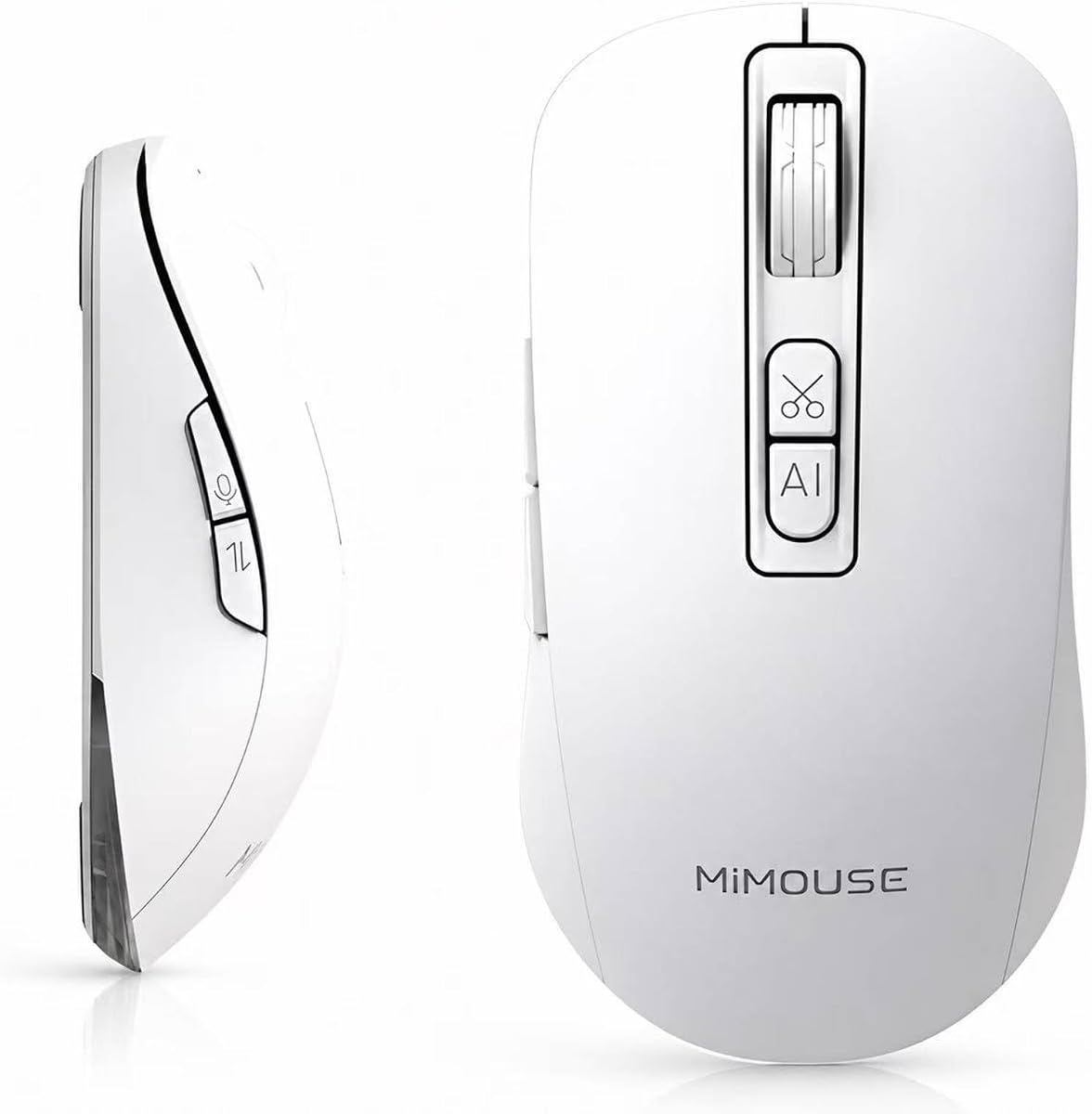
The MiMouse AI Wireless Mouse targets demanding professionals with a large, centralized AI platform and extensive document-oriented tools. Its supplied rating is N/A, but the listed capabilities are among the most ambitious in this guide: voice typing in multiple languages, meeting and lecture transcription, summaries, screenshot OCR, writing assistance, presentation creation, and access to several named AI platforms.
We may earn a commission when you buy through this link, at no additional cost to you.
The M-AI platform reportedly brings together ChatGPT, Gemini, Claude, Grok, and DeepSeek. Its voice workflow is stated at 200 to 400 words per minute, 98-plus-percent accuracy, and a 0.5-second response. The mouse also offers contract drafting, Word-to-PowerPoint functions, text summarization, and AI-assisted writing, reading, drawing, video, and presentation creation.
Hardware specifications support the productivity positioning. The mouse connects to three devices through 2.4GHz and dual Bluetooth, uses four DPI levels from 800 to 4000, and has a 500Hz polling rate. Its 500mAh rechargeable battery is claimed to last up to 30 days and support charging while in use. The stated 92-gram weight and curved ergonomic shape improve portability and comfort.
The trade-off is complexity and a higher tier of features for someone who will actively use them. Local encryption and user-controlled cloud access offer privacy flexibility, although the statement about cloud access should be reviewed carefully. This mouse is best for content professionals, lawyers, teachers, and heavy-document workers rather than casual users seeking only an everyday pointing device.
The ability to move among several AI models from one platform may be useful for users who want to compare writing, coding, research, or creative outputs. Consolidating those tools in a mouse-based workflow can also reduce application switching during busy workdays.
Supporting three simultaneous connections makes the device a natural fit for hybrid workers moving among a laptop, desktop, or tablet. The 500Hz polling rate and adjustable DPI provide more precise control for detailed document work and presentations.
We may earn a commission when you buy through this link, at no additional cost to you.
The Bluetooth Wireless AI Mouse with Voice Recorder emphasizes accessible voice input, transcription, translation, and summarization across widely used devices. No Amazon rating was supplied, and the specification list is less extensive than those of the higher-end AI models, but the core functions are clear and relevant to office work, research, and remote collaboration.
We may earn a commission when you buy through this link, at no additional cost to you.
Its AI assistant can generate presentations, copy, question-and-answer content, artwork, and office templates through voice commands. Real-time voice typing and built-in translation target meetings and academic use, while a one-button switch among 2.4GHz USB, BT1, and BT2 supports up to three connected devices. Compatibility extends across Windows 7, 8, 10, and 11, macOS 10.15 and later, tablets, and iPads.
The ergonomic shape and five adjustable DPI levels running from 800 to 4000 support general productivity and more detailed work such as design or presentation preparation. The main limitation is that the supplied information gives no battery capacity, charging method, or detailed noise rating. A missing rating also makes the product harder to compare confidently with highly reviewed alternatives.
This mouse is a good fit for users who want straightforward speech-to-text and translation without a large collection of specialized creation tools. It may also appeal to users who type slowly or prefer voice capture for meeting and lecture notes. Buyers should verify power specifications and software requirements before choosing it over models with more explicit hardware details.
The ability to request presentations, copy, templates, question answers, and artwork by voice can make the mouse more than a dictation tool. It is particularly helpful for users who spend time creating structured documents but do not want to navigate menus for every task.
Triple-mode connectivity and support for Windows, macOS, tablets, and iPads suit remote workers with several devices. The single mode switch and remembered pairings can simplify daily movement between a home computer and portable setup.
We may earn a commission when you buy through this link, at no additional cost to you.
The AI Mouse with Voice Typing is a simple, voice-focused alternative for turning speech into text, translating communications, and organizing written ideas. Its supplied rating is 1.0, the lowest in the roundup, so it should be considered only after checking recent customer feedback and confirming that its basic functions meet your needs.
We may earn a commission when you buy through this link, at no additional cost to you.
The core proposition is straightforward. Users can dictate emails, notes, reports, messages, meeting notes, and longer content by speaking naturally. The mouse also advertises real-time translation across more than 200 languages, AI writing assistance, and text summarization. Those features target repeated typing, blank-page problems, and multilingual communication rather than gaming or specialized design work.
Silent clicks and a rechargeable wireless design are useful for shared offices and study sessions, while the wireless format keeps the desk uncluttered. However, the supplied description does not specify Bluetooth versions, 2.4GHz support, device counts, DPI settings, battery capacity, charging connector, or supported operating systems. Those omissions are significant because a wireless mouse can be difficult to recommend without basic connectivity details.
The product may be worth considering for a buyer who values a simple voice interface and primarily needs dictation and translation. Its low supplied rating indicates greater uncertainty, however, and the missing hardware information makes it difficult to recommend over the better-documented alternatives. Treat it as an option to investigate carefully rather than the default recommendation.
Voice input can accelerate the drafting of routine emails, reports, notes, and messages. The strongest use case is repetitive or lengthy text entry where typing speed is the main bottleneck, followed by a quick review for punctuation and recognition errors.
Support for more than 200 languages could be useful for international work and study. As with every voice translator, real-world accuracy will vary with accent, background noise, microphone distance, and the complexity of the selected language pair.
We may earn a commission when you buy through this link, at no additional cost to you.
The right AI smart wireless mouse depends on the tasks you want to automate, the devices you use, and your tolerance for companion software. Voice quality, privacy, connectivity, battery design, comfort, and support deserve attention before making a selection.
Start by determining how you expect to use voice input. The strongest models specify recognition accuracy, words per minute, supported dictation languages, and whether the mouse can execute commands as well as create text. Products offering 300 to 400 words per minute can shorten long drafting sessions, but the practical value depends more on correct recognition, quiet recording, and easy text correction.
Choose a mouse that makes the microphone easy to use and supports the languages or accents you regularly speak. Also check whether dictation works in multiple applications and whether a dedicated key starts and stops recording. In noisy offices, holding the mouse closer to the mouth may improve clarity.
Translation is more than a count of supported languages. Look for voice translation, screenshot translation, highlighted-text translation, and configurable language pairs, because each serves a different workflow. Meeting-focused users may prioritize audio recording, searchable transcripts, and one-click summaries, while students may value lecture capture and cross-language study functions.
Check how recordings and transcripts are stored. Local processing can reduce cloud exposure, but reviewers should still examine software permissions and account settings. Confirm that exported notes reach the applications and folders where you actually work.
AI labels cover everything from basic voice commands to multi-model writing platforms. A narrow assistant may be enough for opening files, searching, and generating simple text, while a broader suite can assist with article editing, code generation, presentations, image analysis, and design prompts. More features do not automatically mean a better experience if setup and software navigation are difficult.
Review the required operating systems, companion-app availability, account requirements, and setup process. Some mice expose AI features only after pressing and holding the scroll wheel, while others require a more involved activation sequence. Favor a platform whose features match your actual workload rather than an imposing but unused toolbox.
Multi-device users should look for a 2.4GHz receiver plus two Bluetooth channels, allowing a mouse to remain connected to a desktop, laptop, and tablet. Bluetooth Low Energy may improve efficiency, while a dedicated receiver can be useful on crowded systems where Bluetooth pairing is inconvenient. Verify the stated range against the size of your work area.
The mode-switch mechanism matters as much as the number of supported connections. A clearly labeled physical control makes daily transitions faster, while automatic reconnection reduces setup after the first pairing. Check whether the mouse remembers previously paired computers and whether the necessary receiver is included.
Rechargeable mice use capacities commonly ranging from 500mAh to 600mAh, while conventional models may rely on replaceable batteries. Compare stated battery life under realistic use rather than headline standby figures. Fast charging and an on-device power display are convenient, but charging while using the mouse is a separate feature worth confirming.
USB-C charging offers convenient cable compatibility, while AA batteries can be convenient for travel if spare cells are available. A five-minute sleep mode is useful for reducing drain during short breaks. Consider how often you want to charge the device and whether the listed endurance matches your workload.
A smart mouse still has to function well as a pointer. Look for an ergonomic shape, a comfortable grip, quiet clicks, and adjustable DPI levels. Larger hands may prefer a fuller palm-supporting design, while people who switch between a desk and presentations may value a compact, portable body more than extensive hand support.
Silent clicks can make a mouse feel refined in a shared space, but they are not automatically the most accurate choice for every user. Sensitivity settings from roughly 800 to 4000 cover general office work through more precise navigation. A mouse with several programmable buttons may also be useful for frequently repeated commands.
Check the listed operating systems before purchasing. Some models support current Windows and macOS releases, while others extend support to older versions, tablets, and iPads. Compatibility also depends on the AI application, so verify that the required app is available for your preferred system and meets your organization's security rules.
Portable users should consider weight, dimensions, receiver storage, and battery endurance together. A 70-gram modular presentation mouse serves a different need from a 92-gram productivity mouse or a full-size office device. Choose the form that matches where and how you work rather than relying on the word smart alone.
A visible customer rating can provide a useful signal, but it should not be the only criterion. Newer products may have no rating at all, while a low score can reflect setup problems, delivery issues, or unmet expectations. Read recent reviews and look for recurring themes involving recognition, software stability, connectivity, and battery behavior.
Give extra weight to feedback from buyers using the same operating system, applications, and languages as you. The best-looking feature list cannot reveal every compatibility problem. Confirm the current listing, included accessories, and manufacturer support terms before finalizing a purchase.
Begin by fully charging the mouse with the specified cable and installing the appropriate software before attempting advanced features. Connect the 2.4GHz receiver or pair the mouse through its Bluetooth mode, then confirm that normal pointing and clicking work in your primary application. Several models use a six-second scroll-wheel press to open or activate pairing and configuration, so consult the included instructions for the exact sequence.
Place the microphone where it can capture your voice clearly and speak at a natural pace during initial dictation. Use short sections for long documents, review the generated punctuation, and make corrections before sending. Keep sensitive recordings in suitable folders, review cloud or local-processing settings, and disconnect the receiver when it is not needed if your workflow includes travel or shared spaces.
For longevity, clean the sensor area and exterior with a soft, dry cloth, and avoid moisture around charging ports and buttons. Charge the device before long meetings, use sleep mode to reduce unnecessary drain, and keep the receiver stored safely with the mouse. Update the companion software when improvements are available, and periodically test the microphone, connection modes, buttons, and battery display to identify issues early.
The main benefit is faster hands-free input for tasks such as dictation, translation, note capture, and AI-assisted writing. It can reduce repetitive typing and help users capture ideas before they are forgotten. The advantage is greatest when the software works smoothly with the applications and languages you regularly use.
No. Most of the voice-focused models in this guide advertise dictation, translation, or recording, but the Logitech Signature AI M750 specification does not list those functions. Its AI edition designation is accompanied by Logi Options+ support, so buyers should confirm the exact features they need rather than relying on the product title.
They can be, but microphone placement and background noise affect recognition. Some products suggest holding the mouse closer to the mouth to improve capture, while a quiet office remains the easiest environment. Test a short recording in your typical workspace before relying on the mouse for important documents.
Many models support three devices through 2.4GHz and two Bluetooth channels. This allows switching among a desktop, laptop, and tablet, usually by pressing a physical mode button. Check the product specifications and operating-system requirements to confirm compatibility with every device you plan to use.
Begin by checking whether processing happens locally or in the cloud, then review the software's privacy settings, permissions, and account configuration. Products that advertise local processing can reduce cloud exposure, but users handling confidential material should still follow organizational security policies and avoid recording when consent is unclear.
Most voice and AI functions require a companion app, configuration utility, or driver. The mouse may still work as a standard pointing device without full setup, but dictation, translation, customization, and AI creation generally become available only after the relevant software is installed and activated.
Adjustable DPI changes the cursor's sensitivity to physical mouse movement. A lower setting offers finer control and is useful on large displays or during detailed design work, while a higher setting moves the pointer faster across smaller screens. AI voice mice commonly provide several preset levels rather than continuous adjustment.
The Cheerdots2 stands out because it detaches into an air mouse, touchpad, presentation clicker, laser pointer, and recorder. Other models are better suited to note-taking, translation, and document creation. Choose a modular presenter when mobility matters, or a conventional AI voice mouse for desk-based meeting productivity.
The Redragon BM4195 is the best budget starting point, offering voice controls, three wireless modes, adjustable DPI, and a rechargeable battery without the complexity of the largest AI platforms. The Ai Mouse with Voice Typing & ChatGPT Assistant is the strongest all-around recommendation for users who want multilingual dictation, local processing, quiet clicks, and a broad productivity toolkit.
For premium buyers, the Cheerdots2 offers the most unusual and versatile design, combining AI transcription with a magnetic presentation controller. In every case, prioritize the functions you will actually use: accurate voice capture, reliable connections, the correct operating-system support, comfortable handling, suitable power management, and software that respects your workflow and privacy needs.
Prices, ratings, availability, and software behavior can change, and several products in this category have limited or no visible rating history. Check the current Amazon listing, package contents, compatibility details, and latest customer feedback before purchasing. Doing so can prevent an attractive AI feature list from obscuring a practical mismatch with your devices or daily routine.