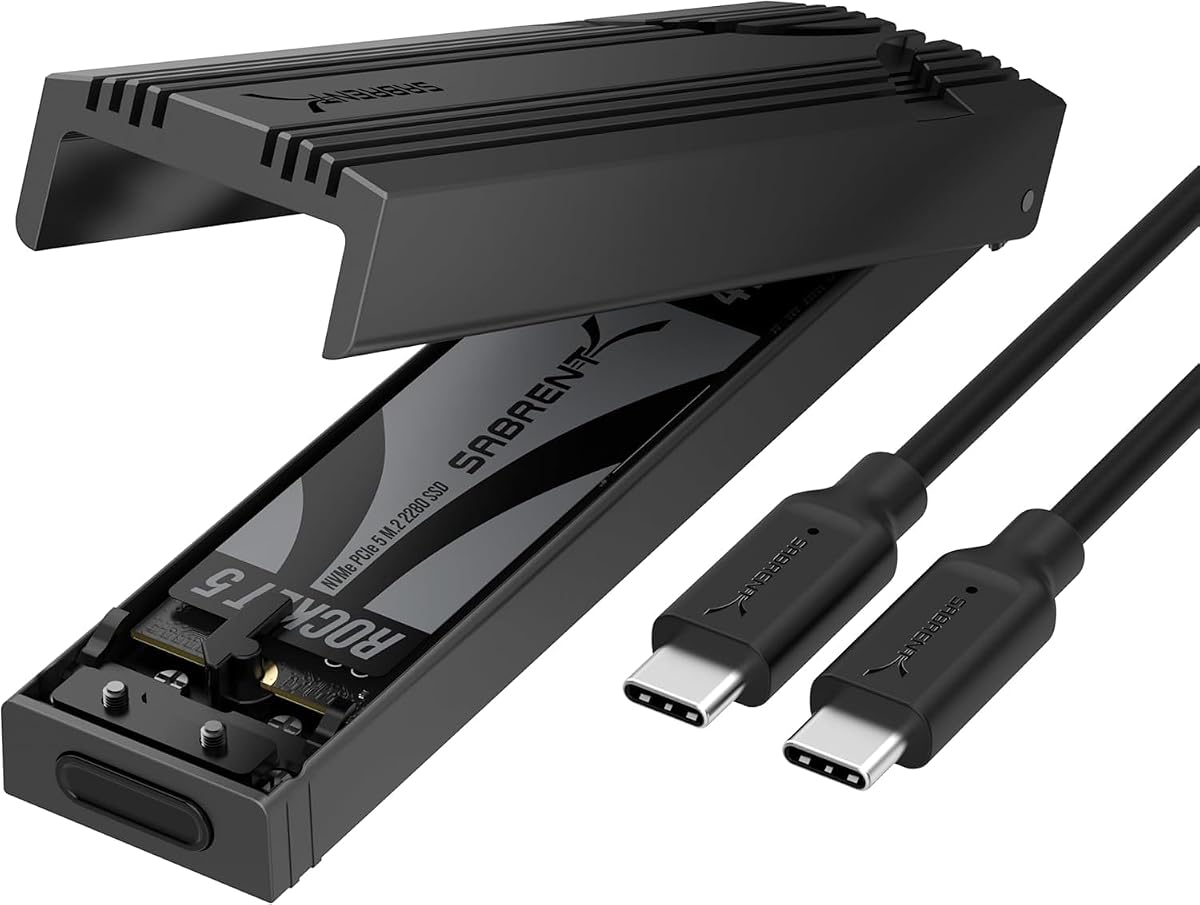
SABRENT USB-C NVMe Enclosure
4.5Editor score
Tool-free flip-open installation
USB 3.2 Gen 2 interface
Supports four M.2 sizes
Direct-contact thermal pad
Bus-powered portable design
Our expert guide compares 10 NVME enclosures for Mac, covering speed, cooling, capacity, portability, compatibility, and value across 10 leading products.
NVME enclosures for Mac give you a flexible way to use fast solid-state drives without opening a laptop or desktop. The best choice depends on your Mac model, available ports, drive capacity, cooling needs, and whether you value a tool-free setup, pocket-sized portability, or workstation-level transfer speed.
We compared 10 enclosures based on their stated interfaces, controller platforms, supported M.2 drive formats, capacity limits, cooling systems, installation methods, and stated Mac compatibility. The list covers USB 3.2 and USB4 models, including compact 10Gbps options and high-speed Thunderbolt-oriented enclosures for demanding workflows.
Each review explains the strongest reasons to consider a particular model, along with its limitations and ideal user. Ratings and technical details reflect the supplied product information, while costs can change over time. Always verify the current listing and the exact specifications of your Mac before purchasing.
4.5Editor score

4.3Editor score

4.5Editor score
The comparison below highlights interface speed, drive support, cooling approach, and Mac relevance. It is designed to show where each enclosure sits in the category without assuming that the fastest interface will deliver maximum speed on every Mac.
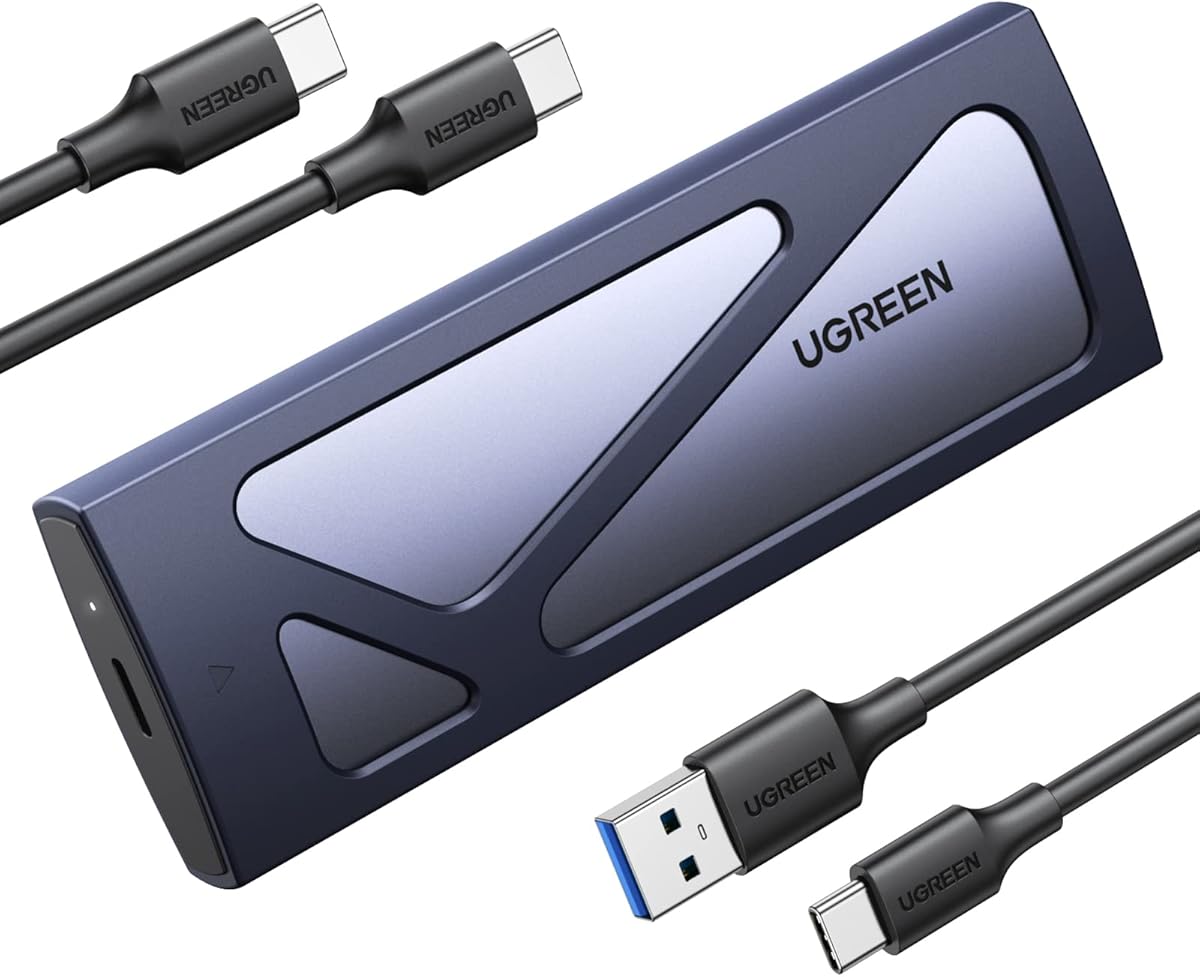


The UGREEN 40Gbps M.2 NVMe Enclosure is the most balanced high-speed option in this guide, combining a USB4 interface with broad drive support and a fan-free cooling design. It carries a 4.3 rating, and its most attractive feature is the combination of up to 3600MB/s stated performance with support for both modern and older USB standards.
We may earn a commission when you buy through this link, at no additional cost to you.
Its ASM2464PD chip enables compatibility with USB4, USB 3.2, USB 3.1, USB 3.0, USB 2.0, Thunderbolt 3, and Thunderbolt 4 connections. Achieving the maximum stated transfer rate requires a Thunderbolt 4 cable and compatible devices, so the enclosure offers more flexibility than one designed exclusively around a single connection type.
Thermal management is handled by a double-sided fin arrangement and three-dimensional cooling system. Because it does not rely on a powered fan, it can remain quiet while providing several times the heat dissipation efficiency of standard enclosure structures, according to the supplied product information. That passive approach is especially attractive for frequent mobile use.
The trade-off is that the fastest advertised performance is limited by the Mac, cable, SSD, and application involved. An older Mac with USB-C but without USB4 or Thunderbolt support will negotiate a lower connection speed. Despite that reality, the broad interface support, 8TB capacity limit, and four supported M.2 lengths make this an excellent general-purpose choice for Mac users who want room to grow.
This enclosure is best for creative professionals, developers, and power users who need fast external storage without settling for a basic 10Gbps design. It is less appropriate for someone who wants plug-and-play speed on any USB-C Mac without checking host compatibility, but for modern hardware it is difficult to overlook the balance of speed, cooling, and portability.
The passive double-sided cooling structure is a meaningful advantage over compact enclosures that use a small fan. It helps control heat without adding moving parts, while the stated 3600MB/s ceiling gives modern Mac users considerable headroom for large media files, project backups, and application libraries.
Backward compatibility makes the enclosure less disposable than a USB4-only design. A Mac limited to 10Gbps or 5Gbps can still use it, although the final speed will be governed by the slower port and cable rather than the enclosure's headline capability.
We may earn a commission when you buy through this link, at no additional cost to you.
The SABRENT EC-PNVO is an approachable 10Gbps enclosure with a 4.5 rating, tool-free installation, and broad support for common M.2 NVMe sizes. It provides a straightforward way to turn a compatible spare SSD into external storage without requiring a permanently installed drive or complicated assembly.
We may earn a commission when you buy through this link, at no additional cost to you.
Its flip-open cover eliminates screws from the installation process. After opening the enclosure, a user can insert and lock the SSD in place, close the cover, and connect it through USB-C. The enclosure is bus-powered and requires no drivers, making it convenient for MacBook users, desktop users, and devices with USB-C connectivity.
Thermal design is a notable strength because the aluminum enclosure presses the thermal pad directly against the SSD. That direct contact is intended to improve heat transfer and sustain 10Gbps operation more consistently than a basic slide-in shell. Reinforced ABS framing adds protection while keeping the body light and compact.
The main limitation is the 10Gbps ceiling. Large video projects, extensive photo libraries, and active backup routines can fill the available bandwidth, so buyers should not confuse this model's practical speed with a USB4 enclosure. M.2 SATA drives are also excluded, leaving it dedicated to M.2 NVMe drives in 2230, 2242, 2260, and 2280 formats.
For Mac users who need affordable, convenient external storage rather than maximum transfer rate, this is a strong recommendation. The tool-free design is especially useful for temporary drive swaps, diagnostics, and mobile workflows, while its 4.5 rating and direct-contact cooling make it a confident entry point into the category.
The flip-open design makes changing SSDs exceptionally simple. A user can open the cover, secure the drive, and close the case without reaching for a screwdriver, which is useful for users who move between different internal drives regularly.
For routine backups, document transfers, and media libraries, 10Gbps can feel highly responsive. For continuous multi-gigabyte transfers, however, a USB4 enclosure will be more appropriate when the Mac and SSD can sustain those higher rates.
We may earn a commission when you buy through this link, at no additional cost to you.
The UGREEN USB-C M.2 NVMe SSD Enclosure is a dependable 10Gbps option with a 4.4 rating and broad platform support. It is especially useful for Mac users who want a compact, simple enclosure that can handle everyday external storage without requiring Thunderbolt-specific hardware.
We may earn a commission when you buy through this link, at no additional cost to you.
The enclosure uses USB 3.2 Gen 2 and is backward compatible with USB 3.1 and USB 3.0. Reaching its stated 10Gbps rate requires a matching USB-C 3.2 Gen 2 data cable, an important distinction because a charge-only or lower-specification cable can reduce performance.
Installation is tool-free, and a buckle mechanism is designed to hold the SSD securely. The RTL9210 controller includes short-circuit, over-current, and multi-protection features while also supporting UASP and Trim. Compatible M.2 NVMe sizes include 2230, 2242, 2260, and 2280, with support for capacities up to 8TB.
The enclosure does not support SATA NGFF or mSATA SSDs, so buyers with older or mixed-format drives need to check the protocol before purchasing. The included silicone case improves portability, but the enclosure still operates within the practical limits of a 10Gbps connection.
This UGREEN model is a strong recommendation for students, office users, and MacBook owners who need reliable storage for backups, downloads, and project files. It is less suitable for a professional editing station that needs sustained Thunderbolt-class throughput, but it offers a balanced feature set at a practical tier.
Short-circuit, over-current, and multi-protection features help protect both the drive and the user's data. These protections are especially reassuring when the enclosure travels in a laptop bag or operates with frequently connected and disconnected accessories.
Even a capable enclosure cannot outperform a cable or host port that cannot carry the requested bandwidth. Mac users should pair it with a verified USB 3.2 Gen 2 data cable and confirm that the connected port supports the expected transfer rate.
We may earn a commission when you buy through this link, at no additional cost to you.
The UGREEN 80Gbps M.2 NVMe SSD Enclosure ranks among the most technically advanced products in the guide, with a 4.6 rating and stated transfer speeds of up to 7000MB/s. It is built for Mac users who have USB4 hardware and need very fast access to demanding external storage.
We may earn a commission when you buy through this link, at no additional cost to you.
Its dual-chip design combines an Intel JHL9480 Thunderbolt controller with a JMicron JMS583 bridge controller. According to the product information, this architecture supports moving a 6GB file in approximately one second and is designed to provide faster, more stable transfers across compatible systems.
Cooling is handled through dual-sided aluminum alloy fins and a three-dimensional airflow structure. The stated design increases heat dissipation by 91% and reduces surface temperatures by 10%. That passive approach makes sense for fast SSDs because it addresses a common cause of sustained-transfer slowdown: accumulated heat.
Compatibility includes 2230, 2242, 2260, and 2280 M.2 NVMe drives up to 8TB. Drives with pre-installed heatsinks are not supported, and unusually thick SSDs may require a thinner thermal pad. The enclosure also needs a host and cable capable of supporting its 80Gbps interface.
This is the best choice in the guide for users who prioritize peak transfer capability and can meet the hardware requirements. It may be excessive for basic storage tasks, but for Mac-based video production, rapid backups, and large project archives, its controller platform and thermal design provide a compelling combination of speed and flexibility.
The Intel and JMicron controller pairing is designed to support high bandwidth while maintaining stability. For owners of compatible USB4 Macs, it offers a clear path toward enclosure performance that is much closer to the speed of an internal NVMe drive.
Large project transfers create sustained workloads rather than brief bursts. The enclosure's finned aluminum structure is intended to dissipate heat effectively without an active fan, helping preserve performance when the internal SSD is working continuously.
We may earn a commission when you buy through this link, at no additional cost to you.
The ACASIS TBU405 Pro combines a 40Gbps USB4 enclosure with a built-in cooling fan, giving Mac users an active option for prolonged high-speed transfers. Its 4.4 rating reflects a generally strong feature set, and the Intel JHL7440 controller supports Thunderbolt 4, Thunderbolt 3, and older USB standards.
We may earn a commission when you buy through this link, at no additional cost to you.
The fan is a defining feature. It is activated with a switch and works with precision-engineered ventilation openings to reduce the risk of thermal throttling during heavy workloads. Active cooling is particularly relevant when using high-power, high-capacity NVMe drives or moving large files for extended periods.
The listed MacBook test with a Samsung 980 Pro produced read and write speeds of up to 2805MB/s and 2734MB/s. Those results provide a more realistic indication of real-world performance than a theoretical interface limit, although outcomes vary with the host, SSD, file size, and thermal conditions.
Compatibility covers M1, M2, and M3 Pro and Max MacBook models, iPad Pro, Windows, and Linux systems. Supported M.2 lengths are 2280, 2260, 2242, and 2230. Backward compatibility allows the enclosure to work with USB 3.2, 3.1, and 3.0 connections, although those ports will limit throughput.
The enclosure is best suited to MacBook Pro users who transfer large media files regularly and want a fan-assisted alternative to passive designs. The manual fan control adds a step compared with automatically managed cooling, but it gives users control over noise and operating conditions. It remains a high-speed option that requires compatible host hardware.
A powered fan can maintain airflow around the SSD during demanding workloads. This makes the enclosure appealing for users who regularly transfer large footage, work with multi-gigabyte archives, or use power-hungry internal SSDs that generate more heat.
The stated read and write figures are more useful than the 40Gbps interface ceiling because they reflect an actual MacBook and SSD combination. Users should still consider the source drive's read speed, destination write speed, and file fragmentation when judging transfer results.
We may earn a commission when you buy through this link, at no additional cost to you.
The SABRENT EC-SNVE stands out for accepting both M.2 PCIe NVMe and M.2 SATA SSDs, giving Mac users more flexibility than enclosures limited to one protocol. It has a 4.5 rating, a 10Gbps USB 3.2 Type-C interface, and a tool-free installation system.
We may earn a commission when you buy through this link, at no additional cost to you.
The enclosure supports bare M.2 drives in 2242, 2260, and 2280 lengths. It cannot accommodate a 2.5-inch SATA drive, an mSATA module, or a bare SSD with a pre-installed heatsink. A thermal pad transfers heat away from the drive, while the slim aluminum case and ABS frame provide a durable yet portable structure.
Up to 10Gbps and approximately 1000MB/s in real transfers make it suitable for backups, project exchanges, and everyday high-volume storage. It is bus-powered, requires no drivers, and works with Windows 7 or later, macOS 10.5 or later, and Linux. An eight-inch Type-C cable is included.
The most important advantage is broader drive compatibility. A user can reuse an older M.2 SATA module for general storage while also taking advantage of faster NVMe drives when needed. That flexibility does not increase the interface speed, but it reduces the chance of buying an unusable enclosure because of a protocol mismatch.
This model is a good fit for Mac users who already own a mixed collection of M.2 drives. It is less appropriate for those needing a compact enclosure that accepts every M.2 length, since 2230 drives are not listed. Even so, its simple installation, strong rating, and dual-protocol support make it an unusually versatile 10Gbps option.
Supporting both NVMe and SATA is especially useful when a Mac user has older M.2 modules available. It makes the enclosure easier to reuse across projects and avoids locking a perfectly usable SATA M.2 drive out of an external workflow.
The enclosure can be opened and reassembled without a screwdriver. That convenience matters for users who alternate between a fast working drive and a larger archival drive or need quick access for troubleshooting and recovery tasks.
We may earn a commission when you buy through this link, at no additional cost to you.
The SABRENT EC-U4TN is a high-speed USB4 enclosure designed for creators and mobile professionals who want tool-free installation in a portable format. Its 4.5 rating and stated transfer rate of up to 3900MB/s position it as a strong alternative to larger workstation-oriented enclosures.
We may earn a commission when you buy through this link, at no additional cost to you.
The enclosure supports USB4 transfer rates up to 3900MB/s and up to 2700MB/s over Thunderbolt 3 or 4. It also remains compatible with USB-C connections operating at 20Gbps, 10Gbps, or 5Gbps, giving it more flexibility across recent Mac hardware.
Installation requires no tools and accommodates PCIe NVMe drives in 2230, 2242, 2260, and 2280 formats. M.2 SATA drives are not supported. The enclosure is bus-powered and requires no drivers, so it can move between a desktop and a MacBook without complicated setup.
An integrated active fan supports cooling during large file transfers, while the aluminum and ABS construction combines rigidity with portability. The design is aimed at sustained workloads involving compatible PCIe Gen 4 drives, including high-capacity NVMe SSDs used for professional media and project storage.
This enclosure is best for MacBook users with USB4 or Thunderbolt who value quick drive changes and active cooling. The main caveat is obvious but important: older or slower USB-C ports will limit performance. Mac users should verify the port standard before expecting the stated maximum speed, while creative professionals will appreciate the combination of portability and sustained-transfer features.
Tool-free installation removes a small but recurring inconvenience from mobile workflows. A creative professional can switch between a current working drive and a secondary media drive without keeping a screwdriver nearby.
The integrated fan helps manage the heat generated by continuous high-bandwidth transfers. This complements the enclosure's performance orientation and makes it a practical choice for large media files, backups, and project data.
We may earn a commission when you buy through this link, at no additional cost to you.
The OWC Express 1M2 80G is a premium USB4 enclosure built around speed, flexible storage choices, and a patented cooling approach. It has a 4.5 rating and a stated peak real-world speed of more than 6000MB/s, positioning it among the fastest options in this guide.
We may earn a commission when you buy through this link, at no additional cost to you.
The enclosure works with Macs, PCs, iPad Pros, Chromebooks, and Surface devices. It supports PCIe Gen 3.0, Gen 4.0, and Gen 5.0 NVMe M.2 SSDs, offering an unusually broad range of compatible internal drives. Users can also choose a DIY or ready-to-run configuration, making it easier to match the enclosure to a preferred SSD.
Its patented heat-dissipating design is intended to cool the drive silently while protecting it from physical damage. Passive cooling avoids the noise of a fan, which can be advantageous in offices and on location. Bus power through the included USB4 cable keeps the setup simple and avoids an external power supply.
PCIe Gen 5 compatibility deserves careful consideration because power requirements vary. The product information recommends choosing a Gen 5 SSD that consumes 11 watts or less during sustained read or write operations, since host computers, docks, and hubs can impose their own power limits.
OWC's enclosure is best for performance-focused Mac professionals who want fast media access and the flexibility to choose current or future NVMe drives. The caveat is that the host, cable, SSD, and application must all support the desired throughput. For compatible USB4 systems, it delivers a compelling premium combination of speed and quiet operation.
A stated peak above 6000MB/s significantly reduces the wait associated with copying large project files. The practical benefit depends on the internal SSD's read and write capabilities, but compatible high-speed drives can deliver a much more responsive experience than 10Gbps storage.
Supporting PCIe Gen 5 drives extends the useful life of the enclosure beyond the current drive generation. Buyers should still verify sustained power consumption and host capabilities, as the fastest interface cannot compensate for a drive or computer that draws too much power.
We may earn a commission when you buy through this link, at no additional cost to you.
The Satechi USB4 Slim NVMe SSD Enclosure combines a 40Gbps interface with a minimalist design inspired by Apple's USB SuperDrive. Its 4.1 rating is the lowest among the featured products, but its attractive dimensions, broad device support, and stated read and write speeds make it relevant for design-conscious Mac users.
We may earn a commission when you buy through this link, at no additional cost to you.
Satechi lists read speeds of up to 3840MB/s and write speeds of up to 3200MB/s based on internal testing. Actual results will vary with the system hardware, configuration, and usage environment. The enclosure supports 2230, 2242, 2260, and 2280 NVMe drives with capacities up to 8TB.
A thermal pad and cooling vents help manage heat and reduce the risk of thermal throttling. The enclosure works with Mac Mini M4 systems, MacBooks, iPads, PCs, Thunderbolt 5, Thunderbolt 4, Thunderbolt 3, and USB4 hosts without additional drivers or an external power supply.
Its dimensions are 5 by 5 inches with a height of 0.63 inches, and a hidden cable compartment helps keep the included braided cable organized. The stated 16mm profile is designed to align visually with a Mac Mini M4, which may matter to users building a tidy desk setup.
Installation requires a screw and screwdriver, unlike many tool-free options. The included 15cm USB4 host cable may also be too short for some arrangements, and Satechi recommends a longer USB4 cable for optimal use in certain setups. Despite those caveats, this is a strong choice for users who prioritize appearance, flexible compatibility, and a high-performance interface.
The slim square form and cable-storage detail give the enclosure a more integrated appearance than a typical rugged drive case. It is especially attractive beside a Mac Mini M4, where its low profile helps maintain a clean and professional workspace.
The included short cable is convenient for close-range use but may not reach comfortably from a Mac display or desktop position. For desktop installations, checking cable reach in advance can prevent frustration and help preserve the intended USB4 performance.
We may earn a commission when you buy through this link, at no additional cost to you.
The Satechi USB4 NVMe SSD Pro Enclosure is designed for Mac users who need high-speed external storage with room for large-capacity drives. Its 4.2 rating reflects a capable USB4 design, and the stated support for SSDs up to 16TB is the highest capacity ceiling among the products featured.
We may earn a commission when you buy through this link, at no additional cost to you.
The enclosure uses a 40Gbps interface and supports PCIe Gen 4 x4 drives, with read speeds listed at up to 3840MB/s and a transfer rate of 40Gbps. It is also backward compatible with USB 3.2 Gen 2 at 10Gbps, USB 3.2 Gen 1 at 5Gbps, and USB 2.0 at 480Mbps.
Tool-free installation is enabled by a silicone pin that secures the SSD without requiring a screwdriver. The enclosure accepts 2280, 2260, 2242, and 2230mm drives and works across Mac, Windows, and Linux systems. That combination makes it a flexible option for mixed personal and professional environments.
Its polycarbonate casing is designed to dissipate heat during file transfers while helping maintain standard operating temperatures for the host and SSD. The enclosure measures 4.4 by 2.7 by 0.9 inches, so it remains portable enough for a laptop bag despite supporting very large capacities.
The included USB4 cable is 15 centimeters long, which may be restrictive for some desk arrangements. The enclosure is best for users who already have a compatible USB4 Mac and want a high-capacity drive format. Its tool-free setup and broad compatibility offset the short cable, while the 16TB ceiling gives it a clear advantage for large archives.
The high capacity ceiling is useful for photographers, filmmakers, and other users who accumulate media faster than internal storage can accommodate. It also creates a flexible path for separating an active working SSD from a larger archive drive.
The silicone pin secures a compatible SSD without tools, making routine drive changes less cumbersome. The four supported M.2 lengths give users flexibility while retaining the convenience of a compact enclosure.
We may earn a commission when you buy through this link, at no additional cost to you.
The right NVMe enclosure for a Mac depends on more than headline transfer speed. Interface capability, drive protocol, thermal design, capacity, physical dimensions, and host compatibility should all be considered before choosing a model.
Start with the fastest port available on the Mac and the enclosure's supported interface. A 10Gbps enclosure can deliver practical transfer rates around 1000MB/s, while USB4 and Thunderbolt-oriented models can support much higher throughput when the Mac, cable, SSD, and application all participate. Older USB-C ports may support only 5Gbps, even when the enclosure itself supports 40Gbps or 80Gbps.
Choose a model whose interface matches your actual hardware. Prioritize USB 3.2 Gen 2 for general-purpose use and USB4 or Thunderbolt compatibility for professional media workflows.
Most modern external storage uses M.2 NVMe drives, but not every enclosure supports every M.2 protocol. The SABRENT EC-SNVE accepts both NVMe and SATA M.2 drives, while most of the high-speed models listed are NVMe-only. Length support also varies, so confirm whether the enclosure accepts 2230, 2242, 2260, and 2280 drives.
For a new setup, buying the enclosure and SSD together simplifies compatibility. If reusing an existing drive, check its protocol, physical length, and whether it has a pre-installed heatsink before ordering.
Fast SSDs generate heat during sustained reads and writes. Enclosures manage it through passive aluminum structures, thermal pads, ventilation openings, or active fans. Passive designs are quiet and simple, while active cooling can help preserve throughput during long transfers. Product cooling claims should still be considered alongside the SSD's own heat output and the ambient conditions inside a laptop bag or crowded workspace.
For sustained workloads, favor a substantial thermal pad, effective metal heat spreading, and either a proven passive fin design or a controllable fan. For occasional transfers, a simpler 10Gbps enclosure may be sufficient.
Capacity limits should be based on the largest SSD you realistically expect to use. Most enclosures support up to 8TB, while the Satechi USB4 Pro Enclosure lists support up to 16TB. Higher capacity can be valuable for media archives, local backup sets, and game libraries, but it also increases the importance of a stable thermal design and a host system that supports the desired drive.
Match the capacity limit to your workflow rather than choosing by headline number alone. Ensure your future SSD size, protocol, and physical thickness are all allowed by the enclosure.
Tool-free designs make an enclosure easier to use with frequently changing SSDs. The SABRENT EC-PNVO uses a flip-open cover, the EC-SNVE installs bare drives without screws, and the EC-U4TN also provides tool-free NVMe installation. Other designs may use a screw, buckle, or thermal-pad retention system, which can be perfectly secure but less convenient for frequent swaps.
Choose tool-free installation if you regularly move between working and archive drives. A screw-secured design may be preferable for a permanently installed drive that will travel infrequently.
Portable users should consider size, weight, cable storage, and the durability of the enclosure. Compact aluminum models are easy to carry, while fan-equipped or heavily finned designs may occupy more space. The Satechi Slim Enclosure includes a hidden cable compartment and aligns closely with the Mac Mini M4, which is especially useful for a coordinated desktop setup.
For travel, favor a compact shell, a secure drive retention method, and a case or sleeve that prevents impact damage. Avoid leaving a drive mounted loosely inside a bag during transit.
The included cable is part of the performance equation. A USB4 model may include a short cable that is convenient for laptops but inconvenient for desktop arrangements, while some 10Gbps enclosures require a USB 3.2 Gen 2 data cable to reach their stated rate. Most selected enclosures are bus-powered, but high-power PCIe Gen 5 SSDs may still exceed the available power of some hosts, docks, or hubs.
Check the included cable length and certification, and review the SSD's sustained power requirements. For Gen 5 drives, choosing a model rated at 11 watts or less can improve compatibility.
Routine backups and document storage place a premium on simplicity and reliability, making 10Gbps models a practical fit. Video editors, photographers, and engineers working with large active project files benefit from USB4 speed and stronger cooling. Some users also value the ability to swap SSDs quickly or choose larger capacities later, making capacity and tool-free installation more important than maximum transfer rate.
Write down your typical file size, transfer duration, and storage needs before purchasing. The most advanced enclosure is not necessarily the most useful if your Mac lacks the required port or your files are too small to benefit from peak bandwidth.
Begin by confirming that the enclosure supports the protocol and physical length of your M.2 SSD. Power down the Mac if you plan to change a drive while the system is running, disconnect the enclosure, and follow the product-specific opening instructions. Install the SSD according to the retention mechanism, ensure the thermal pad makes consistent contact, and close or secure the enclosure fully before connecting it.
Connect the enclosure to the appropriate Mac port using a suitable data cable. Format the new drive using macOS Disk Utility if it is not already recognized, then create a volume with a filesystem appropriate for the drive and the user's needs. Before transferring important files, copy a small sample and verify that it opens correctly before committing an entire project or archive.
To protect the drive, eject it from Finder before unplugging it and avoid moving the enclosure while a transfer is active. Keep the enclosure ventilated and away from direct heat or prolonged sunlight. If performance falls during a long operation, pause the transfer, let the enclosure cool, and check whether the SSD, thermal pad, cable, and Mac port are all suitable for the intended workload.
Most modern NVMe enclosures use USB-C and work with Macs that have compatible USB or Thunderbolt ports. The important distinction is speed: the enclosure and Mac must negotiate the highest shared standard. A USB4 enclosure can still operate on an older USB-C Mac, but it will be limited by the slower host connection.
USB4 and Thunderbolt are closely related, but their maximum performance depends on the specific controller, host, cable, and device. Some of the enclosures in this guide support both standards. The Mac's port label alone is not always sufficient, so the system's technical specifications should be checked for the actual connection standard.
Usually not. An NVMe-only enclosure requires an M.2 drive that uses the NVMe protocol, while an M.2 SATA drive uses a different interface. The SABRENT EC-SNVE is the exception in this list because it supports both M.2 NVMe and M.2 SATA drives in supported lengths.
No. Every product featured in this guide is an enclosure rather than a complete external drive, so an M.2 SSD must be installed separately. This approach is useful because users can select the capacity and performance level they need while reusing the same enclosure with different drives.
The advertised rate is an interface ceiling, not a guarantee for every transfer. The Mac port, cable, internal SSD, file size, background activity, and thermal conditions can all affect the result. Check that the cable supports the required standard, avoid hubs, and compare performance with a large file and a modern compatible SSD.
A fan-equipped enclosure can produce audible movement, especially during sustained high-speed transfers. Passive aluminum and thermal-pad designs operate silently but may be less effective at removing concentrated heat. The best choice depends on whether the user prioritizes silence, compactness, or maximum sustained performance.
Several of the listed enclosures support iPads and other platforms such as Windows, Linux, and Android, provided the device has a compatible USB-C connection and suitable storage support. The enclosure does not make every Mac-only task portable, but basic external drive access may work across supported devices.
Eject the drive from the operating system before unplugging it, and never move the enclosure while a transfer is running. Keep the shell closed, use a protective sleeve or case for travel, and avoid placing the enclosure against hot surfaces. If the SSD gets unusually hot, pause the operation and allow it to cool.
The SABRENT EC-PNVO is the most approachable choice for everyday storage, offering a 4.5 rating, tool-free installation, direct thermal-pad contact, and a practical 10Gbps interface. The UGREEN 40Gbps Enclosure takes the lead as the most balanced high-speed option for compatible modern Macs, while the OWC Express 1M2 80G represents the premium end with exceptional bandwidth, broad drive generation support, and quiet cooling.
Prioritize the connection your Mac actually supports, then choose an enclosure based on workload. A 10Gbps model is sufficient for routine backups and everyday file use, while USB4 becomes valuable for large media libraries, active project drives, and sustained professional transfers. Always verify NVMe protocol, M.2 length, capacity, cable specifications, and cooling requirements before buying.
Product costs and configurations can change, so review the current listing before making a final decision. Most importantly, check the enclosure's Mac compatibility notes and the specifications of the SSD you already own or plan to purchase. A carefully matched drive, enclosure, cable, and Mac creates the most reliable and satisfying result.