
Starlink Ethernet Adapter for Rectangular Satellite Internet V2
4.6Editor score
Single RJ45 wired port
Up to 1 Gbps speed
Rectangular Gen 2 compatibility
This Starlink Ethernet Adapter guide compares 10 models for compatibility, port count, wired speed, weather resistance, and setup convenience.
A Starlink Ethernet adapter adds a conventional RJ45 connection to compatible satellite internet equipment, making it easier to serve a desktop, game console, network storage device, smart television, or home network. The right model depends heavily on which Starlink generation you own, because plugs and cable interfaces vary between rectangular, standard, and Mini systems.
This guide compares ten adapters based on the supplied compatibility information, supported wired speeds, number of RJ45 ports, installation method, included components, environmental protections, and suitability for multiple devices. It covers single-port adapters for straightforward connections, multi-port splitters for larger networks, and short cable options for indoor or portable installations.
Each review explains the adapter's strongest feature, practical trade-offs, and best use case. The top picks represent a budget-friendly option, a compact short-cable model, and a premium four-port solution, while the remaining choices are organized by hardware generation and connection needs. Product details and prices can change, so confirm compatibility and current pricing before purchasing.
4.6Editor score

4.8Editor score

4.6Editor score
The comparison below organizes all ten adapters by Starlink generation, connection style, port count, stated speed, and intended installation environment, making hardware compatibility easier to verify before buying.

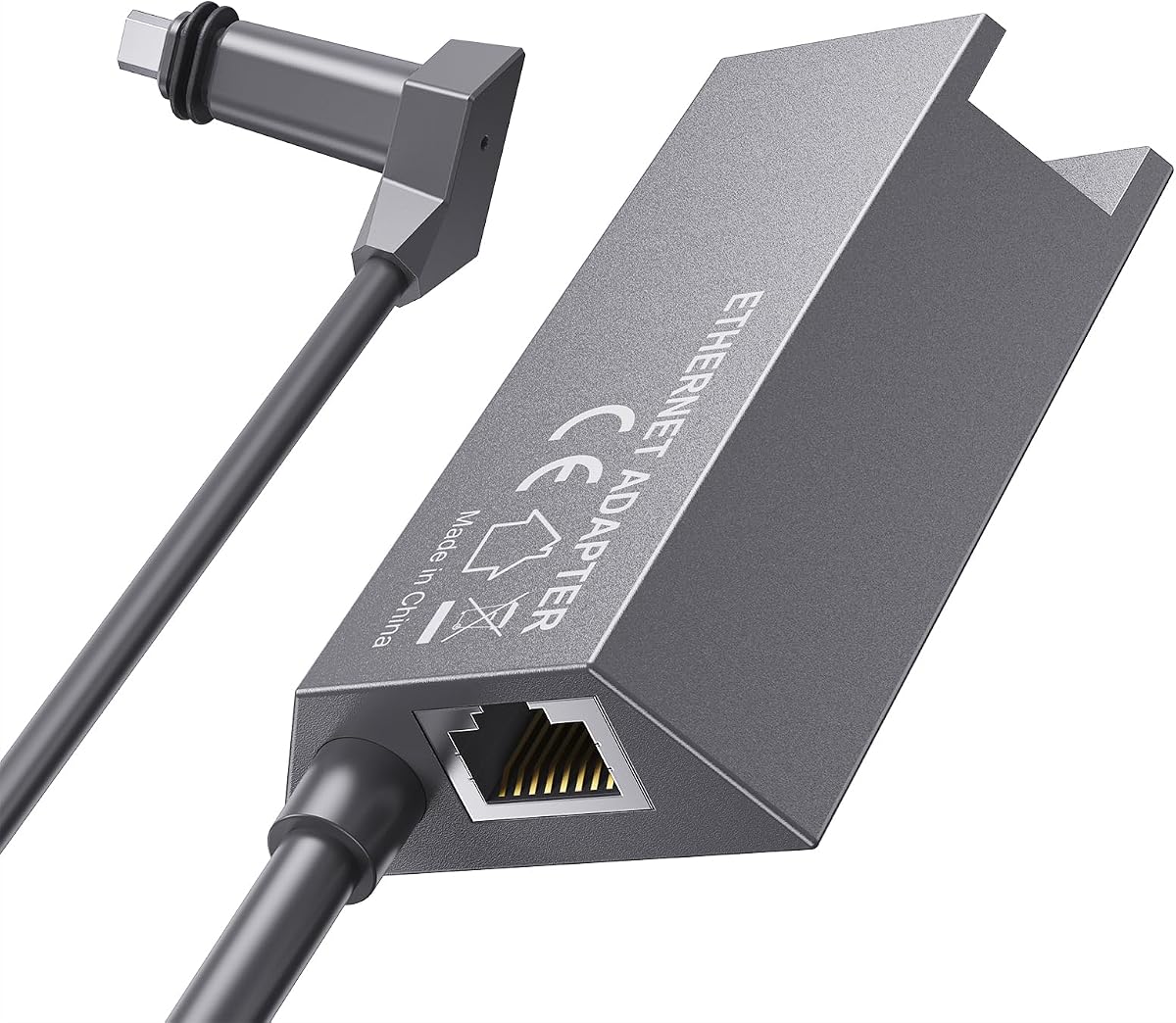


This adapter gives rectangular Starlink Gen 2 users a practical way to create a wired connection through the router. Its 4.6 rating reflects a generally favorable balance of simple installation and stable performance, while the stated support for speeds up to 1 Gbps makes it suitable for a single demanding device or another piece of network infrastructure.
We may earn a commission when you buy through this link, at no additional cost to you.
The adapter occupies the port normally used by the antenna cable, allowing the Starlink cable to connect to the adapter and an Ethernet cable to extend toward the desired equipment. Its plug-and-play design requires no driver installation. This makes it especially appealing for a desktop computer, smart television, Ethernet switch, or third-party router that benefits from a stable wired link.
Compatibility is the main limitation. The supplied information specifies the rectangular Starlink Actuated Gen 2 system and explicitly says it does not work with the latest Starlink Standard Kit featuring a kickstand base. It also offers only one RJ45 port, so buyers wanting several simultaneous wired devices will need a more elaborate adapter or an external switch.
This is a strong budget-oriented recommendation for owners of the specified rectangular hardware who need one dependable wired connection. Confirm the router and dish generation before ordering, unplug the router before changing cables, and use quality Ethernet cabling for the best result.
The inline installation keeps the process understandable: the adapter fits where the antenna cable previously connected, and the existing Starlink cable attaches to the adapter. That arrangement reduces the need for complicated configuration while delivering a conventional Ethernet interface.
A single Gigabit port is sufficient for a desktop, television, or network switch. It is less suitable for a busy household that wants several wired clients without adding another network device.
We may earn a commission when you buy through this link, at no additional cost to you.
This dual-port adapter is designed for Starlink Gen 2 users who want to connect two wired devices rather than investing in a single-port inline solution. It carries a 4.1 rating and supports a broad collection of Gen 2 systems, including Standard Actuated, High Performance, mobile High Performance, and Enterprise router configurations.
We may earn a commission when you buy through this link, at no additional cost to you.
Two ports make it possible to serve combinations such as a PC and game console or network storage and smart television. Each connection can operate on a Gigabit wired path, supporting activities that include high-resolution streaming, gaming, remote work, and large transfers. The adapter also uses gold-plated contacts, an ABS enclosure, and energy-efficient chips.
The stated IP65 housing rating and 72-hour industrial stress testing support its positioning as a durable, continuously operating component. These claims are particularly relevant in a home office, workshop, or other installation where the adapter may be exposed to dust or moisture. As with any compact inline device, placement still matters.
Choose this model when two simultaneous wired connections are the central requirement and compatibility with multiple Gen 2 kits is important. It is less appropriate for Gen 3 or Mini owners, and its two-port ceiling means larger networks will still need an external switch. Its rating is not the highest in the group, but the expanded hardware support and useful port count compensate.
The dual RJ45 arrangement eliminates the need to choose only one wired client. That makes the adapter practical for households or offices where a computer, television, console, or storage device all benefit from stable Ethernet.
An IP65 housing, energy-efficient electronics, gold-plated ports, and reported stress testing make this a sensible option for installations intended to remain active rather than serve as a temporary travel accessory.
We may earn a commission when you buy through this link, at no additional cost to you.
This is a compact single-port adapter intended specifically for the Starlink Standard Actuated Gen 2 kit. With a 4.5 rating, it presents a straightforward way to integrate satellite service with a wired device or a home mesh Wi-Fi system. The stated maximum speed of 1 Gbps is well suited to modern local connections.
We may earn a commission when you buy through this link, at no additional cost to you.
Its installation process is clearly defined: unplug the router, disconnect the antenna cable, insert the adapter into that port, reconnect the antenna cable, and restore power. No drivers are required. Users can connect the RJ45 output to a PC for a direct wired experience or use it to bridge the Starlink system into an existing mesh network.
The trade-off is simplicity rather than expansion. Only one wired device can connect directly, and the product is not intended for newer Starlink generations. The supplied description also makes broad performance claims about improved speeds and reduced latency, but actual results will depend on the Starlink service, local equipment, and network conditions.
This adapter is a practical recommendation for a Standard Actuated Gen 2 owner who wants one stable Ethernet connection without unnecessary complexity. It is best for a direct desktop connection or feeding a separate router or switch, while users needing multiple RJ45 outputs should consider a multi-port model.
By placing the adapter in the router's antenna-cable path, it converts the Starlink connection into a conventional wired feed. The process is approachable even for users who have not configured network hardware before.
Connecting the adapter to a home mesh system can extend satellite service into areas where Wi-Fi reception may be inconvenient. A separate Ethernet switch can expand the single output when more wired clients are required.
We may earn a commission when you buy through this link, at no additional cost to you.
This four-port adapter expands the selection for owners of Starlink Standard 4X, Gen 3, and Mini equipment. Its 4.2 rating and four-device support make it a practical choice for a home or office that needs several wired endpoints without relying on multiple separate inline adapters.
We may earn a commission when you buy through this link, at no additional cost to you.
The included cable and setup instructions simplify acquisition and installation. Users can connect devices such as computers, game systems, televisions, and network equipment to the four RJ45 ports. Wired networking can also reduce reliance on Wi-Fi in situations where video conferencing or online gaming benefits from a more consistent link.
Compatibility deserves careful attention. The supplied information explicitly states that the adapter is not compatible with the Starlink Mini X, even though it supports Mini systems. It also does not state a specific port speed, so buyers prioritizing documented throughput may favor a model that advertises Gigabit performance on every connection.
This adapter is best for Gen 3 or compatible Mini owners who need a straightforward four-port solution and value included setup guidance. Check the exact Mini model before buying, and confirm that all required Ethernet cables and powered arrangements fit the intended installation.
Four independent RJ45 ports reduce cable complexity in entertainment rooms, offices, and media areas. The adapter can serve as the central wired distribution point for several devices.
Compatibility is generation-specific, and the product information distinguishes the Starlink Mini from the Mini X. Confirming the exact hardware before ordering helps prevent an otherwise straightforward installation from becoming a return.
We may earn a commission when you buy through this link, at no additional cost to you.
This kit combines a Gen 3 and Mini-compatible adapter, four Gigabit RJ45 ports, and an included Cat 5e network cable. Its 3.9 rating is the lowest among the listed products, but the package addresses several common setup needs at once: model-specific fitting, multi-device connectivity, and the cabling required to begin using the adapter.
We may earn a commission when you buy through this link, at no additional cost to you.
The stated Gigabit performance and included cable are useful for streaming, gaming, and other high-bandwidth activities. LED indicators provide a quick visual indication of port status, while the plug-and-play design removes the need for software drivers. The product also supports connecting the Starlink antenna to a home mesh system through Ethernet.
Compared with more compact options, the design is intentionally built around Gen 3 and Mini contours, snug button arcs, and aligned connection points. Buyers with another generation should not assume compatibility. The stated testing and performance claims are useful product information, but they do not guarantee the same experience in every installation.
This kit is best for a Gen 3 or Mini user who wants four wired ports and wants the included Cat 5e cable as part of the package. It may be less compelling when minimizing size is the priority or when a simpler one-port inline connection is sufficient.
The included Cat 5e cable and instruction manual reduce the number of separate purchases required. Buyers still need suitable Ethernet cables for additional devices, but the core connection hardware is already in the package.
Four Gigabit ports allow computers, consoles, televisions, and storage systems to share the adapter as a centralized wired hub. Individual device performance remains subject to the Starlink service and local network conditions.
We may earn a commission when you buy through this link, at no additional cost to you.
This Rectangle Dish V2 adapter is aimed at users who want to integrate Starlink into a home or business network through a wired connection. It has a 4.1 rating, supports speeds up to 1 Gbps, and can connect directly to a computer or feed an existing mesh Wi-Fi system through Ethernet.
We may earn a commission when you buy through this link, at no additional cost to you.
One of its main strengths is its clear physical installation method. The router is turned off, the antenna cable is disconnected, the adapter is inserted into the router port, the antenna cable reconnects to the adapter, and power is restored. This avoids ambiguous wiring and keeps the process driver-free.
The trade-off is that the adapter provides only one RJ45 port. A household with several wired endpoints can still use it ahead of an Ethernet switch, but it does not directly replace a multi-port splitter. Compatibility is also limited to the named Rectangle Dish V2 configuration, so the model must be verified before purchase.
This is a sensible choice for a compatible Rectangle Dish V2 owner who primarily needs a direct desktop link or integration with an existing wired mesh network. Its clear setup instructions and stated Gigabit capability make it practical, although buyers should not expect the convenience of multiple ports from this design.
The Ethernet output can connect to a home mesh system, allowing Starlink service to extend farther through the property. This is especially useful in buildings where wireless coverage alone may be inconsistent.
Wiring a computer directly removes Wi-Fi variability from the immediate connection path. The result can be more predictable for large transfers, gaming sessions, and demanding video calls.
We may earn a commission when you buy through this link, at no additional cost to you.
This adapter is designed for Starlink Gen 3 Standard and Mini systems where an Ethernet cable may need to run along a roof, down an exterior wall, or through another exposed area. Its 4.4 rating and IP68 waterproof kit distinguish it from basic indoor inline adapters, while the stated transmission rate reaches 1200 Mbps.
We may earn a commission when you buy through this link, at no additional cost to you.
The male-to-female extender accepts an RJ45 cable without cutting or crimping the original Starlink cable. A 24AWG pure-copper core and full-metal shielding are specified to support signal integrity and reduce interference. These features are meaningful for long or exposed installations where cable quality and environmental protection are more important than a minimal inline form.
The recommended Ethernet run is under 175 feet, or 50 meters. Although the advertised maximum transfer speed exceeds 1 Gbps, the useful network result will depend on the equipment, cable quality, and service configuration. The coupler is also a connection accessory rather than a multi-device splitter.
This is the most compelling option in the group for exposed cable routing and weather resistance. Gen 3 or Mini owners who need to extend or repair a connection with a conventional Ethernet cable should consider it carefully, while those seeking several outputs should choose a splitter instead.
The IP68 kit is designed to protect the connection from moisture, dirt, and environmental exposure. This makes the adapter more appropriate for exterior cable runs than a basic non-sealed coupler.
Pure-copper wiring and full-metal shielding support reliable transmission over longer runs. Keeping the recommended Ethernet length below 175 feet helps limit signal loss and interference.
We may earn a commission when you buy through this link, at no additional cost to you.
This compact Gen 2 adapter provides one RJ45 connection with a stated speed of up to 1 Gbps. Its 4.0 rating places it in the middle of the group, but the portable design and uncomplicated installation make it relevant for users who need a basic wired link with compatible Starlink hardware.
We may earn a commission when you buy through this link, at no additional cost to you.
The adapter is intended for the Starlink Standard Actuated Kit and connects a device directly to the router. Because it requires no drivers, users can install it without adding software to a computer or network device. Its smaller form is also convenient for mobile or temporary arrangements, subject to the equipment's own portability.
It explicitly does not work with the latest Starlink Standard Kit featuring a kickstand base, and the single port limits simultaneous wired connections. The supplied description also mentions customer support for Gen 2 issues, which may be useful for troubleshooting compatibility or setup questions.
Choose this model for an Actuated Gen 2 user who values compactness and a simple one-device Ethernet connection. It is less suitable for newer hardware or users who need to connect several devices directly, but those requirements can be met by the dual-port and four-port alternatives in this guide.
The inline adapter removes the need to cut or terminate the Starlink cable and provides a familiar RJ45 interface. A PC or router with Ethernet can use the same compact accessory.
Compatibility is limited to the Actuated Gen 2 configuration and excludes the latest kickstand-base Standard Kit. Reviewing the router design before ordering is essential.
We may earn a commission when you buy through this link, at no additional cost to you.
This short 11.8-inch adapter combines a Starlink-specific connector with a standard T568B RJ45 female port. It supports Gen 3 Standard and Mini dishes and routers, and its 4.8 rating is the highest among the listed products. The compact form makes it especially convenient when the Starlink router and wired device are close together.
We may earn a commission when you buy through this link, at no additional cost to you.
The product supports transfer rates up to 1000 Mbps over Cat 5E or Cat 6 cabling. Its IP67-rated sealing ring improves resistance to moisture, while the dedicated dish-and-router connector eliminates the need to cut or crimp original cables. Setup is described as plug-and-play, making the design accessible for home and camping configurations.
The fixed 11.8-inch length is the principal limitation. It is ideal when devices sit beside one another, but it offers little routing flexibility for a desk farther away or for cable management around furniture. As a single-port adapter, it also cannot serve several wired clients simultaneously.
This is the top choice for a compact indoor arrangement involving compatible Gen 3 or Mini equipment. It also works well as a short connection near a camping setup where a full-size inline adapter would be unnecessary. For longer reaches, choose an adapter that accepts user-supplied Ethernet cable.
The dedicated Starlink connector and T568B RJ45 port remove the need to modify the original cable. That reduces installation work and makes the adapter useful for temporary setups.
At 11.8 inches, the lead is best suited to a router positioned close to a computer, television, or portable setup. Its short profile also reduces excess cable around compact installations.
We may earn a commission when you buy through this link, at no additional cost to you.
This four-port splitter is the most elaborately engineered product in the guide. Its 4.6 rating reflects a strong feature set: four independent RJ45 Gigabit ports, an aviation aluminum alloy shell, a high-performance chip, and a wide 9–60V power input for compatibility with original and third-party power systems.
We may earn a commission when you buy through this link, at no additional cost to you.
It is designed for Starlink Standard Gen 3 and Mini antennas, providing simultaneous wired connections for computers, game devices, televisions, cameras, and other Ethernet equipment. The stated 1 Gbps port speed makes it suitable for a broad mix of household and office traffic, while the aluminum housing helps dissipate heat during continuous operation.
Industrial-oriented construction continues with a 16AWG tinned pure-copper connecting cable and UL-certified fire-resistant, temperature-resistant rubber rated from -30°C to 60°C. The adapter itself is described as operating from -20°C to 60°C. Those specifications point toward a durable installation, although physical dimensions should be checked before selecting a mounting position.
This is the premium recommendation for compatible Gen 3 or Mini users who want several wired devices connected through one substantial adapter. Its construction and power flexibility justify consideration for extended service, outdoor-oriented installations, or a home network with several high-bandwidth endpoints. Gen 2 owners should look elsewhere in the guide.
The aviation aluminum shell is more than a cosmetic material choice. Efficient heat dissipation helps the internal chip maintain stable operation during demanding, continuous network activity.
A 9–60V input range allows the adapter to work with the original Starlink power arrangement and compatible third-party systems. This flexibility can simplify custom installations where conventional power compatibility is uncertain.
We may earn a commission when you buy through this link, at no additional cost to you.
The most important choice is hardware compatibility, followed by the number of wired clients, connection style, environmental exposure, and installation convenience. Reviewing these factors before buying prevents an adapter from being technically fast yet completely unusable with the intended Starlink system.
The safest approach is to compare the product's stated hardware names with the labels and physical design of your own equipment. Do not rely on a shared Starlink name alone. Generation compatibility should be the first filter, because a connector that appears similar may still have a different shape, latch, or placement.
Count every device that must connect directly and leave room if the network may grow. For occasional expansion, a single-port adapter paired with a quality Ethernet switch may be more economical. For simultaneous connections on Gen 3 or Mini hardware, a four-port model offers the most integrated approach.
For ordinary home use, a documented 1 Gbps connection is appropriate for high-definition streaming, gaming, video calls, and large file transfers. Pair a fast adapter with Cat 5e or better cable and a wired device capable of the same speed for the most useful result.
Measure the intended route before selecting a fixed-length design. Longer cables should be routed away from sharp bends, excessive heat, moisture, and sources of interference. When a cable must cross an exterior wall or roof area, weather protection becomes more important than a short, tidy profile.
For indoor-only use, weather resistance may be less important than size, port count, or price. For semi-outdoor installations, prioritize the sealing system and compatible cable entry method over cosmetic compactness.
Before starting, identify the cable ends, move equipment away from the router, and follow the manufacturer's power-disconnection instructions. Keep the original Starlink cable intact whenever the adapter allows it, and avoid cutting or crimping unless the product specifically requires such work.
Match the adapter's power arrangement to the equipment you already own and prefer a durable enclosure for extended operation. Confirm that the included or required power supply operates consistently in the intended temperature and electrical environment.
Begin by confirming that the dish, router, and adapter belong to compatible Starlink hardware generations. Read the adapter's included instructions, identify the antenna-cable connection, and gather a suitable Ethernet cable. For any inline model, disconnect the router's power before touching the antenna cable. This reduces the risk of an incorrect connection or damage to the equipment.
For a traditional inline adapter, unplug the router, disconnect the antenna cable, insert the adapter into the router's antenna port, and reconnect the Starlink cable to the adapter. Connect the desired Ethernet device to the RJ45 port. A short-cable or coupler-style model instead connects directly to the specified Starlink dish-and-router interface. Restore power and allow the router to recognize the wired connection.
After setup, test the link with the connected computer, television, switch, or router. Confirm that the port status indicators show activity when appropriate, then verify speed, latency, and stability with the applications you use. For outdoor routes, secure the cable, protect connectors from standing water, and inspect seals periodically. Do not cut the original Starlink cable unless the product instructions specifically call for it.
No. Compatibility depends on the dish, router, and generation involved. Options in this guide target rectangular Gen 2, Standard Actuated Gen 2, Standard Gen 3, and Mini systems, while some listings expressly exclude specific variants. Check the complete model names and the compatibility notes before buying.
It can improve the consistency of the local connection and remove some Wi-Fi variability, but it does not independently increase the speed of the Starlink service. The result still depends on the subscription, satellite equipment, Ethernet cable, local hardware, network congestion, and the capabilities of the connected device.
An inline adapter typically adds one RJ45 port between the Starlink router and antenna cable. A splitter adds several RJ45 ports so multiple wired devices can connect through the same adapter. A splitter is convenient for a home or office network, while a single-port adapter is usually sufficient for one device or a connection to another router or switch.
The listed products are described as driver-free or plug-and-play, so the hardware should not require special software on the connected computer. The main setup work is physical: power down the router where instructed, connect the Starlink and Ethernet cables correctly, and then restore power.
It depends on the model's construction and how the connection is installed. The IP68 Gen 3 and Mini coupler is specifically described for waterproof indoor and outdoor use, and the dual-port Gen 2 adapter has an IP65 housing. Even with weather-resistant hardware, connectors should be secured and positioned so water cannot collect around them.
Use quality Cat 5e or newer cable for a Gigabit connection, with Cat 6 also being a practical choice for a modern installation. Keep runs within reasonable limits, avoid sharp bends, and secure outdoor cables away from moving parts and standing water. The IP68 extender's guidance recommends keeping Ethernet runs under 175 feet, or 50 meters.
Yes, by connecting the adapter to an Ethernet switch and then connecting the desired devices to that switch. A two-port or four-port adapter is more integrated and can reduce the need for separate switching hardware. The Starlink connection remains shared, so individual device speeds will depend on available bandwidth and network activity.
Confirm that the adapter supports the exact Mini variant, because at least one listed model excludes Mini X. Short-cable and coupler designs connect to the specified Starlink interface, while traditional inline models sit between the router and antenna cable. Follow the product's diagram, power down equipment when instructed, and test the connection before routing cables permanently.
The best overall budget choice is the Rectangular Satellite Internet V2 adapter because it provides a simple, compact path to a 1 Gbps wired connection for the specified Gen 2 hardware. The Gen 3 and Mini short-cable adapter stands out for its 4.8 rating, compact installation, and 1000 Mbps capability, while the four-port Gen 3 and Mini splitter is the premium choice for users who want substantial construction, four wired outputs, and broad power compatibility.
Prioritize exact hardware compatibility above every other feature. Once that is confirmed, choose one port for a single device, two ports for a compact dual-client setup, and four ports for a broader network. Installation style, outdoor sealing, included cable, construction, and power requirements then determine which model best fits the site.
Finally, check the current product listing, included components, and current pricing immediately before purchase. Starlink hardware revisions and adapter designs change over time, and the compatibility distinctions in this guide make careful model identification especially important. The right adapter should connect cleanly, fit the intended placement, and support the devices you actually plan to wire.