
TP-Link AC1200 WiFi Extender RE315
4.2Editor score
One-Touch Wi-Fi setup
Dual-band AC1200 performance
Fast Ethernet device connection
Discover the best easy to install WiFi extenders, comparing coverage, setup, Wi-Fi generation, Ethernet options, security, and everyday performance.
Easy to install WiFi extenders can fill weak-signal rooms without replacing a functioning router. The most useful models combine quick setup, flexible placement, dual-band or Wi-Fi 6 support, and enough coverage for bedrooms, basements, offices, and other stubborn dead zones.
This guide compares ten extenders on installation method, supported Wi-Fi generation, stated coverage, device capacity, wired connectivity, security, and placement flexibility. It includes compact dual-band options, Wi-Fi 6 and Wi-Fi 7 models, app-assisted designs, and simpler wall-plug repeaters.
Each review explains who benefits most from the extender, along with practical trade-offs. Ratings and specifications can change, and selling prices vary, so compare the current listing, router capabilities, and room layout before making a final decision.
4.2Editor score

4.1Editor score

4.2Editor score
The table below compares all ten extenders by wireless generation, maximum stated coverage, supported device count, and setup approach, making it easier to match a model to a home, office, or difficult-to-reach area.




The TP-Link RE315 is a dual-band AC1200 extender that combines a straightforward wall-plug format with features usually associated with more advanced models. Its 4.2 rating reflects a generally practical approach to expanding a home network without replacing the existing router. The stated band maximums are 867 Mbps on 5 GHz and 300 Mbps on 2.4 GHz, while the product is listed for coverage of up to 1,500 square feet and as many as 32 devices.
We may earn a commission when you buy through this link, at no additional cost to you.
Installation is one of its strongest attributes. One-Touch Connection offers a fast path for extending an existing network, and the TP-Link Tether app provides guided setup, management, and firmware updates. Adaptive Path Selection is designed to help devices move between the router and extender, while an intelligent signal indicator helps identify a better outlet. Two adjustable external antennas can be repositioned after installation to improve coverage in a particular room or along a hallway.
There are some trade-offs. The RE315 uses Wi-Fi 5 rather than Wi-Fi 6 or Wi-Fi 7, so it will not unlock the higher performance and efficiency benefits available to a compatible modern router and client. It also does not support the 6 GHz band. Like other wireless extenders, it improves reach and signal reliability rather than directly increasing the speed delivered by the internet connection. The Fast Ethernet port is useful for a nearby wired device, but it is not the Gigabit option offered by several higher-tier TP-Link models.
This is a strong recommendation for a reader who wants a recognizable, app-supported extender without moving to the newest wireless generation. It is especially suitable for filling a bedroom, basement, garage, or similar area where the router remains reliable in other parts of the home. Buyers with newer Wi-Fi 6 equipment and a larger number of high-bandwidth clients may prefer the RE715X, but the RE315 offers the most balanced approach for many typical homes.
One-Touch Connection and the Tether app make the RE315 approachable for first-time extender owners. Start with an outlet that already receives a strong router signal, connect through the available setup method, and use the signal indicator to refine placement.
The separate 2.4 GHz and 5 GHz radios let compatible clients choose a useful balance of range and throughput. Adaptive Path Selection and external antennas add flexibility without requiring a complete network redesign.
We may earn a commission when you buy through this link, at no additional cost to you.
The TP-Link RE550 is a desktop-style AC1900 range extender aimed at homes that need more reach than a basic wall plug can provide. It carries a 4.3 rating and combines 1,300 Mbps maximum performance on the 5 GHz band with 600 Mbps on 2.4 GHz. The stated coverage reaches up to 2,100 square feet for up to 32 devices, making it a potential fit for larger layouts with several weak-signal rooms.
We may earn a commission when you buy through this link, at no additional cost to you.
Three adjustable external antennas provide more directional control than many compact extenders. The Gigabit Ethernet port can serve a nearby wired device, and AP mode can turn a wired network connection into a Wi-Fi hotspot. That versatility makes the RE550 useful when the extender must sit beside a network cable rather than directly beside the router. Smart Adaptive Roaming is designed to keep compatible devices associated with the strongest available signal as people move around.
Setup remains approachable through the Tether app, which supports guided configuration, signal-based placement advice, and firmware updates. The main limitation is that the RE550 is still a Wi-Fi 5 device. It cannot exploit Wi-Fi 6 features such as OFDMA, and it does not support the 6 GHz band. Also, the extenders in this roundup exist to expand coverage rather than increase the underlying internet speed. Its physical design may also be less convenient than a flat wall-plug model in a tight outlet location.
Choose the RE550 when coverage area, antenna adjustment, and a Gigabit wired port matter more than adopting the latest wireless standard. It is well suited to medium-sized or larger homes, offices, and installations where an Ethernet run is available. Users with a Wi-Fi 6 router and demanding modern devices should compare it with the RE715X or RE615X, while simpler layouts may find the smaller RE315 easier to place.
Three adjustable antennas give the RE550 additional options for directing coverage toward a difficult area. Position the unit where its signal indicator is strong, then adjust the antennas based on the shape of the home and the location of client devices.
The Gigabit Ethernet port provides a reliable option for one nearby wired device. AP mode also lets the extender establish a wireless access point from a wired connection, which can be valuable in an office or finished room.
We may earn a commission when you buy through this link, at no additional cost to you.
The TP-Link RE715X is a dual-band Wi-Fi 6 extender built for readers who want a modern extension of an existing router without moving immediately to Wi-Fi 7. Its 4.1 rating reflects a capable general-purpose option, with stated maximum speeds of 2,404 Mbps on 5 GHz and 574 Mbps on 2.4 GHz. Coverage is advertised for up to 2,400 square feet, and the unit is listed for up to 64 devices.
We may earn a commission when you buy through this link, at no additional cost to you.
Two high-gain directional antennas use beamforming to direct signal toward the intended coverage area. Smart Adaptive Roaming helps compatible devices move to the strongest signal, while a Gigabit Ethernet port offers a stable wired option for a desktop, television, game console, or other nearby device. AP mode adds another installation possibility, and EasyMesh compatibility allows the RE715X to join an EasyMesh-compatible router for a more unified whole-home network.
The Tether app streamlines setup and management. Its intelligent signal indicator helps identify an outlet with a good backhaul connection, and firmware updates can be handled through the app. The product title includes a PCMag Editor's Choice designation, but the rating in the supplied listing is 4.1 rather than a perfect score. As with other wireless extenders, advertised rates are not the same as real-world internet throughput, and performance depends on the router, client devices, distance, and obstacles such as walls.
This is the strongest all-around choice for a household with a Wi-Fi 6 router and a mix of newer phones, laptops, smart-home equipment, and streaming devices. Its 2,400-square-foot claim and 64-device capacity offer useful headroom, while the Gigabit port adds wired flexibility. It is less compelling for owners of older Wi-Fi 5-only networks or those ready to build around a Wi-Fi 7 router, in which case the RE223BE may be a more natural fit.
Wi-Fi 6 support makes the RE715X a sensible middle ground for newer networks. It can serve current AX phones and laptops while remaining compatible with almost all Wi-Fi-enabled routers and access points.
The stated 64-device capacity and 2,400-square-foot coverage provide room for busy homes. Beamforming antennas focus the extension toward the area that needs it rather than relying on omnidirectional coverage alone.
We may earn a commission when you buy through this link, at no additional cost to you.
The NETGEAR EX6120 is a Wi-Fi 5 dual-band extender focused on uncomplicated installation and compatibility with an existing home network. It has a 3.8 rating, the lowest listed score in this roundup, but its core proposition is easy to understand: bring coverage into rooms the router cannot reach without requiring a replacement router or closed ecosystem.
We may earn a commission when you buy through this link, at no additional cost to you.
Coverage is listed for up to 1,500 square feet and up to 25 devices, with aggregate dual-band performance of up to 1.2 Gbps. Users can set it up with guided help from the NETGEAR Nighthawk app or use the WPS button on a compatible router and extender. It is designed to work with routers or gateways from major providers such as Xfinity, Spectrum, AT&T, Cox, and Verizon, making it relevant to many existing home networks.
One important limitation is the wired port. The EX6120 includes a 10/100 Mbps Fast Ethernet connection rather than Gigabit Ethernet, so it is less attractive for a nearby desktop, game console, or smart television that could benefit from a faster wired link. It uses Wi-Fi 5 and does not offer the newer wireless capabilities of Wi-Fi 6 or Wi-Fi 7 options. Real-world speed also depends on the clients, router, internet plan, distance, and obstructions.
The EX6120 makes sense for a reader who values a short setup process, a familiar wall-outlet design, and compatibility with an existing provider gateway. It is less appropriate for bandwidth-intensive wired clients or a home that is already standardizing on Wi-Fi 6. Buyers willing to invest in a newer TP-Link model may obtain better long-term flexibility, but this NETGEAR unit remains a straightforward option for filling a basic dead zone.
The Nighthawk app provides a guided route, while WPS offers a faster alternative for compatible routers. Either method can be used to establish the extension without advanced network configuration.
The Fast Ethernet port is adequate for basic network access and can reduce reliance on wireless reception. However, it is not the right choice when a nearby client needs Gigabit-class wired performance.
We may earn a commission when you buy through this link, at no additional cost to you.
The generic 1200Mbps dual-band WiFi extender is a compact wall-plug model with a 4.8 rating, the highest conventional rating among the products in this guide. It combines 2.4 GHz performance of up to 300 Mbps with 5 GHz performance of up to 867 Mbps and is listed for coverage of up to 3,000 square feet. The stated device capacity is up to 20 connected clients.
We may earn a commission when you buy through this link, at no additional cost to you.
Its installation is designed around one-click WPS setup. Pressing the WPS buttons on the router and extender creates a quick extension path without requiring a complicated network redesign. The unit also supports Repeater Mode and AP Mode. Its Ethernet port can turn a wired internet connection into a wireless network, while the supplied information also describes using it as a wireless adapter for devices such as a game console, smart television, or Blu-ray player.
The main consideration is the limited security vocabulary. The product supports WEP and WPA/WPA2 protocols, but WPA3 is not listed. Buyers should ensure their existing router uses an appropriate current security standard and avoid legacy WEP where possible. The very large stated square-foot figure should also be treated as a maximum rather than a promise of strong performance throughout a large property. Walls, floors, router capability, and client capabilities still determine actual results.
This extender is a practical option for a home, office, or hotel where simple WPS pairing and a compact outlet design matter most. It is particularly useful when one nearby device benefits from a wired connection or when the extender needs to travel. Readers who prioritize long-term software management, newer wireless standards, or a well-documented support ecosystem may prefer a TP-Link or NETGEAR model instead.
One-click WPS setup dramatically reduces the number of steps. It is well suited to temporary use in offices or hotels and straightforward extension when the source router supports WPS.
Repeater and AP modes cover the most common extension needs. The Ethernet port also adds value by supporting a wired client or a wireless access point created from a wired connection.
We may earn a commission when you buy through this link, at no additional cost to you.
The NETGEAR EX5000 is a straightforward AC1200 wall-plug extender for bringing a basic wireless signal into areas that the main router struggles to reach. Its 4.0 rating and advertised coverage of up to 1,500 square feet place it in the conventional Wi-Fi 5 category. The listed capacity is up to 25 devices across the 2.4 GHz and 5 GHz bands.
We may earn a commission when you buy through this link, at no additional cost to you.
Installation can be completed through guided steps in the NETGEAR Nighthawk app or by pressing WPS on the extender and a compatible router. Its wall-plug form is convenient for bedrooms, basements, garages, and other places where a desktop unit would be inconvenient. The product is designed to extend a router or gateway from major service providers rather than force a particular ecosystem, which can be reassuring for a mixed-device household.
The listing describes WPA2 protection, automatic firmware updates, and WPA3 protection for connected devices. Compatibility with WPA2 or WPA/WEP routers is also noted, although using older security standards should be limited to situations where there is no alternative. The EX5000 does not include the Fast Ethernet port found on the EX6120, so it is aimed primarily at extending wireless coverage rather than serving a nearby wired client.
The EX5000 is a reasonable pick when a reader wants a familiar NETGEAR installation experience and the goal is a simple dual-band signal improvement. It suits average-sized homes and mixed internet-provider equipment. However, buyers who want a wired fallback, a newer wireless standard, or more precise app-based optimization should look to the EX6120 or one of the Wi-Fi 6 TP-Link extenders.
Its compact form makes the EX5000 easy to position where an outlet is available. Use app guidance or WPS pairing, then confirm that the chosen outlet has a strong enough connection to the router.
The Nighthawk app supports guided setup, while automatic firmware updates help maintain the device. These features make the EX5000 approachable for users who want limited but accessible management.
We may earn a commission when you buy through this link, at no additional cost to you.
The TP-Link RE220 is a compact dual-band extender intended to provide a straightforward way to expand a home network. Its 4.0 rating reflects a practical middle-ground option, with 300 Mbps performance on 2.4 GHz and 433 Mbps on 5 GHz. The stated coverage is up to 1,200 square feet for up to 30 devices.
We may earn a commission when you buy through this link, at no additional cost to you.
One of its most useful qualities is OneMesh support, which can make the extension feel more integrated with compatible TP-Link equipment. It also includes an Ethernet port, giving a nearby device a wired option without requiring a larger desktop extender. Dual-band operation allows compatible clients to use the 2.4 GHz band for range or the 5 GHz band for greater throughput when signal conditions permit.
The RE220's total stated bandwidth is lower than that of the AC1200, AC1900, AX1800, AX3000, and BE3200 models in the guide. That makes it more appropriate for browsing, calls, ordinary streaming, and light household use than for maximizing performance across many simultaneous high-bandwidth clients. As with every wireless extender, it repeats an existing signal and does not directly increase the speed of the source internet connection.
This is a good pick for a smaller home or apartment, particularly when a compact OneMesh-compatible unit is desired. It can also work as a straightforward addition to a compatible router without replacing it. Buyers with newer Wi-Fi 6 equipment, extensive square footage, or many demanding devices should consider one of the higher-bandwidth models, but the RE220 remains an approachable and compact option.
The RE220's lower stated coverage and total bandwidth make it most convincing for apartments, smaller homes, and isolated dead zones. Its compact body is easier to integrate than a large desktop unit.
Despite its small form, the Ethernet port can serve a nearby device. That flexibility is useful when the extension point is a room where a computer or television can benefit from a wired link.
We may earn a commission when you buy through this link, at no additional cost to you.
The TP-Link RE615X is an AX1800 Wi-Fi 6 extender that balances modern wireless features, broad stated coverage, and flexible installation. Its 4.2 rating supports its position as a capable general-purpose model. It offers up to 1,201 Mbps on 5 GHz and 574 Mbps on 2.4 GHz, with coverage stated for up to 2,100 square feet and up to 64 devices.
We may earn a commission when you buy through this link, at no additional cost to you.
Two high-gain directional antennas use beamforming to improve signal strength and focus coverage toward difficult areas. The Gigabit Ethernet port allows one device to use a fast wired connection, and AP mode can create a Wi-Fi hotspot from a wired network. Smart Adaptive Roaming is intended to maintain sensible connections as compatible devices move between access points. EasyMesh compatibility provides an additional path to a more unified whole-home experience when paired with a suitable router.
Setup and management are handled through the TP-Link Tether app for Android and iOS. The intelligent signal indicator assists with placement, and the app can provide firmware updates. Despite being labeled a Wi-Fi 6 extender, the supplied information contains a wording inconsistency that calls it a dual-band Wi-Fi 7 range extender; it explicitly operates on 2.4 GHz and 5 GHz and does not support 6 GHz. Buyers should therefore understand it as a dual-band Wi-Fi 6 unit rather than a Wi-Fi 7 system.
The RE615X is a strong recommendation for readers who want Wi-Fi 6, a large connected-device allowance, and a Gigabit wired port without moving to the most advanced tier. It suits larger homes and busy networks where an older AC-series extender may be limiting. The RE715X offers greater aggregate throughput and slightly more stated coverage, while the RE223BE is the logical choice for a Wi-Fi 7 router.
AX1800 performance and support for as many as 64 devices make the RE615X appropriate for a home full of phones, laptops, televisions, and smart-home products. Older client devices can still use the extender through backward compatibility.
The intelligent signal indicator helps identify a suitable outlet before the unit is fully optimized. Tether app setup and firmware management make ongoing changes more accessible than manual configuration alone.
We may earn a commission when you buy through this link, at no additional cost to you.
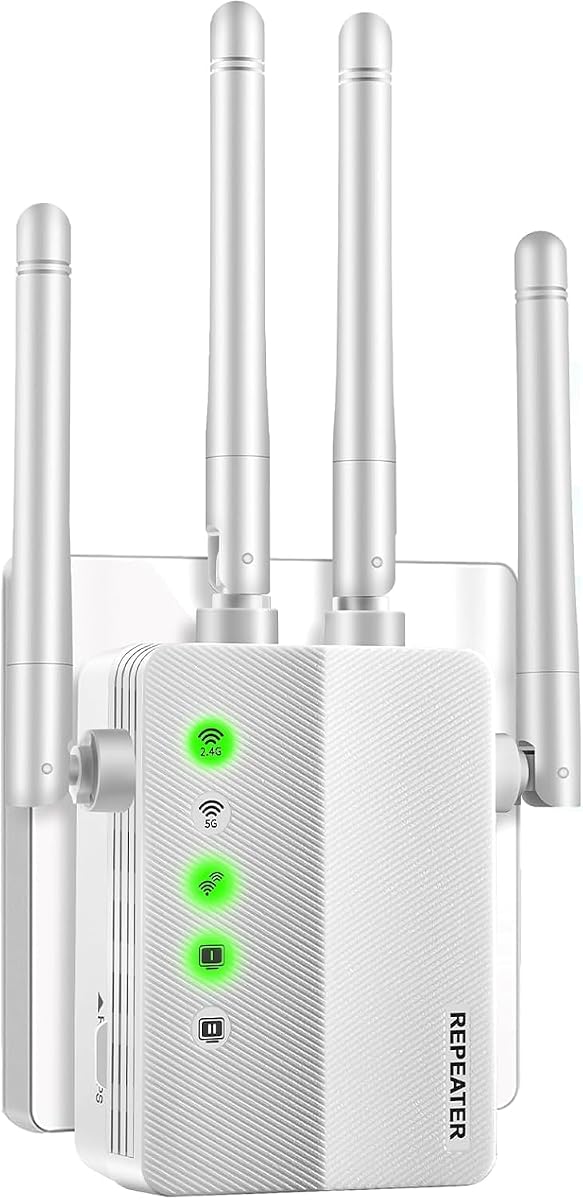
The Baetaey 15000-square-foot WiFi extender is built around a striking coverage claim and a 5.0 listed rating. It offers four operating modes—Repeater, Bridge, Access Point, and Router—and is listed to accommodate more than 70 connected devices. The supplied information describes a 2.4 GHz processor and support for common devices such as laptops, phones, speakers, IP cameras, tablets, and streaming devices.
We may earn a commission when you buy through this link, at no additional cost to you.
Its most convenient feature is one-tap WPS setup. The stated process is to press WPS on the router and then on the extender, with a connection target of within 30 seconds. Four adjustable external antennas are included to improve signal direction and stability. An Ethernet port adds another potential use, allowing the device to fit into a network where a wired connection is preferable.
The very large square-foot claim needs careful interpretation. A 15,000-square-foot claim does not mean every corner will receive full-strength Wi-Fi; construction, floors, walls, router placement, interference, and client capabilities all affect the result. The product also lists WEP and WPA/WPA2 rather than WPA3, so security should be configured with a modern standard whenever the source router allows it. The absence of a more specific brand ecosystem may also make ongoing software support less transparent than with a major networking manufacturer.
This extender is most appealing to readers with a very large property, outbuilding, warehouse, or other expansive area where broad reach is a priority. It is also attractive for buyers who want several operating modes and a simple WPS flow. Those wanting stronger documentation, newer Wi-Fi standards, and established app management should compare it with the TP-Link options, especially the RE715X or RE223BE.
The stated 15,000-square-foot coverage and four adjustable antennas make this a candidate for unusually large spaces. Real-world placement should still be tested incrementally rather than assuming the maximum applies throughout.
Repeater, Bridge, Access Point, and Router modes provide flexibility for homes and small offices. One-tap WPS pairing makes the most common extension scenario especially approachable.
We may earn a commission when you buy through this link, at no additional cost to you.
The TP-Link RE223BE is a BE3200 dual-band Wi-Fi 7 extender positioned as the premium option in this guide. Its 4.2 rating is supported by stated performance of up to 2,594 Mbps on 5 GHz and 688 Mbps on 2.4 GHz. Coverage is listed for up to 2,400 square feet, with support for as many as 64 devices.
We may earn a commission when you buy through this link, at no additional cost to you.
When paired with a Wi-Fi 7 router, the extender can use Multi-Link Operation, Multi-RUs, 160 MHz channels, and 4K-QAM. Multi-Link Operation combines frequency bands to improve throughput, latency, and reliability on compatible devices. The device also uses four positioned antennas with beamforming and includes a Gigabit Ethernet port. Smart Adaptive Roaming helps compatible clients move toward the strongest available signal.
EasyMesh compatibility allows a more seamless whole-home setup when used with an appropriate router, and the Tether app handles setup, security, optimization, placement guidance, and firmware. As with all wireless extenders, the device improves coverage rather than directly increasing internet service speed. It is also a dual-band unit and does not support the 6 GHz band, so buyers should not equate Wi-Fi 7 branding with tri-band operation.
The RE223BE is the right recommendation for a household that already owns a Wi-Fi 7 router and several compatible modern clients. It is particularly relevant for users seeking high local throughput, low-latency responsiveness, and forward-looking equipment. Those with a Wi-Fi 6 router will likely receive a more balanced result from the RE715X, while owners of older Wi-Fi 5 systems can achieve adequate coverage with less advanced models.
Multi-Link Operation and Multi-RUs can improve reliability and efficiency when paired with a Wi-Fi 7 router and compatible devices. These benefits are most meaningful in a deliberately modern network rather than a mixed legacy setup.
The RE223BE combines four beamforming antennas, EasyMesh compatibility, and a Gigabit Ethernet port. It offers a useful path to a unified high-performance network without replacing every component at once.
We may earn a commission when you buy through this link, at no additional cost to you.
The most important consideration is not merely the advertised speed or square-foot figure, but whether the extender can receive a strong signal where it is plugged in and serve clients in the rooms that need help. Match the wireless generation, wired ports, coverage claims, and placement design to your router and home.
Start by identifying the router already serving the home. Wi-Fi 5 extenders are appropriate for many existing networks, while Wi-Fi 6 or Wi-Fi 7 extenders can provide more modern efficiency and client support when the source router uses the same generation. A newer extender does not automatically make an older router faster, and an older client may not benefit from advanced features at the extender end.
Choose a wireless generation that complements the router and the devices that matter most. For a mixed network, dual-band compatibility and broad client support may matter more than the newest badge.
An extender receives the router's signal, retransmits it, and then serves connected clients. If the backhaul connection is weak, placing the device directly in a dead zone will not fix the problem. The best location is usually halfway between the router and the area that needs coverage, at a point where the router still shows a strong signal.
Use a mobile Wi-Fi analyzer or the extender's signal indicator to compare outlets. Placement often improves results more than moving between two extenders with similar headline speeds.
Stated square-foot figures provide a useful comparison, but they are maximum coverage claims rather than guaranteed performance at every point. Thick walls, multiple floors, metal appliances, long corridors, and concrete can sharply reduce usable range. A model advertising a large figure should still be placed carefully and tested in the rooms that matter.
For apartments and small homes, 1,200 to 1,500 square feet may be sufficient. Larger properties may benefit from a higher-capacity model, multiple coordinated access points, or a full mesh system.
The 2.4 GHz band generally offers better reach and is useful for distant clients, smart-home devices, and browsing. The 5 GHz band provides greater throughput when the client is close enough and the environment is not overly obstructed. A dual-band extender gives compatible clients more choices than a single-band model.
Wi-Fi 6 adds efficiency and capacity benefits to compatible networks, while Wi-Fi 7 introduces additional capabilities such as Multi-Link Operation on compatible systems. Confirm that the router and primary clients support the chosen standard.
An Ethernet port can provide a more stable connection for a desktop, television, game console, or other nearby device. Gigabit Ethernet is preferable for demanding traffic, while a 10/100 Mbps port is best treated as a basic fallback. AP mode can also create a wireless access point from a wired connection, which is useful when a finished room has a network cable but no convenient outlet link to the router.
Check port speed before buying if you plan to connect a wired device. A faster port adds meaningful flexibility without changing the extender's wireless coverage.
The easiest models support WPS, app-guided setup, or both. WPS is fast and familiar, but it may not be available on every router or desirable on networks with stricter security policies. App-based setup provides clearer instructions, placement assistance, and firmware updates, while desktop-style units with external antennas can be fine-tuned after installation.
Choose the control method that matches your comfort level. Easy installation does not mean no maintenance, so consider whether the brand provides accessible firmware updates and useful management tools.
Look for support for current wireless security on both the extender and the existing router. WPA3 is desirable where available, while WPA2 is still widely used. Products limited to WEP should be treated cautiously because it offers inadequate protection for a modern home network. Device capacity matters in busy homes with televisions, voice assistants, cameras, phones, and computers connected simultaneously.
Choose a listed capacity that comfortably exceeds the number of active clients, not merely the total number of devices in the home. Keep the router's own security and firmware practices current as well.
Begin by identifying the weak area and mapping the route from the main router. Place the extender at an outlet where the router's signal remains strong, rather than directly inside the farthest room. Connect it using the manufacturer's app, WPS buttons, or the supplied web interface, and wait for the device to establish the extension before moving clients.
After connecting a phone, tablet, or computer, test speed and reliability in the intended room. Move between the router and extender to see whether roaming is smooth, and compare performance on both 2.4 GHz and 5 GHz. If results are weak, try another outlet, adjust external antennas, or reposition the router and extender to create a better backhaul path.
Treat the extender as managed network equipment. Check for firmware updates through the manufacturer's app, review the network's security settings, and avoid leaving the device in an awkward position that blocks ventilation. Repeat the placement check after router updates or major furniture changes, because walls, channels, and interference can alter the result over time.
An extender does not normally reduce the main router's available internet speed, but devices connected through the extender share a repeated wireless signal. The connection to the router, also called backhaul, can become a bottleneck, especially on a crowded 2.4 GHz or 5 GHz channel. Wired backhaul or a properly placed Wi-Fi 6 or Wi-Fi 7 extender can produce more consistent results.
Place it roughly halfway between the router and the dead zone, where the router still has a strong signal. A good rule is that the extender should show a strong backhaul connection while also being close enough to serve the target room. If the extender is too far from the router, the repeated signal may be weaker than the original.
Most current models are designed for simple installation through WPS, a mobile app, or a short web-based setup process. WPS usually takes the least time, while app-guided setup can provide better placement guidance and firmware management. Make sure the existing router uses a compatible security method and that the extender is connected to power before starting.
Wi-Fi 6 extenders are generally designed to work with older routers because Wi-Fi 6 clients can communicate with earlier generations. The benefit will be limited, however, because the source router still limits the wireless signal being extended. Matching the extender generation to the router and primary devices produces the most logical result.
Repeater mode receives an existing wireless signal and rebroadcasts it, which is useful when bringing coverage to a remote room. Access point mode uses an Ethernet connection as the network source and creates a wired or wireless access point from it. Access point mode can offer a more stable backhaul when running a cable is practical.
No. A large maximum coverage claim does not guarantee full-speed Wi-Fi throughout that area. Building materials, floors, router placement, interference, and client capabilities still matter. Measure the signal at several outlets and test the extended network in the rooms that need improvement before deciding whether the claim is realistic for the property.
An extender is usually the simplest option for one or two weak-signal areas when a good backhaul location is available. A mesh system is generally better when several rooms need seamless coverage, the home has multiple floors, or wiring makes a dedicated backhaul practical. Either option can still require thoughtful placement and current router security.
Many extenders include an Ethernet port that can provide a wired connection to a nearby game console, smart TV, desktop, or other device. Check whether the port is Gigabit Ethernet or the slower 10/100 Mbps Fast Ethernet, because that difference affects performance for high-bandwidth activity.
The TP-Link RE315 is the best-balanced budget choice for a typical home because it combines One-Touch Connection, app support, adaptive roaming, and a Fast Ethernet option. The RE715X is the stronger overall recommendation when a Wi-Fi 6 router and newer clients are present, while the RE223BE leads the premium group for a compatible Wi-Fi 7 network.
Prioritize placement, a strong backhaul connection, and compatibility with the existing router before focusing on the largest advertised speed. A smaller extender positioned halfway to the target room can outperform a more powerful model installed at the network's edge. Ethernet ports, device capacity, and app management are useful secondary considerations.
Finally, check the current listing and product documentation before purchasing because ratings, software, and selling prices can change. Confirm the supported bands, security options, port speed, and required setup method to ensure that the extender suits the network and solves the specific dead zone.