
MikroTik CRS520-4XS-16XQ-RM
4.6Editor score
Twenty-eight 25G SFP28 ports
Six 100G QSFP28 ports
Six 10G network interfaces
Four GB DDR4 memory
Quad-core 2 GHz ARM CPU
Explore the best 25GbE switches with SFP28 ports, comparing port layouts, Layer 3 features, switching capacity, management options, and ideal deployments.
A 25GbE switch gives growing networks a practical path beyond 10 Gigabit Ethernet without requiring a complete redesign. SFP28 ports add flexible fiber connectivity, while models with 100G uplinks and multi-gigabit access ports can consolidate storage, virtualization, and high-throughput workloads into a more adaptable infrastructure.
This guide compares ten switches with SFP28 interfaces or closely related multi-gigabit uplinks. The analysis focuses on port counts, supported media, Layer 2 and Layer 3 capabilities, switching capacity, management options, rack design, and the environments each model is best suited to serve.
Each entry reveals what makes a particular model distinctive, while also pointing out limitations such as incomplete high-speed port coverage or specialized management requirements. Ratings and availability can change over time, so readers should verify current listings, specifications, and prices before purchasing.
4.6Editor score

5.0Editor score

This side-by-side comparison highlights the major differences in high-speed port availability, access-port speed, uplink options, management, and switching scale across all ten models.






The QNAP QSW-M7230-2X4F24T-US combines 24 10GbE RJ45 access ports, four 25GbE SFP28 ports, and two 100GbE QSFP28 ports in a single top-of-rack design. Its standout feature is the unusually useful balance between access and aggregation connectivity, making it a compelling option for organizations bringing higher-speed fiber into a mixed 10G environment.
We may earn a commission when you buy through this link, at no additional cost to you.
Management covers the operational needs of a growing enterprise without presenting the switch as a highly specialized research appliance. The web GUI supports IPv4 and IPv6 static routing, VLANs, QoS, and bandwidth control. Priority Flow Control and Explicit Congestion Notification are also highlighted for environments where minimizing congestion and packet loss is important, including RoCEv2-oriented workloads.
The principal limitation is that only four dedicated SFP28 ports operate at 25G. Buyers expecting a large wall of 25G server connections may find the two QSFP28 ports more useful for backbone or device aggregation than for numerous individual 25G links. There is also no listed customer rating, so long-term user feedback is not available in the supplied product information.
This is a strong recommendation for server rooms, NAS installations, virtualization environments, and media-production networks that need a blend of 10G copper endpoints and high-speed optical uplinks. It may be especially attractive to administrators who value explicit congestion controls, static routing, and a purpose-built top-of-rack profile over a larger number of 25G ports.
The 24 RJ45 ports let existing 10G servers and workstations connect over familiar copper cabling, while SFP28 and QSFP28 options provide dedicated paths for higher-bandwidth aggregation. That mix can simplify staged upgrades without forcing every endpoint onto the same media type.
PFC and ECN are meaningful additions for networks carrying latency-sensitive traffic. They can help maintain flow behavior in demanding storage, AI clustering, and virtualization environments where congestion control is more important than simple plug-and-play connectivity.
We may earn a commission when you buy through this link, at no additional cost to you.
The TRENDnet TEG-S50284 is a 28-port multi-gigabit switch with 24 2.5GbE RJ45 ports and four 10G SFP+ uplink ports. It holds a 4.8 customer rating and offers 120 Gbps of switching capacity. Although it does not include true 25GbE SFP28 connectivity, it is a relevant option for buyers whose immediate priority is affordable 2.5G access rather than a dedicated 25G server fabric.
We may earn a commission when you buy through this link, at no additional cost to you.
The 2.5G access ports work with Cat5e or better cabling, which can make this switch useful for modern offices, creative studios, and compact server rooms. Its four SFP+ ports provide fiber uplinks to a higher-speed core, and the metal 1U housing and included mounting kit make it straightforward to install in a standard rack. Smart fans adjust their operation according to cooling needs.
Its biggest caveat is obvious when viewed against the keyword: the TEG-S50284 has no 25GbE SFP28 ports. The four optical ports are identified as 10G SFP+ and above, but the supplied interface details specify four 10G connections. It also supports IEEE 802.1Q VLAN passthrough, which is useful for segmentation but does not make this a full Layer 3 switch.
Choose the TEG-S50284 if the real requirement is abundant 2.5G endpoint access and 10G uplinks in a rack-ready enclosure. Skip it if a server cluster requires native 25G links or if SFP28 optics and transceiver interoperability are central to the planned topology.
Twenty-four 2.5G ports provide substantial room for modern workstations, access points, cameras, and other multi-gigabit devices. Existing Cat5e installations can therefore support a useful bandwidth increase without an immediate structured-cabling replacement.
The one-unit 19-inch metal chassis and included mounting hardware suit established server cabinets. Automatic fan control is also useful where noise and power efficiency matter, although actual acoustic output is not specified in the available information.
We may earn a commission when you buy through this link, at no additional cost to you.
The Cisco Nexus N9K-C92160YC-X is built around 48 25GbE SFP28 ports and six QSFP+ or QSFP28 ports. That concentration of 25G connectivity makes it one of the most relevant options in this guide for data centers that need to connect many servers or distributed storage nodes without relying on a collection of smaller switches.
We may earn a commission when you buy through this link, at no additional cost to you.
The product listing identifies the unit as renewed and states that Amazon-qualified vendors professionally inspect, test, and clean it. Accessories may not be original but are described as compatible and fully functional, and the item may arrive in generic packaging. Dual AC power is part of the title, adding an important redundancy consideration for rack deployments.
The supplied information is much more limited than it is for most products here. It confirms the product type, switch, port arrangement, renewed status, and power configuration, but it does not provide a detailed breakdown of switching capacity, management features, latency, or transceiver support. Buyers should therefore request or verify those specifications before treating it as a complete fit for a production deployment.
This model is most appropriate for experienced administrators who recognize the Nexus platform and can validate the exact configuration of the refurbished unit. Its 48-port 25G layout is highly attractive for storage and virtualization aggregation, but the renewal status and limited listing detail make careful condition verification essential.
Forty-eight dedicated 25G SFP28 ports provide a much larger high-speed access footprint than most models in this comparison. That density is useful for rack-scale servers, storage arrays, and horizontally distributed workloads that each require a dedicated fiber link.
Professional refurbishment can offer a path into enterprise hardware, but the stated possibility of generic packaging and non-original accessories deserves attention. Review the condition, included components, warranty, and return terms before deployment.
We may earn a commission when you buy through this link, at no additional cost to you.
The MikroTik CRS520-4XS-16XQ-RM offers an exceptional concentration of high-speed interfaces: 28 Gigabit SFP28 ports, six 100 Gigabit QSFP28 ports, and 10 Gigabit Ethernet interfaces. Its 4.6 customer rating and enterprise positioning make it one of the strongest choices for infrastructure built around 25G server links and 100G backbone connections.
We may earn a commission when you buy through this link, at no additional cost to you.
Processing resources are unusually substantial for a switch in this category. The model includes 4 GB of DDR4 RAM and a quad-core ARM CPU operating at 2 GHz. Those resources support a device intended to handle intensive switching tasks, and the combination of 25G access density with 100G uplinks provides a clear path from individual servers to a larger data-center fabric.
The main trade-off is physical and operational complexity. Twenty-eight SFP28 positions plus six QSFP28 positions require a significant number of compatible optical transceivers and careful cable management. The listing does not identify the unit as fanless, so buyers seeking a silent office installation should verify its thermal design directly.
For labs, high-performance computing, storage fabrics, and data centers that value port density, the CRS520 is a particularly compelling recommendation. It is less suitable for a small installation where only a few 25G links are needed and the additional interfaces would remain unused.
A quad-core 2 GHz ARM processor and 4 GB of DDR4 memory distinguish this model from simpler access switches. That resource base is well matched to environments where the device must serve as a meaningful aggregation point rather than merely connect a handful of endpoints.
The 25G ports can connect individual servers and storage systems, while the 100G QSFP28 interfaces provide high-capacity links toward cores or spine layers. This separation between access and uplink bandwidth gives network designers room to scale in deliberate stages.
We may earn a commission when you buy through this link, at no additional cost to you.
The UBIQUITI UniF Aggregation Switch Pro combines 28 10G SFP+ ports with four 25G SFP28 ports in a fully managed Layer 3 design. Its 760 Gbps switching capacity, 380 Gbps total non-blocking throughput, and 565.44 Mpps forwarding rate make it an efficient aggregation platform for environments that need plenty of 10G links and a smaller number of 25G connections.
We may earn a commission when you buy through this link, at no additional cost to you.
Administration is centered on the UniFi Network web application and mobile app, with a 1.3-inch LCM color touchscreen for local system and connection insights. The switch also supports enhanced power-supply failure protection when connected to the separately sold UniFi SmartPower Redundant Power System, making it flexible for both simpler and more resilient installations.
There are two important port limitations. First, only four ports provide dedicated 25G access, so this is not a natural choice for a large wall of 25G servers. Second, the four SFP28 ports do not support mixed speed while operating at 25G; once one is set to 25G, the others are limited to that mode. Mixed-speed operation is available only when all four run at 1G or 10G.
This is a strong recommendation for UniFi administrators who need a managed aggregation layer, abundant SFP+ connectivity, and targeted 25G expansion. Its relative simplicity compared with a full data-center fabric makes it useful for studios, enterprise offices, distributed storage, and growing virtualization environments.
Layer 3 features and central UniFi management make the switch approachable for teams that need more capability than an unmanaged device but do not need a highly specialized fabric controller. The local touchscreen provides immediate operational context without replacing remote management.
All four SFP28 interfaces can operate at 1G or 10G for mixed-speed flexibility, but configuring one at 25G constrains the others. Networks should therefore treat these four ports as a coordinated 25G group unless all are intentionally kept at lower speeds.
We may earn a commission when you buy through this link, at no additional cost to you.
The Dell EMC PowerSwitch N3224P-ON combines access-layer convenience with high-speed optical uplinks. Its interface list includes multi-gigabit PoE++ copper connections, four 25 Gigabit SFP28 ports, and two 100 Gigabit QSFP28 ports. That makes it especially relevant to networks that must power access devices while still providing substantial fiber bandwidth to a core switch.
We may earn a commission when you buy through this link, at no additional cost to you.
PoE++ support can simplify deployments involving compatible access points, cameras, and other powered endpoints by reducing the need for separate power adapters. The switch is managed, supports Layer 3, is rack mountable, and fits a one-unit form factor. It also accommodates both optical fiber and twisted-pair connections, giving administrators flexibility across different media types.
The stated 944-watt power consumption deserves attention in capacity planning. It reflects a high-power design that should be checked against rack circuit capacity, heat management, and operational targets. Only four native 25G SFP28 ports are provided, so the model is better viewed as a versatile enterprise access switch with strong uplinks than as a dense 25G server switch.
Choose the N3224P-ON for campus, enterprise, or distributed environments where PoE++ access and 100G backbone connectivity are priorities. Confirm its full port map and PoE budget with the manufacturer or reseller before ordering, since the supplied listing gives an abbreviated interface summary.
Combining PoE++ access with 25G and 100G uplinks reduces the number of separate infrastructure elements a network designer must coordinate. It is particularly convenient where powered edge devices need a unified cabling approach.
A stated consumption of 944 W calls for careful review of circuit capacity, power redundancy, and cooling. The switch may be powerful and adaptable, but its operating footprint is far beyond a lightly equipped office switch.
We may earn a commission when you buy through this link, at no additional cost to you.
The TRENDnet TEG-3284WS provides 24 2.5GbE RJ45 ports and four 10G SFP+ ports in a web-smart managed design. Its 3.4 customer rating is lower than those of several alternatives, but the feature set is still substantial for small businesses and branch offices that want more control than an unmanaged switch offers.
We may earn a commission when you buy through this link, at no additional cost to you.
The web interface supports VLANs, access control lists, IGMP snooping, QoS, RMON, SNMP traps, and syslog. TRENDnet also offers a cloud service for remote configuration, management, and diagnosis, although the listing notes that an additional fee may apply. The 2.5G access ports support 10 Mbps, 100 Mbps, 1 Gbps, and 2.5 Gbps over Cat5e or better wiring.
This model does not include true 25GbE SFP28 ports, which is a decisive limitation for readers shopping strictly by that requirement. Its 10G SFP+ uplinks can still connect a multi-gig access layer to a faster core, but they do not provide a native 25G server path. Buyers should also account for the possible cloud-service charge and the modest available customer rating.
It remains a useful selection for access-heavy installations that prioritize VLAN segmentation, traffic control, and remote monitoring rather than native 25G. Choose it for branch access or edge aggregation, but look to the QNAP, MikroTik, UniFi, Dell, or Cisco options for genuine SFP28 connectivity.
VLAN support, ACLs, IGMP snooping, and QoS cover many requirements that would otherwise force an organization into a more sophisticated managed platform. The browser-based interface reduces the learning curve for routine administration.
The product should not be presented as a native 25G option. Its value comes from broad 2.5G access and 10G fiber uplinks, making it more appropriate as a secondary recommendation for edge or branch use.
We may earn a commission when you buy through this link, at no additional cost to you.
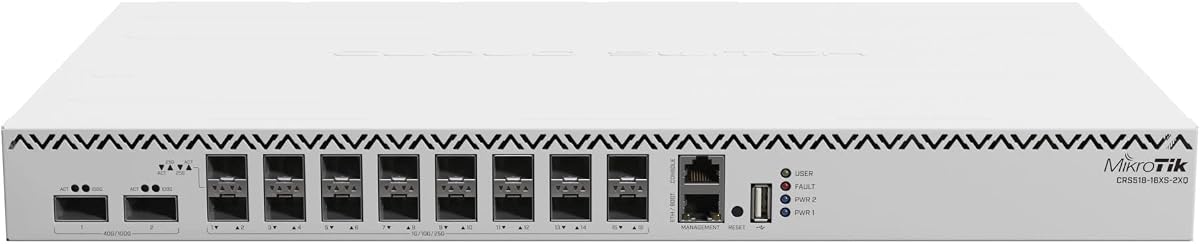
The MikroTik CRS518-16XS-2XQ-RM combines a cloud-router-switch designation with QSFP28 high-speed connectivity. Its 4.5 customer rating indicates generally favorable user reception, while the rack-mountable format makes it relevant to compact labs, branch networks, and enterprise aggregation points.
We may earn a commission when you buy through this link, at no additional cost to you.
The supplied title identifies a 650 MHz processor and 64 MB of device memory. Those are relatively modest resources compared with the processing and memory specifications listed for the MikroTik CRS520 in this guide. Without additional product details, it is not possible to infer exact port counts, supported software features, or the operational impact of those resources from the listing alone.
QSFP28 support makes the switch worth investigating for high-capacity links, but the title does not explicitly identify a set of 25GbE SFP28 access ports. Buyers should therefore verify the full interface layout rather than assuming that all high-speed QSFP28 positions support the same speed and breakout options.
This model is most suitable for buyers comfortable with MikroTik's ecosystem who want a manageable rack-level router or switch with QSFP28 uplink potential. It is a credible recommendation for compact professional networks, but the lack of detailed SFP28 specifications makes the MikroTik CRS520 a safer choice when a large, clearly documented 25G port count is essential.
QSFP28 interfaces can serve as the backbone side of a smaller network, allowing access switches and storage systems to converge on a higher-capacity link. That role can be useful when a single access unit would otherwise limit the topology.
The abbreviated listing does not provide a full port breakdown. Before purchasing for a 25G migration, confirm whether the required SFP28 connections are present, how they are configured, and whether compatible transceiver media is supported.
We may earn a commission when you buy through this link, at no additional cost to you.
The Cisco N9K-C93180YC-EX pairs 48 fixed 10/25 Gbps SFP+ ports with six fixed 100 Gbps QSFP28 ports. Its 3.6 Tbps switching capacity, less-than-one-microsecond latency, and cut-through architecture make it a natural fit for data-center fabrics, high-performance computing, and large-scale virtualization.
We may earn a commission when you buy through this link, at no additional cost to you.
The switch supports VXLAN for network virtualization and Cisco ACI for automation and centralized management. Cisco NX-OS provides the operating environment, while the modular design supports hot-swappable power supplies and fans. These are important characteristics for organizations that prioritize availability and maintenance flexibility in critical infrastructure.
This is a renewed unit, so buyers should review the listing's condition terms, included components, warranty, and return policy. The supplied 5.0 rating is positive, but ratings alone should not replace due diligence when purchasing enterprise hardware. The feature set also assumes administrators who understand ACI, NX-OS, optical transceiver compatibility, and data-center design.
For a demanding virtualization or storage environment, the N9K-C93180YC-EX is one of the strongest options in the guide. It is especially convincing where 48 native 25G-capable ports and 100G uplinks are needed on the same platform and the extra scale of the Nexus architecture is justified.
A 3.6 Tbps switching capacity and six 100G uplinks provide substantial room for server access, storage, and interswitch links. The architecture is suited to deployments where traffic concentration and east-west communication are central to the design.
Hot-swappable power supplies and fans reduce maintenance disruption, while the modular chassis allows future upgrades. These enterprise characteristics can matter more than raw port count in a network where downtime is costly.
We may earn a commission when you buy through this link, at no additional cost to you.
The D-Link DGS-1210-28 is a 28-port smart managed switch built around 24 Gigabit Ethernet access ports and four Gigabit optical SFP ports. Its 4.4 rating and fanless design make it a dependable option for ordinary office, surveillance, and branch networks where quiet operation and traditional Gigabit connectivity are sufficient.
We may earn a commission when you buy through this link, at no additional cost to you.
Layer 2+ features include VLAN support, QoS, port mirroring, link aggregation, spanning tree, IGMP snooping, bandwidth control, and static routing. Security options include ACLs, 802.1X with RADIUS, ARP spoofing prevention, and D-Link Safeguard Engine. Surveillance Mode automatically detects ONVIF-compliant devices and optimizes their video traffic.
The model falls well below the requested performance tier. Its optical ports are Gigabit SFP rather than 25G SFP28, so it cannot natively satisfy a requirement for 25G server connectivity. Its fanless chassis and IEEE 802.3az compliance support energy efficiency, but they do not offset the difference in throughput.
Choose the DGS-1210-28 as a quiet, managed edge switch when 1G connectivity, security, and surveillance support matter more than multi-gig performance. It should not be selected for a 25G migration, although its VLAN, monitoring, and access-control foundation can still be useful in networks that need inexpensive endpoint switching.
The fanless metal-style chassis is suited to offices and sensitive spaces where acoustic noise would be unwelcome. IEEE 802.3az support also helps reduce energy consumption when ports are not fully utilized.
Surveillance Mode recognizes ONVIF-compatible devices and optimizes associated traffic. Combined with IGMP snooping, QoS, VLANs, and monitoring features, it can simplify deployments where many cameras share access infrastructure.
We may earn a commission when you buy through this link, at no additional cost to you.
The right 25G switch depends on more than headline speed. Buyers should match access and uplink ports to their hardware, verify transceiver compatibility, and select a management model that their team can operate reliably.
A switch may look high-speed because it includes a few 100G interfaces, while most of its access ports are much slower. Count the dedicated 25G SFP28 positions separately from 10G, 2.5G, and 100G ports. Cisco N9K-C93180YC-EX and MikroTik CRS520-4XS-16XQ-RM provide large native 25G access footprints, while QNAP, Dell EMC, and UniFi emphasize mixed port layouts.
SFP28 is a physical form factor, but operating speed, breakout behavior, and transceiver support vary among switches. UniFi's four SFP28 ports cannot mix 25G with lower speeds when one is set to 25G. Other models may have different constraints, so check the firmware documentation and confirm whether the required optics are directly supported or need vendor-specific modules.
Switching capacity should comfortably exceed the aggregate traffic the design may carry, especially when many 25G ports feed 100G uplinks. The UniFi model provides 760 Gbps of switching capacity, the Cisco N9K-C93180YC-EX provides 3.6 Tbps, and the TRENDnet TEG-S50284 provides 120 Gbps for a smaller multi-gigabit access design. Compare both ports and fabric performance.
Managed Layer 3 switches offer routing, segmentation, monitoring, and automation, but they also demand configuration expertise. QNAP provides a web GUI with static IPv4 and IPv6 routing, while UniFi centers management in its web application and mobile app. Cisco adds ACI and NX-OS for data-center automation. MikroTik generally appeals to administrators comfortable with its configuration ecosystem.
SFP28 switches ultimately depend on the optical or copper media attached to each port. Existing Cat5e can support the 2.5G access offered by the TRENDnet models, while higher-speed server links may require compatible SFP28 transceivers or suitable DAC cables. Check connector type, reach, power budget, and support for the switch's operating system before building a bill of materials.
A switch with a high-capacity port matrix may still lack the traffic controls a business needs. VLANs, QoS, IGMP snooping, ACLs, link aggregation, spanning tree, and monitoring can matter as much as raw speed. The Dell EMC N3224P-ON supports Layer 3, while the D-Link DGS-1210-28 is a Layer 2+ model and the Cisco platforms emphasize virtualization and automation.
Rack form factor, fan noise, power consumption, and airflow direction all affect deployment. The D-Link DGS-1210-28 is fanless for quiet offices, TRENDnet's rack models include smart fans, and the Cisco N9K-C93180YC-EX uses back-to-front airflow for data-center orientations. High-power models also require adequate rack capacity and cooling.
Enterprise switches are expected to remain in service for years, so replaceable components, warranty coverage, support access, and management continuity deserve attention. Cisco's hot-swappable power supplies and fans support maintenance goals, while lifetime warranty coverage is highlighted for both TRENDnet products and the D-Link model. Renewed hardware requires additional condition and warranty verification.
Begin with a documented port plan that assigns each server, storage node, and uplink to a specific switch interface. Confirm cabling, transceiver type, supported speed, and airflow direction before energizing the equipment. Label both ends of every cable and record the switch configuration so the physical network can be reconstructed during maintenance.
Configure the management address, administrative access, VLANs, routing features, and monitoring functions before connecting critical systems. If using SFP28 ports at 25G, verify how the four or more associated interfaces behave when speed settings differ. For UniFi's Switch Pro Aggregation specifically, all four SFP28 ports must remain at 1G or 10G for mixed-speed operation.
Operate the switch according to its environmental requirements. Maintain airflow around the rack, use the mounting hardware correctly, and avoid blocking fan openings. Keep a record of firmware versions, approved optics, configuration backups, and any cloud-service subscription requirements, and schedule component inspection for switches with replaceable power supplies or fans.
SFP28 is designed for 25 Gigabit Ethernet and can also support lower speeds in some configurations, while SFP+ is commonly associated with 10 Gigabit Ethernet. A switch may include both types, so a listing that mentions SFP+ does not necessarily provide native 25G connectivity. Buyers should inspect the individual port specifications.
Not always. A 25GbE switch can work well with 10G or 25G uplinks when the traffic pattern and growth path do not demand more. However, multiple 25G access links can saturate a single 10G uplink, so 100G interfaces provide useful aggregation capacity in larger data centers.
It depends on the switch's copper ports and the network standard. The guide's TRENDnet models offer 2.5G over Cat5e, but that is not the same as 25G. Native 25G connectivity may require compatible SFP28 modules and appropriate fiber or copper media, so cabling should be checked against the exact port specification.
The supplied product information does not indicate that transceivers are generally included. Switch listings commonly show the chassis and port configuration only. Buyers should budget separately for compatible optics or cables and confirm vendor support before installation.
At minimum, look for VLAN support, reliable monitoring, and the routing or automation level required by the network. Enterprise options add features such as VXLAN, ACI, static IPv4 and IPv6 routing, QoS, and remote application control. The best choice is usually the platform the administering team can configure and maintain confidently.
They can be practical when the hardware meets current requirements and the condition, warranty, and support terms are acceptable. The Cisco Nexus N9K-C92160YC-X and N9K-C93180YC-EX are listed as renewed products. Inspect the return policy, included accessories, operational status, and coverage before deploying either unit.
A small office usually needs multi-gigabit access more than a dense 25G fabric. The TRENDnet TEG-S50284 or TEG-3284WS may provide more relevant 2.5G access ports and manageable web-based controls. Networks that truly require native 25G server links should focus on the QNAP, Cisco, MikroTik, UniFi, and Dell EMC models.
That depends on the model and configuration. The MikroTik and Cisco data-center switches present large dedicated high-speed port arrays, while UniFi specifically restricts mixed-speed operation when one SFP28 port is set to 25G. Check the complete port behavior and planned aggregate bandwidth before deploying multiple 25G links.
The Cisco N9K-C93180YC-EX stands out for its 48 high-speed SFP+ ports, six 100G QSFP28 uplinks, strong switching capacity, and data-center automation features. The MikroTik CRS520-4XS-16XQ-RM offers exceptional 25G density and processing resources, while the UniFi Switch Pro Aggregation provides a more approachable managed path with a combination of 10G and 25G connectivity.
For buyers with lighter requirements, the QNAP QSW-M7230-2X4F24T-US provides a versatile mixture of 10G copper access, 25G fiber, and 100G uplinks. The Dell EMC N3224P-ON adds PoE++ to that formula. TRENDnet and D-Link models are valuable for multi-gigabit or Gigabit edge access, but they should not be mistaken for native 25GbE SFP28 solutions.
Before purchasing, verify current specifications, transceiver compatibility, management requirements, physical requirements, warranty terms, and current prices. Product availability and pricing can change, and a carefully matched configuration is more valuable than choosing solely on the largest advertised port count.