
UGREEN HDMI Switch
4.3Editor score
4K at 60Hz
Remote and manual switching
Five active-source indicators
Our 5 Port HDMI Switch guide compares ten models for 4K performance, switching options, gaming features, compatibility, and easier entertainment setup.
A 5 port HDMI switch gives you one convenient way to connect multiple consoles, streaming devices, laptops, and media players to a single display. The right model should make source changes effortless while preserving the resolution, refresh rate, HDR support, and audio features that your entertainment equipment requires.
We compared ten switches based on their stated HDMI specifications, supported resolutions, control methods, bandwidth, construction, compatibility, included accessories, and practical limitations. The list covers options for 4K television use, multi-console gaming, compact media centers, and setups that need support for newer high-refresh-rate standards.
Each recommendation highlights a different reason to consider it, from dependable everyday switching to advanced 8K and 4K gaming performance. Product ratings and feature details reflect the supplied information, while availability and pricing can change, so confirm the current specifications and package contents before ordering.
4.3Editor score

4.7Editor score

4.6Editor score
The table below places the ten switches side by side, emphasizing maximum stated resolution, supported HDMI generation, switching methods, and the capabilities most likely to affect console, home theater, and high-refresh-rate display setups.


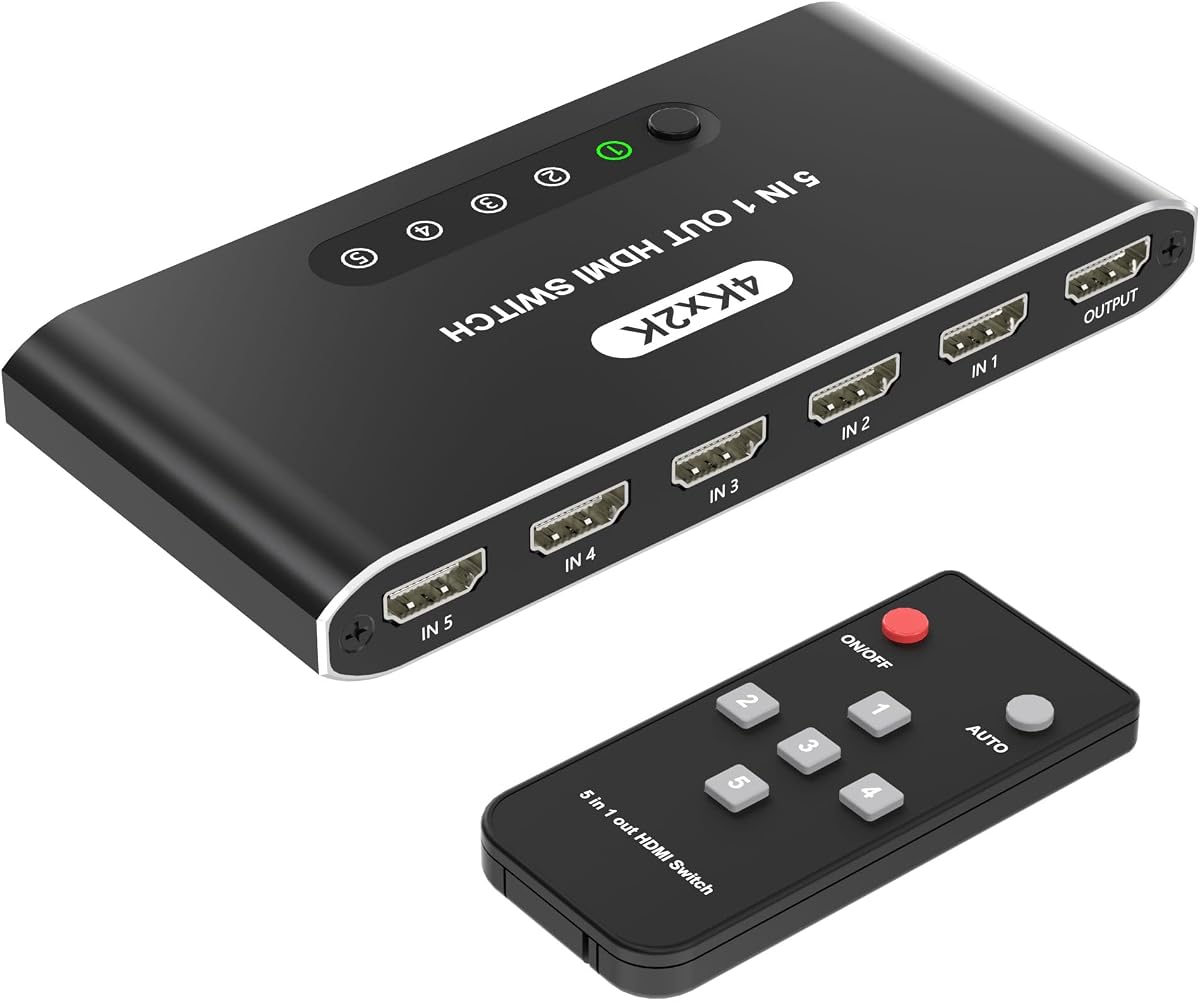

The UGREEN HDMI Switch has a 4.3 rating and stands out as a well-balanced five-input solution for 4K televisions, projectors, and gaming displays. It combines a compact remote, manual button control, five LED indicators, and support for 4K at 60Hz. That combination makes it practical for anyone who regularly moves between consoles, streaming boxes, Blu-ray players, and computers.
We may earn a commission when you buy through this link, at no additional cost to you.
Its stated 18Gbps bandwidth covers HDMI 2.0 and HDMI 1.4, with backward compatibility for 4K at 30Hz, 2560 by 1440 at 120Hz, and 1920 by 1080 at 240Hz. Gaming-oriented features include VRR, HDR, 3D, and support for HDCP 2.2 and 1.4. All five HDMI ports support HDR, 3D, and CEC, which is useful when the connected equipment depends on those features.
The principal compromise is that automatic switching is not supported. You must use the included remote or the button on the unit, although the remote reportedly works from up to 33 feet away. The package includes the switch, remote, USB power cable, and manual, but it does not include a power adapter, batteries, or HDMI cables. To reach 4K at 60Hz, connected input and output cables should each remain within nine feet.
This is a strong recommendation for a balanced media-center setup, especially if you want useful gaming features without moving to an advanced 8K model. Manual source selection may even be preferable in an esports or presentation environment where accidental changes are unwelcome. Verify that you already have suitable power and HDMI connections, then choose it for its clear feature-to-cost balance.
The remote can change sources from across the room, while the manual button and five LEDs make it easy to confirm which input is active. This combination is straightforward when several devices may be active at once.
VRR, HDR, 3D, and high refresh-rate compatibility make the switch relevant to modern console and PC gaming. Its 18Gbps bandwidth is appropriate for 4K at 60Hz when cable lengths stay within the stated limits.
We may earn a commission when you buy through this link, at no additional cost to you.
The Acer 5 in 1 Out HDMI Switch carries a 4.1 rating and offers a straightforward way to consolidate game consoles, streaming devices, Blu-ray players, and presentation sources. Its five-input layout, included remote, physical controls, and five active-port LEDs make it particularly approachable for both home entertainment and office conference rooms.
We may earn a commission when you buy through this link, at no additional cost to you.
The switch supports 4K at 60Hz through HDMI 2.0 or HDMI 1.4 and includes HDCP 2.3 support. Its listed 18Gbps bandwidth allows lossless transmission, while HDR, 3D, and multi-channel Dolby Atmos and DTS audio are among the compatible features. The total combined length of connected HDMI cables should remain at or below 10 feet to achieve 4K at 60Hz.
Its stated automatic-switching limitation is important. Despite being useful in many multi-device environments, it cannot automatically detect a newly active source, so switching is handled by the remote or on-device buttons. The package contains the switch, remote, USB-A to USB-C power cable, user manual, and quick guide. A power adapter, remote battery, and HDMI cables are not included, and the switch must remain connected to power for full performance.
The Acer model is a good fit for a household with a mixed collection of consoles, media players, and streaming hardware, as well as offices that need quick access to laptop and video sources. It lacks the newest 8K capabilities and automatic source detection, but it delivers the core 4K features in a clear, practical package.
The same five inputs can serve a game console, laptop, Blu-ray player, and streaming stick at home, or support integrated video sources in a conference room. Physical controls add a convenient fallback when a remote is not within reach.
Gold-plated ports, an advanced-looking housing, and bottom heat-dissipation vents support consistent operation. Keeping the power supply connected is especially important because full performance is not intended for completely unpowered use.
We may earn a commission when you buy through this link, at no additional cost to you.
The HDMI 2.1 Switch 5 in 1 Out has a 4.3 rating and targets demanding gaming and home theater configurations. Its headline capabilities include 8K at 60Hz, 4K at 120Hz, 2K at 240Hz, and 48Gbps of bandwidth. These figures make it one of the most technically advanced options in the group for users with compatible source devices, displays, and cables.
We may earn a commission when you buy through this link, at no additional cost to you.
The switch supports VRR, ALLM, QFT, and HDCP 2.3, while its zero-compression approach is designed to avoid data loss. HDR10+ and Dolby Vision support are listed for compatible content, and the device can feed 8K televisions, projectors, VR headsets, and capture cards. Its dual operating approach includes IR remote control and automatic switching, while a manual lock helps prevent accidental changes during esports or presentations.
The remote offers an unusually long stated range of about 26 feet, with a separate description of an 8-meter operating range. HDMI 2.1 cables are required for the advertised 8K performance, which means an existing cable collection may need an upgrade. The package is otherwise generous, including the switch, remote, power adapter, USB cable, instruction manual, and an anti-slip mat. Two AAA batteries for the remote must be purchased separately.
Choose this model when your display, console, graphics card, and cables are prepared for next-generation HDMI. It offers more flexibility than the basic 4K models through automatic detection, manual locking, 8K support, and gaming-focused features. It is less relevant for a conventional television setup that never exceeds 4K at 60Hz, where a simpler switch may meet the same needs.
Eight 60Hz output, 4K 120Hz, and 2K 240Hz support provide room for high-end televisions, gaming monitors, and demanding PC configurations. The full 48Gbps figure reflects a modern, high-bandwidth design.
Automatic source detection reduces effort when starting a console or media player. For gaming, meetings, or presentations, switching to manual mode helps keep the display on the intended source.
We may earn a commission when you buy through this link, at no additional cost to you.
The Kinivo 550BN has a 4.4 rating and provides a balanced combination of 4K performance, broad device compatibility, and flexible switching. Its five-input design is intended for reducing cable clutter around televisions, projectors, and monitors while retaining convenient access to consoles, streaming devices, disc players, computers, and set-top boxes.
We may earn a commission when you buy through this link, at no additional cost to you.
The stated 4K at 60Hz capability is supported through 18Gbps bandwidth, HDCP 2.2, and zero-compression signal transmission. The feature list includes HDR10, Dolby Vision, Dolby Atmos, VRR, and ALLM, with backward compatibility for 2K at 120Hz. An aluminum alloy shell and 24K gold-plated connectors are intended to support heat dissipation, durable connections, and consistent signal performance.
Kinivo offers three switching methods: IR remote, manual button, and automatic switching. The important qualification is that automatic operation is not compatible with every source. Apple TV, Xbox One, PS5, PS4, and Roku are specifically identified as examples that may not support it. That means a buyer who values precise control should not choose this model solely for automatic detection without checking source-device behavior.
This switch is well suited to a mixed home entertainment system where 4K, HDR, audio, and gaming support matter but 8K is unnecessary. Its extensive device list, including current and older consoles plus portable and streaming hardware, also makes it a practical consolidation hub. The two-year warranty and lifetime United States-based customer support add confidence for long-term use.
Use the IR remote from across the room, select the physical switch when needed, or allow automatic detection when a compatible source becomes active. This variety is useful for households with different switching habits.
Support for HDR10, Dolby Vision, Dolby Atmos, VRR, and ALLM gives the switch relevance beyond simple 4K video. The 18Gbps bandwidth aligns it with HDMI 2.0-class performance.
We may earn a commission when you buy through this link, at no additional cost to you.
The UGREEN 8K HDMI Switch has a 4.2 rating and offers a middle ground between standard 4K models and more advanced 48Gbps devices. It supports 8K at 60Hz, 4K at 60Hz, and 1080p at 240Hz and below through 40Gbps of data transmission. That makes it relevant for early 8K displays, high-end PCs, and compatible modern consoles.
We may earn a commission when you buy through this link, at no additional cost to you.
Video features include HDR10+, Dynamic HDR, 3D, Dolby Atmos, and HDCP 2.3. VRR is also supported for compatible gaming scenarios, helping the switch address smoother motion and a more responsive presentation. Its five LED indicators identify the active source, while a remote with a stated 33-foot range and a one-click button on the box simplify routine changes.
The most important limitations concern both operation and installation. Automatic switching is not supported, so source changes are deliberate. To obtain 8K at 60Hz, the input cable should be no longer than 3.3 feet and the output cable no longer than 6.6 feet. ARC pass-through is also unsupported. The package includes the switch, remote, power adapter, and manual, reducing the setup burden compared with models that require a separate power supply.
This is a compelling choice for someone who wants 8K readiness and gaming features without moving to the highest-bandwidth model. It suits a carefully planned entertainment center where cables can remain short. For a standard 4K television or a room where long cable runs are unavoidable, one of the 18Gbps alternatives may be more practical.
Forty gigabits per second is enough for 8K at 60Hz according to the supplied specifications, while retaining useful gaming support such as VRR. This gives buyers a path toward newer displays without moving directly to the most advanced bandwidth class.
The aluminum housing supports heat dissipation, and the included power adapter simplifies installation. The remote and front-button option make it easy to change sources even when the switch is placed inside a cabinet.
We may earn a commission when you buy through this link, at no additional cost to you.
The OREI 8K HDMI Switch has a 4.6 rating and is the strongest premium recommendation for a high-performance gaming setup. It supports up to 48Gbps FRL bandwidth, 8K at 60Hz, and 4K at 120Hz, including 4K 120Hz 4:4:4 12-bit and 8K 60Hz 4:2:0 12-bit output. Those are meaningful advantages for users with high-end displays and carefully selected source hardware.
We may earn a commission when you buy through this link, at no additional cost to you.
Its most distinctive capability is 4K at 240Hz through Display Stream Compression. This is not automatic compatibility, however; the source, graphics processor, display, driver, cables, and DSC or EDID support all need to align. The model also supports VRR, ALLM, QMS, QFT, and SBTM. For conventional 4K or 8K setups, it is designed for consoles, gaming PCs, high-refresh monitors, and next-generation displays.
Video and audio support is extensive. HDR10+, Dolby Vision, HLG, Dolby Atmos, Dolby TrueHD, DTS:X, and LPCM are listed among compatible formats. Sources can be changed with the included IR remote, front-panel controls, or automatic switching, giving buyers flexibility according to their setup. The 4.6 rating also makes it one of the strongest-rated products in this comparison.
This switch is best justified by a system built around high bandwidth rather than a basic television arrangement. It is particularly appropriate for competitive PC gaming, 4K 120Hz or 240Hz monitors, and consoles feeding a television that supports advanced HDMI 2.1 features. If your equipment is limited to 4K at 60Hz, many of its headline benefits will remain dormant.
The switch extends beyond 4K at 120Hz with DSC-based 4K at 240Hz support. That capability can benefit fast competitive games, but only when every component in the signal chain supports the intended format.
VRR, ALLM, QMS, QFT, and SBTM cover several gaming and display-control features. HDR and advanced audio pass-through options make the switch useful for a mixed gaming and home theater installation.
We may earn a commission when you buy through this link, at no additional cost to you.
The 4K HDMI Switch 5 in 1 Out has a 4.1 rating and serves as a basic way to combine up to five HDMI sources with one television, monitor, or projector. It is most appropriate for older game systems, Blu-ray players, standard streaming equipment, and displays that operate at 4K at 30Hz rather than more demanding refresh rates.
We may earn a commission when you buy through this link, at no additional cost to you.
Its headline specifications include 4K at 30Hz, 1080p, 720p, HDR, HDCP, 3D, and HDMI 1.4 support. Input cable length is listed at up to 16.4 feet, while output cable length can reach 82 feet, giving the product unusual placement flexibility for a selector box. The metal construction is intended to dissipate heat and support reliable signal transfer.
The switch offers automatic, manual, and IR remote switching. That flexibility is useful for casual setups where the user wants the display to follow an active source. The main limitation is technical rather than operational: 4K at 30Hz is well below the 4K at 60Hz standard supported by many current consoles, televisions, and computers. HDR support also does not by itself indicate support for the newest gaming features.
Choose this model for a secondary television, an older home theater system, or a setup where 4K at 30Hz is sufficient and automatic source selection is valuable. It is not the best match for a modern 4K 60Hz gaming room. Its straightforward operation, durable-looking housing, and long permitted cable runs may still make it useful as a secondary hub.
The stated maximum input and output cable lengths are unusually generous. This can help when the switch sits far from the display or when the source equipment is located around a room.
Automatic, manual, and remote methods cover different habits. The device also operates without software, reducing setup to connecting sources, power, and the display.
We may earn a commission when you buy through this link, at no additional cost to you.
The 5 in 1 HDMI Switch with Remote has a 4.6 rating and focuses on straightforward operation for everyday entertainment setups. It connects five sources to one display, automatically detects the active device, and includes a remote with a battery. That combination makes it a convenient option for users who do not want to press a button whenever they start a console or streaming service.
We may earn a commission when you buy through this link, at no additional cost to you.
Video support reaches 4K at 30Hz, 1080p at 60Hz, 3D, HD content, and HDCP 2.2. The product information describes the switch as offering zero-lag 4K Ultra HD output, although the more concrete resolution figures should guide compatibility planning. It is compatible with PS5, Xbox Series X/S, Fire TV, Apple TV, Roku, laptops, PCs, and most smart televisions, making it relevant to a broad range of mixed-source systems.
Setup requires no drivers or special software. A USB power cable is included, so there is no separate power adapter to locate, and the source and display can be connected in a straightforward sequence. LED indicators reveal the active input. The stated input and output cable length can reach up to 16 feet using AWG26 standard HDMI cable, which should be enough for many entertainment cabinets.
This model is a good recommendation when convenience and automatic operation matter more than 4K at 60Hz. Its 4.6 rating, bundled remote battery, and USB-powered design make it particularly attractive for a secondary room, a family television, or a setup with several frequently used devices. Gamers with 4K 60Hz or high-refresh displays should choose a higher-bandwidth model instead.
The switch detects the active source and changes inputs automatically, removing the need to use the remote every time a console is switched on. LED indicators still provide a clear visual confirmation of the selected port.
The included USB power cable avoids a bulky adapter, and the no-driver design keeps setup uncomplicated. It is a practical option when every component must fit neatly behind a television or inside a media cabinet.
We may earn a commission when you buy through this link, at no additional cost to you.
The HBAVLINK 5 Port HDMI Switcher has a 4.7 rating, the highest among the ten products listed. It combines 4K at 60Hz, 18Gbps HDMI 2.0-class bandwidth, automatic source detection, manual controls, a remote, and a memory function. The result is a particularly complete feature set for a 4K-focused home entertainment hub.
We may earn a commission when you buy through this link, at no additional cost to you.
Video formats include HDR10, 3D vision, and Dolby Vision, while Dolby Atmos support covers compatible audio. Backward compatibility extends to 4K at 30Hz and 1080p at 120Hz. The five inputs can accommodate current and older PlayStation systems, Xbox consoles, Nintendo Switch, Fire TV, Apple TV, Roku, Chromecast, Blu-ray players, and other HDMI-enabled equipment. CEC support is another useful addition for compatible television and source-device control.
Automatic switching reduces repetitive button presses, while the memory function restores the last selected source after a power cycle. The remote and manual button offer alternatives when automatic detection is not desired. A stated change time of two to three seconds should be considered when a viewer wants instantaneous input changes, particularly in competitive gaming. The remote requires two AAA batteries that are not included.
The compact aluminum housing measures 5.4 by 2.5 by 0.8 inches, making it easy to position in a crowded entertainment center. A power adapter and manual are included, and the product carries a 12-month warranty with lifetime technical support. This is a strong all-around recommendation for 4K 60Hz users who value automatic operation and thoughtful convenience features without needing 8K bandwidth.
Automatic detection handles everyday source changes, while manual controls and the remote remain available when deliberate selection is preferable. Remembering the last input makes recurring routines less disruptive after power is restored.
HDR10, Dolby Vision, Dolby Atmos, 3D, and 18Gbps bandwidth provide a strong feature set for modern televisions and consoles. The switch remains grounded in the widely useful 4K at 60Hz format.
We may earn a commission when you buy through this link, at no additional cost to you.
The BlueRigger 4K HDMI Switch has a 4.4 rating and delivers a clear five-input, one-output design for home theaters, gaming rooms, offices, and presentations. It supports 4K at 60Hz and 2K at 120Hz through 18Gbps of high-speed transmission. That makes it a practical match for many modern 4K televisions and displays without the complexity of an 8K-focused model.
We may earn a commission when you buy through this link, at no additional cost to you.
The feature set includes HDR10+, HDCP 2.3, and 3D. Manual switching and an included IR remote provide two ways to control the active source, which can be preferable in gaming, work, and presentation environments where a stable source is important. Its stated advanced chipset, nickel-plated connectors, and smooth, lossless transmission are designed around stable audio and video handling.
Compatibility spans HDTVs, PS5, PS4, PS3, Xbox systems, projectors, Fire TV, Apple TV, set-top boxes, DVD and Blu-ray players, Roku, and other HDMI-equipped devices. The included power adapter should remain connected for optimal performance. Unlike several competitors, automatic source switching is not listed as a feature, so buyers should not expect the switch to follow a newly active console on its own.
BlueRigger is a sensible choice for an entertainment system that needs five sources, dependable 4K at 60Hz support, and simple remote or manual operation. The two-year warranty and lifetime United States-based customer support strengthen the package. It is less suitable for buyers seeking automatic detection or very high refresh rates, but it covers the common requirements of a multi-device home setup.
Eighteen gigabits per second, 4K at 60Hz, and 2K at 120Hz support cover common modern display formats. HDR10+, HDCP 2.3, and 3D add useful compatibility for a mixed media library.
The remote makes it easy to change devices from a seat, while manual switching keeps full control. This is a sound approach for gaming sessions and presentations where accidental input changes could be disruptive.
We may earn a commission when you buy through this link, at no additional cost to you.
The right 5 Port HDMI Switch depends on your display, source devices, cable arrangement, and preferred control method. Start with the maximum format you actually use, then consider switching behavior, gaming features, power requirements, and what is included in the box.
A switch is only as capable as the weakest part of the signal chain, including the source, cables, switch, and display. For most modern televisions and consoles, 4K at 60Hz is the practical baseline. Gaming monitors and high-end TVs may justify 4K at 120Hz, 4K at 240Hz with DSC, or 8K at 60Hz, but each increase raises bandwidth, cable, and equipment requirements.
The listed bandwidth gives a quick indication of the switch's capability. The 18Gbps models support 4K at 60Hz, while the 40Gbps UGREEN and 48Gbps models extend into 8K. Also check for VRR, ALLM, HDR formats, HDCP versions, Dolby Vision, Dolby Atmos, and CEC if your source equipment and display use those features.
Remote-controlled switching is the most predictable method, while manual buttons work without line of sight. Automatic switching can make a system feel effortless, but it may not work with every streaming device or console. Some products also provide a manual lock, which is valuable for esports, meetings, and presentations where an unexpected input change would be disruptive.
Cable limits become more important at high resolutions and refresh rates. For 4K at 60Hz, products recommend keeping input and output runs within roughly 3 meters. The UGREEN 8K model recommends an input under 1 meter and output under 2 meters, while the OREI's most advanced modes depend on the complete cable and DSC chain. Longer runs can still be possible at lower resolutions, depending on the model.
Some switches run from a USB cable, while others include a wall adapter or expect one to be purchased separately. Several remotes also arrive without batteries. The UGREEN 4K model includes a USB power cable but no adapter, the Acer likewise requires an available power supply, and the HBAVLINK includes an adapter but not its two AAA remote batteries. Check the package list to avoid an incomplete setup.
VRR can reduce perceived tearing and stutter when the game, console, display, and switch all support it. ALLM can help a compatible television switch into an appropriate low-latency mode, while QFT and other advanced features may matter on high-end systems. Audio considerations include Dolby Atmos, Dolby TrueHD, DTS:X, and LPCM, especially if a home theater system handles surround-sound decoding.
A metal or aluminum housing can help dissipate heat, while a compact enclosure is easier to conceal behind a television. HBAVLINK lists a particularly compact 5.4 by 2.5 by 0.8-inch body, while OREI and UGREEN emphasize premium materials. Active ventilation is not stated for most models, so adequate placement around the switch remains important.
Most models list common consoles, streaming devices, Blu-ray players, computers, projectors, and televisions as compatible, but automatic switching has device-specific limitations. Warranty terms also vary, from a 12-month period to two years, with some brands including lifetime technical support. A longer warranty can add reassurance, but correct source support remains the more important criterion.
Begin by identifying which device will be connected to each of the five numbered HDMI inputs. Connect the chosen source and the display using suitable HDMI cables, then attach the supplied power cable or adapter. The switch should be placed on a stable surface with its ventilation openings unobstructed, especially if it is housed inside a cabinet.
After power is connected, turn on the display and the desired source device. Use the included remote, front-panel button, or automatic detection as appropriate, then confirm the selected port using the LED indicators. If a high-resolution mode does not appear, power the source down before changing cables or settings, reconnect the switch, and verify that the display, source, and cables support the intended format.
For long-term care, keep the switch away from moisture, direct heat, and cramped piles of cables. Do not repeatedly unplug HDMI cables while the system is active, and avoid using damaged cables or a power supply that does not meet the device's requirements. Clean the enclosure with a dry or lightly damp cloth, and periodically verify that the connectors remain secure.
A 5 Port HDMI Switch combines five source devices and lets you select one of them for a single display. A 5-output splitter normally mirrors one source across multiple displays. The products in this guide are selector switches designed for one output, not one-to-five splitters.
It depends on the resolution and refresh rate you want to use. Basic 4K at 60Hz and 1080p use can often be handled with suitable HDMI 2.0-class cables, while 8K at 60Hz and some 4K high-refresh modes require compatible HDMI 2.1 cables. Check the cable-length limits and the specifications of the source, switch, and display together.
Automatic switching is not available on every model, and some devices do not send the signal needed to trigger it. Apple TV, Xbox One, PS5, PS4, and Roku are specifically mentioned as potential limitations for at least one product. Manual or remote switching remains available even when automatic detection is inactive.
You can connect the switch output to an HDMI-equipped soundbar or receiver when that device is designed to accept the source and pass the intended video and audio to the display. Check the receiver's HDMI switching and resolution limits, and note that several models do not support ARC or eARC pass-through.
A properly matched switch is designed to transmit the signal without adding meaningful delay, but features such as ALLM and TV picture processing can influence the final display behavior. For low-latency gaming, use the display's game mode, keep the source and cable chain within specifications, and confirm that the selected format is supported by every device.
That varies by product. The UGREEN 4K model, Acer switch, and HBAVLINK include power hardware but not every required accessory, while the 8K HDMI 2.1 model requires two AAA batteries that are not included. Several packages also omit HDMI cables. Review the supplied package contents carefully before completing your setup.
For most current consoles, 4K at 60Hz is the most practical target and is supported by several 18Gbps models. A compatible gaming PC and high-refresh television may justify 4K at 120Hz, while 8K at 60Hz is mainly relevant to premium 8K displays. Match the switch to the display rather than selecting a higher number than your equipment can use.
Keep the high-speed connections as short as the manufacturer recommends. The UGREEN 8K model specifies an input under 1 meter and output under 2 meters, and other advanced models may impose similar limitations. Use quality cables rated for the intended bandwidth, avoid tight bends, and connect the switch to power for stable operation.
The UGREEN HDMI Switch is the strongest balanced recommendation for buyers focused on 4K at 60Hz and useful gaming features. The HBAVLINK stands out for automatic switching, source memory, and the highest listed rating, while the OREI is the premier option for high-refresh gaming, 48Gbps bandwidth, and advanced HDMI 2.1 features.
Prioritize the format and features you genuinely need, not simply the largest resolution number. A 4K at 60Hz model is often the most versatile for a normal television, while high-refresh and 8K modes demand compatible displays, graphics hardware, source devices, and carefully managed cable lengths. Automatic switching can improve convenience, but dependable manual control may be more valuable in gaming and presentation spaces.
Before ordering, check the current package contents, power requirements, remote battery situation, and HDMI cable length guidance. Product specifications, package configurations, ratings, and availability can change over time, so compare the current listing with the needs of your particular source devices and display before making a final decision.