
Computer PC Power Supply Tester ATX Testing Kit
4.8Editor score
Highest listed customer rating
Readable LCD voltage and PG values
Automatic buzzer fault indication
Durable thick plastic enclosure
Compare ten ATX Computer Power Supply Testers covering LCD voltage displays, buzzer alarms, connector support, portability and features for PC power supplies.
An ATX computer power supply tester provides a convenient way to inspect a PSU before it is installed or trusted with valuable components. The best units translate voltage and power-good readings into an easy-to-read LCD, add audible warnings, and support the connector mix found in older and modern desktop systems.
This guide compares ten testers based on the information supplied for each product, including ATX-family compatibility, display functions, alarm behavior, connector coverage, construction, portability, and diagnostic detail. It covers models for 20-pin and 24-pin systems as well as tools that also support SATA, IDE, PCI-E, EPS, and legacy drive connectors.
Each review explains what the tester is designed to reveal, where it offers the strongest practical value, and where its features should be interpreted carefully. Ratings and availability can change over time, and product prices fluctuate, so compare the current listing, specifications, connector layout, and customer feedback before purchasing.
4.8Editor score

4.6Editor score

4.4Editor score
The table below gives a quick view of all ten options, emphasizing their display, alarm, compatibility, and connector characteristics. Use it to narrow the field, then read the detailed reviews for practical limitations and recommended use cases.

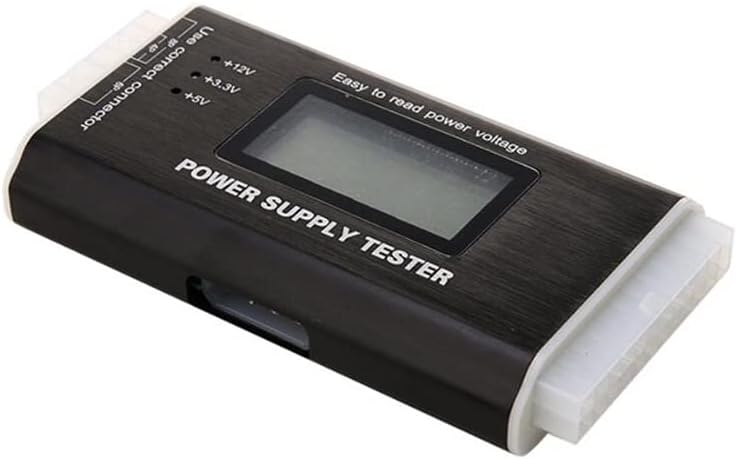


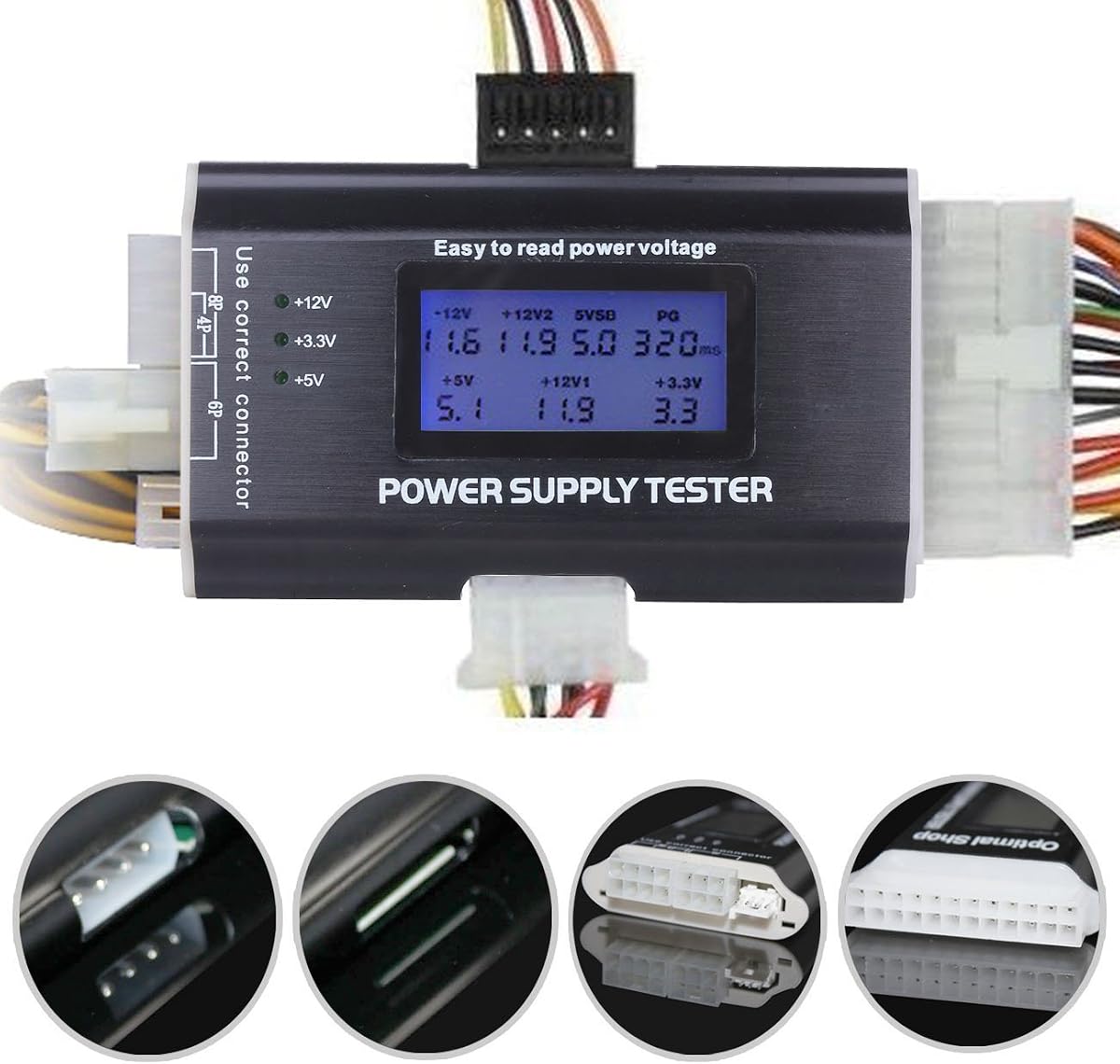
The Computer PC Power Supply Tester is a compact, broad-coverage diagnostic device for desktop power supplies, carrying a listed rating of 4.5. Its defining feature is the combination of a 1.8-inch LCD with individual LEDs for smaller peripheral connectors, allowing a technician to inspect the main rails and secondary outputs without relying on a separate display.
We may earn a commission when you buy through this link, at no additional cost to you.
The supplied specification lists support for 20-pin ATX, 24-pin ATX, HDD IDE, four-pin floppy, six-pin PCI-E, four-pin, eight-pin EPS, and SATA connectors. The LCD displays +3.3V, +12V1, +5V, -12V, 5VSB, and PG through the main ATX connection, while PCI-E six-pin, four-pin, and EPS eight-pin results are represented as +12V2.
One important limitation is that the 8-pin connector is specified as EPS and does not fit PCI-E 8-pin. The display also consolidates some output information rather than presenting every rail independently, so the labeling should be checked before use. Even so, the alarm, readable screen, and wide connector selection make this a practical option for general PC repair work.
This tester is best for builders and repair technicians who need a portable tool for both modern SATA-equipped PSUs and older systems with legacy drive connectors. It is especially useful when a PSU starts but produces unstable or incomplete outputs. Buyers should verify connector shape carefully, particularly if their equipment uses a PCI-E 8-pin cable.
The broad connector set allows one device to handle 20-pin, 24-pin, SATA, IDE, floppy, PCI-E six-pin, four-pin, and EPS eight-pin testing. That flexibility is particularly useful when working across generations of desktop hardware.
The LCD makes the primary voltage and PG information easy to inspect, while the buzzer provides an audible cue when readings fall outside the normal range. LEDs extend the feedback to IDE, floppy, and SATA outputs.
We may earn a commission when you buy through this link, at no additional cost to you.
The 20/24 Pin LCD Computer PC Power Supply Tester is a focused diagnostic tool with a listed rating of 4.4. It connects to the main ATX connector and displays voltage and PG information for +3.3V, +5V, +12V, -12V, and 5VSB, making it a useful first step when checking whether a suspected power supply is producing acceptable outputs.
We may earn a commission when you buy through this link, at no additional cost to you.
The display and buzzer work together: when a parameter leaves the normal range, the corresponding value flashes and an audible warning sounds. The product supports 20-pin and 24-pin ATX interfaces along with SATA, four-pin, eight-pin, PCI-E six-pin, floppy, and IDE connections, covering many common PSU configurations.
Peripheral connector measurements are conveyed through LEDs rather than separate LCD values. That distinction matters when comparing this model with more elaborate displays: only the 20-pin or 24-pin connection supplies the detailed voltage information shown on the screen.
The tester is a good fit for general users who want a straightforward way to check a PSU without learning a full multimeter workflow. Repair professionals will also appreciate the automatic warning behavior, provided they confirm the displayed values against the appropriate limits for the power supply being tested.
A flashing parameter and buzzer make abnormal output difficult to overlook. This is useful when a technician needs both visual and audible confirmation while working around an open chassis.
The LCD reports several common voltage groups and the PG signal from the primary ATX connection. It therefore serves as a quick visual overview before deciding whether more detailed investigation is needed.
We may earn a commission when you buy through this link, at no additional cost to you.
The Kingwin Digital Power Supply Tester is our Editor's Choice for its balanced combination of diagnostic detail, compatibility, and ease of use. Its listed rating of 4.6 is among the strongest in this guide, and the product is designed to test ATX, ITX, IDE, HDD, SATA, and BTX power supplies through a straightforward digital interface.
We may earn a commission when you buy through this link, at no additional cost to you.
A clear LCD provides real-time voltage information, including common positive rails such as +12V, +5V, and +3.3V. The plug-and-play format avoids the need for advanced technical knowledge, while the stated protective features are intended to help guard against short circuits and overvoltage during testing.
The listing also emphasizes quick diagnostic results, a lightweight and compact design, and durable aluminum construction. These characteristics make the tester suitable for system builders, repair technicians, and PC enthusiasts who want a portable instrument that can move between a workbench and a customer or home system.
Although the product description repeats one quick-diagnostic benefit, the core feature set remains well rounded. It is an especially attractive choice for users who prioritize readable voltage data and broad desktop-PSU compatibility over testing every individual peripheral output simultaneously.
The digital display presents live voltage levels in a form that can be checked quickly. This reduces the need to interpret several separate meter leads when performing a routine PSU inspection.
Support for ATX, ITX, BTX, IDE, HDD, and SATA expands the tool's usefulness across older and current desktop platforms. The stated compact aluminum construction also supports convenient storage and transport.
We may earn a commission when you buy through this link, at no additional cost to you.
This Computer PC Power Supply Tester is a portable inspection tool with a listed rating of 4.4. Its intelligent LCD displays key values such as +12V, -12V, +5V, -5V, +3.3V, SB, and PG, giving users a more complete visual summary than a basic pass-and-fail indicator.
We may earn a commission when you buy through this link, at no additional cost to you.
The stated measurement precision is 0.01V, which is useful for checking whether outputs remain close to their expected values. A built-in monitoring system triggers a buzzer and flashes the abnormal parameter when a voltage moves outside the normal range, helping users identify the rail that deserves closer attention.
Connector support includes 20-pin and 24-pin ATX, SATA, four-pin, eight-pin, PCI-E six-pin, floppy, and other common power interfaces. The product is designed to be intuitive and lightweight, making it suitable for routine maintenance as well as troubleshooting a desktop that does not power on normally.
The primary caution is that the tester is a diagnostic aid rather than a substitute for understanding PSU standards. Different platforms can have different expectations, and some peripheral outputs are represented by LEDs rather than detailed LCD values. For users who value precise parameter visibility, it remains a capable and approachable option.
The stated 0.01-volt resolution is the key technical attraction. It allows a user to compare the displayed rail readings closely instead of relying entirely on a simple good-or-bad light.
Flashing the questionable parameter helps direct attention to a particular output. The simultaneous buzzer is convenient in a workshop where the display may be partly obscured.
We may earn a commission when you buy through this link, at no additional cost to you.
The ATX Power Supply Tester is a compact model created for users who want more convenience than a multimeter without giving up digital voltage information. It has a listed rating of 4.3 and supports ATX, BTX, ITX, and TFX power supplies, with a clear LCD and automatic buzzer included.
We may earn a commission when you buy through this link, at no additional cost to you.
When connected through the 20-pin or 24-pin ATX plug, the screen displays the available voltage groups and PG information. The supplied description states a measurement accuracy of +/-0.01V and uses that display to help determine whether a PSU's output is stable.
The tester can also measure P4, P6, P8, SATA, and IDE outputs. These results appear as external indicator lights rather than separate LCD values, so the display and the peripheral test area should be interpreted as two complementary parts of the diagnostic interface.
Its mini and practical design makes it a sensible addition to a home repair kit or technician's tool bag. It is less suited to users expecting every connector's voltage to appear numerically on one screen, but it remains a practical ATX-focused option for quick output and PG checks.
The combination of a numerical display and audible defect warning supports rapid inspection. A user can identify that a problem exists and narrow attention to the relevant output.
The small enclosure is easy to carry and store. It can be moved between a desktop system, a parts shelf, and a repair bench without taking up much room.
We may earn a commission when you buy through this link, at no additional cost to you.
The Computer Power Supply Tester combines an LCD readout with an aluminum housing and an audible PG alarm. Its listed rating is 4.2, placing it among the more highly rated products in this comparison, while its stated compatibility includes ATX, BTX, ITX, and TFX power supplies.
We may earn a commission when you buy through this link, at no additional cost to you.
The clear display provides real-time voltage readings, making the tool appropriate for users who want to inspect a PSU's major outputs during assembly or troubleshooting. Its multiple connectors are intended to detect a range of supported power supply types rather than limiting the device to one connector style.
The aluminum material is described as lightweight, strong, thermally conductive, and suitable for straightforward storage and transport. The compact structure also makes the tester practical for technicians who need a small diagnostic tool rather than a larger bench instrument.
When the PG value fails, the tester sounds a buzzer and the corresponding value flashes. Users should still understand that a diagnostic reading is one part of troubleshooting and may need to be compared with PSU-specific standards and symptoms. Within that context, this is a simple, portable option for common ATX-family units.
The LCD presents live voltage levels in a compact format. This makes it possible to see whether the principal outputs change during a brief test or remain steady.
The stated aluminum construction offers a lightweight enclosure that is easy to carry. It also provides a more substantial feel than a purely plastic diagnostic adapter.
We may earn a commission when you buy through this link, at no additional cost to you.
The ATX Power Supply Testing Kit is the Best Premium pick in this guide and has the highest listed rating at 4.8. It is designed for straightforward ATX-family inspection, with a readable LCD that presents voltage groups and PG information and a buzzer that activates when a defect is detected.
We may earn a commission when you buy through this link, at no additional cost to you.
Connecting the tester to the main ATX connector is the central part of the process. The screen can then be used to review the output data, while the alarm provides a quick indication that one of the monitored parameters may be abnormal. The listing specifically notes that the LCD remains readable even in dark places.
The enclosure is made from thick plastic described as hard, durable, and resistant to breakage. Compatibility extends across 20-pin and 24-pin power supplies as well as ATX, BTX, ITX, and TFX formats. P4, P6, P8, SATA, and IDE outputs can be checked through the available peripheral interfaces.
The product is a strong recommendation for a technician, enthusiast, or builder who wants a dedicated PSU tool with a particularly strong customer rating. Its one presentational limitation is that peripheral connector results are shown by lights rather than separate LCD readings, while the main connector supplies the detailed voltage information.
A 4.8 rating gives this model the strongest customer feedback signal among the ten products listed. Combined with the straightforward LCD, it is a compelling choice for buyers who value proven reception.
The product description highlights LCD readability in dark places. This is useful during chassis inspections, where lighting may be limited and the tester must be viewed at an angle.
We may earn a commission when you buy through this link, at no additional cost to you.
The 20/24 4/6/8 Pin Computer PC Power Supply Tester is a portable digital diagnostic with a listed rating of 4.4. It supports ATX, BTX, ITX, and TFX units and provides a 20-pin, 24-pin, four-pin, six-pin, eight-pin, SATA, IDE, and PCI-E-oriented testing setup.
We may earn a commission when you buy through this link, at no additional cost to you.
Its main advantage is the LCD display of voltage and PG values, advertised as accurate to +/-0.01V. The additional connector ports expand the scope of the check, while the compact form factor is intended to make the tool easy to carry and use during maintenance.
The listing's buzzer wording is somewhat ambiguous because it describes an alarm in connection with a normal-range condition. For dependable use, the visual readings and PG indication should be the primary reference, while the sound is treated as an additional prompt to investigate rather than the sole result.
This tester suits users who need a dedicated tool for several common connector formats and want a numerical main-rail display. Its limitation is that P4, P6, P8, SATA, and IDE results are shown by LEDs, and only the main 20-pin or 24-pin connection provides LCD voltage values.
The +/-0.01V claim makes this model more useful for comparisons than a basic indicator-only tool. It gives a user visible figures to evaluate when a rail appears unstable.
Four-, six-, and eight-pin coverage is useful for a mixed collection of desktop equipment. The tester can address both the main ATX connection and several common peripheral outputs.
We may earn a commission when you buy through this link, at no additional cost to you.
The PC Power Supply Diagnostic LCD Testing Device is our Best Budget recommendation because it combines the key essentials with a 4.4 listed rating. It connects to the ATX connector and displays voltage and PG values for ATX, BTX, ITX, and TFX power supplies.
We may earn a commission when you buy through this link, at no additional cost to you.
The screen is described as providing intuitive voltage readings with +/-0.01V accuracy. If a voltage or PG problem is detected, the corresponding value flashes and the buzzer supplies an audible warning. That combination helps users distinguish a normal startup condition from a suspect output.
Its connection set includes 20-pin and 24-pin ATX, four-pin, six-pin, eight-pin, SATA, IDE, and HDD-oriented testing. As with several other products in this category, detailed LCD values come from the main ATX connection, while some secondary connector results are communicated through indicators.
The product is a sensible choice for a home technician, PC builder, or budget-conscious professional who wants dedicated PSU diagnostics. Its core appeal is not exotic features but a legible screen, clear warnings, broad compatibility, and a relatively accessible entry point into desktop power-supply testing.
The tester presents voltage and PG information in a familiar LCD format. This makes it approachable for users who want more feedback than a simple LED adapter but do not need a complex instrument.
When a parameter is problematic, its flashing display and the warning buzzer direct attention to the affected value. That immediate feedback shortens the initial diagnostic process.
We may earn a commission when you buy through this link, at no additional cost to you.
The 20+4 Pin LCD Computer Power Supply Tester has a listed rating of 4.5 and offers a balanced set of features for desktop PSU inspection. Its 1.8-inch LCD shows output voltage from the main 20-pin or 24-pin connection, while a buzzer warns when the PG value fails.
We may earn a commission when you buy through this link, at no additional cost to you.
The product is described as an eight-in-one tester supporting 20-pin IDE, 24-pin IDE, HDD, four-pin floppy, PCI-E six-pin, four-pin, eight-pin, and SATA connectors. External indicator lights show +12V, +3.3V, and +5V when testing HDD, floppy, PCI-E, four-pin, eight-pin, and SATA leads.
Its aluminum alloy shell is described as light, strong, thermally conductive, and corrosion resistant. The screen arrives with a protective film because it is susceptible to scratches; the listing notes that the film can be removed if the user prefers the appearance of the bare display.
This is a well-rounded choice for anyone who wants detailed main voltage information plus broad peripheral coverage. The main limitations are that peripheral readings are not individually displayed on the LCD and that the protective film may be mistaken for damage. A careful comparison of the connector layout before purchase is advisable.
The connector selection spans the primary ATX connection and several legacy and modern peripheral formats. It is well suited to a mixed workshop or collection of older desktop systems.
The aluminum alloy shell keeps the device portable while providing a rigid outer structure. Its stated corrosion resistance is also useful for repeated workshop handling.
We may earn a commission when you buy through this link, at no additional cost to you.
Choosing an ATX computer power supply tester comes down to connector compatibility, the depth of its voltage display, alert behavior, and the kind of systems you service. A useful tester should make abnormal output easy to identify without creating more confusion than it resolves.
Start with the connector used by the power supplies you intend to inspect. Every product in this guide supports 20-pin and 24-pin ATX-style testing, but connector shapes and keying still deserve a visual check against the PSU. A nominal 20-pin or 24-pin label is not a substitute for confirming that the plug fits comfortably and that the tester covers the rails you need.
Some desktop power supplies are described as supporting 20-pin, 24-pin, or 20+4 configurations, and this distinction can matter with older systems. A tester that does not connect firmly may not produce dependable readings. For a tool intended to serve multiple machines, verify the main plug before adding secondary connector coverage to the decision.
Choose a tester with confirmed 20-pin and 24-pin support for broad use. Inspect connector shape, keying, and intended system generation before buying.
An LCD that displays individual voltage rails and the PG signal gives you substantially more information than an LED-only tester. Look for visible readings for outputs such as +12V, +5V, +3.3V, -12V, 5VSB, and PG where applicable. Some testers consolidate certain rails or show secondary outputs through a shared +12V2 label, so the display legend should be understood before interpreting a result.
The PG indicator is especially useful because it reports whether the PSU indicates that its outputs are ready for use. Voltage can appear present while a power-good problem prevents startup, so a tester that presents both kinds of information helps distinguish these conditions. Precise measurement claims around 0.01V are useful, but they should never be treated as laboratory certification.
Prioritize a clear LCD with visible voltage and PG data. Understand any combined labels before trusting a rail-specific diagnosis.
A buzzer and flashing abnormal value provide immediate feedback, particularly when the tester is inside a dark chassis or the display is positioned at an awkward angle. The best workflow combines the sound with the LCD and LED evidence, because descriptions can differ on whether a sound indicates a fault or simply confirms that a reading has entered an expected range.
Look for a tester that identifies the abnormal parameter through flashing, rather than merely sounding a generic alarm. That makes it easier to decide which output or signal needs further examination. Users should confirm the manufacturer's operating instructions and observe the tool on a known-good PSU when first using it.
Favor combined audible and visual warnings. Verify the exact alarm behavior and learn the flashing pattern before field use.
SATA, IDE, HDD, floppy, four-pin, six-pin, and eight-pin support can make a tester useful beyond a simple ATX startup check. This is valuable for technicians working across generations of equipment, but it is only helpful if you understand the output method. In many products, only the main 20-pin or 24-pin connection produces detailed LCD voltage readings, while peripheral connectors use shared indicator lights.
Check whether you need a shared +12V2 indication for GPU or EPS cables, separate LEDs for +12V, +5V, and +3.3V, or full numerical readings for every connector. The latter is uncommon in this product category. A broad connector list is useful, but the quality of the main-rail readout and PG indication is usually more important for routine PSU assessment.
Match peripheral support to the equipment you service. Confirm whether LEDs or LCD numbers report each connector.
Many desktop PSU formats use the broad ATX family name even when the physical layout differs. Products in this guide list combinations of ATX, BTX, ITX, and TFX support. That wording gives a useful indication of intended use, but users should still compare the actual connectors and power requirements of the specific unit in front of them.
For modern builders, ATX and ITX compatibility will usually matter most. A repair technician working with older inventory may place greater value on BTX, TFX, floppy, and legacy drive support. Consider both your current systems and any equipment you expect to service in the future rather than choosing solely by the broadest printed compatibility list.
Prioritize the formats you actually encounter, then verify the physical connector layout. Broad family labels should support, not replace, that check.
A compact tester is more useful when it can be moved easily between a home desk, a system chassis, and a repair bench. Several products in this guide use aluminum for a lightweight enclosure, while one highlights a thick plastic shell designed to resist breakage. Both approaches can be practical; the important factors are size, connector protection, and whether the display remains easy to read.
A larger screen can be easier to inspect during testing, but portability should not be overlooked for technicians who carry a tool bag. Screen scratches are also worth considering because LCD visibility is central to the product's purpose. One model explicitly includes a removable protective film, while others provide no equally detailed information about screen protection.
Choose a size and enclosure that suit your work. Consider screen visibility, connector durability, and the need to transport it.
The strongest general-purpose tools use a simple workflow: connect the tester to the ATX plug, energize the PSU, and read the LCD and indicators. Automatic fault feedback reduces the need to memorize every acceptable range, although it does not eliminate the need for basic electrical knowledge. A compact shape and straightforward controls are particularly helpful when working alone.
Consider whether the display can be read in the position in which you normally inspect a PSU. A bright, clear screen and visible alarm indicators are valuable inside a chassis. Also check whether the tester requires the main ATX connection to power its LCD, as several models do, and plan to make that connection first.
Favor a simple connect-and-read process. Make sure the display and indicators remain visible in your typical work environment.
Customer ratings provide a useful indication of general reception, but they should be considered alongside connector compatibility and the supplied specifications. The products reviewed here range from 4.2 to 4.8 in listed rating, with the Kingwin, ATX Power Supply Testing Kit, and first Computer PC Power Supply Tester among the strongest. Review language can reveal recurring usability concerns that a short feature list does not show.
Also examine the current listing for accurate dimensions, included accessories, warranty details, and support information. Listings in this category sometimes use repetitive or awkward wording, so buyers should focus on objective details such as connector type, display labels, alarm operation, and case material. Checking recent customer questions can also clarify use before purchase.
Use ratings and reviews as supporting evidence, not as a substitute for checking specifications. Confirm dimensions, warranty, and support details on the current listing.
Begin with the computer powered off and disconnected from mains power. Identify the correct main connector for the PSU, inspect it for bent pins or debris, and connect the tester firmly. Because the LCD on many models is powered through the 20-pin or 24-pin connection, the tester may remain blank until the PSU is energized and starts signaling.
Energize the PSU in a controlled environment and watch the LCD for voltage and PG values. Listen for the buzzer and note which displayed value flashes, if any. For smaller outputs, attach the relevant SATA, IDE, floppy, four-pin, six-pin, or eight-pin connector and interpret the LEDs according to the product's guide rather than expecting a separate numerical LCD reading for every lead.
After testing, disconnect the PSU from mains power before removing any connector. Keep the tester dry, protect the LCD from pressure and sharp objects, and store it in a dust-free location with its sockets covered. Treat unusual readings as a reason to inspect the PSU further rather than definitive proof that a particular computer component has failed.
Most units show the principal voltage rails and the PG, or power-good, signal when connected through the main 20-pin or 24-pin ATX plug. They may also indicate the condition of SATA, IDE, floppy, PCI-E, four-pin, or EPS eight-pin outputs through LEDs. The exact voltage labels and grouping vary between models, so check the display legend and manufacturer instructions before interpreting the results.
A tester can provide a valuable first-line indication of output voltage and PG behavior, but it does not test every characteristic of a modern power supply. Ripple, load behavior, protection circuits, fan operation, and performance under sustained demand may require more advanced equipment. A normal reading should still be followed by careful inspection and testing under realistic load when symptoms remain.
Most testers in this category reserve the LCD for the main ATX connection because it carries the broadest set of measurable signals. Secondary connectors are often checked with LEDs that indicate whether selected outputs are present. This design keeps the device compact and affordable, but it means you cannot compare every peripheral connector's numerical voltage on the same screen.
Not necessarily. Many ATX testers can be attached directly to a powered PSU, although the exact procedure and safety considerations depend on the model. Disconnecting unnecessary loads can make the test easier and reduce uncertainty. Follow the product instructions, avoid shorting exposed connectors, and never open or modify a PSU enclosure because hazardous internal capacitors may retain a charge.
In most of the listed models, a flashing parameter and buzzer indicate that the reading is outside the expected range or that a monitored signal has failed. Product descriptions vary, and at least one listing uses ambiguous wording about the alarm condition. Read the display, check the PG indication, and consult the specific instructions instead of relying on sound alone.
It is safe to use only with connectors the tester explicitly supports. Several products include four-pin, six-pin, and eight-pin connections, but the first model states that its eight-pin fitting is for EPS and cannot fit a PCI-E 8-pin plug. Check both connector shape and keying before insertion, and never force a connector that does not fit.
The supplied product information does not identify native 12VHPWR or 12V-2×6 testing support. Even if a power supply includes such a cable, the tester must be able to connect to the relevant output and evaluate the correct rail before that connection can be considered tested. Do not improvise an adapter or assume a visually similar connector is electrically interchangeable.
Not immediately based on a single reading. Repeat the test, confirm the correct connector and power state, inspect for damage, compare the value with the PSU specification, and consider testing the PSU under load. If voltages remain unstable, PG fails, or the unit shows physical damage, replacement and professional service are safer than repeatedly installing it in a valuable system.
The Kingwin Digital Power Supply Tester is the strongest all-around recommendation because it combines a 4.6 listed rating, real-time voltage readings, broad ATX-family compatibility, and a straightforward aluminum-bodied design. The ATX Power Supply Testing Kit is the premium choice, offering the highest listed rating at 4.8 along with a readable LCD, PG information, and automatic fault alerts.
For value-focused buyers, the PC Power Supply Diagnostic LCD Device provides voltage and PG monitoring, a warning buzzer, and common desktop compatibility in a budget-oriented package. If you work with legacy systems, pay closer attention to SATA, IDE, floppy, and four-, six-, or eight-pin coverage; if your work is primarily modern ATX systems, focus more heavily on clear main-rail readings and reliable PG indication.
Regardless of the model, verify connector shape, display labels, and alarm behavior against the current listing before use. Prices and availability change over time, so review current product details and customer feedback when making a final purchase rather than relying on this guide alone.