
ASRock PRO 750G
4.6Editor score
750W gaming capacity
Native 12V-2×6 connector
ATX 3.1 and PCIe 5.1
Low-noise 120mm fan
Three-year warranty
Discover the best budget power supplies for gaming PCs, comparing efficiency, capacity, modularity, connectors, protections, noise, and warranty coverage.
A budget gaming PC still needs a dependable power supply, because even an affordable build can suffer from instability if the unit cannot deliver clean, consistent power. The best budget power supplies for gaming PCs balance usable capacity, reliable protections, efficient operation, useful connectors, and a quiet cooling system without requiring top-tier refinements that may not improve an entry-level or midrange build.
This guide compares ten budget-focused options rated from 500 to 750 watts, covering fixed, semi-modular, and fully modular designs. We considered capacity, efficiency certification, ATX and PCIe standards, graphics card connectors, fan behavior, safety protections, warranty length, and physical design. The list includes both modern ATX 3.0 and 3.1 models and more established ATX 12V designs for compatible systems.
Each review reveals which use case the model best serves, from budget builds with modest graphics cards to newer systems that need a native 12V-2×6 connection. Headline ratings reflect the supplied customer feedback, while technical details come from the manufacturer information provided. Product prices and configurations can change over time, so compare current listings, connector layouts, and case dimensions before purchasing.
4.6Editor score

4.6Editor score

4.5Editor score
The comparison below highlights capacity, efficiency, cabling approach, major connector support, and warranty coverage for all ten models. These details make it easier to identify a unit that fits both the planned components and the physical layout of the chassis.
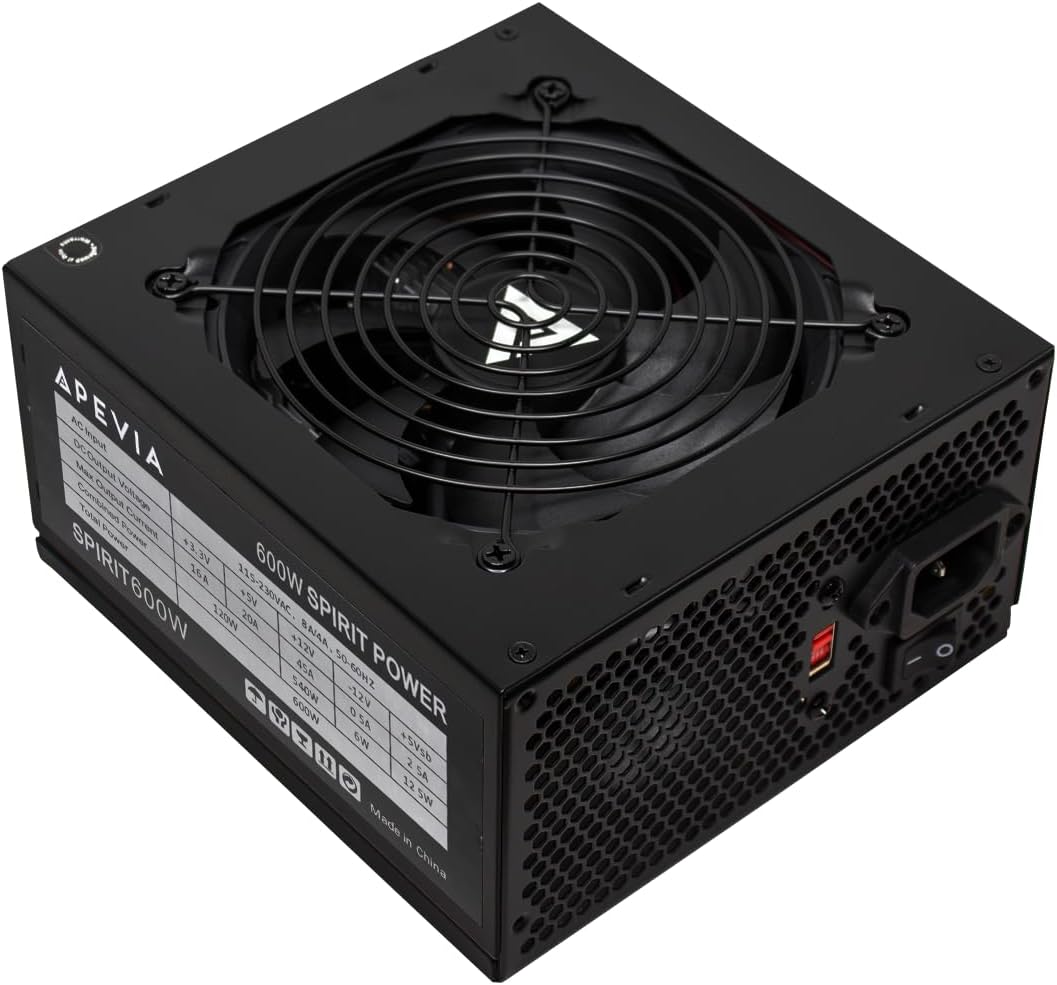



The Apevia SPIRIT600W is a straightforward ATX power supply for budget gaming systems that need more than the bare minimum but do not require extensive modularity or the newest ATX standard. It carries a 4.3 customer rating and stands out for a 600W rating, a 45A single 12V output, and a broad set of safeguards. Its black sandblasted enclosure also gives it a restrained, purpose-built appearance that should blend into most gaming cases.
We may earn a commission when you buy through this link, at no additional cost to you.
The strongest feature is its combination of capacity and useful connections. A 45A 12V rail supplies up to 540W through that principal output, making the unit better suited to substantial graphics hardware than a very small 500W design. Two PCI-E 6+2 connectors can support many mainstream and older gaming cards. The connector bundle also includes one 20+4-pin motherboard plug, one split 4+4-pin CPU connector, four SATA connectors, and four Molex peripheral connectors. That is a generous set for a budget-focused system.
The listed protections cover short circuit, over-current, over-voltage, over-power, under-voltage, and over-temperature conditions. An automatically controlled 120mm fan adjusts to the internal temperature, which is sensible for maintaining airflow without running at maximum speed unnecessarily. The trade-offs are that the supplied information does not name an 80 Plus efficiency certification, and the fixed cable design means unused leads may need to be routed out of the way. Its 4.3 rating is also the lowest among the listed products, although it still reflects a generally favorable customer response.
This is a sensible choice for a cost-conscious builder assembling a 600W-class gaming PC with a supported graphics card and conventional power requirements. It is less compelling when a native 12V-2×6 cable, fully modular wiring, or a documented efficiency certification is a priority. Confirm the case has sufficient room and compare the installed graphics card's power requirements before buying. For a basic gaming build, however, it delivers the required power and protection coverage at a restrained budget.
The 45A single 12V rail provides the most important resource for a gaming system: concentrated power for processors and graphics cards. It gives this 600W model more flexibility than a unit with divided rails, although the exact sustained load still needs to remain within the platform's overall limits.
Two PCI-E 6+2 connectors, four SATA plugs, and four Molex connectors cover the usual needs of a gaming desktop. The split motherboard and CPU connectors also allow the unit to fit older or entry-level boards that use 20-pin or four-pin connections.
We may earn a commission when you buy through this link, at no additional cost to you.
The Thermaltake SMART 600W is a proven ATX 12V option for budget gaming PCs whose components use conventional PCIe power connections. Its 4.5 rating reflects a favorable balance of useful capacity, 80 Plus certification, active PFC, and extensive platform support. It complies with ATX 12V 2.3 and EPS 12V 2.92 standards, making it a logical fit for established motherboards that do not require ATX 3.1 or a native 16-pin graphics connector.
We may earn a commission when you buy through this link, at no additional cost to you.
This model is specified to deliver 600W continuously at an ambient temperature of 40 degrees Celsius. That continuous-output statement is especially helpful when comparing budget units with more general maximum-output descriptions. The 80 Plus certification indicates approximately 80% efficiency under typical loads, reducing the amount of energy lost as heat. Active PFC improves the relationship between input current and voltage, while a stated MTBF of 100,000 hours and a minimum 16-millisecond hold-up time within a 60% load are positive signs for transient stability.
Protection includes over-power, over-voltage, and short-circuit protection. Two PCI-E 6+2-pin connectors are suitable for many conventional gaming graphics cards, and the strong 12V rail is intended to perform well across different system loads. The meaningful limitation is that this is not a modern ATX 3.x unit. It has no native 12V-2×6 cable, so a current high-power graphics card requiring that connection would need an appropriate adapter and cable arrangement. The five-year warranty also gives it stronger coverage than several neighboring models.
Choose the Thermaltake SMART 600W when you want documented efficiency, continuous output, and established ATX 12V compatibility at a budget-conscious level. It is well suited to a gaming build using a graphics card with two or fewer conventional PCIe connectors. It is less appropriate for a brand-new platform centered on a native 12V-2×6 connection. Otherwise, the combination of efficiency, protection, and warranty makes it one of the more balanced recommendations in the guide.
A 600W continuous rating at 40 degrees Celsius gives buyers a clearer performance target than a maximum wattage figure alone. The strong +12V rail and listed hold-up time are particularly relevant when the CPU and GPU change load during play.
The combination of 80 Plus certification and active PFC makes this a sensible option for an efficient everyday gaming system. Its older platform standard is not an issue when the motherboard and graphics card use conventional ATX and PCIe connections.
We may earn a commission when you buy through this link, at no additional cost to you.
The ARESGAME AGV Series 500W is aimed at entry-level and value-oriented gaming builds rather than enthusiast systems with power-hungry graphics cards. It has a 4.4 rating, 80 Plus Bronze certification, a 120mm fan, and a five-year warranty. Those features make it a credible budget option when the processor and graphics card together can operate comfortably within a 500W envelope.
We may earn a commission when you buy through this link, at no additional cost to you.
Bronze certification means the unit is rated for approximately 85% efficiency or higher under typical loads. Less energy becomes internal heat, which can help the fan remain quiet and reduce the burden on the surrounding components. The 120mm ultra-quiet cooling fan is designed to provide effective cooling without making the power supply the dominant source of case noise. Protection against over-voltage, under-voltage, over-power, and short-circuit conditions adds an important layer of system safeguarding.
The main limitation is capacity and connector modernization. A 500W unit can be appropriate for many mainstream gaming configurations, but high-power graphics cards and aggressive processor upgrades can push it toward its limit. Its non-modular arrangement also means every fixed cable remains attached, potentially creating unnecessary clutter behind the motherboard tray. The supplied information does not highlight a native 12V-2×6 connection, so builders should verify the required adapter and ensure the correct cable is used with the graphics card.
This power supply makes the most sense for a budget build involving an efficiency-conscious, lower-power gaming configuration. It is especially attractive if the builder values a quiet fan, documented Bronze efficiency, and a five-year warranty over modular wiring or current ATX standards. Avoid choosing it merely because the wattage number looks adequate; calculate the combined component requirements and allow reasonable operating headroom. With suitable hardware, it can provide a dependable foundation for an inexpensive gaming PC.
Bronze efficiency is valuable even in a budget system because lower conversion losses produce less heat. That helps the 120mm fan operate with less noise and places less thermal stress on the power supply during ordinary gaming loads.
The 500W rating is best suited to mainstream CPUs and graphics cards that leave adequate peak-load headroom. A high-end processor combined with a large graphics card can exceed what this budget-oriented unit is designed to handle comfortably.
We may earn a commission when you buy through this link, at no additional cost to you.
The MSI MAG A750GL PCIE5 is the most feature-complete recommendation in this guide, combining modern power standards with a fully modular design and a 750W capacity. Its 4.6 rating reflects strong customer approval, while the supplied specifications position it as a ready-made choice for current gaming platforms. The native dual-color 12V-2×6 cable is especially valuable for compatible high-performance graphics cards that benefit from direct power delivery.
We may earn a commission when you buy through this link, at no additional cost to you.
ATX 3.1 and PCIe 5.1 readiness make this a forward-looking option for a new build. Rather than relying on a transitional adapter arrangement, builders with compatible hardware can use the native 12V-2×6 cable. Full modularity means only the required cables are attached to the power supply, simplifying the build and improving airflow. Compact construction also helps when space is limited, and 80 Plus Gold certification supports efficient operation under typical load.
The standout ownership feature is the 10-year limited warranty. It is much longer than the three- to five-year coverage offered by several alternatives and can provide useful reassurance for a gaming system expected to remain in service for years. The trade-off is that a 750W fully modular ATX 3.1 unit represents a step above the simplest budget options. A modest entry-level PC may not use all of its capacity or need its modern cable, and buyers focused strictly on minimum cost may find a 500W or 600W design more appropriate.
This MSI is recommended for builders who want a clean, modern, expandable gaming PC without moving to an unrestricted enthusiast price category. It gives a current system ample power, efficient operation, modern connector support, and exceptionally long warranty coverage. Choose it when using a compatible ATX 3.1 motherboard and graphics card, or when future upgrades are likely. The combination of modularity, capacity, standards, and warranty makes it the most versatile pick here.
A native dual-color 12V-2×6 cable supports current high-end graphics-card power requirements without making the main power bundle even more cumbersome. Buyers should still confirm that their graphics card uses a compatible 12V-2×6 socket and follow the card maker's connection guidance.
Fully modular wiring reduces unused cables and makes the interior easier to manage. Paired with 80 Plus Gold efficiency and a 10-year limited warranty, that makes this a practical option for a gaming PC intended to see several component upgrades.
We may earn a commission when you buy through this link, at no additional cost to you.
The Segotep 650W is a budget-oriented option aimed at gaming configurations that need a meaningful amount of capacity without moving to a 750W unit. It has a 4.6 rating and 80 Plus Gold certification, combining efficiency with a single 12V output designed to concentrate power for demanding components. Its 650W rating gives it enough scope for many midrange systems and many mainstream graphics cards without being as large a commitment as a 750W supply.
We may earn a commission when you buy through this link, at no additional cost to you.
Four PCI-E 6+2-pin connectors are the most attractive practical detail. This is more flexibility than most competing budget models offer and can accommodate multiple conventional power sockets, additional accessories, or systems with a demanding graphics card. A single 12V rail is generally simpler for modern multi-core processors and graphics hardware than a design divided among several rails. Global voltage adaptation also makes the unit potentially convenient in different regions, subject to local plug and product compatibility.
The 80 Plus Gold certification supports improved efficiency, helping reduce waste heat during normal operation. The supplied description refers to a non-modular design but also notes that all wires can be separated from the power supply and mentions cleaner internal routing. Regardless of that wording, buyers should inspect the included cable arrangement and product photos closely, because fixed cables can complicate a clean build. The product information does not identify ATX 3.x compliance or a native 12V-2×6 connector, making it more appropriate for conventional PCIe-equipped cards.
The Segotep is worth considering for a midrange gaming PC that prioritizes 650W capacity, Gold efficiency, and abundant conventional graphics connectors. It may suit a system with a power-hungry card that uses two or three 6+2-pin plugs. It is less attractive for a compact, carefully organized build or for a new graphics card requiring a native 16-pin cable. Confirm the case clearance, exact connector inventory, and regional power requirements before finalizing the purchase.
Four PCI-E 6+2 connections give this model more conventional graphics-card support than most of the field. This is useful for builds where the GPU uses multiple sockets or where additional powered accessories are planned.
Gold certification makes the 650W unit a sensible middle ground for systems that run for long periods. Reduced energy loss can support cooler, quieter operation, although the non-modular wiring remains a less tidy alternative to modern compact designs.
We may earn a commission when you buy through this link, at no additional cost to you.
The ASRock PRO 750G combines modern ATX support, 750W capacity, and Gold efficiency in a package aimed at midrange and high-end gaming PCs. Its 4.6 rating places it among the strongest customer-rated products in the list. It is particularly relevant to builders who want a native 12V-2×6 connection and ATX 3.1 compatibility without moving beyond the budget-oriented category.
We may earn a commission when you buy through this link, at no additional cost to you.
The native dual-color 12V-2×6 connector is listed as supporting up to 450W power delivery for modern graphics cards. That removes the need for a multi-connector adapter when using a compatible card, producing a cleaner installation and reducing the number of separate power leads. ATX 3.1 and PCIe 5.1 compliance also align the unit with current platform expectations. Its 750W rating is sufficient for many combinations of a powerful processor and high-performance GPU, although unusually demanding dual-GPU or heavily upgraded systems still require careful load analysis.
Cooling is handled by a 120mm low-noise fan, while Gold certification indicates up to 90% energy efficiency. Together, these specifications support a system that remains quiet while operating efficiently. The main drawback is the three-year warranty, which is shorter than the MSI MAG A750GL's 10-year coverage and the five-year terms offered by several other picks. The standard ATX form factor should fit most cases, but the product information specifically advises checking chassis space and system power requirements.
This model is a strong recommendation for a new gaming PC that pairs a contemporary motherboard and graphics card with a desire for clean, direct power connections. It also provides enough capacity for future expansion within the 750W class. Buyers should verify dimensions, inspect the graphics card's socket, and leave suitable power headroom. In return, they gain modern standards, strong efficiency, quiet cooling, and a straightforward power architecture tailored to current gaming hardware.
The native 12V-2×6 cable is designed to deliver substantial power through one connection to compatible graphics cards. This simplifies cable routing and avoids the bulk of several separate PCIe plugs when the GPU supports the standard.
A low-noise 120mm fan and up to 90% energy efficiency make this a comfortable choice for prolonged gaming sessions. The 750W capacity covers substantial systems, while three years of warranty coverage is the principal point of comparison for buyers prioritizing longevity.
We may earn a commission when you buy through this link, at no additional cost to you.
The MSI MAG A650BE is a compact, semi-modular power supply with a 4.7 customer rating, tying for the highest rating among the products listed. It is a natural fit for midrange gaming PCs where 650W is sufficient but the builder still wants tidy wiring. Bronze efficiency, active PFC, and DC-DC circuit design provide a modern electrical foundation without moving into the cost of a fully modular ATX 3.1 unit.
We may earn a commission when you buy through this link, at no additional cost to you.
Semi-modularity offers a practical compromise. Permanently attached cables handle the essential motherboard and CPU connections, while selected peripheral cables can be removed when they are not needed. This generally produces a cleaner interior than a completely fixed design and avoids the complexity and potential cost of managing every lead. The compact chassis is another advantage for smaller cases, and the 120mm low-noise fan is designed to keep acoustic output under control.
The protection suite is broad, covering over-voltage, over-current, over-power, over-temperature, and short-circuit conditions. These safeguards are especially relevant to a gaming computer that may see sharp CPU and GPU load changes. The trade-offs are efficiency and future connector compatibility. Bronze certification is still efficient, but it does not match the Gold level of several alternatives. The supplied specifications do not mention a native 12V-2×6 cable, so a modern high-power graphics card may require a supported adapter and the correct manufacturer's cable.
Choose the A650BE for a midrange build that values compact dimensions, a 4.7 customer rating, and semi-modular convenience. It is a particularly good fit when a 600W unit feels too close to the system's requirements but 750W is unnecessary. Check the case's PSU clearance and the graphics card's required connection before purchasing. With suitable components and conventional PCIe power, it offers a quiet, protected, and manageable installation.
Semi-modular cabling removes the clutter associated with unused peripheral leads without making every connection optional. That makes it a practical choice for builders who want tidier wiring without moving to the full cable cost of a fully modular design.
Over-voltage, over-current, over-power, over-temperature, and short-circuit protection provide broad coverage for components that experience rapid load changes. Active PFC and DC-DC circuitry also support stable conversion across the range of demands placed on a modern gaming system.
We may earn a commission when you buy through this link, at no additional cost to you.
The MSI MAG A650BN is a compact, non-modular 650W unit that shares several core characteristics with the A650BE, including its 4.7 customer rating, Bronze certification, active PFC design, DC-DC circuitry, low-noise fan, five-year warranty, and broad protection suite. It is best suited to builders who prioritize a compact enclosure, dependable capacity, and straightforward installation over perfect cable management.
We may earn a commission when you buy through this link, at no additional cost to you.
At 650W, it offers more breathing room than a 500W supply and less bulk in the wattage category than many 750W choices. That middle position works well for a mainstream gaming processor and a mainstream or moderately powerful graphics card. The low-noise fan is intended to manage heat without creating excessive acoustic output, while the DC-DC circuit and active PFC support stable power conversion. The five protection functions cover over-voltage, over-current, over-power, over-temperature, and short-circuit events.
Its defining compromise is the non-modular arrangement. Every attached cable stays connected to the unit, so builders must route excess leads behind the motherboard tray or into dedicated storage space. The fixed design can make an otherwise tidy build look crowded, particularly in a compact case with little cable-management room. The supplied product information also does not mention ATX 3.x support or a native 12V-2×6 cable, so buyers should plan for conventional GPU connectors and verify compatibility with their hardware.
The A650BN makes sense when the system needs more capacity than a basic 500W model but the build does not require the newest connection standard. It may also appeal to a compact case where a smaller power supply is helpful and unused cables can be neatly hidden. Those who value easy cable cleanup should compare it with the semi-modular A650BE or a fully modular alternative. Otherwise, it is a capable mainstream gaming option with strong customer feedback and comprehensive safeguards.
A 650W rating gives the system meaningful power headroom while remaining easier to accommodate than larger high-capacity units. The compact form is particularly helpful in smaller cases where every available dimension matters.
Because all cables remain attached, good planning can keep the build orderly. Route excess wiring behind the motherboard tray, avoid blocking airflow, and confirm that the case provides sufficient space for the full cable bundle.
We may earn a commission when you buy through this link, at no additional cost to you.
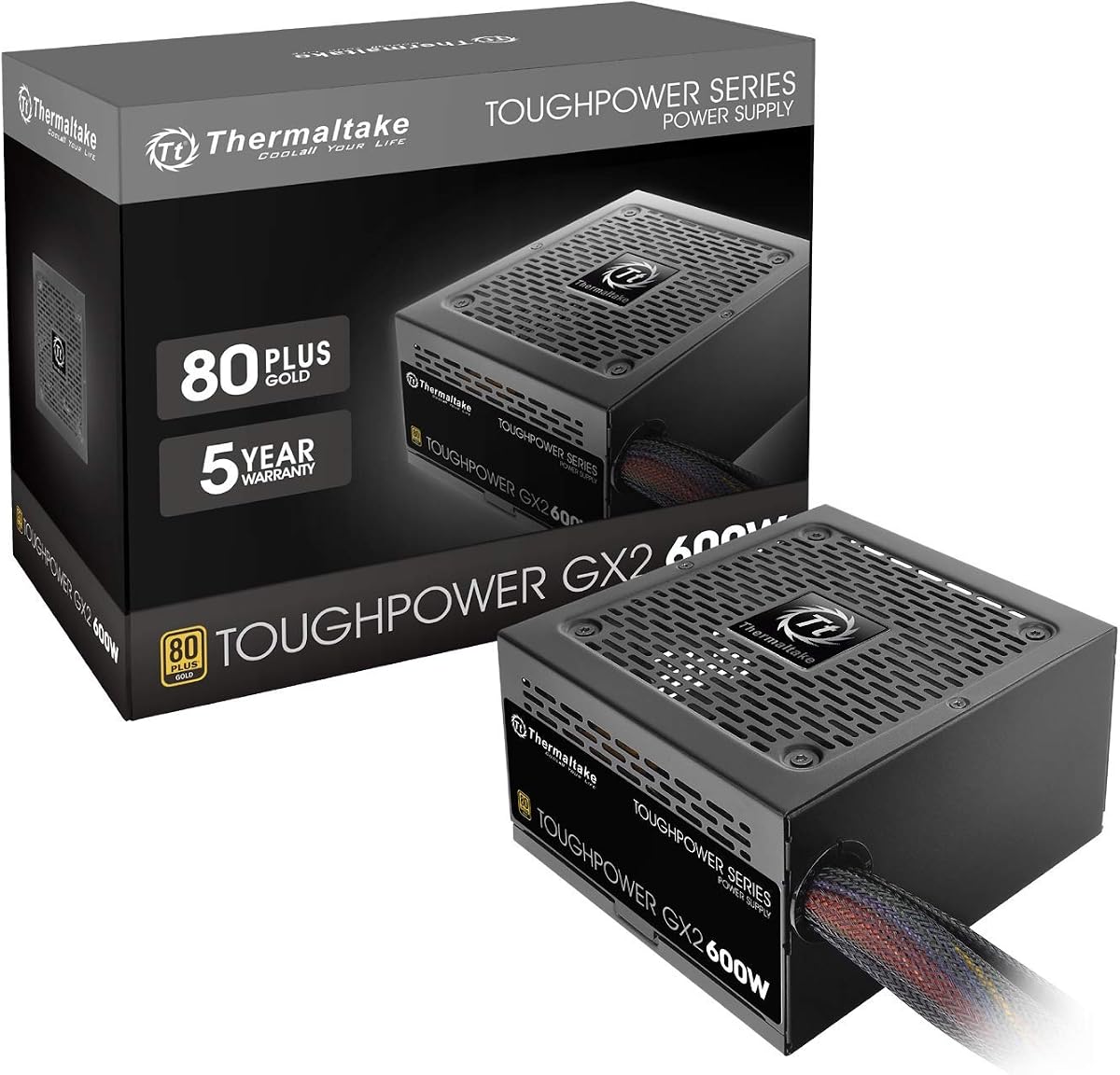
The Thermaltake Toughpower GX2 is a Gold-certified 600W power supply for gaming builds that need established ATX 12V support, multiple SATA connections, and a clear focus on stable low-ripple output. Its 4.6 rating indicates strong customer reception. Although its fixed wiring and older platform specification place it outside the newest ATX 3.x category, it remains relevant for compatible motherboards and graphics cards.
We may earn a commission when you buy through this link, at no additional cost to you.
The unit supports up to 90% efficiency and is optimized for C6 and C7 power states, which helps reduce energy use during lighter workloads. A dynamic-bearing 120mm fan is described as combining cooling performance with silent operation. High-quality capacitors and low-ripple output are intended to help performance-sensitive components such as the graphics card operate reliably. The continuous 600W rating and single 12V rail also make it suitable for many gaming configurations that need more headroom than a 500W option.
Connector coverage is broad for a 600W model. There are two PCI-E 6+2 connectors, six SATA connections, three peripheral four-pin plugs, one FDD connector, one 4+4-pin CPU connector, and one 24-pin motherboard connector. Protection includes over-power, over-voltage, under-voltage, and short-circuit functions. The trade-off is that only two PCIe graphics connectors are provided, and the fixed cables may be less convenient to manage. The ATX 12V 2.4 and EPS 12V 2.92 standards also predate the latest native 16-pin GPU approach.
Buy the Toughpower GX2 for a 600W-class gaming PC built around conventional PCIe power and stable output. It is a good fit when efficiency matters, a five-year warranty is preferred, and multiple SATA drives or accessories need connections. It is less suitable for a new build whose graphics card requires 12V-2×6 or whose owner wants fully modular wiring. As always, check the case clearance and the full power requirements of the planned components.
The emphasis on low-ripple output is valuable for a gaming system because cleaner power can support stable operation in sensitive components. A single 12V rail and continuous 600W rating provide a clear foundation for conventional high-performance configurations.
Six SATA connectors are useful for systems with multiple drives, while the remaining peripheral and FDD connections cover less common accessories. The fixed layout demands careful cable routing, but the broad connector inventory reduces the need for extra adapters.
We may earn a commission when you buy through this link, at no additional cost to you.
The Rosewill VSB 650W combines a modern 12V-2×6 connection, a compact chassis, and 650W capacity in an intriguing budget-oriented design. Its 4.5 rating indicates positive customer feedback, and the specification list includes ATX 3.0 and 3.1 compatibility, PCIe 5.1 support, a semi-modular cable layout, and a Japanese capacitor rated for 105 degrees Celsius. It is aimed at builders who want modern GPU support without carrying a full-size 750W unit.
We may earn a commission when you buy through this link, at no additional cost to you.
Its native PCIe 5.1 12+4-pin 12V-2×6 cable is designed to deliver up to 450W directly to compatible graphics cards. The listed support for up to 235% power excursion and 300% GPU power excursion is particularly relevant to the changing power demands of modern gaming hardware. Semi-modularity helps limit unused peripheral cables, while the 140 by 150 by 86mm chassis is listed as 35% smaller, giving builders more freedom in compact cases.
Thermal management combines a steel shell with large ventilation openings and a 120mm ICB silent fan. A Japanese capacitor rated to 105 degrees Celsius supports the product's high-temperature theme. Its six-protection suite covers over-current, over-power, over-temperature, over-voltage, short-circuit, and under-current conditions. The main compromises are Bronze rather than Gold efficiency and a five-year warranty rather than the longer coverage offered by the MSI MAG A750GL.
The VSB 650W is worth shortlisting for a compact new gaming build that needs a native 12V-2×6 cable but not 750W of capacity. It gives buyers an unusually modern connector and excursion specification without moving to the top of the product category. Verify that the graphics card uses a compatible socket, confirm the PSU bay can accommodate the 140mm depth, and inspect the fixed cables. With suitable components, it is a forward-looking and space-conscious budget choice.
The native 12V-2×6 cable allows compatible graphics cards to receive direct modern power delivery. A 140mm chassis depth makes that capability more accessible in compact builds where larger power supplies can interfere with cable routing or front-mounted hardware.
A 105-degree-rated Japanese capacitor, large shell vents, and an ICB fan form a thoughtful thermal strategy. Six listed protection functions add system security, while Bronze efficiency remains the main specification gap compared with Gold-certified alternatives.
We may earn a commission when you buy through this link, at no additional cost to you.
Choosing a budget gaming power supply involves balancing component draw, connector needs, efficiency, physical fit, and reliability. The following factors help narrow the field without encouraging buyers to overspend on capacity they will never use.
Begin with the recommended power requirements for the processor and graphics card, then add a reasonable allowance for the motherboard, memory, storage, fans, and accessories. Gaming components can draw more power momentarily than their idle figures suggest, so choosing only enough capacity for the average desktop workload can create an unnecessarily constrained system. A 600W unit is common for mainstream gaming configurations, 650W offers additional breathing room, and 750W is better suited to a powerful graphics card, a high-end CPU, or a system likely to receive upgrades.
Choose capacity based on the entire build, not the graphics card alone. The extra headroom also gives the PSU room to operate away from its maximum output, which can be useful for transient loads and future component changes.
Inspect the power sockets on the graphics card before selecting a power supply. Older and mainstream cards commonly use one or more 6+2-pin PCIe connectors, while current high-performance models may use a 12VHPWR or 12V-2×6 connection. A native 12V-2×6 cable is the cleanest option for a compatible card and can help avoid the bulk and potential routing problems of adapter cables. If a model uses an adapter, use the cable supplied or explicitly recommended by the graphics-card manufacturer and ensure the connector is fully seated.
For a new build centered on a modern GPU, favor ATX 3.1 and PCIe 5.1 support with a native 12V-2×6 lead. For an older card, a supply with multiple conventional 6+2 connectors may be simpler and more appropriate.
The 80 Plus program describes efficiency under standardized loads. Bronze units here are specified for roughly 85% efficiency or higher at typical loads, while Gold units offer a stronger efficiency level, with some listings citing up to 90%. Less energy is lost as heat, potentially allowing the fan to remain quieter and reducing the heat entering the case. Efficiency does not increase the unit's maximum wattage, but it can make a given capacity easier to cool and operate efficiently.
Choose Bronze for a straightforward entry build and Gold when the system will run frequently or the builder wants improved efficiency and strong brand-specific features. Verify the actual certification in the listing rather than relying on a general efficiency claim.
A non-modular power supply keeps every cable attached, while a semi-modular model detaches selected peripheral leads and a fully modular design allows nearly every cable to be removed. Modular designs make installation easier and reduce clutter, especially in compact cases. Non-modular units can still be tidy when excess leads are routed behind the motherboard tray, but they require more space and planning. Remember that the modularity label does not change the underlying electrical capacity or the connectors available to the system.
Use semi-modular or fully modular wiring when aesthetics and airflow are priorities. Choose a fixed design when simplicity and a lower-tier budget matter more, and check the case's cable-management space before ordering.
Over-voltage, over-current, over-power, short-circuit, over-temperature, and under-voltage protections help protect the power supply and connected components when operating conditions become abnormal. A good unit should provide broad coverage rather than relying on only one safeguard. Protection circuits are especially valuable in gaming PCs because graphics cards and processors can alter demand rapidly during games, rendering, or other workloads.
Prioritize models with a comprehensive suite and clear manufacturer documentation. Warranty coverage also provides useful context because it indicates the manufacturer's support commitment, although it should not be treated as a substitute for proper installation.
ATX power supplies share a common width, but dimensions and mounting arrangements can still vary. Compare the unit's length with the PSU bay, especially in compact cases where a hard drive cage, radiator, or front intake may reduce clearance. The listed Rosewill VSB measures 140 by 150 by 86mm, while the MSI A650 models are described as compact, illustrating why the physical specification deserves attention. Also consider the case's airflow path and the position of the power supply fan.
Measure before purchasing and leave room for cables around modular connectors. A low-noise fan is useful, but adequate case ventilation and unrestricted PSU intake remain more important than marketing language alone.
Warranty length varies substantially across the list, ranging from three years for the ASRock PRO 750G to five years for several models and 10 years for the MSI MAG A750GL. Longer coverage can be reassuring for a gaming PC that will remain in service for many years. Warranty terms are most meaningful when paired with a clearly documented product, established manufacturer, and straightforward support process. Review the current listing for regional terms and any registration requirements.
Use warranty length as a supporting factor rather than the sole decision. A shorter warranty can still be acceptable when capacity, efficiency, protection, and connector compatibility are a better match for the build.
ATX 3.0 and 3.1 models are valuable for current platforms, but they are not mandatory for every gaming computer. A well-equipped ATX 12V 2.3 or 2.4 unit can serve an older motherboard and conventional graphics card effectively. The trade-off is that modern standards bring native 12V-2×6 support, updated transient-response expectations, and compatibility with increasingly power-demanding graphics cards. Paying for those features makes sense when the rest of the system is also new.
For a recent build, modern standards are a useful long-term investment. For a modest upgrade to an established PC, prioritize adequate wattage and the connector already required by the graphics card.
Install the power supply in the orientation specified by the case, with the fan and exhaust facing the correct direction. Connect the 20+4 or 24-pin motherboard cable, the appropriate 4+4-pin CPU connector, and the graphics card's required PCIe power. If a 12V-2×6 connection is used, verify that the socket and plug are fully compatible, align the connector carefully, and avoid forcing it. Secure the unit with the correct screws and check that cables do not obstruct fans, drives, or expansion slots.
Before powering on, remove any shipping restraints, confirm every required cable is connected, and ensure the case's power switch or motherboard button can reach the power supply. Some budget units, including the Apevia Spirit, require the motherboard's power-good or power-on signal before the unit starts; simply plugging the AC cord into the wall and PSU will not activate it. Do not use damaged cables, unofficial adapters, or modular leads from a different power-supply model.
For care, keep the intake and exhaust paths free of dust and use gentle airflow when cleaning. Do not open a power supply, as the internal capacitors can retain dangerous charge. Monitor unusual noises, repeated restarts, unusual smells, or power problems, and stop using the unit if any appear. Good airflow, balanced loads, proper connections, and periodic visual inspection are the most effective ways to maintain reliability throughout the life of a gaming PC.
A 500W supply can work for many entry-level configurations when the CPU and graphics card have modest combined requirements. A 600W unit offers a more comfortable balance for mainstream gaming hardware, while 650W or 750W provides additional headroom for stronger graphics cards and planned upgrades. Always compare the manufacturers' recommended PSU figures for both major components and allow room for the rest of the system.
Yes, when it is paired with a processor and graphics card whose combined recommended requirements fit within its capacity and connector options. Six of the models in this guide offer 600W or more, with differing efficiency and modern-feature levels. The key is to check the complete system draw rather than focusing only on the graphics card's advertised power figure.
A native 12V-2×6 cable is preferable for a graphics card designed around that connector, particularly in a new ATX 3.1 build. It provides direct power delivery and cleaner routing than an adapter. For graphics cards using 6+2-pin PCIe connectors, a conventional power supply may be more appropriate and economical.
A non-modular model keeps all cables permanently connected, which can leave unused leads that must be hidden. A semi-modular model detaches selected peripheral cables, while a fully modular model allows nearly all cables to be removed. Modularity affects installation and airflow rather than the amount of power the unit delivers.
It can. Higher efficiency means less energy is converted into heat, which can reduce how hard the cooling fan needs to work. Actual noise also depends on fan design, load, case airflow, and the general condition of the unit, so certification should be considered alongside those factors.
Yes, provided its wattage, form factor, connector standards, and graphics-card connections match the system. Older PCs often use conventional 24-pin motherboard and 4+4-pin CPU connections, making an ATX 12V unit suitable. Check the original manufacturer's recommendations and avoid adapters or pin configurations that are not explicitly supported.
It can be valuable because a power supply is a long-term component in a gaming PC. Warranty coverage here ranges from three to 10 years, and the MSI MAG A750GL provides the longest stated term. Coverage should still be balanced against compatibility, capacity, efficiency, and connector requirements.
The AC cable alone does not activate most ATX power supplies. The motherboard power-on switch must send the power-on signal, and all required motherboard and CPU cables must be connected. The Apevia Spirit's supplied information specifically notes this behavior. If the system still does not start, check the front-panel connections, the power switch, and the selected outlet.
The MSI MAG A750GL PCIE5 is the most versatile choice because it combines 750W capacity, full modularity, 80 Plus Gold efficiency, ATX 3.1 and PCIe 5.1 support, a native 12V-2×6 cable, and a 10-year limited warranty. The ASRock PRO 750G is another strong modern option with ample capacity and quiet cooling, while the Thermaltake SMART 600W delivers the clearest established-budget combination of documented continuous output, 80 Plus certification, active PFC, and a five-year warranty.
Prioritize the graphics connector and total component requirements first, followed by enough capacity for realistic peaks and a sensible upgrade path. Efficiency, protection, modularity, warranty, and dimensions should then refine the choice. A 500W Bronze unit can be adequate for a modest build, while 600W to 750W models provide more flexibility for mainstream graphics hardware, modern GPUs, and future component upgrades.
Before ordering, verify the current product listing, connector inventory, regional compatibility, warranty terms, and physical dimensions. Prices and configurations can change, so the information available today should be checked against the latest listing. With the right match between capacity and components, a budget gaming PC can still have a quiet, efficient, and dependable power supply.