
NZXT H5 Flow
4.6Editor score
Two 120mm fans included
Front 360mm radiator support
Fine-mesh dust filtering
This Cooling Computer Case guide compares ten PC cases, weighing radiator support, included fans, chassis layout, clearance, lighting, and build flexibility.
A cooling computer case should move air through the components that generate the most heat while remaining straightforward to build in and visually suited to your setup. Strong front-to-back airflow, useful radiator options, sensible fan placement, and adequate clearance for modern graphics cards and CPU coolers are the essentials.
We compared ten cases on the features that most directly affect thermal performance and practical usability. The list includes ATX mid-towers, a compact mid-tower, and a full tower, with attention given to included fans, radiator capacity, chassis organization, motherboard support, cable routing, filters, and lighting.
Each recommendation reveals what the case does particularly well and where compromises may appear. The ranking also highlights the most balanced, budget-conscious, and premium choices, although product availability and market conditions can change over time.
4.6Editor score

4.7Editor score

4.8Editor score
This side-by-side comparison covers the key cooling and usability features of all ten cases, including fan bundles, radiator capacity, motherboard compatibility, graphics card clearance, airflow architecture, and build features.


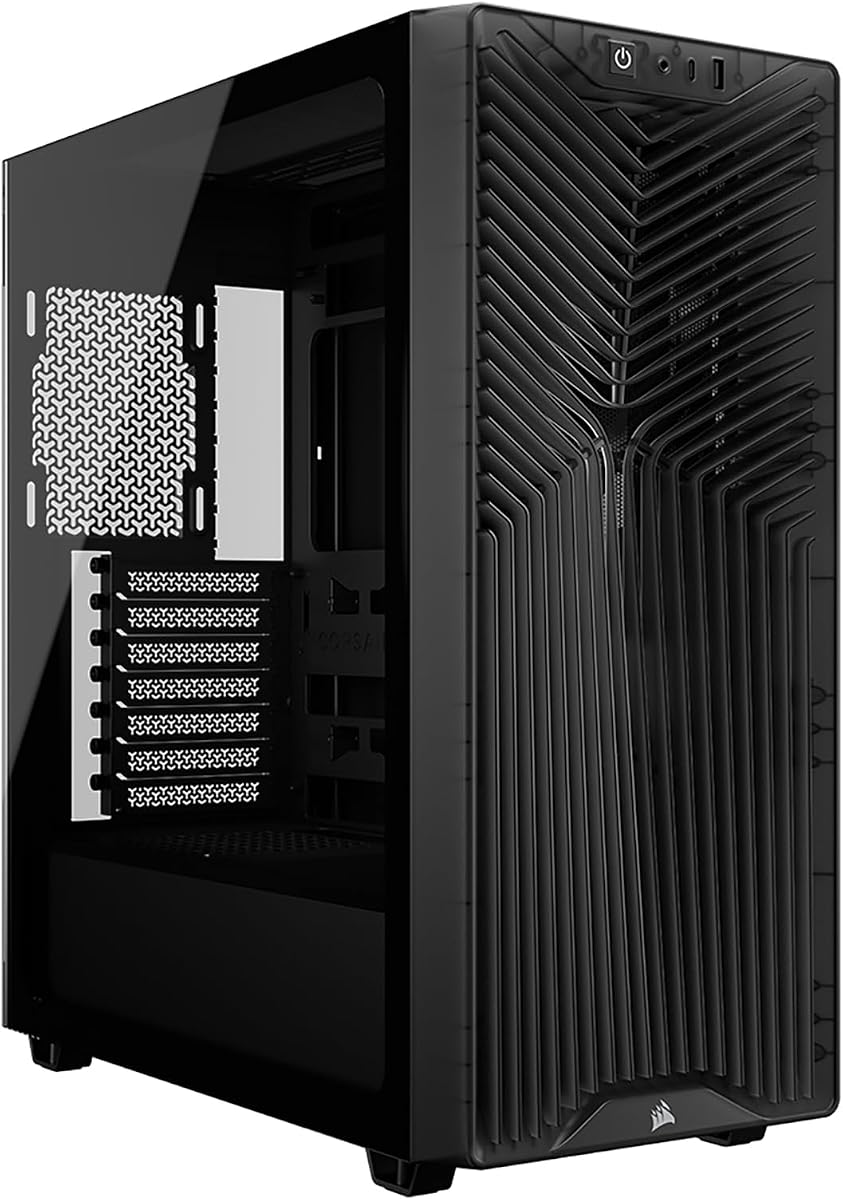


The CORSAIR 4000D RS ARGB is the most balanced recommendation in this guide, earning a 4.7 rating for its combination of airflow, flexibility, and build convenience. It arrives with three CORSAIR RS ARGB PWM fans and uses a three-dimensional Y-pattern front panel intended to provide a low-obstruction path for incoming air. That combination makes it a strong foundation for a gaming system using either air cooling or a liquid-cooling upgrade.
We may earn a commission when you buy through this link, at no additional cost to you.
The InfiniRail mounting system is the case's defining feature. Steel mounting rails allow front fans to be positioned in different locations and support larger fan sizes, while roof positions accommodate up to 140mm fans. The motherboard-tray-side panel can remain in place as a cable cover or be removed for additional side-mounted cooling. Three pre-installed fans support motherboard-controlled PWM and ARGB connections, including Zero RPM behavior at low loads, which helps reduce unnecessary noise.
The main trade-offs are familiar to anyone considering a visually oriented mid-tower. The included lighting requires compatible five-volt ARGB control, and the modular design does not create the nearly unlimited interior space of a full tower. Even so, the chassis provides enough flexibility for a powerful mainstream or gaming PC, and the high-airflow front panel makes it more purposeful than a purely decorative enclosure.
This is the recommendation for a builder who wants strong cooling without immediately installing every extra fan. It is particularly attractive when you may move from the included air-cooling setup to a larger radiator later. The combination of perforated intake, adjustable fan locations, modest included fan count, and clean presentation makes the CORSAIR 4000D RS ARGB a broadly useful center of this ranking.
The InfiniRail system is more useful than a fixed bracket because it lets builders direct larger fans toward particularly demanding components. Front positions can accept larger fans, and the removable motherboard-side panel creates another opportunity to supplement airflow when the build needs it.
The three RS ARGB PWM fans combine speed control with coordinated lighting. Their Zero RPM support means they can stop when the system load does not require active cooling, while the ARGB connection keeps illumination synchronized with compatible motherboard controls.
We may earn a commission when you buy through this link, at no additional cost to you.
The NZXT H5 Flow has a 4.6 rating and stands out as a compact ATX mid-tower that treats airflow as a central design goal rather than an afterthought. Its ultra-fine mesh covers the top, front, and side panels, creating multiple paths for air while also helping filter dust. The result is a clean-looking enclosure that can support a substantial cooling configuration despite its relatively restrained footprint.
We may earn a commission when you buy through this link, at no additional cost to you.
Two 120mm Quiet Airflow fans are installed, one at the front and one at the rear, giving a basic front-to-rear airflow path from the beginning. The case can accept a 360mm radiator at the front or a 240mm radiator at the top, so it can grow into a liquid-cooled build without requiring a chassis change. The perforated power-supply shroud also provides additional intake potential through two optional 120mm fans, although those fans are not included.
Its primary limitation is the modest starting fan count. A builder focused on maximizing cooling will need to add fans, and the side intake area may become more useful once it is populated. The supplied information does not identify a dedicated GPU-support limitation, so rather than inventing one, the more relevant trade-off is simply that two included fans leave more cooling expansion to the owner.
Choose the NZXT H5 Flow when desk space, visual simplicity, and useful radiator support matter more than having a large collection of fans from day one. It is a convincing starting point for a compact gaming or productivity PC, and its high-airflow mesh, rear exhaust fan, and broad liquid-cooling options give it more thermal potential than its minimalist exterior might initially suggest.
The H5 Flow avoids the common mistake of treating a small chassis as a reason to restrict radiator choices. Its 360mm front and 240mm top support make it suitable for a powerful CPU and a clean AIO installation when the builder wants more than air cooling.
Wide channels, hooks, and straps help keep wiring out of the airflow path and away from visible areas. This supports both easier maintenance and the case's clean visual design without requiring a complicated initial layout.
We may earn a commission when you buy through this link, at no additional cost to you.
The Antec Flux Pro has a 4.7 rating and is built for builders who want abundant fan positions and room to grow. Its full-tower format supports E-ATX motherboards, and the multi-directional vent design can accommodate up to 12 fans at once. Six PWM fans are included: three 140mm Tranquil 140 PWM fans at the front, two P12R PWM reverse fans on the power-supply shroud, and one 140mm rear exhaust fan.
We may earn a commission when you buy through this link, at no additional cost to you.
Cooling hardware can be arranged around the front, top, and power-supply shroud because the relevant brackets are removable. The case can also support a 420mm radiator and a 360mm radiator simultaneously, which is a rare degree of liquid-cooling flexibility. An innovative 90-degree power-supply mount can improve internal space, while the CPU and GPU dual temperature display adds useful information directly inside the chassis.
The obvious trade-off is size. A full tower can be difficult to place on a smaller desk and may be more than necessary for a compact or moderately powered system. The combination of metal, glass, and wood also creates a distinctive texture that may not suit every aesthetic. Nevertheless, the included fan quantity and radiator capability make the additional footprint purposeful for enthusiasts rather than merely decorative.
The Antec Flux Pro is a strong fit for high-end workstations, expansive gaming systems, and builders who expect to add cooling over time. It provides the space and mounting flexibility that smaller mid-towers often lack, and its six included fans reduce the immediate work required to establish a productive airflow layout.
Twelve supported fan positions and simultaneous 420mm and 360mm radiator installation create meaningful room for future upgrades. Removable cooling brackets make it easier to reconfigure the chassis as hardware and cooling demands change.
The CPU and GPU dual temperature display gives builders an immediate view of thermal conditions without relying entirely on software. It is especially convenient during initial setup, when checking airflow behavior and component temperatures is most informative.
We may earn a commission when you buy through this link, at no additional cost to you.
The Lian Li V100-ATX carries a 4.8 rating, matching the highest listed score in the group, and combines a capable cooling layout with a polished presentation. Four PWM-controlled 120mm ARGB fans are pre-installed, while an integrated 26-LED ARGB strip adds a second controllable lighting element. The case supports modern ATX and Micro-ATX motherboards, including back-connect versions that simplify cable routing around the motherboard tray.
We may earn a commission when you buy through this link, at no additional cost to you.
The hardware allowances are generous. It accommodates graphics cards up to 420mm long, CPU coolers up to 178mm high, and top-mounted radiators up to 360mm. Tool-less mounting mechanisms on both side panels improve access during assembly and later maintenance. The supplied fan specifications include a maximum speed of 1800 RPM, airflow around 61.47 to 60.4 CFM, static pressure around 2.54 to 2.17 mm-H2O, noise levels from 26.5 to 30.8 dBA, and hydraulic bearings.
One consideration is that the exact arrangement and orientation of all four included fans are less clearly described in the supplied information than the mounting rails on the CORSAIR 4000D RS. Buyers should confirm the current configuration in the product listing and compatibility details. Another minor issue is that ARGB synchronization depends on the selected motherboard software and controller.
Overall, the Lian Li V100-ATX is an attractive recommendation for builders who want high-end component clearance, accessible panels, coordinated lighting, and strong radiator capability in a conventional mid-tower. It is especially suitable for a polished gaming build that will later receive a 360mm liquid cooler.
Support for graphics cards up to 420mm and CPU coolers up to 178mm reduces the likelihood that a major upgrade will be constrained by chassis dimensions. The 360mm top-radiator allowance also makes it straightforward to plan a high-capacity AIO.
Four ARGB fans and the integrated 26-LED strip create a coordinated appearance when synchronized with compatible software. Tool-less side-panel access makes it easier to inspect the interior, adjust fan placement, or reach components without fumbling with fasteners.
We may earn a commission when you buy through this link, at no additional cost to you.
The Cooler Master HAF II 500 is the most ambitious airflow-focused case in this roundup, earning a 4.8 rating for its Mighty40 cooling system. It comes with two 220 by 40mm front intake fans and one 180 by 40mm rear exhaust fan. Their combined size provides substantial moving volume, while large front and rear ventilation openings reduce the chance that the chassis itself becomes the primary restriction.
We may earn a commission when you buy through this link, at no additional cost to you.
The MasterRail system supports multiple fan and radiator sizes at the front and top, allowing a builder to tune the arrangement around available hardware. Split-level cable management preserves useful routing space and creates clearance for the oversized rear fan. The dual-mode GPU holder can stabilize a single graphics card or support two cards up to 72mm thick each, adding flexibility for unusual multi-GPU configurations.
Its size is the defining trade-off. A case built around 220mm and 180mm fans is less likely to fit comfortably in a confined desk area, and some builders may prefer a more conventional grid of smaller fans. Large fans can also impose more clearance constraints around radiators and mounting points than standard 120mm or 140mm components. These are considerations rather than flaws, because the case's design is deliberately built around maximum airflow volume.
Choose the HAF II 500 if cooling headroom is the priority and the physical footprint is acceptable. It is a premium option for powerful systems, ambitious thermal configurations, and builders who prefer fewer large fans to a dense collection of smaller ones. The high rating, low-resistance design, and extensive mounting support make it one of the strongest specialist recommendations here.
Two 220mm intake fans can move a high volume of air through a comparatively small number of mounting points. The low-resistance ventilation design complements their size, helping cool components without requiring a tightly packed fan wall.
The dual-mode GPU holder can brace one card or accommodate two cards up to 72mm thick each. That support broadens the appeal for specialized workstations, although most gaming builds will continue to use a single graphics card.
We may earn a commission when you buy through this link, at no additional cost to you.
The MSI MAG Forge 321R Airflow has a 4.6 rating and combines a vented front panel, tempered-glass side view, and a high theoretical fan count. It supports up to 11 system fans, giving builders ample opportunity to create an intake-and-exhaust arrangement around a powerful CPU and graphics card. A magnetic top filter is designed for easy removal and routine cleaning.
We may earn a commission when you buy through this link, at no additional cost to you.
Lighting is a major part of the product's appeal. A built-in ARGB fan provides illumination, while the included one-to-six ARGB LED control board offers several control points. MSI Mystic Light software can manage the system's ARGB effects from one interface. The case also supports liquid-cooling hardware up to 360mm, allowing the build to evolve beyond the included air-cooled arrangement.
The supplied product information does not enumerate the exact number and orientation of every pre-installed fan, which makes direct comparison with cases that explicitly list their bundles less precise. It also depends on compatible software and hardware for full lighting synchronization. Neither point undermines the core case design, but both deserve attention for builders who prioritize a particular cooling layout or a completely software-managed lighting setup.
This MSI case is a well-rounded option for a gaming system that needs good airflow, visible components, and extensive expansion. It is particularly useful for builders who expect to add multiple fans and want a one-to-six ARGB control board rather than relying on a single lighting connection.
An eleven-fan capacity creates considerable flexibility for a high-airflow configuration. Combined with the vented front, this makes the case suitable for builds that will need more cooling than the initial installation provides.
The one-to-six ARGB LED control board gives builders multiple points for synchronized lighting. Mystic Light provides a convenient central interface for coordinating effects with compatible MSI components.
We may earn a commission when you buy through this link, at no additional cost to you.
The CORSAIR 3200D RS has a 4.6 rating and delivers a practical balance of cooling, convenience, and modern system features. Three RS120 ARGB fans are included, and the chassis can hold up to nine 120mm fans. A top-mounted 360mm radiator is supported, making it a strong foundation for a high-powered CPU and future liquid-cooling upgrade.
We may earn a commission when you buy through this link, at no additional cost to you.
The build experience receives particular attention. Generous cable tie-down points, a built-in power-supply shroud, reverse-connector motherboard support, and a single front-cable connector simplify installation. The front I/O includes USB Type-C and USB Type-A, which is useful with current accessories. A built-in GPU anti-sag stabilization arm supports heavier graphics cards and may help maintain a cleaner, more stable internal layout.
As with any case that supports reverse-connector motherboards, compatibility should be confirmed before assembly because older motherboards use a different front-panel connector arrangement. The smoke finish is another subjective consideration: it can reduce visual clarity and make the lighting less prominent than a fully transparent panel. Neither issue affects the underlying cooling design.
The 3200D RS is a sound recommendation for a modern gaming PC that starts with three illuminated fans but can expand to a nine-fan configuration. It combines useful top-radiator capacity with straightforward cable management and current front-panel connectivity, covering the major requirements of a well-balanced build.
The chassis supports up to nine 120mm fans, providing room for additional intake and exhaust positions. This makes it easy to build a denser cooling path without choosing a larger chassis.
Reverse-connector motherboard support, a consolidated front connector, front USB Type-C, and abundant tie-down points reduce assembly friction. The anti-sag arm adds useful support for modern heavy graphics cards.
We may earn a commission when you buy through this link, at no additional cost to you.
The CORSAIR AIR 5400 RS ARGB has a 4.6 rating and takes a more structured approach to cooling than a conventional open mid-tower. Its triple-chamber design separates the CPU, GPU and motherboard, and power-supply, storage and cable areas. The CPU occupies a dedicated front chamber capable of holding a 360mm radiator, helping keep concentrated processor heat from interacting with other components.
We may earn a commission when you buy through this link, at no additional cost to you.
The central chamber is designed around vertical airflow through the motherboard and graphics card. An airflow duct along the bottom fan array accelerates air as it is forced into a narrow channel, increasing velocity without requiring greater fan speed. The lower chamber has dedicated intake and exhaust locations for the power supply, storage, and cables, helping improve the efficiency of the whole enclosure rather than treating the power supply as an isolated obstacle.
This architecture is more complex than a standard mid-tower, so it may not appeal to a builder who wants maximum freedom to place every component. The separate chambers can also make the internal arrangement feel less conventional. Those trade-offs are justified when the goal is controlled, targeted cooling for a high-power system rather than simply fitting as many components as possible.
The AIR 5400 RS ARGB is a strong recommendation for an enthusiast system that will use a 360mm AIO and substantial computing or gaming hardware. It is particularly compelling for builders who value organized, purpose-driven airflow and a panoramic view of the components.
Separating the CPU from the graphics card, motherboard, and power supply reduces the chance that heat from one area compromises another. The dedicated front CPU chamber is designed around the concentrated thermal load of a powerful processor.
The bottom airflow duct narrows the path beneath the main fan array to increase air velocity. This design seeks greater cooling power with less reliance on raising fan RPM, which can also help preserve a quieter acoustic profile.
We may earn a commission when you buy through this link, at no additional cost to you.
The CORSAIR AIR 5400 LX RGB carries a 4.7 rating and shares the advanced three-chamber concept of the AIR 5400 RS ARGB. The case separates the CPU cooling area, the central motherboard and GPU area, and the lower power-supply, storage, and cable chamber. This compartmentalized plan makes it easier to define a deliberate cooling route through the enclosure.
We may earn a commission when you buy through this link, at no additional cost to you.
The front chamber can accommodate a 360mm radiator, while the central chamber emphasizes vertical airflow to cool the motherboard and graphics card. Airflow ducts accelerate the bottom fan array's output through a narrow channel, improving velocity without simply demanding more fan speed. Dedicated intake and exhaust locations in the lower chamber ensure that the power supply and storage also receive planned airflow rather than depending on incidental air movement.
The trade-off is internal complexity. A builder accustomed to a completely open mid-tower may find the chambers and airflow pathways less flexible, and the dedicated routing is less useful if components are installed in a way that blocks the intended path. The case is also positioned as a premium enclosure rather than a minimalist starter.
For a build that emphasizes a 360mm liquid cooler, high-end graphics hardware, and disciplined internal airflow, the AIR 5400 LX RGB is highly compelling. Its 4.7 rating reflects a design that makes meaningful use of space instead of relying only on a large number of fans.
Dividing the enclosure into thermal zones gives builders a clearer cooling strategy. Processors, graphics cards, and power components each receive airflow paths designed around the way they release heat.
The lower section handles the power supply, storage, and cables with its own ventilation locations. Separating these parts from the central chamber can help maintain cleaner airflow around the processor and graphics card.
We may earn a commission when you buy through this link, at no additional cost to you.
The MONTECH XR Panoramic has a 4.7 rating and combines a generous cooling budget with extensive hardware clearance. Three 120mm ARGB PWM fans are included: two reverse-blade side-mounted fans that face their illuminated surfaces toward the interior and one rear fan. The chassis supports up to nine fans, giving a builder considerable room to add intake and exhaust positions or transition to a 360mm top-mounted radiator.
We may earn a commission when you buy through this link, at no additional cost to you.
Its dimensional allowances are among the more generous in the mid-tower group. Compatible graphics cards up to 420mm long can fit, while CPU coolers may reach 175mm and power supplies up to 230mm. That margin reduces uncertainty when assembling a system with a long graphics card, a substantial air cooler, or a longer power supply. The panoramic tempered-glass front and side panels keep the cooling hardware and lighting visible.
The wood-grain area around the I/O adds a decorative element that may not suit a strictly minimalist or all-black setup. The two side-mounted fans also require more deliberate placement because their reverse-blade design changes the visual direction of the airflow. A builder adding several fans should verify that the final arrangement supports the intended intake and exhaust pattern.
The MONTECH XR is a well-equipped choice for a gaming system that needs strong cooling, modern connections, and generous clearance. Three included illuminated fans provide a useful starting point, while nine-fan capacity, a 360mm radiator option, and three removable magnetic filters make it easy to expand and maintain.
Removable magnetic filters at the top, side, and bottom simplify routine cleaning. Keeping these intake paths clear helps preserve the case's cooling performance as dust accumulates over time.
Support for 420mm graphics cards, 175mm CPU coolers, and 230mm power supplies gives builders room to install substantial hardware. It is a useful advantage for systems likely to be upgraded after the initial assembly.
We may earn a commission when you buy through this link, at no additional cost to you.
A useful cooling case is not defined by fan count alone. The right choice depends on component size, cooling technology, intended power, acoustic priorities, maintenance habits, and how much room is available for a future upgrade.
Begin with the intended direction of airflow. The most effective arrangement draws cool air through low or front openings, moves it across the processor and graphics card, and then exhausts the warmed air through the rear or upper panels. A perforated or finely meshed front intake is particularly valuable because it is often the main source of cool outside air. Some cases also shape the interior with ducts, while others isolate sections for more targeted circulation. The CORSAIR AIR 5400 models take the structured approach, whereas the NZXT H5 Flow relies on broad mesh coverage and conventional front-to-rear movement.
Check radiator support before deciding on a case, especially if you plan to use an all-in-one liquid cooler. A 360mm radiator offers substantial surface area for demanding processors, while 240mm and 280mm options can be easier to fit and still perform well. Placement matters too: a front-mounted radiator is often convenient in a mid-tower, while a top radiator can shorten the path between the pump and CPU but competes with CPU-cooler clearance. The NZXT H5 Flow, CORSAIR 3200D RS, Lian Li V100-ATX, and MONTECH XR all support top radiators up to 360mm.
The number of fans included determines how much cooling is available immediately, but their size and orientation may matter more than the raw total. Standard 120mm fans are versatile, while 140mm and 220mm models can move more air with fewer mounting points. Reverse-blade fans can provide a cleaner appearance when their illuminated side faces inward. Before adding fans, sketch a balanced layout: at least one intake, one rear or top exhaust, and enough additional intake to avoid creating a starved or over-pressurized chamber.
A cooling-focused case still has to fit the hardware that creates the heat. Compare maximum graphics card length, CPU cooler height, power-supply length, motherboard format, and drive layout against the components you already own or intend to buy. Modern systems increasingly include long graphics cards and tall tower coolers, making 420mm GPU support and at least 175mm of CPU-cooler clearance useful. The Lian Li V100-ATX and MONTECH XR provide broad allowances, while smaller cases may require more careful planning.
Check motherboard form-factor support and connector standards. Standard ATX boards offer broad compatibility, while Micro-ATX and Mini-ITX boards can fit larger cases when the layout permits. Back-connect motherboards can reduce visible wiring around the motherboard tray, and some modern boards use a consolidated front-panel connector. The Lian Li V100-ATX supports back-connect ATX and Micro-ATX boards, while the CORSAIR 3200D RS supports reverse-connector motherboards and includes both USB Type-C and USB Type-A.
Efficient cable management is part of thermal design because loose wires can obstruct intake and exhaust paths. Look for dedicated spaces behind the motherboard tray, tie-down points, cable straps, and a removable shroud. Tool-less side panels can also make initial assembly and later maintenance faster. The MONTECH XR uses a built-in shroud and accessible side-mounted fans, while the NZXT H5 Flow provides wide channels, hooks, and straps for a tidy result.
A high-airflow case is only as effective as its clean intake paths. Fine mesh and removable filters can reduce the amount of dust drawn toward fans, radiators, and heatsinks. Magnetic filters are convenient because they can be removed without tools, and multiple filters are useful when air enters from the front, side, and bottom. The MSI MAG Forge 321R Airflow has a magnetic top filter, while the MONTECH XR includes removable magnetic filters at the top, side, and bottom.
Cooling is only one part of the final system experience. PWM control and Zero RPM support can reduce fan noise when the workload is light, while large fan options may provide strong airflow without requiring multiple high-speed fans. ARGB lighting creates a coordinated appearance but requires compatible five-volt control and software. Consider whether reverse-blade fans, RGB strips, tempered glass, or mixed materials suit the room and desk. A case that looks attractive is only worthwhile if its layout and acoustic behavior also match the system.
Plan the airflow layout before installing components. Identify the front, side, or bottom positions intended for intake and the rear or top positions intended for exhaust. Mount the power supply and drives first, then route power and data cables behind the tray or through dedicated channels. Connect every PWM fan to the appropriate four-pin header and every ARGB device to a compatible five-volt header before closing the panels.
After assembly, power the system on without the side panel installed and confirm that each fan spins in the intended direction. Reverse-blade fans are specifically designed to create a different visual and directional effect, so verify their orientation against the chassis design. Use motherboard software or a fan controller to create a gentle curve, monitor temperatures under a sustained workload, and increase fan speed only when additional cooling proves necessary.
Routine care is essential for preserving airflow. Remove the power cable, switch off the system, and let the components cool before cleaning. Open the case, disconnect power, and use a soft brush or suitable cleaning tools to remove dust from fan blades, filters, radiators, and vents. Clean removable filters on a regular schedule, avoid pushing debris into the chassis, and confirm that every filter is fully dry and seated before reassembly.
More fans can improve airflow, but the number alone does not determine performance. Fan size, blade design, placement, mesh resistance, radiator fit, and the case's internal airflow path all matter. A well-directed set of three or four quality fans may outperform a larger collection installed in conflicting positions. Start with the included arrangement, follow a balanced intake-and-exhaust plan, and add fans only where they serve a defined purpose.
A 360mm radiator can provide a substantial thermal advantage for demanding processors, particularly during sustained workloads, but it also adds cost, pump complexity, and maintenance considerations. Air cooling remains a simple and effective option for many systems. Choose a liquid cooler when the CPU demands it, the case supports the radiator, and the added complexity matches the rest of the build.
ATX offers the broadest selection of boards and is appropriate for most gaming and productivity builds. Micro-ATX and Mini-ITX can work well in a mid-tower when its dimensions and airflow layout suit the smaller board. Some premium cases also support back-connect motherboards, which can simplify cable routing. Confirm the case's motherboard formats and connectors before purchasing the board.
Tempered glass itself is not a major heat source, but the side panel and its mounting structure can affect the position of intake fans and the shape of the internal airflow path. Fans mounted directly against the panel can restrict incoming air if there is insufficient spacing. Cases designed for side intake account for this with appropriate offsets, guides, or mounting positions. Compare the recommended fan thickness and radiator clearance with the components you plan to install.
The ideal interval depends on the environment, the amount of dust, and how much air the filters process. A visible buildup is a clear sign to clean them, but short intervals may be needed near construction, carpeted floors, or other dusty spaces. Cleaning both sides of a removable filter and keeping the intake paths unobstructed helps maintain stable temperatures and fan efficiency.
An AIO cools the processor but does not automatically provide sufficient airflow for the graphics card, power supply, memory, and other components. A rear or top exhaust fan and one or more front or bottom intake fans are commonly useful. The correct number depends on the case layout and the components involved, so the radiator's own fans should not be treated as a replacement for a complete case airflow plan.
Yes. Several compact mid-towers in this guide support a 360mm radiator, usually at the front or top. Physical support does not guarantee compatibility with every cooler, however, so check CPU-cooler height, radiator thickness, pump dimensions, tubing length, front-panel clearance, and the graphics card's position. A listed radiator size should be treated as a starting point for a full dimensional check.
A good case should support both, but thermal performance should come first. Cable channels, a power-supply shroud, and purposeful fan placement can create a clean appearance without restricting airflow. Cases with dedicated chambers and ducts may look more complex internally while offering superior organization. Choose the level of visual complexity that you are comfortable building and maintaining.
The CORSAIR 4000D RS ARGB is the strongest all-around recommendation because it combines a high-airflow front panel, three ARGB fans, flexible InfiniRail positioning, and useful radiator expansion. The NZXT H5 Flow is the compact choice for builders who value a tidy footprint, fine-mesh ventilation, and broad radiator support without a large initial fan bundle.
For maximum cooling capacity, the Cooler Master HAF II 500 uses large 220mm front fans and a 180mm rear fan to move substantial air, while the CORSAIR AIR 5400 models take a more sophisticated approach with isolated thermal chambers. Priority should be placed on a coherent intake-and-exhaust layout, correct radiator support, adequate GPU and CPU-cooler clearance, and accessible filters rather than on fan count alone.
Finally, check the current listing details before ordering, especially motherboard compatibility, included fan orientation, radiator dimensions, and available space around the power supply. Case designs and component configurations can vary, so confirming the latest specifications helps ensure that the selected cooling computer case fits both the planned hardware and the intended build process.