
Square Reader for magstripe
4.6Editor score
Compact USB-C magstripe reader
Free Square Point of Sale app
Tracks sales and inventory
Digital receipts and tipping
Compare the 10 best credit card swipers for compatibility, security, connection options, payment features, and everyday merchant needs.
Credit card swipers range from simple USB magnetic stripe readers for authorized data capture to compact contactless terminals built for modern retail payments. The right choice depends on card types, existing software, connection style, security requirements, and whether you need a portable device or a fixed counter setup.
We compared all ten products by examining their stated compatibility, connection methods, supported card formats, security features, intended applications, and merchant capabilities. The guide includes dedicated swipe readers, mobile POS terminals, contactless devices, and integrated payment hardware, while clearly separating different use cases.
Each review explains the product's strongest qualities, limitations, and best-fit buyer. Our top three picks represent budget, overall, and premium options, while the remaining entries show how specialized readers fit into different workflows. Product availability, merchant terms, and prices can change, so verify current details before purchasing.
4.6Editor score

4.5Editor score

3.9Editor score
This side-by-side comparison highlights each reader's connection, card compatibility, primary function, and mobility so buyers can quickly distinguish a USB data reader from a merchant-facing payment terminal.



The Deftun MSR90 is a compact USB magnetic card reader rated 4.2 out of 5. It is designed for authorized data-entry workflows that rely on keyboard-emulation output rather than for processing live customer payments. Its defining advantage is dependable three-track reading across ISO7811, AAMVA, CA DMV, and other common magnetic data formats.
We may earn a commission when you buy through this link, at no additional cost to you.
Connection is refreshingly straightforward. The MSR90 emulates a USB keyboard, so it can send captured information into text fields in Windows, macOS, or compatible workflows without requiring a normal driver installation. A configuration utility is available when settings need to change, while threaded inserts and an LED indicator make the reader practical to mount and easy to monitor during use.
The reader supports bi-directional swipes, which reduces the frustration of repositioning cards that are scratched, worn, or producing high jitter. The stated reliability figure of more than one million swipes also suggests a durable design, although actual longevity depends on storage conditions, handling, and the quality of the cards being read.
This is a good fit for developers, authorized administrators, or businesses that need a dependable magnetic stripe interface for existing software. It is not suitable as an all-purpose retail payment machine because it does not provide a complete transaction workflow, modern contactless acceptance, or a customer-facing display. For its focused purpose, the MSR90 remains a versatile and dependable choice.
Because the MSR90 can read cards in either direction, users do not need to memorize a preferred orientation. This is especially useful with worn or scratched magstripes that can be more difficult to capture consistently.
USB keyboard emulation allows captured data to appear in familiar text-entry fields. That makes the reader useful with general-purpose software without relying on a specialized driver for routine operation.
We may earn a commission when you buy through this link, at no additional cost to you.
This USB Magnetic Stripe 3-Track POS Credit Card Reader receives a 4.2 rating and offers a practical bridge between physical cards and computer-based data entry. It reads all three tracks and supports high- and low-coercivity cards, making it more versatile than readers limited to one magnetic format or one class of card.
We may earn a commission when you buy through this link, at no additional cost to you.
The USB interface operates through keyboard emulation, so ordinary applications such as text documents, spreadsheets, and POS systems can receive the data without a dedicated installation for routine reading. Configuration software is available for changing settings, and the stated compatibility covers Windows, Mac, and other USB-capable systems.
Its scope extends beyond payment counters. The listed applications include point of sale, banking, loyalty programs, access control, and identity verification, making it relevant to organizations that need a general magnetic stripe input device. The red connection and swipe-status LED also gives users immediate operational feedback without adding a complicated interface.
Buyers should choose this reader when their requirement is three-track magnetic data capture across existing desktop software. It should not be mistaken for a modern payment terminal capable of processing chip, contactless, or fully secured transactions. Within that narrower role, it is adaptable, easy to deploy, and supported across a broad collection of common workflows.
Keyboard-emulation output means the reader can work with familiar tools such as Notepad, Word, and Excel. This is valuable when a buyer wants a standard input method rather than a specialized application interface.
Support for banking, loyalty, access control, and identity workflows makes the reader more adaptable than a device marketed only for retail checkout. Compatibility with the destination software remains essential.
We may earn a commission when you buy through this link, at no additional cost to you.
The Square Terminal earns a 4.5 rating and stands out as the most complete general-purpose payment option in this guide. It combines sales entry, payment acceptance, and receipt printing in one cordless device, allowing a merchant to operate at a counter or move around a store without relying on a separate receipt printer.
We may earn a commission when you buy through this link, at no additional cost to you.
Square states that the Terminal accepts all major credit and debit cards under one stated rate with no hidden fees or long-term contracts. Chip cards are processed in about two seconds, and funds may become available as soon as the next business day, making the device especially relevant to small merchants who value simple setup and quick transaction handling.
The built-in battery is designed to last all day, while the integrated display and printer create a self-contained checkout experience. Those conveniences come with dependencies: buyers need a Square account and must accept the platform's current service terms. The device is also a complete POS system rather than a low-level reader intended to feed data into third-party software.
Square Terminal is the strongest all-around recommendation for a new merchant seeking portability, modern card acceptance, and receipts without assembling several separate components. It is especially attractive to shops that need one device at a counter and the freedom to take it elsewhere during the day. Confirm current account, fee, and settlement requirements before deployment.
The Terminal combines card acceptance, sale entry, and receipt printing, reducing the number of devices a new merchant must coordinate. Its cordless design makes it convenient for pop-up checkout or roaming sales.
The stated two-second chip-processing time supports a smoother customer experience. Actual performance can vary with card condition, signal quality, and the connected Square workflow.
We may earn a commission when you buy through this link, at no additional cost to you.
The ETEKJOY ET-MSR90 carries a 4.3 rating and combines a compact form with a broad set of magnetic stripe capabilities. Like the other desktop data readers in this list, it uses USB keyboard emulation and can read all three tracks, including high- and low-coercivity cards, ISO7811, AAMVA, and CA DMV formats.
We may earn a commission when you buy through this link, at no additional cost to you.
Its 145-centimeter cable offers enough reach for many standard desks while avoiding the loose-cord management problems associated with very long leads. Two screw holes in the underside allow the housing to be secured in a fixed location, which is useful for a dedicated capture station, kiosk, or counter used repeatedly by staff.
The LED indicator provides feedback during connection and card reading. Configuration software is available for changing settings, and the reader can work with text tools, office applications, and POS systems. The trade-off is that it remains a data-capture device, not a complete modern payment terminal with a screen, receipt printer, or contactless interface.
The ET-MSR90 is best for an authorized user who values mounting flexibility and reliable three-track reading without a more complicated setup. It is a particularly sensible choice when the reader will live at one workstation. Confirm that the intended software accepts keyboard-emulated magnetic data before buying.
The underside screw holes let an installer secure the reader to a counter or shelf. That fixed placement is useful in repetitive environments where a loose USB reader could easily be moved or disconnected.
A 145-centimeter lead reaches beyond a typical monitor or compact desktop without creating a cumbersome length. It provides a practical compromise between placement flexibility and cable management.
We may earn a commission when you buy through this link, at no additional cost to you.
The Square Reader for magstripe has the highest listed rating in the guide at 4.6 out of 5, earning recognition as the best budget-oriented selection. It is a dedicated USB-C magnetic stripe reader designed to work with the Square Point of Sale app and Apple devices that use a Lightning connector.
We may earn a commission when you buy through this link, at no additional cost to you.
Setup centers on downloading the free Square Point of Sale application, creating an account, and beginning to take payments wherever the merchant operates. The app extends beyond transaction entry by tracking sales, managing inventory, accepting tips, and sending digital receipts, which makes the small reader part of a broader retail management system.
Square also states that funds can become available as soon as the next business day. The reader is especially appealing to merchants who already use or are comfortable with the Square ecosystem and want focused magstripe support without buying a full countertop terminal. It does not include a screen or printer, so those functions must come from the connected device and app.
This is the best pick for a small seller who wants a simple, well-rated dedicated reader and already has a compatible Apple setup. Buyers using recent USB-C-only devices should check the stated Lightning compatibility carefully or confirm the appropriate adapter and current Square requirements. The reader is compact, functional, and backed by a free app ecosystem.
The dedicated reader keeps checkout hardware simple by relying on the connected phone or tablet for the interface. It is a practical choice for businesses that do not need a separate receipt printer.
Sales tracking, inventory management, digital receipts, and tipping are integrated into the Square Point of Sale app. This makes the reader useful for sellers who want a connected operating system rather than isolated card input.
We may earn a commission when you buy through this link, at no additional cost to you.
The 2xhome POSMATE package includes a set of two compact USB magnetic readers and earns a 4.1 rating. Each unit supports tracks one, two, and three and is listed as compatible with ISO, ANSI, and AAMVA formats, including applications involving credit cards, gift cards, driver's licenses, and ATM-related data.
We may earn a commission when you buy through this link, at no additional cost to you.
Buying two readers can be convenient for a counter with multiple stations, separate entry and return points, or a business that wants a backup unit. The stated 150-centimeter cable length is similar to that of the other desktop readers in this guide and should be sufficient for many standard layouts.
The most important limitation is explicit: these readers are not suitable when the destination system requires an encrypted reader. A buyer operating under payment-security rules should confirm the exact encryption and key-management requirements of the software and terminal environment before assuming that a standard three-track reader will work.
This set is best for authorized small-business, registry, or point-of-sale environments that need two conventional magnetic readers and have verified their software requirements. Its multi-reader format adds flexibility, but the lack of encrypted-reader support rules it out for many modern payment systems. The product should be purchased only after confirming compatibility.
The two-reader configuration is useful for separate counters, input and output workflows, or keeping a spare on hand. It offers more deployment options than a single-reader package.
The manufacturer explicitly says the readers do not suit systems requiring encrypted devices. Verifying those requirements is essential because a basic magnetic reader may capture data without meeting a platform's protected-processing rules.
We may earn a commission when you buy through this link, at no additional cost to you.
The SumUp Plus Card Reader is a wireless NFC and RFID device rated 3.8 out of 5. It links to a smartphone or tablet through Bluetooth and uses the free SumUp app to accept major credit and debit cards wherever the merchant conducts business.
We may earn a commission when you buy through this link, at no additional cost to you.
Its main appeal is the absence of a cable. A small business can pair the reader with a mobile device and move between a counter, market stall, or customer location without remaining tied to a fixed checkout station. The listed transaction charge is 2.6% plus 10 per in-person transaction, and the vendor describes one low rate with no hidden fees or long-term contracts.
The trade-off is that the SumUp platform and its transaction pricing are central to the product. This is not a standalone reader that can simply feed information into any accounting, registration, or POS program. Buyers should compare the platform's current fees, activation requirements, account policies, and supported regions with their expected transaction volume.
SumUp Plus is most appropriate for a mobile seller who values contactless acceptance, a simple app workflow, and cable-free operation. Its rating is lower than those of the other mobile-oriented options in this guide, so prospective buyers should examine current customer feedback as well as the vendor's terms. For a merchant already committed to SumUp, it offers a practical compact reader.
Bluetooth connectivity removes the need to tether the reader to a counter. The paired phone or tablet can move with the merchant, which is useful for mobile and temporary checkout locations.
The free SumUp app provides the operating interface for accepting transactions. This keeps the physical device compact, although it also makes the merchant relationship with the platform essential.
We may earn a commission when you buy through this link, at no additional cost to you.
The PAX S300 v2 is a sophisticated integrated payment terminal with a 3.9 rating. It is designed for multilane merchants that want to combine magnetic stripe, chip and PIN, contactless, electronic signature, and secure payment handling in a polished counter device rather than relying on a small accessory reader.
We may earn a commission when you buy through this link, at no additional cost to you.
The terminal supports RS232 and Ethernet connectivity, with the broader product description also identifying USB and LAN options. Its large color touchscreen and loudspeaker make it suitable for customer interaction, while a 32-bit ARM11 processor and substantial memory are intended to support responsive multimedia and transaction workflows.
Security is the principal reason to consider this premium model. The stated PCI PTS 3.x and SRED design protections are intended to safeguard and encrypt transaction information, making it more appropriate for a professional payment environment than a basic data-capture reader. Those capabilities do not automatically make the device compatible with every processor, software package, or payment service.
The S300 v2 is best for established merchants or integrators that need a fixed, feature-rich terminal and can manage its setup. It is not a lightweight choice for a spontaneous mobile sale, and professional configuration may be necessary. Buyers should confirm processor compatibility, interface requirements, supported workflows, and PCI obligations before ordering.
PCI PTS 3.x and SRED protections are central to the S300 design. These features make it more suitable for professional payment environments than a simple reader that only outputs magnetic data.
Magnetic stripe, chip and PIN, contactless, and electronic-signature support give the terminal a broader payment toolkit. That versatility is valuable for busy counters serving customers with different card preferences.
We may earn a commission when you buy through this link, at no additional cost to you.
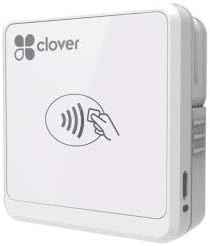
The Clover Go Contactless Reader has a 4.0 rating and provides a compact way to add contactless, EMV, and chip-ready payment to a mobile workflow. It works with both iOS and Android, giving it broader phone compatibility than readers explicitly tied to one connector or platform.
We may earn a commission when you buy through this link, at no additional cost to you.
The product description states that no merchant account is required, which may appeal to a buyer looking for the physical reader before completing account approval. Even so, a current reader is a component of a larger payment setup rather than a self-sufficient terminal. The connected mobile device, compatible software, account enrollment, and current service policies ultimately determine how the device functions.
Availability is the largest concern. The listing notes that quantities of this version may be limited or end of life, and orders may be fulfilled with the most current Clover Go version. This means the hardware can still be relevant, but buyers should examine exactly what they receive, confirm mobile operating-system support, and verify that current software remains available.
Clover Go is best for a mobile merchant who wants broad smartphone compatibility and a dedicated contactless reader. It is less suitable for someone who needs an abundant stock of an exact model or wants to avoid platform-specific account and app dependencies. Checking the current version before purchase is the most important step.
Compatibility with both iOS and Android gives the reader broader appeal than a USB-C-only accessory. Buyers should still verify the latest Clover app and operating-system requirements.
The listing warns that this version may be limited or discontinued. Since fulfillment could provide a newer reader, checking the package contents and current feature set helps prevent surprises.
We may earn a commission when you buy through this link, at no additional cost to you.
The Dejavoo QD2 is a mobile wireless payment terminal that supports chip, EMV, and NFC cards. Unlike products with an established numeric score, it has no listed customer rating, so prospective buyers have less visible feedback to help gauge long-term satisfaction or installation experience.
We may earn a commission when you buy through this link, at no additional cost to you.
The device has a 2.4-inch color LCD with backlight, 192 MB of total listed memory, and a power supply included in the package. Its mobile form factor is designed for merchants who need to process payments away from a fixed counter, while wireless operation offers more placement flexibility than a cabled desktop reader.
The critical requirement is the new merchant account with SwyftPAY before equipment ships. That approval dependency means the terminal is not an off-the-shelf device for arbitrary payment processing. The listing identifies SwyftPAY as a contracted reseller for Dejavoo and CardConnect, so the buyer should evaluate that relationship, support structure, and current service availability carefully.
The QD2 is best for a merchant already committed to the SwyftPAY processing pathway or willing to complete its approval process. It is a poor choice for someone wanting an immediately usable, platform-neutral reader. Confirm account eligibility, terminal support, card activation, and setup responsibilities before ordering, particularly because there is no listed customer rating to guide the decision.
The terminal's mobile wireless design is suited to merchants who move between locations or need a checkout position away from a fixed counter. Power and connectivity requirements should be tested in the intended environment.
A new SwyftPAY merchant account is required before shipment. This makes the processing relationship part of the purchase decision rather than an optional later step.
We may earn a commission when you buy through this link, at no additional cost to you.
The best credit card swiper depends on whether you need simple authorized data capture, a complete mobile checkout system, or professional counter hardware. Evaluate card formats, connection methods, security, mobility, and account requirements before choosing.
A conventional magnetic stripe reader captures data stored on the black stripe at the back of a card, while modern payment terminals may also support chip, EMV, NFC, and contactless transactions. A three-track reader is useful for authorized systems built around magnetic formats, but it is not a substitute for a certified payment terminal where customers expect tap, insert, or PIN workflows. Choose based on the cards your customers present and the standards required by your payment processor.
In short, match the reader to the card formats and transaction process your business actually handles.
USB keyboard emulation is common among the basic desktop readers in this guide. It can send captured information into familiar text fields and software without a special driver, but the destination application must accept that method. Bluetooth readers pair with a phone or tablet, while the PAX S300 supports fixed interfaces such as RS232 and Ethernet. Consider where the device will live, which computer it must communicate with, and whether cables or wireless pairing are more convenient.
In short, prioritize a connection method that works naturally with your existing hardware and software.
A physical reader rarely works independently of a processing arrangement. Square Terminal, Square Reader for magstripe, SumUp Plus, and Clover Go depend on their respective apps and merchant ecosystems. The Dejavoo QD2 explicitly requires a new SwyftPAY merchant account before equipment is shipped. These dependencies can simplify daily operation, but they also make current fees, account policies, support quality, and geographic availability central to the buying decision.
In short, read the merchant terms and account requirements before treating a reader as ready to use.
The basic magnetic readers vary significantly in their suitability for sensitive environments. The 2xhome POSMATE set explicitly states that it is not suitable for systems requiring an encrypted reader. By contrast, the PAX S300 is described with PCI PTS 3.x and SRED protections. Even when a device offers encryption, merchants must still follow their processor's rules for key management, access, storage, and equipment approval. A reader should never be used to collect payment data outside an authorized and properly configured system.
In short, verify encryption, certification, and processor approval before handling sensitive card information.
Mobile devices such as Square Terminal, SumUp Plus, Clover Go, and the Dejavoo QD2 are better suited to merchants who move between locations or cannot remain tethered to one workstation. Desktop USB readers are compact and dependable for fixed stations, with some offering mounting holes and long-enough cables to reach around a monitor. Consider counter space, charging requirements, workflow interruptions, and whether staff will carry the device during every sale.
In short, choose mobility for roaming sales and stable mounting for a permanent counter.
A complete checkout often involves more than reading a card. Square Terminal includes a receipt printer and a customer-facing screen, while compact magstripe readers depend on the connected phone or tablet for the interface. Some customers may prefer a printed receipt, while digital receipts can be more convenient for other businesses. Compare the hardware included with the needs of your POS application rather than assuming every reader performs the same function.
In short, confirm whether you need a screen, printer, keypad, or only a dedicated card input.
A broad list of supported standards is useful only when it matches the actual environment. Several desktop readers state support for ISO7811, AAMVA, CA DMV, high- and low-coercivity cards, and three magnetic tracks. Other products emphasize EMV, NFC, PIN, and electronic signature. Confirm the card formats, operating systems, interfaces, and applications you intend to use, and test a representative workflow before deploying equipment across a business.
In short, use the card and software lists as a checklist, not as proof of end-to-end compatibility.
Customer ratings can provide a useful signal, but they should be considered alongside product fit. The MSR90 and USB Magnetic Stripe Reader each carry a 4.2 rating, while the Square Reader for magstripe leads this group at 4.6. The Dejavoo QD2 has no listed rating, making independent feedback especially important. Look for patterns in reviews rather than treating one score as proof of performance, and note that stated swipe endurance does not guarantee a specific lifespan for every deployment.
In short, use ratings and repeated review themes to identify concerns, then verify the device's core fit.
Begin by confirming that the hardware, operating system, application, and payment account are compatible. For a USB reader, connect it to the intended computer and let the operating system recognize the keyboard-emulation device. For a mobile reader, install the official app, sign in or complete the required merchant enrollment, and pair the hardware using the procedure specified for that model. Never test a reader with live customer information until the destination system is configured correctly.
Use cards only for authorized business purposes and handle the device according to the processor's security procedures. Swipe magnetic cards in the direction indicated by the reader, keeping the stripe aligned with the magnetic head. For contactless models, present the card within the marked sensing area and wait for the app to confirm completion. A status light can indicate connection or a successful read, but merchants should always verify the transaction and customer-facing amount before completing a sale.
Keep the magnetic head, chip contacts, and contactless antenna free from dust, adhesive residue, liquids, and abrasive debris. Store the unit in a dry environment, use only the supplied or approved power adapter, and avoid pulling a connected cable sideways from the port. Inspect the cable, connector, screen, and card path periodically, and follow the manufacturer's update, cleaning, and device-replacement guidance. A reader that reads inconsistently should be removed from service and checked before it is placed back into circulation.
In this guide, a credit card swiper is a device that reads information from a card's magnetic stripe. Some models also support chip, EMV, NFC, PIN, receipts, or complete point-of-sale functions. The correct type depends on whether the device is for authorized data entry or for live customer payment processing.
Several products in this guide use USB keyboard emulation, allowing them to enter captured information into ordinary text fields without a routine driver installation. A separate configuration utility may be available. The destination application must still support the input method and must be properly configured for the intended authorized workflow.
No. Reading three magnetic tracks does not automatically mean a device can securely process live transactions. Payment-capable terminals also need processor approval, encryption where required, account enrollment, and software that supports the device. The 2xhome POSMATE set specifically states that it is not suitable for systems requiring an encrypted reader.
A card reader is primarily a hardware input for a larger system, while a POS terminal may include a display, application interface, payment processing, receipt output, and account management. Square Terminal and the PAX S300 v2 provide broader terminal functions, whereas several MSR90-style devices are designed for magnetic data capture into existing software.
That depends on the model. SumUp Plus uses Bluetooth with the SumUp app, Clover Go supports iOS and Android, and the Square Reader for magstripe uses USB-C while noting Lightning connector support for Apple devices. Check connector type, operating-system version, app availability, and merchant-account requirements before buying.
You need one for a device intended to process live customer payments through a specific service. Square, SumUp, and Clover products use their associated ecosystems, and the Dejavoo QD2 requires a new SwyftPAY account before shipping. Basic magnetic data readers may be used in other authorized applications, but their software must support keyboard-emulated input.
Disconnect the device from power and avoid opening the housing unless the manufacturer provides instructions. Use a soft, dry or lightly approved cloth to remove loose debris, and never spray liquid directly onto the unit. Follow model-specific cleaning guidance, especially around the magnetic head, electrical contacts, display, and card slot.
Confirm the required card formats, connection type, device operating system, destination software, security rules, and merchant-account process. Also review current availability, warranty coverage, replacement procedures, and customer feedback. Reading the latest product listing and processor documentation can reveal version changes that materially affect compatibility.
Square Terminal is the strongest all-around option for a merchant seeking a complete, portable checkout with major-card acceptance, fast chip processing, and integrated receipts. The Square Reader for magstripe is a strong budget choice for sellers already using its app, while the PAX S300 v2 serves professional fixed-counter environments that value broad payment support and layered security.
The remaining products solve narrower needs. MSR90-style readers are appropriate for authorized desktop data capture, the two-reader POSMATE set is useful where multiple basic stations are required, SumUp Plus offers wireless contactless checkout, Clover Go provides mobile platform flexibility, and the Dejavoo QD2 is intended for merchants approved through SwyftPAY. Prioritize the connection, card standards, account pathway, and security model that match your existing operation.
Before ordering, confirm the exact model version, current compatibility, software support, account eligibility, warranty, and return terms. Product listings, merchant plans, fees, and prices can change over time, so checking the latest information will help ensure that the selected swiper remains suitable for your workflow.
