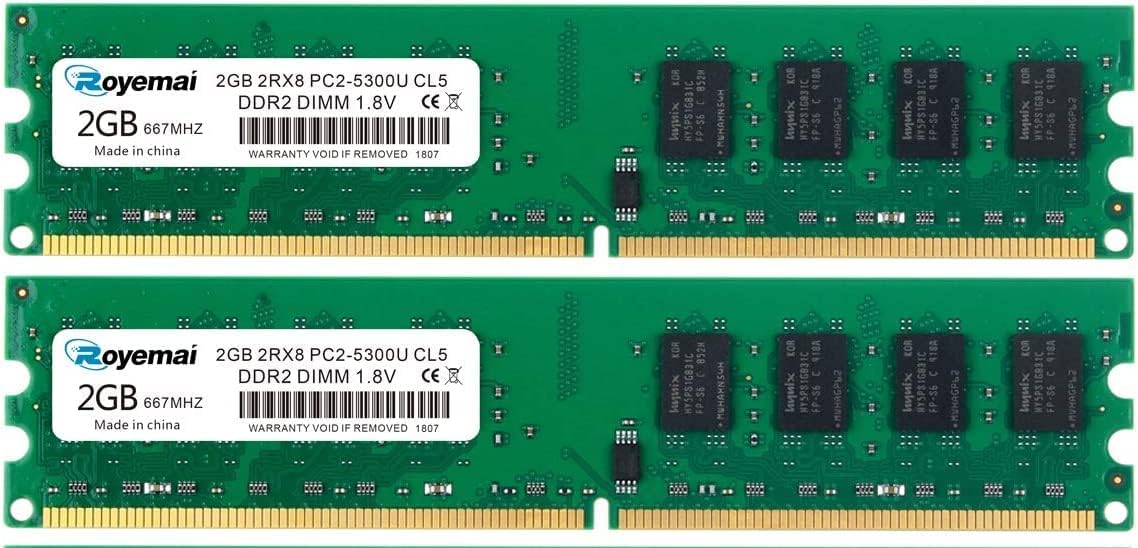
4G DDR2 667MHz Desktop Memory
4.8Editor score
4GB dual-module desktop kit
DDR2-667 PC2-5300 speed
240-pin non-ECC UDIMM
Our DDR2 Laptop and Desktop RAM guide compares capacity, speed, voltage, pin count, ECC status, and form factor to help you choose with more confidence.
DDR2 Laptop and Desktop RAM remains useful for repairing, refurbishing, and extending older computers that cannot support newer memory standards. A good upgrade must match the system’s supported speed, voltage, capacity, and physical form factor while avoiding incompatibilities that can prevent booting or compromise stability.
We compared the ten featured kits and modules by examining their stated capacity, data rate, timings, voltage, pin configuration, ECC and buffering status, rank organization, intended device type, manufacturer support, and customer rating. The guide covers both portable 200-pin SODIMM modules and full-size 240-pin desktop UDIMMs.
Each review identifies the most suitable use for its product, including general-purpose upgrades, machine-specific replacements, and capacity-conscious installations. Ratings reflect the supplied marketplace feedback rather than personal testing, and current prices can change, so confirm the complete system requirements before purchasing.
4.8Editor score

4.7Editor score

4.5Editor score
The comparison below separates laptop and desktop DDR2 options by capacity, speed, electrical and physical specifications, intended use, and marketplace rating. Form factor is the most important distinction, while machine-specific compatibility and the number of included modules determine how straightforward installation will be.




The Rasalas PC2-6400 DDR2 800 SODIMM is a 4GB laptop upgrade kit consisting of two 2GB modules. It carries a 4.6 customer rating and stands out for a clearly stated 800MHz PC2-6400S specification, 1.8V operation, CL6 timing, and a 200-pin SODIMM form factor. Its dual-rank configuration also makes it interesting for systems that support that organization.
We may earn a commission when you buy through this link, at no additional cost to you.
The strongest part of this kit is the breadth of its stated compatibility. Rasalas describes the modules for use with Mac, AMD, and Intel systems, while also emphasizing component screening and testing across motherboards from various brands. A matched two-module set can be especially useful for laptops that benefit from dual-channel memory, provided both slots accept the modules and the system supports 2GB modules.
The primary limitation is that DDR2-800 is not universal across every DDR2 notebook. Some machines cap memory at 667MHz, while others impose stricter maximum capacities, supported ranks, or module sizes. A 4GB pair may also be more than an older notebook can use, so the product’s general compatibility language should not be treated as a substitute for checking the exact service manual or system documentation.
This Rasalas kit is a sensible choice for a DDR2 laptop that explicitly supports 800MHz PC2-6400S memory and can benefit from two matched modules. It is less appropriate for a budget-oriented 667MHz-only notebook or a system limited to 1GB modules. For compatible hardware, it offers a practical balance of capacity, specification detail, and positive customer feedback.
Including two 2GB modules gives users a straightforward route to 4GB when both memory slots are available. It also allows the kit to be used in systems that benefit from dual-channel operation, subject to the computer’s own chipset and memory support.
The 800MHz PC2-6400S label, CL6 rating, and 1.8V requirement make this kit appropriate for systems designed around common DDR2-800 laptop specifications. Checking those details before ordering can prevent an otherwise simple upgrade from failing to boot.
We may earn a commission when you buy through this link, at no additional cost to you.
This MemoryMasters kit provides 8GB of DDR2 laptop memory using two 4GB SODIMM modules. It is rated 3.6 by customers, a lower score than most products in this guide, but its core specifications are straightforward: DDR2-800, PC2-6400, 1.8V, 200-pin SODIMM, and non-ECC unbuffered construction. Those details make it relevant to compatible notebooks and all-in-one systems.
We may earn a commission when you buy through this link, at no additional cost to you.
The main attraction is capacity. Two 4GB modules can raise the memory ceiling for a DDR2 laptop that supports 8GB and accepts 4GB SODIMMs. The kit also includes lifetime warranty coverage and toll-free technical support according to its product information, which are useful service-oriented features for buyers working with aging equipment.
Its 3.6 rating deserves careful attention. The supplied feedback does not explain the reasons behind that score, so it would be inappropriate to assign a specific technical fault or praise an unverified feature. What can be said objectively is that the module arrangement, capacity, and operating specifications are more restrictive than the list’s smaller and more broadly rated alternatives.
Choose this kit when a specific laptop supports 8GB DDR2-800 memory and accepts 4GB 200-pin SODIMMs. It is less compelling for a typical 2GB-to-4GB upgrade because either module could serve that purpose, and a higher-capacity system-specific alternative may offer a better-supported buying experience. Confirm maximum capacity and module size before ordering.
An 8GB total capacity is useful for older notebooks that handle several browser tabs, office applications, or background tasks. The benefit only applies when both the operating system and hardware officially support that much memory.
The stated lifetime warranty and toll-free technical support add reassurance for buyers who may need help determining compatibility. Buyers should still ask for the exact system model and obtain confirmation before installation.
We may earn a commission when you buy through this link, at no additional cost to you.
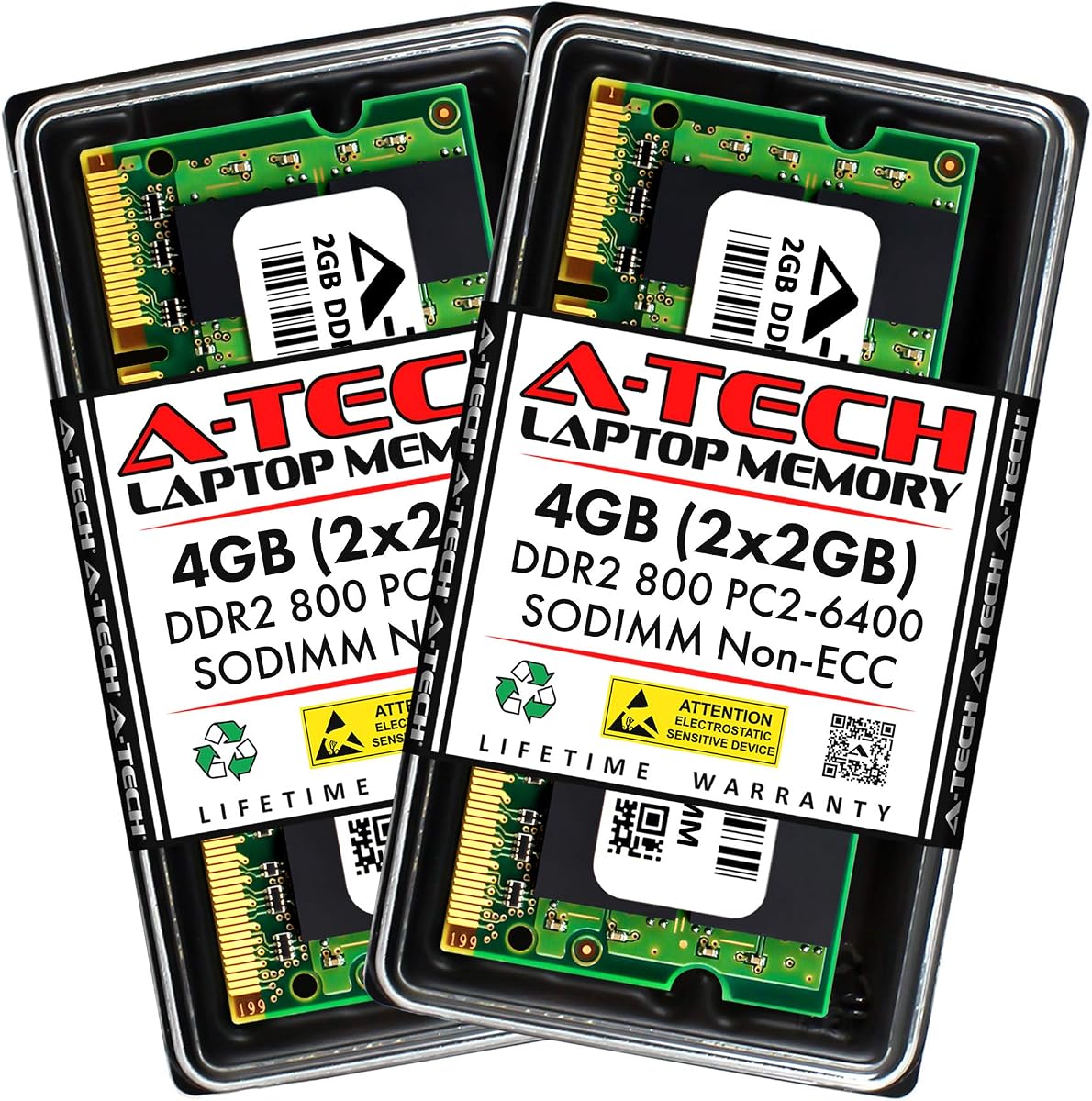
The A-Tech 4GB DDR2-800 SODIMM kit includes two 2GB modules and earns a 4.6 customer rating. Its detailed specification covers DDR2-800 PC2-6400 speed, CL6 latency, 1.8V operation, 200 pins, and non-ECC unbuffered operation. These characteristics align it with one of the most common DDR2 laptop memory configurations.
We may earn a commission when you buy through this link, at no additional cost to you.
Compatibility information is the kit’s defining strength. A-Tech names Acer, Alienware, Apple, ASUS, Dell, Fujitsu, Gateway, Gigabyte, HP, Lenovo, Samsung, Sony, Toshiba, and other laptop, notebook, and all-in-one brands. The stated quality assurance process and lifetime warranty reinforce the brand’s general appeal, particularly for owners restoring an older portable computer.
A long compatibility list is not a guarantee that every model supports 4GB, two modules, or DDR2-800 speeds. Older laptops may accept only one 2GB module, cap total memory at 2GB or 4GB, or run at a lower speed. A matched pair can still work in a single-slot system, but installing both requires two free and compatible slots.
This A-Tech kit is a strong general option for a laptop whose specifications confirm support for 4GB DDR2-800 PC2-6400 SODIMM memory. It combines a well-documented 4.6 rating, a 4GB matched-pair format, extensive brand coverage, and lifetime support. The essential buying task is to verify the exact notebook model rather than relying only on its brand.
The listed range of manufacturers makes this kit a practical candidate for a wide variety of older laptops. Compatibility still depends on the exact model, motherboard, maximum capacity, and supported memory organization.
A-Tech states that its modules undergo quality assurance testing and are backed by a lifetime warranty. It also offers United States-based technical support before, during, and after a purchase, which can be useful when identifying the correct upgrade.
We may earn a commission when you buy through this link, at no additional cost to you.
This A-Tech package supplies 8GB of DDR2 desktop memory in the unusual form of four 2GB modules. It has a 4.5 customer rating and is explicitly designed for Dell Inspiron 519, 530a/c, 545, 545s, 546, and 546s systems. Its PC2-6400 800MHz non-ECC DIMM specification narrows the target to compatible desktop configurations.
We may earn a commission when you buy through this link, at no additional cost to you.
For a listed Dell model with four suitable slots, the four-module arrangement makes efficient use of the board’s available memory positions. It also provides a clearly defined capacity without requiring a mixed-size set. The lifetime warranty adds a reassuring element, while the model-specific positioning can be easier for a refurbisher to evaluate than a broadly compatible desktop kit.
The constraint is equally important. A four-module set cannot be installed in a system with fewer than four usable slots, and Dell systems that use laptop-style SODIMMs are excluded even if they share the same Inspiron branding. A desktop that supports only two modules or has different memory limits will not benefit from all four sticks.
This is the best specialized option among the Dell-focused choices for a compatible four-slot Inspiron desktop. It is particularly relevant to refurbishment work where the target model is known and every included module can be used. For a general desktop upgrade or a laptop memory task, a two-module kit would be easier to accommodate.
Naming exact Inspiron models gives refurbishers and owners a more concrete target than a universal compatibility claim. The list still needs to be checked against the actual machine because configurations can vary within a product family.
Four 2GB modules provide 8GB while keeping each module the same size and specification. This makes the set particularly attractive to systems with four memory slots and a maximum capacity of at least 8GB.
We may earn a commission when you buy through this link, at no additional cost to you.
The Motoeagle PC2-5300U kit provides 4GB of desktop memory through two matched 2GB modules. Its 4.4 customer rating is backed by a clear list of characteristics: DDR2-667 speed, PC2-5300U classification, 1.8V operation, 240-pin unbuffered configuration, and 2Rx8 dual-rank organization. It is built for conventional desktop motherboards rather than laptops.
We may earn a commission when you buy through this link, at no additional cost to you.
A two-module set is one of the most versatile upgrade formats for DDR2 desktops. It fits many boards with two or four memory slots and can support dual-channel operation when the chipset and installed modules are compatible. Motoeagle says its chips come from large manufacturers and are tested, while also emphasizing stable long-term operation and broader motherboard compatibility.
Its speed should be considered carefully in relation to faster DDR2-800 alternatives. Memory rated for 667MHz can be a sensible fit in a system designed for PC2-5300, and a matching chipset may run the modules at a common speed. Conversely, buyers should not assume the higher rated speed of a DDR2-800 kit will be matched exactly by this product.
The Motoeagle kit is a good general choice for a 240-pin DDR2 desktop that uses 667MHz memory and supports 2GB modules. Its two-stick format avoids the slot requirements of the four-module Dell set, while the 4.4 rating and detailed technical description provide a solid basis for comparison. Verify desktop form factor, maximum capacity, and supported speed first.
The 240-pin UDIMM form factor distinguishes this kit from every laptop-focused product in the guide. It is suitable for compatible desktop motherboards but physically will not fit a notebook’s 200-pin SODIMM socket.
Two identical 2GB modules simplify capacity planning and may enable dual-channel behavior where supported. A desktop with only one slot can still use one module, provided its maximum supported capacity reaches 2GB.
We may earn a commission when you buy through this link, at no additional cost to you.
The Crucial 4GB kit is a two-module, 4GB DDR2-800 desktop memory set with a 4.7 customer rating. It uses PC2-6400 speed, CL6 latency, unbuffered design, and a 240-pin UDIMM layout. The compact two-stick format and full-speed DDR2-800 specification make it a strong all-around option for compatible desktop platforms.
We may earn a commission when you buy through this link, at no additional cost to you.
Crucial’s product information emphasizes system performance, easy installation, premium quality, and 100% testing. It also provides the model identifiers CT2KIT25664AA800 and CT2CP25664AA800, with the latter stated as identical. This level of model information can be useful for buyers who need a recognizable replacement rather than an unspecified generic module.
There are two important limits. First, a 240-pin UDIMM is physically and electrically different from a laptop SODIMM, so this kit cannot serve a portable computer. Second, the computer must accept 2GB DDR2-800 modules and must support the intended total capacity. A module that works in one machine is not automatically ideal for every motherboard, even when it uses the same nominal speed.
Among the general desktop options, this is the most balanced selection. Its 4.7 rating is among the strongest in the guide, its specification is current for the DDR2 category, and its two-module capacity is broadly practical. It is the top choice for a DDR2 desktop that requires a matched 4GB PC2-6400 kit, provided the system documentation confirms support.
A 4GB matched pair fits the upgrade path of many DDR2 desktop systems without requiring four modules. It can also improve responsiveness in multitasking environments where the installed system is constrained by a small original memory configuration.
Providing exact part numbers and stating that the modules are tested makes the kit easier to compare with system requirements. Matching the required part number or one of its stated equivalents can reduce uncertainty during an upgrade.
We may earn a commission when you buy through this link, at no additional cost to you.
This 4GB DDR2-667 desktop kit contains two 2GB modules and has the highest customer rating in the selection, 4.8. Its specifications are PC2-5300, 1.8V, CL5, 240-pin, 2Rx8, non-ECC, and unbuffered. It is designed for desktop AMD, Intel, and Mac systems, giving it a broad target across several major hardware ecosystems.
We may earn a commission when you buy through this link, at no additional cost to you.
The product information states that the modules use Samsung ICs and original chips, and that all RAM is tested for stability, durability, and compatibility before shipment. A 4GB matched pair is a convenient format for older desktops that support two modules. The manufacturer also provides contact support for model checking, which is valuable when compatibility is uncertain.
The kit’s 4.8 rating is encouraging, but ratings should be considered alongside specifications and system limits. Its 667MHz speed is lower than the 800MHz offered by several alternatives, and its dual-rank 2Rx8 modules may not be accepted by every older board. Mac support also does not mean universal compatibility across every Mac model; the specific requirements still apply.
This is an excellent pick for a compatible 667MHz desktop that accepts 2GB dual-rank UDIMMs. It combines the guide’s highest rating with a practical 4GB two-module configuration and detailed compatibility information. It is less appropriate when a system requires DDR2-800, rejects dual-rank modules, or has a maximum capacity below 4GB.
The 4.8 rating makes this one of the strongest marketplace-rated options in the guide. It indicates favorable customer sentiment, although buyers should still evaluate the exact technical requirements of their own computer.
The stated willingness to check desktop model compatibility is particularly useful for older machines. Sharing the precise model number can help a buyer confirm that the 4GB kit, dual-rank layout, and 667MHz speed are supported.
We may earn a commission when you buy through this link, at no additional cost to you.
The Crucial 2GB DDR2-667 SODIMM is a single 200-pin notebook module with a 4.5 customer rating. It is identified as PC2-5300, operates at 667MHz, and has CL5 timing. Unlike several other selections, it is not a kit, which makes it an approachable option when a notebook has a failed stick or only one usable memory slot.
We may earn a commission when you buy through this link, at no additional cost to you.
Single-module upgrades are useful for replacing faulty memory without changing the entire configuration. The 2GB capacity is also conservative enough for many DDR2 notebooks, including older systems that may not support larger modules. The exact model number CT25664AC667 allows buyers to compare the product with a laptop manufacturer’s supported memory list.
A single 2GB module cannot provide the same flexibility as a matched two-module kit. It may be the only option in a system with one slot, but in a notebook with two slots and a higher memory ceiling, a 2GB pair can offer greater total capacity. It also cannot enable a two-module dual-channel arrangement on its own.
Choose this Crucial module for a DDR2 notebook that accepts 2GB PC2-5300 200-pin memory and needs a straightforward replacement or a single-stick addition. It is a solid option with a 4.5 rating, but buyers seeking the greatest flexibility should compare it with the 4GB laptop kits in this guide.
A single module can restore a laptop that has only one installed stick or one open slot. It is especially convenient when the user wants to preserve an existing compatible module rather than replace every memory device.
The 2GB size is often easier for older notebook motherboards to support than larger DDR2 modules. It remains necessary to confirm the maximum capacity and supported module organization in the laptop documentation.
We may earn a commission when you buy through this link, at no additional cost to you.
The 2GB Dell Optiplex DDR2 kit consists of two 1GB 240-pin DIMMs rated at PC2-5300 and 667MHz. It has a 4.7 customer rating and specifically names the Dell Optiplex 330, 740, 745, 745c, and 755. This model-specific approach makes it relevant to office desktops, refurbished business machines, and other systems with confirmed support.
We may earn a commission when you buy through this link, at no additional cost to you.
Two matched 1GB modules offer a convenient way to populate both slots in a compatible Optiplex. They may support dual-channel behavior, subject to the system’s chipset, and the kit’s advertised lifetime warranty adds a service-oriented advantage. Compared with larger desktop kits, the 2GB total is modest but can be enough to improve a lightly used machine that previously had very little memory.
Capacity is the obvious trade-off. Modern browsers and operating systems can place substantial demand on even a basic 4GB configuration, so a 2GB upgrade may provide only a modest improvement. The system must also support two 1GB DDR2-667 modules, and buyers should not assume every Optiplex from the same era uses the same maximum capacity or slot arrangement.
This kit is a targeted option for owners of the listed Dell Optiplex models who need inexpensive, compact memory and have confirmed that 2GB is their supported configuration. For a machine that supports 4GB, a larger two-module kit may offer a more useful result. The 4.7 rating and model-specific focus make it worth checking when the computer is one of the named systems.
Listing the exact Optiplex families makes it easier to narrow a search for an older office computer. The service tag or model identifier should still be checked because hardware configurations can differ between similarly named systems.
The two 1GB modules can fill both memory slots in systems designed for a matched pair. This provides a simple installation with the possibility of dual-channel operation where the platform supports it.
We may earn a commission when you buy through this link, at no additional cost to you.
The Hynix 2GB DDR2-800 SODIMM is a single laptop memory module for systems that support PC2-6400 200-pin memory. It has a 4.3 customer rating, the lowest among the ten selections, but its technical description is concise and clear. It offers 2GB at 800MHz in the smaller form factor required by many DDR2 notebooks.
We may earn a commission when you buy through this link, at no additional cost to you.
As a single module, it can fill one available slot or replace a failed stick without requiring a matched pair. The PC2-6400 specification makes it relevant to laptops that support DDR2-800 rather than only the slower 667MHz generation. Its RoHS compliance is another stated characteristic, though buyers should not assume that alone determines compatibility.
The limitations are straightforward. A single 2GB module provides less total memory than the 4GB and 8GB kits, and its 4.3 rating is the lowest in this comparison. It also cannot create a dual-channel configuration by itself, and the computer must accept 2GB DDR2-800 SODIMMs. Older notebooks may support smaller capacities or slower speeds exclusively.
This Hynix module is best for a compatible laptop that needs a single 2GB DDR2-800 stick, particularly when only one slot is available. It can also be a practical replacement when a matching existing module is already installed. For a broader capacity increase, the two-module laptop kits offer more flexibility, but this option remains focused and useful for its intended upgrade.
The single-module format keeps installation straightforward for systems with one open slot. It is a logical way to raise low memory without requiring a paired kit or multiple compatible sticks.
A laptop that explicitly supports PC2-6400 can take advantage of the module’s 800MHz specification. The system must also support 2GB modules, so the memory limit and maximum module size should both be confirmed.
We may earn a commission when you buy through this link, at no additional cost to you.
Choosing compatible DDR2 memory requires matching several technical details to the computer. Form factor, speed, voltage, capacity, rank, and buffering rules determine whether the modules can be installed safely and deliver useful performance.
The physical shape of a memory module must match the slots on the motherboard. Laptop and compact all-in-one computers use 200-pin SODIMMs, while conventional desktop motherboards generally use longer 240-pin UDIMMs. Although both may be called DDR2, they have different dimensions, contact layouts, and notch positions, so one cannot substitute for the other. The product title should explicitly say SODIMM for a notebook or DIMM or UDIMM for a desktop.
DDR2 modules operate at several labeled speeds. PC2-5300 corresponds to 667MHz, while PC2-6400 corresponds to 800MHz. Faster memory can usually run at a lower speed supported by the motherboard, but a module faster than the system expects may not be recognized or may create compatibility problems. PC2-6300 and PC2-6400S are also referenced in the laptop selections, so buyers should compare all labels with the manufacturer’s memory specifications rather than focusing only on the advertised clock rate.
Total capacity is only useful if both the operating system and hardware support it. A computer may support 4GB overall but accept only 1GB or 2GB modules, while another may have two slots and a 2GB maximum. Matched pairs of 2GB modules are common in this category, and a 4GB single module can suit systems with one slot. The more modules in a kit, the more memory slots the target system must have.
The featured DDR2 products are rated at 1.8V, which corresponds to the mainstream notebook and desktop DDR2 standard. Some server-oriented DDR2 memory can use different electrical characteristics, and desktop systems may have both DDR and DDR2 slots. Buyers should verify that the machine accepts 1.8V DDR2 and does not require registered, buffered, or ECC memory unless the listing explicitly states it.
Most compatible client computers use non-ECC unbuffered memory. A product described as ECC or buffered may require server-class hardware or a workstation chipset. Rank organization also matters: 1Rx8 and 2Rx8 modules look similar physically but may be treated differently by an older motherboard. The Rasalas, Motoeagle, and 4G DDR2-667 desktop kits are specifically described as 2Rx8, making model verification especially important for them.
Installing two matching modules can enable dual-channel operation on compatible chipsets, which can improve memory bandwidth. A kit with identical 2GB modules is therefore more flexible than a bundle of unrelated sizes. It is not guaranteed to produce a speed increase in every system, since the motherboard, processor, and existing memory all influence channel behavior. For reliable operation, matched modules remain the safer approach when both slots will be populated.
A long brand list can help narrow the field, but it cannot replace model-level verification. Laptops and desktops from the same manufacturer may use different memory formats, maximum capacities, and chip configurations. Machine-specific listings, such as the options for Dell Inspiron and Optiplex systems, are helpful because they begin with a known target. Still, the exact model identifier, motherboard revision, and service documentation should determine the final purchase decision.
A lifetime warranty and accessible technical support can be valuable when diagnosing installation problems or confirming compatibility. A-Tech advertises lifetime warranty coverage, while MemoryMasters also states lifetime warranty service and toll-free support. These benefits are most useful when a retailer permits returns and when the seller supplies clear instructions. A support contact is valuable, but it should complement—not replace—the buyer’s responsibility to verify specifications.
Begin by shutting the computer down completely and disconnecting its power source. For a desktop, remove the side panel and note the installed memory arrangement before touching the modules. For a laptop, consult the manufacturer’s service guide, remove the battery if the design permits it, and access the memory compartment carefully. Record the module size, speed, and any existing manufacturer markings so the new kit can be matched appropriately.
Ground yourself before handling the memory and avoid touching the gold contact edges. Release or retain the retention clips as required, align the module’s notch with the socket, and press both ends until the clips close. A desktop 240-pin UDIMM and a laptop 200-pin SODIMM should never be forced into one another. Install the modules according to the manufacturer’s recommended channel arrangement, which is often the farthest slot followed by the slot nearest the processor.
After installation, close the case, reconnect power, and enter the system’s memory diagnostics or BIOS information screen. Confirm that the full installed capacity is recognized and watch for repeated errors during a restart. A boot failure may indicate an unsupported module size, incorrect voltage, mixed memory, or a system limit. If problems occur, power down, reseat the modules, try only one stick at a time, and revisit the system’s supported memory specifications.
No. Laptop DDR2 normally uses 200-pin SODIMMs, while desktop DDR2 normally uses 240-pin UDIMMs. They have different dimensions, notch positions, and electrical layouts, so one form factor cannot physically fit the other. Always identify the form factor required by the exact computer model before ordering.
A compatible module may often operate at a lower speed supported by the motherboard, but this is not guaranteed for every system. The computer must also recognize the module’s size, voltage, rank, and buffering configuration. PC2-6400 is commonly advertised as 800MHz, while PC2-5300 is 667MHz, so the system’s supported speed remains a critical check.
A 2GB module provides 2GB in one physical stick, while a 4GB kit usually contains two 2GB modules. A kit may provide more total memory and can enable dual-channel operation when both modules are installed in the correct slots. A single module can be more convenient for a system with only one slot or for a simple replacement.
Consult the manufacturer’s service manual, technical support, or a reliable hardware identification tool for the exact model. The relevant limits include maximum total memory, maximum capacity per slot, supported form factor, operating speed, and accepted rank organization. Do not rely solely on the age of the computer, because model configurations can vary substantially.
Most laptops and desktops designed for general use require non-ECC unbuffered memory, which is what most products in this guide provide. Some servers and workstations use registered, buffered, or ECC DDR2, and ordinary client memory may not work in those systems. Check the motherboard and system documentation before choosing anything other than non-ECC unbuffered modules.
Possible causes include an unsupported module size, a maximum capacity limit, incorrect slot configuration, mixed modules, or a rank combination the motherboard does not accept. Start the system after installing one module at a time to determine whether each stick works independently, then check the manual for the recommended dual-channel arrangement.
It can improve responsiveness when the computer has been constrained by too little memory, especially during multitasking or when many applications are open. Adding RAM will not make the processor, storage, or graphics system faster. If the computer already has sufficient memory, the visible benefit may be small.
A matched kit is usually the safer choice because both modules share the same capacity, speed, voltage, timings, and organization. That reduces the chance of compatibility problems and makes dual-channel operation more dependable. Unrelated modules can work, but they are more likely to run at a shared speed or produce stability issues.
The 4G DDR2-667 Desktop Memory earns the highest customer rating in the guide and is a compelling two-module desktop option for compatible PC2-5300 systems. The Crucial 4GB DDR2-800 UDIMM stands out as the best overall desktop choice because it combines full DDR2-800 speed, a practical matched capacity, and a 4.7 rating, while the A-Tech 8GB Dell Inspiron set serves compatible four-slot systems with a more specialized capacity package.
For laptop upgrades, form factor and module limits matter more than any general compatibility claim. The Rasalas and A-Tech 4GB DDR2-800 SODIMM kits suit compatible 800MHz notebooks, the MemoryMasters 8GB kit addresses higher-capacity systems, and the Crucial or Hynix single modules are useful when only one slot is available. Check exact model documentation, maximum capacity, supported rank, and speed before purchasing.
Marketplace ratings provide useful context, but they do not replace system-specific verification, and current prices can change at any time. Compare the module format, electrical specifications, capacity, and intended machine first, then review seller support and return terms. That disciplined approach is the surest way to select DDR2 Laptop and Desktop RAM that works as intended.