
ORICO 3.5 Inch Trayless Mobile Rack
4.1Editor score
Single 3.5-inch drive
SATA III up to 6Gbps
Tool-free mounting process
Front power button
A hot swap SATA mobile rack turns an internal drive bay into a convenient way to install, remove, and replace hard drives or SSDs without opening the computer chassis. The strongest choices combine broad drive compatibility, secure connections, useful cooling, and front-accessible operation in a design that suits the available space.
This guide compares 10 mobile racks ranging from a single 3.5-inch drive carrier to six-bay 2.5-inch enclosures. The evaluation considers bay count, supported drive sizes, SATA and SAS compatibility, connector type, cooling, indicators, locking features, construction, and how easily bare drives can be inserted or removed.
The picks illustrate different priorities, from a straightforward single-bay solution to high-density tool-less cages with active cooling. Ratings reflect the supplied customer feedback, while technical details come from the listed product information. Availability, configurations, and prices can change, so confirm the current listing and system requirements before purchasing.
4.1Editor score

4.4Editor score

5.0Editor score
As an Amazon Associate we earn from qualifying purchases.
This side-by-side comparison highlights the major differences in drive capacity, physical footprint, connector support, cooling, and access features across the 10 selected hot swap SATA mobile racks.




The StarTech HSB100SATBK is a straightforward one-drive mobile rack for a 5.25-inch bay, and its supplied 4.4 rating reflects a favorable balance of simplicity and construction. It holds a 3.5-inch SATA drive at the front of the chassis, allowing a user to install or remove the disk without pulling the computer apart. That convenience makes it especially practical for maintenance-oriented desktop systems and workstations.
We may earn a commission when you buy through this link, at no additional cost to you.
Its central advantage is the trayless arrangement. Rather than forcing the drive into a separate carrier, the enclosure accepts the bare disk and is secured through its own locking mechanism. Internal rubber shock absorbers help isolate the drive, while the aluminum structure and 50,000-plus insertion rating support repeated use. The front-accessible placement also means the drive can be serviced without opening the case.
The compromises are equally clear. This rack handles only one 3.5-inch SATA drive, so it cannot provide the density offered by multi-bay cages. It also relies on passive cooling rather than a dedicated fan. In addition, users who need SAS, individual activity LEDs, or 2.5-inch support will need to look at one of the more specialized alternatives in this guide.
This is the most sensible pick for someone who wants one dependable, front-reachable 3.5-inch drive without a complicated tray system. It offers a restrained feature set centered on quick replacement, security, and physical durability. For a single-disk hot swap use case, that focus is an advantage rather than a limitation, making it our overall choice.
Because the drive mounts directly in the trayless bay, routine replacement does not require a separate enclosure or a collection of screws. The front locking mechanism helps keep the disk secure while still allowing authorized access when maintenance is needed.
Rubber shock absorbers add a useful layer of protection for a drive that may be moved in and out regularly. Combined with the aluminum construction and high insertion rating, the design is oriented toward repeated service rather than occasional storage use.
We may earn a commission when you buy through this link, at no additional cost to you.
The ICY DOCK flexiDOCK MB522SP-B provides two 2.5-inch drive positions inside a single 3.5-inch bay, giving it more flexibility than the single-drive StarTech model. Its 4.3 rating indicates solid customer reception, and the enclosure is aimed at systems where fast SSD replacement or convenient access to two compact drives matters.
We may earn a commission when you buy through this link, at no additional cost to you.
Both SATA and SAS devices are supported, with listed compatibility for SATA 3.0 at 6Gbps and SAS 3.0 at 12Gbps. The tool-less, doorless design accepts bare drives without requiring separate trays. Large eject buttons make each position easy to release, while an activity indicator built into each button provides immediate visual feedback.
Active Power Technology is a thoughtful addition for systems that may not always contain a drive. The listed behavior powers an individual LED when a drive is present, reducing unnecessary activity compared with powering every position continuously. However, the product is a single-channel enclosure, and the listed specifications do not mention an active cooling fan, so buyers with sustained high workloads should consider thermal requirements carefully.
Choose the MB522SP-B if you want two compact SATA or SAS drives, straightforward insertion, and no door to interfere with the swap process. It is a good fit for mobile computers, rackmount systems, industrial control machines, and other applications that value accessible 2.5-inch storage. It is less suitable for large 3.5-inch disks or installations that need a high number of simultaneously active bays.
The doorless, trayless format removes several steps from a traditional hard-drive swap. Each 2.5-inch drive is inserted directly, then secured and removed with the individual eject controls, making the enclosure convenient for service workflows.
The integrated power and activity light in each eject button makes it easier to see the status of both drive positions. This is helpful when a system operator needs immediate confirmation that a replacement has been recognized and is communicating.
We may earn a commission when you buy through this link, at no additional cost to you.
The StarTech HSB220SAT25B converts one 3.5-inch bay into a front-accessible interface for two 2.5-inch SATA hard drives or SSDs. Its supplied rating is 4.1, and its strongest qualities are broad SATA compatibility, a clean trayless format, and useful per-drive controls in a space-efficient enclosure.
We may earn a commission when you buy through this link, at no additional cost to you.
The backplane supports SATA I, SATA II, and SATA III devices without requiring extra drivers or software. Dedicated front eject buttons simplify replacement, and individual power and activity LEDs show the state of each slot. The included screw kit and SATA data and power cables reduce uncertainty during installation, while protective film sheets are provided for the bottom of the hard drives.
Thermal design relies on an open top and vented divider to dissipate heat passively. This is a sensible approach for a compact two-bay unit, but it is not equivalent to a cage with controlled fans. The product also focuses on SATA rather than SAS, and its two-drive capacity is much lower than larger four-, five-, and six-bay options.
The HSB220SAT25B suits a technician or advanced user who needs to maintain a pair of 2.5-inch SATA drives in a 3.5-inch bay. It is particularly useful when broad drive-generation support and clear status indicators are priorities. For denser storage or SAS devices, move up to the ICY DOCK or Kingwin multi-drive racks.
The open-top aluminum structure and vented slot divider promote airflow around the drives. That makes the enclosure useful in systems where a fan-equipped cage would add complexity, provided the chassis itself has adequate circulation.
Separate eject buttons and individual power and activity LEDs reduce ambiguity during maintenance. Operators can see each position separately and release the intended drive without disturbing the other slot.
We may earn a commission when you buy through this link, at no additional cost to you.
The Kingwin tray-less mobile rack combines a dual 2.5-inch layout with support for SATA I/II/III and SAS I/II drives. Its 4.5 rating is among the stronger results in the group, and the inclusion of a key lock gives it a security-oriented feature that many compact hot-swap cages omit.
We may earn a commission when you buy through this link, at no additional cost to you.
Both mechanical hard drives and SSDs can be inserted directly without tools or screws. The listed non-scratch SATA connector supports up to 50,000 insertions, while power and drive-activity LEDs help indicate operating status. Its mixed-interface compatibility makes it more versatile than backplanes limited to SATA generations, particularly for systems that may use either SATA or suitable SAS drives.
The rack is built from ABS and metal to provide structural strength and heat dissipation, but no dedicated fan is stated in the supplied information. Users planning to run several high-workload 2.5-inch drives continuously should verify that the host case supplies enough airflow. As with any hot-swap product, the computer, controller, operating system, and file system must also support the intended replacement behavior.
This Kingwin model is a strong choice for a compact workstation or server-style installation that wants two front-accessible drives, mixed SATA/SAS support, and a physical lock. It balances practical security and tool-free operation without expanding beyond two drive positions. Users who need greater density or active fan control should consider the four- or six-bay ICY DOCK alternatives.
The built-in key lock helps prevent unauthorized removal of a drive. That matters in shared systems where a front-accessible bay could otherwise be opened by someone without proper maintenance authority.
Supporting both SATA and SAS devices provides a wider path for reuse and expansion. The enclosure can therefore serve systems that need the flexibility to use different drive interfaces, subject to the host controller and cabling requirements.
We may earn a commission when you buy through this link, at no additional cost to you.
The ICY DOCK MB326SP-1B is the most capacity-focused product in this guide, packing six 2.5-inch SATA or SAS drives into one 5.25-inch bay. Its supplied 5.0 rating, combined with active cooling and a tool-less mounting system, makes it the strongest premium option for dense internal storage.
We may earn a commission when you buy through this link, at no additional cost to you.
Its ExpressTray system supports removable trays with tool-less installation while retaining optional bottom screw holes for users who want additional stability. Drives from 5mm through 9.5mm in height are accepted, and each bay receives an individual blue LED. Active Power Technology is designed to power the appropriate position when a drive is installed, while two upgradeable 40mm fans provide active cooling with high, low, and off settings.
The enclosure lists SATA 6Gbps and SAS 3.0 12Gbps support in a single-channel configuration, and two 15-pin SATA power connectors supply all six drive positions. Buyers must therefore check whether the host has the necessary backplane or controller support, whether the power supply can provide the required connections, and whether the intended data setup matches the enclosure's single-channel arrangement.
This is the pick for a technician, media workstation, or storage-oriented computer that needs six quickly replaceable compact drives in one conventional bay. The cooling controls and dense capacity justify its premium position, although it offers no advantage over simpler models in a system that only needs one or two disks.
Two user-upgradeable 40mm fans give the six-drive enclosure an active thermal-management option. High, low, and off settings let the builder balance cooling and noise according to the workload and the acoustic needs of the system.
The ExpressTray approach combines quick loading with optional screw-down points. Six individually indicated positions make it easier to identify a missing or active drive, which is valuable in a dense maintenance environment.
We may earn a commission when you buy through this link, at no additional cost to you.
The ICY DOCK MB324SP-1B offers four hot-swappable 2.5-inch drive positions in a single 5.25-inch bay. Its 4.6 rating is one of the strongest in the roundup, while the enclosure's tool-less tray system, broad drive-height support, and locking connectors make it a versatile middle ground between compact dual-bay units and larger six-bay cages.
We may earn a commission when you buy through this link, at no additional cost to you.
The drive positions accept SATA and SAS hard drives or SSDs with heights from 5mm to 12.5mm. Individual blue LEDs identify each bay, while a metal enclosure and heavy-duty ABS trays add structural support. Locking latches on both the seven-pin SATA data connectors and 15-pin power connectors help maintain secure connections, and three-speed fan control provides airflow management.
The listed interface support is SATA 6Gbps or SAS 3.0 12Gbps in a single channel, with one 15-pin SATA power connector supplying all four drives. As a result, the enclosure is not a four-channel storage controller. The host must provide the appropriate backplane or controller arrangement, and the data speed available to each drive will depend on the overall system design.
The MB324SP-1B is best for builders who want more density than a dual-bay cage but do not need six positions. It works especially well for compact servers, technical workstations, and systems that routinely rotate SSDs. Its balance of capacity, drive-height tolerance, connector security, and adjustable cooling is particularly persuasive.
Dedicated locking latches on the data and power connectors help resist accidental disconnection. That attention to connector security is useful in systems where vibration, movement, or frequent maintenance could otherwise undermine a frequent hot-swap workflow.
The enclosure accepts four drive thicknesses, from slim 5mm devices to 12.5mm models. A metal body, durable trays, door latches, and controllable cooling give the unit a professional profile suited to service-oriented internal builds.
We may earn a commission when you buy through this link, at no additional cost to you.
The ORICO 1106SS is a simple one-bay solution for converting a 5.25-inch optical-drive space into front-accessible 3.5-inch SATA storage. Its 4.1 rating and compact feature set make it the most budget-oriented pick, particularly for a basic desktop that needs quick access to one hard drive without purchasing a larger backplane.
We may earn a commission when you buy through this link, at no additional cost to you.
The stated SATA III data transfer capability reaches up to 6Gbps, and the tool-free process is straightforward: lock a compatible 3.5-inch drive into the carrier, install that carrier in the optical bay, and connect it through the SATA interface. A front on/off control allows the user to switch between connection and sleep mode, adding operational control that is useful during maintenance.
Stainless steel construction is intended to aid heat dissipation, but there is no dedicated fan. The product also has just one drive position and does not list a physical lock, so it offers less capacity and security than the StarTech HSB100SATBK. Its operating-system compatibility statement references Windows XP through Windows 10, which is less comprehensive than the current information available for newer systems.
The ORICO is best for a straightforward one-drive conversion, a temporary service arrangement, or a user who values uncomplicated installation over multi-bay flexibility. It is a practical budget recommendation, but buyers who need multiple drives, physical locking, or current host compatibility should compare the more specialized alternatives.
The carrier is designed to use space that may otherwise be occupied by an optical drive. A builder can install a standard 3.5-inch disk and gain front access without building a custom mounting arrangement.
The integrated on/off button offers a straightforward way to disconnect the drive or place it into sleep mode. This can be convenient when the system is being serviced or when a removable disk is not being used.
We may earn a commission when you buy through this link, at no additional cost to you.
The Rosewill RSV-SATA-Cage-34 is a high-capacity internal cage that converts three 5.25-inch optical-drive spaces into four hot-swappable drive positions. Its 4.3 rating reflects a well-rounded design for systems with room to spare, particularly builders who want 3.5-inch storage density and active cooling rather than compact 2.5-inch density.
We may earn a commission when you buy through this link, at no additional cost to you.
The cage accommodates four 3.5-inch SATA drives, four 2.5-inch SATA drives, or SAS drives, giving users several ways to populate the available positions. A single rear 120mm exhaust fan creates active airflow through the enclosure. The steel and ABS construction is intended to provide a durable internal platform, and the listed compatibility with Rosewill L4000U, L4500U, and R4000U models adds a useful note for system-specific builders.
Hot-swap support is explicitly listed for SATA I, SATA II, and SATA III. SAS compatibility is limited to 6Gbps, which may not align with newer SAS equipment. The three-bay footprint is also substantially larger than the compact cages in this guide, so users must confirm that their chassis has three adjacent 5.25-inch positions and suitable power and data connections.
The RSV-SATA-Cage-34 is an attractive choice for a storage-heavy desktop, media system, or legacy workstation with enough internal space. It combines four full-size positions with a dedicated cooling fan and broad SATA support. Its primary trade-off is physical footprint: if every 5.25-inch bay is needed for optical drives or other equipment, a smaller 2.5-inch cage is a better fit.
The cage is centered on 3.5-inch drives, which remain important for high-capacity storage. Four positions in three optical-bay spaces provide useful expansion without requiring a separate external enclosure.
The 120mm rear exhaust fan offers more deliberate cooling than a fully passive design. It is particularly relevant when multiple hard drives operate in the same enclosure for extended periods.
We may earn a commission when you buy through this link, at no additional cost to you.
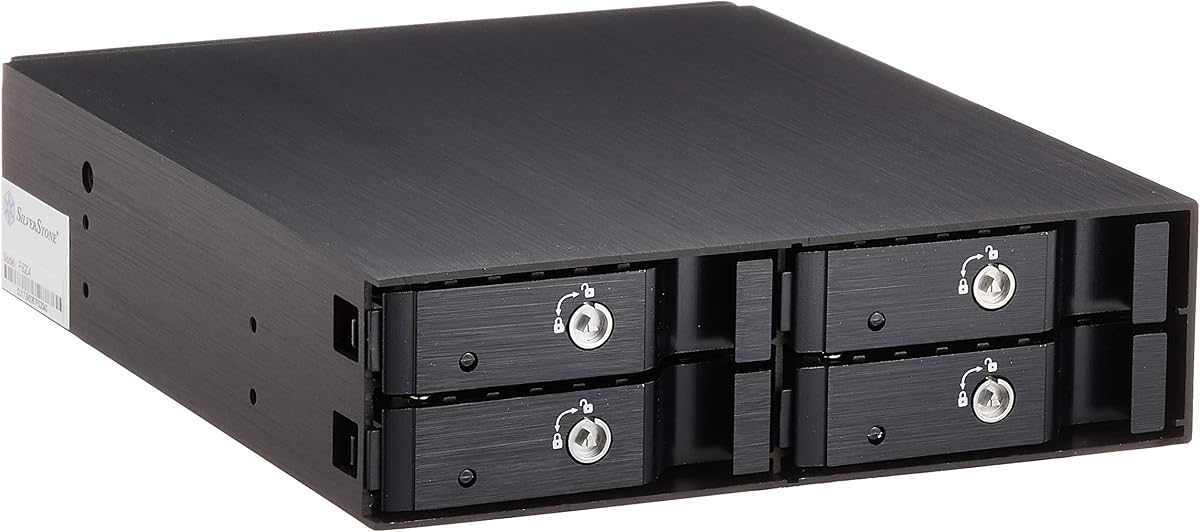
The SilverStone SST-FS204B combines four 2.5-inch drive positions with an all-aluminum body, individual key locks, and a built-in cooling fan. Its 4.2 rating and premium materials make it an appealing option for a professional workstation or compact server where security and chassis presentation are important.
We may earn a commission when you buy through this link, at no additional cost to you.
Each bay can hold a SAS or SATA hard drive or SSD with listed interface performance up to 6Gbit/s. A separate metal key lock for every position provides a strong degree of physical security, while independent drive-status LEDs allow an operator to check each slot. The brushed aluminum enclosure is designed for heat dissipation and presents a durable, refined appearance inside a case.
Unlike the ICY DOCK units, the supplied information does not identify a tool-less mounting system or adjustable fan speed. Buyers should also verify how the enclosure connects to the host and whether the host's controller arrangement supports its intended drive configuration. Its full 5.25-inch footprint is considerably larger than a 3.5-inch dual-bay cage, even though it carries more 2.5-inch devices.
The SST-FS204B is best for users who prioritize individual physical locks, aluminum construction, and integrated cooling in a four-drive package. It is particularly suitable for shared technical systems where unauthorized drive removal is a concern. If tool-free service and selectable fan speeds matter more, the ICY DOCK MB324SP-1B offers a more explicitly service-oriented feature set.
Separate locks for all four drive bays provide finer control than a single shared enclosure lock. That makes it easier to secure sensitive positions individually while leaving routine service access manageable.
The brushed aluminum body gives the enclosure a professional internal finish. Beyond appearance, the listed material supports heat dissipation and provides a rigid structure for a unit intended to hold multiple drives.
We may earn a commission when you buy through this link, at no additional cost to you.
The LYNICESHOP 5-Bay Mobile Rack delivers five drive positions while occupying three contiguous 5.25-inch bays. Its supplied 5.0 rating and space-saving design make it a distinctive option for internal systems that want more capacity than a four-bay cage without moving to the physical footprint of a conventional five-position frame.
We may earn a commission when you buy through this link, at no additional cost to you.
The enclosure supports both SATA and SAS interfaces and lists compatibility with 3.5-inch SATA drives, 2.5-inch SATA drives, and SAS storage. Its aluminum-alloy and plastic construction is designed for rigidity and resistance to everyday wear and corrosion. A cooling fan supports heat dissipation, while the dual power-supply arrangement is intended to improve operational stability.
A key consideration is that this is not a compact single-bay device. The builder must have three adjacent optical-drive positions, enough SATA power capacity, and the necessary host-side data connections. The listed information does not mention a physical drive lock, and the specific controller and power requirements should be confirmed before installation. As with the other cages, software and file-system support remain part of the broader hot-swap equation.
The LYNICESHOP cage is well suited to a storage-focused desktop, server, or industrial system that can reserve three optical-bay spaces. It stands out by fitting five usable positions into that footprint and by offering both SATA and SAS flexibility. Buyers prioritizing a simpler one- or two-drive installation should choose one of the smaller trayless racks instead.
The compact arrangement improves drive density within the space occupied by three optical-drive bays. That makes the enclosure attractive when capacity is important but the chassis cannot accommodate a full-size multi-bay frame.
The dual power-supply design is intended to make operation more stable. Buyers should confirm that the available power connections and system configuration align with the enclosure's requirements before committing to the installation.
We may earn a commission when you buy through this link, at no additional cost to you.
A useful hot swap mobile rack must fit the chassis, support the intended drives, and cooperate with the host controller. Capacity, interface, cooling, access method, and physical security should be considered together before choosing a model.
Begin with the physical space inside the computer. Some products occupy one 5.25-inch bay, while the Rosewill and LYNICESHOP cages use three. A single 3.5-inch bay is smaller but limits drive density, whereas a full 5.25-inch bay can accommodate multiple 2.5-inch drives. Measure the available area and check whether the positions are adjacent, because a three-bay cage generally needs three contiguous optical-drive spaces.
A mobile rack designed around 3.5-inch hard drives serves high-capacity storage, while 2.5-inch cages suit laptops, compact systems, and SSDs. Some multi-bay products accept both, but their mounting methods and physical arrangements differ. Pay attention to drive thickness as well: the MB326SP-1B accepts 5mm, 7mm, and 9.5mm drives, while the MB324SP-1B extends support to 12.5mm.
SATA is the common requirement for most internal desktop storage, but some server and workstation environments use SAS. Several products support both, including the flexiDOCK MB522SP-B, Kingwin cage, MB326SP-1B, MB324SP-1B, Rosewill cage, SilverStone enclosure, and LYNICESHOP rack. Interface support does not remove the need for a compatible host controller, backplane, cabling, and operating-system support.
The stated interface speed is only useful when the host can drive the enclosure appropriately. The ICY DOCK multi-bay products list single-channel configurations, while some enclosures are described as SATA or SAS backplanes. A multi-drive cage does not automatically aggregate the bandwidth of every drive into one faster channel. Review the number of host connections, controller capabilities, and intended workload before assuming that every position can operate at the advertised interface rate.
Cooling needs depend on drive type, quantity, workload, and case airflow. The StarTech HSB220SAT25B uses an open top and vented divider for passive cooling, while the MB326SP-1B has two upgradeable 40mm fans with three speed settings. The Rosewill, SilverStone, and LYNICESHOP products also include fans. For sustained multi-drive workloads, active cooling and a case with adequate airflow are generally more reassuring than a sealed passive design.
Tool-free loading is convenient for frequent maintenance, and it can reduce the chance of a small screw being lost or a drive being mounted incorrectly. The ICY DOCK flexiDOCK, Kingwin, and ExpressCage products explicitly emphasize tool-less operation. The StarTech and ORICO models are also described as trayless, with the drive secured directly in the carrier. Whichever method you select, confirm that the drive locks firmly and that indicators show the expected status.
Front-accessible storage introduces physical-access concerns in shared or unattended systems. The StarTech HSB100SATBK has a lockable bay, the Kingwin rack includes a key lock, and the SilverStone SST-FS204B provides a separate key lock for every drive. Other models emphasize LEDs and eject controls rather than physical security. Independent power and activity indicators are valuable when a technician must identify an inactive, failed, or newly installed drive.
The enclosure is only one part of a working hot-swap setup. The computer must support the relevant SATA or SAS controller, the power supply must have suitable connections, and the operating system and file system must be able to handle the intended replacement process. Review the supplied cables, backplane requirements, and any stated system-model compatibility. Hot swapping is not automatically supported by every combination of hardware and software.
Before installation, power the computer down fully and disconnect the power cable. Open the case, identify the intended 3.5-inch or 5.25-inch bay, and verify that the rack's footprint, mounting points, data connection, and power requirements align with the system. Remove any conflicting drive or optical-drive hardware and avoid forcing a rack into a space that does not match its dimensions.
Insert the drive according to the rack's mechanism. For trayless models, align the SATA connectors and secure the carrier with its latch, lock, or eject control. For tool-less tray systems, place the drive in the removable tray and engage the retaining features; optional screw holes can be used where extra stability is wanted. Connect the specified SATA data and power leads, then check that every cable seats firmly without crossing a fan.
After installation, restore power and verify that the host detects each intended drive. Confirm that the power and activity indicators behave as expected and that the operating system, controller, and file system support the planned hot-swap workflow. If a drive is being moved, safely eject it through the software first and wait for all activity to stop. Keep the front bay clear, clean the enclosure and filters from outside the system, and investigate unusual noise, heat, or indicator behavior promptly.
It is an internal enclosure that installs in a 3.5-inch or 5.25-inch drive bay and allows SATA hard drives or SSDs to be inserted or removed from the front. Many designs support hot-swap operation, meaning a drive can be exchanged without shutting down the entire computer. Actual hot-swap behavior also depends on the host controller, operating system, and file system.
Only if the rack accepts 3.5-inch drives and the replacement disk uses a compatible interface. Many compact mobile racks are designed exclusively for 2.5-inch SATA or SAS devices. Check the stated drive sizes, interface generation, thickness, and connector requirements before ordering.
The computer must have a controller and backplane arrangement that supports the enclosure and the intended hot-swap process. Plugging a multi-bay rack into an ordinary internal SATA connector may provide storage access without reliable hot-swap functionality. Confirm the required connections, channel count, and operating-system support before installation.
It usually is not, because most desktop and office systems use SATA storage. SAS becomes more relevant in servers, workstations, and storage systems designed around enterprise interfaces. A mixed-interface rack can be useful for reuse, but a SATA-only system still needs suitable host hardware to use SAS devices.
Not automatically. Bay count describes storage capacity, while channel configuration and the host controller determine how data is transferred. A six-bay enclosure with a single-channel configuration may not deliver the combined bandwidth of six independent controllers. Review the listed interface, channel arrangement, and host capabilities to understand expected performance.
It depends on capacity, drive type, and workload. Passive racks can work in well-ventilated systems with one or two lightly loaded drives, while dense multi-drive setups benefit from active cooling. The MB326SP-1B, Rosewill cage, SilverStone enclosure, and LYNICESHOP rack include fans, and the MB326SP-1B also offers selectable fan speeds.
Only when the rack explicitly supports 2.5-inch SSDs and the appropriate SATA or SAS interface. The ICY DOCK, StarTech, Kingwin, Rosewill, SilverStone, and LYNICESHOP options list SSD support, but drive thickness, connector type, and mounting method must still be checked. A 3.5-inch drive cannot be used simply because it uses the same SATA connector.
Check the enclosure's power and activity indicators, then use the host operating system to confirm that the drive is idle and safely ejected. Do not pull a drive while files are being written or when activity is still occurring. If the software cannot complete the eject request, shut down the system and remove the drive only after power has been disconnected.
The StarTech 3.5in SATA Trayless Mobile Rack is the most balanced general recommendation because it combines front access, a secure lock, tool-free replacement, and durable construction in a simple one-drive design. The ORICO 1106SS is the budget choice for a straightforward 3.5-inch conversion, while the ICY DOCK MB326SP-1B is the premium option for builders who need six drive positions, tool-less loading, and controlled active cooling.
Prioritize chassis space, drive format, interface support, channel arrangement, and host-controller compatibility before focusing on bay count. A larger cage is not automatically better, and a single 5.25-inch bay can be more practical than a three-bay frame in a compact system. Cooling, locking, indicators, and removal method should then be matched to the way the computer will actually be used and serviced.
Finally, verify the current listing, included cables, power requirements, and system compatibility before buying. Product configurations can change, and customer feedback may evolve over time. Checking those details at the point of purchase helps ensure that the selected hot swap SATA mobile rack integrates cleanly with the intended computer and drive workflow.