
Standard 5ft 10 Amps Power Cord
4.7Editor score
Five-foot flexible cable
Three-prong wall connection
Heavy-duty 18 AWG wiring
An HP monitor replacement power cord must match the display’s voltage, current, connector, and intended power arrangement. A cable that looks similar can still fail to fit, deliver inadequate power, or create avoidable electrical risks, so identifying the correct replacement is the essential first step in this guide.
We compared ten replacement options based on the specifications and compatibility information supplied for each product. The list covers 19V, 19.5V, and 12V monitor adapters, along with conventional AC cords for monitors that connect directly to a wall outlet.
Each review explains connector design, supported HP monitor families, electrical output, cable reach, protection features, and important exclusions. Ratings reflect the supplied customer feedback, while prices and availability can change, so confirm the current listing and your monitor’s requirements before buying.
4.7Editor score
4.4Editor score

4.8Editor score
As an Amazon Associate we earn from qualifying purchases.
This side-by-side comparison distinguishes true monitor power adapters from standard wall cords and highlights the voltage, connector, wattage, reach, and compatibility details that determine which replacement is appropriate.




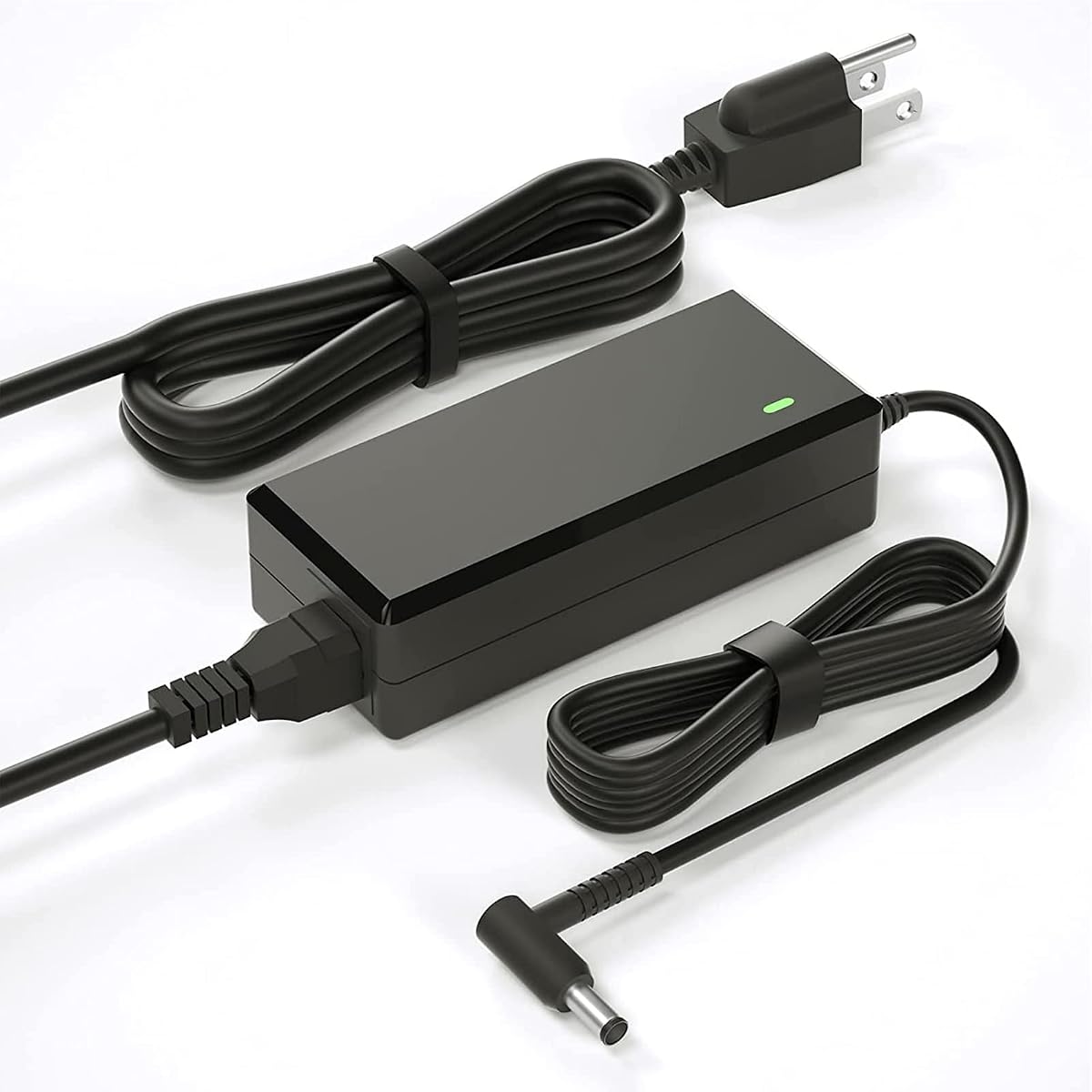
This replacement monitor power supply earns a 4.4 rating and stands out for its unusually broad list of supported HP monitor models. It is designed around 19V output up to 3.42A and 65W, covering many Pavilion and other HP displays listed under model families such as 20xi, 22cwa, 23er, 24ea, 25CW, 27xi, and 32f.
We may earn a commission when you buy through this link, at no additional cost to you.
Its listed compatibility includes several part numbers, including ADPC1945, ADPC1965, 735297-001, and 700392-001. The package includes an 8.2-foot power cord and a 19V adapter with a connector cable. The product information also notes over-voltage, overload, over-current, and short-circuit protection, along with ETL, CE, FCC, and RoHS certifications.
Compatibility is not universal, however. The listing explicitly excludes 2011X, 2211X, 2311X, 2511X, 2711X, M22F, M24F, M24FW, M27F, and M27FD. It also suggests a blue adapter cable when the monitor’s power port lacks visible metal contact pins, so buyers should inspect the connector and the original adapter before ordering.
This is the strongest general choice for a common HP monitor that uses a 19V system and is not one of the excluded M-Series models. It combines a broad model list, useful reach, and documented protections. Verify the monitor label, required wattage, and connector arrangement before purchase.
The included 8.2-foot length gives users more freedom to position a monitor near a wall outlet, desk corner, or shared power strip. That extra reach can also reduce visible cable tension around the workstation.
Documented safeguards against over-voltage, overload, over-current, and short circuits make this a more considered replacement than an unidentified cord. Always use a compatible, undamaged cable and a properly grounded outlet.
We may earn a commission when you buy through this link, at no additional cost to you.
This standard AC cord has a 4.7 rating and serves a different role from most powered HP monitor adapters. Instead of converting wall power to 19V, it provides a three-prong connection for electronics that accept a matching cord directly, including many monitors, televisions, printers, computers, and other devices.
We may earn a commission when you buy through this link, at no additional cost to you.
Its 125V, 10A rating and heavy-duty 18 AWG construction make it a straightforward replacement for a missing or worn household equipment cord. A fully molded design is intended to improve durability and reduce weaknesses around the plug and strain relief, while the five-foot length is sufficient for many desktop arrangements.
The key limitation is that this is not a universal HP monitor replacement. It will not convert AC to the 19V, 19.5V, or 12V required by a typical monitor with an external power brick. It is appropriate only if the monitor has an inlet that accepts the cord’s three-prong configuration.
Choose this option for a monitor designed to connect directly to a grounded wall outlet. It is one of the simplest and most economical ways to replace a damaged three-prong power lead, but check the monitor’s inlet and original cord before purchasing.
Some HP monitors use a standard three-prong AC inlet rather than a low-voltage barrel connection. This cord is designed for that arrangement and can also serve compatible computers, printers, televisions, and other household electronics.
The fully molded body and heavy-duty 18 AWG wiring prioritize durability where cables commonly bend or receive pulling forces. Route the cord without creating tight bends to extend its usable life.
We may earn a commission when you buy through this link, at no additional cost to you.
This VH240A replacement adapter carries a 4.6 rating and is tailored to the 19V power arrangement used by several HP monitor families. Its maximum output is 19V at 3.42A and 65W, with stated compatibility for lower-current 19V devices as well.
We may earn a commission when you buy through this link, at no additional cost to you.
The listing names the 1KL30AA#ABA and 1KL30AA#ABB hardware codes and includes numerous monitor and display identifiers. It also describes input from 100-240V at 50/60Hz. The package contains a 4.9-foot AC cord and a 19V adapter with a 3.9-foot DC cord, while the stated protections cover over-voltage, overload, over-current, and short circuits.
The unusually extensive compatibility description can be useful, but it also includes devices beyond standard HP monitors, such as tattoo equipment and specialized displays. Buyers should concentrate on their display’s actual voltage, current, connector, and part number rather than assuming every listed device is interchangeable.
This is a compelling option for owners of an HP VH240A or a listed monitor using the same 19V adapter arrangement. Its clear electrical specifications and protections offer useful reassurance, but matching the original label is the safest way to ensure compatibility.
Stating the input range, maximum current, output voltage, and wattage makes it easier to compare this replacement with the original brick. Those figures should be checked before connecting any new adapter.
Separate AC and DC sections allow the adapter brick to remain near the outlet while the monitor-side cable reaches the display. This can make a crowded desk easier to organize.
We may earn a commission when you buy through this link, at no additional cost to you.
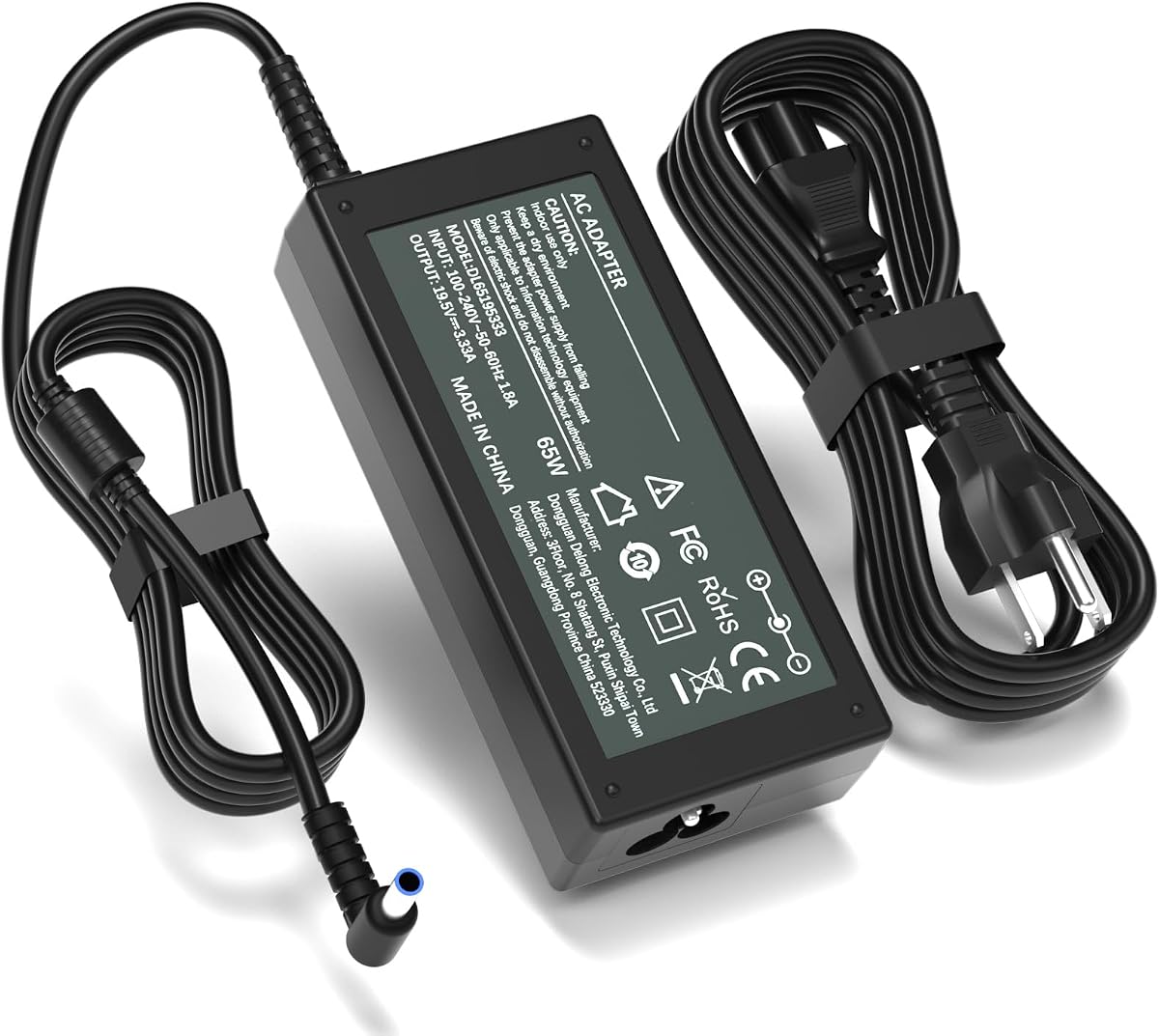
This adapter has a 4.4 rating and is explicitly aimed at HP M-series displays rather than the broader 19V monitor market. It supports models including M22f, M24f, M24fe, M24fw, M24fwa, M27f, M27fe, M27fw, M27fwa, M27fq, M27fd, and M27ha.
We may earn a commission when you buy through this link, at no additional cost to you.
Its key technical identifiers are 19.5V output, 3.33A current, and 65W power. The connector is a 4.5 by 3.0mm blue round tip. A 1.5-meter adapter cord and 1.2-meter AC cable produce a stated total reach of 2.7 meters, or 8.8 feet.
The product explicitly does not fit common 19V families, including 22cwa, 23er, 24ea, 25CW, 27xi, VH240A, and several M-Series systems listed as exclusions. This specificity is useful: the blue tip and 19.5V output distinguish it from ordinary 5.5mm-tip adapters.
It is a suitable option for a monitor specifically listed as an M-series model with a blue-tip inlet. Confirm the model number, output requirements, and physical connector before ordering, particularly if the display came with an older external brick.
The blue 4.5mm tip and 19.5V output reflect a different power standard from the common 19V yellow-tip system. That specificity helps users avoid an adapter that appears close but cannot safely connect.
The 8.8-foot combined length is particularly helpful when the wall outlet is behind a desk or display arm. It reduces the need for additional extension hardware, which can introduce convenience or safety concerns.
We may earn a commission when you buy through this link, at no additional cost to you.
This 19V adapter has a 4.4 rating and offers a focused replacement for HP displays using the common 5.5 by 2.5mm connector. It provides 19V at up to 3.42A and 65W, with an input range of 100-240V at 50-60Hz.
We may earn a commission when you buy through this link, at no additional cost to you.
The compatibility list covers numerous 19V monitor families, including 22cwa, 23er, 24ea, 25CW, 27f, 27xi, 27xw, 32f, and VH240A. Its listed certifications include CE, FCC, and RoHS, while the protection features address short circuits, over-current, over-voltage, and overheating.
It is explicitly unsuitable for M-series models such as M22F, M24F, M24FW, and M27F, as well as listed X-Series displays and the 2711X family. It is also a monitor power supply rather than a laptop charger, despite the general use of the word charger in some product descriptions.
Choose it for a compatible 19V HP monitor with the specified barrel connector. The fixed, clearly identified tip is helpful when compared with universal adapters, but the buyer should still match voltage, wattage, and model number before connecting it.
A fixed 5.5 by 2.5mm tip makes the physical match easy to understand. The outer and inner dimensions are more informative than connector color alone, especially with third-party replacements.
The warnings against M-Series and X-Series use are valuable because several adapters in this category look similar but provide different voltage or connector arrangements. Follow the exclusion list even when screen sizes overlap.
We may earn a commission when you buy through this link, at no additional cost to you.
This 19V replacement adapter receives a 4.4 rating and provides a 65W output with a 5.5 by 2.5mm connector. It is designed for many common HP monitor families, including 22cwa, 23er, 24ea, 27f, 27xw, 32f, and VH240A.
We may earn a commission when you buy through this link, at no additional cost to you.
Its specification covers 100-240V input at 50-60Hz and 19V output at up to 3.42A. A built-in smart chip is listed with protection against over-temperature, over-current, over-voltage, and short circuits. The cable contains copper wiring and has a PVC outer jacket.
The listing says the cable remains functional after more than 10,000 bending tests. That is a manufacturer claim rather than an independent benchmark, so good handling habits remain important. The product also asks buyers to use the search function to locate their model and confirm fit before ordering.
This is a sensible alternative for users seeking a conventional 19V 65W adapter with explicit circuit protections. Its on-screen size descriptions are less useful than the model list, so use the exact monitor designation and original power label as the deciding factors.
The protection chip is designed to respond to excessive heat, current, voltage, and short-circuit conditions. These safeguards supplement, rather than replace, careful compatibility matching and use in a dry environment.
Copper wiring and a bend-resistant PVC jacket are intended to tolerate normal movement around a display arm or desk. Avoid sharp bends, crushing, and repeated pulling at the connector.
We may earn a commission when you buy through this link, at no additional cost to you.
This blue-tip adapter has a 4.7 rating and is positioned as a precise replacement for select HP M-series and Series 5 and 7 displays. It delivers 19.5V at up to 3.33A and 65W through a 4.5 by 3.0mm blue round connector.
We may earn a commission when you buy through this link, at no additional cost to you.
The supplied compatibility information includes M22f, M24f, M24fe, M24fw, M24fwa, M27f, M27fe, M27fw, M27fwa, M27fq, M27fd, and M27ha. It also lists Series 5 and 7 displays under model families including 524sa, 524sf, 524sh, 524sw, 527sa, 527sf, 527sh, and 527sw.
Input support is stated as 100-240V at 50-60Hz. The listing also says it works with 19.5V 2.05A devices and 19V 2.1A or 1.58A devices. Because the description provides no total cable length, buyers should consider desk placement carefully before ordering.
This is the leading 19.5V pick in the group for its strong rating and specific supported-model list. It is most appropriate when the display is one of the named models and uses the blue-tip connector. For any other HP monitor, check the label and avoid relying on screen size alone.
The extensive list of M-series, Series 5, and Series 7 models gives buyers concrete identifiers to compare with the hardware. Match the complete model number rather than only the diagonal screen size.
A 65W maximum output supports the listed monitors and gives clear compatibility with several lower-current arrangements. The monitor’s own label should still be the final authority.
We may earn a commission when you buy through this link, at no additional cost to you.
This monitor adapter has a 4.5 rating and is among the clearest listings in the group about both what it supports and what it does not. It provides a fixed 19V output up to 3.42A and 65W using a hollow 5.5 by 2.5mm yellow tip.
We may earn a commission when you buy through this link, at no additional cost to you.
Compatible 19V monitors include 27F, 25F, 24F, 23F, VH240A, 27BW, 25BW, 27CW, 25CW, 27FW, 27XW, 25XW, 27ER, 25ER, and 24EA. The adapter uses a grounded North American Type B wall plug and a combined reach of 7.9 feet, divided into 1.2-meter AC and DC sections.
The listing expressly excludes M-Series and X-Series displays, 7.4mm ports, blue and black tips, laptops, tablets, and USB-C devices. It also explains that the yellow tip is hollow and lacks an inner center smart pin, which explains why it will not serve every HP device.
Its precise descriptions make it particularly useful for compatibility-sensitive buyers. It is a good choice for a listed 19V desktop monitor needing a yellow-tip replacement, but it should never be treated as a universal HP power supply.
The physical grounding pin is appropriate for a grounded North American outlet and provides a defined connection for compatible desktop equipment. Avoid bypassing or altering the plug.
A permanently attached tip avoids the loose or sliding connections associated with some multi-tip adapters. Its hollow design is specifically different from center-pin and blue-tip connectors.
We may earn a commission when you buy through this link, at no additional cost to you.
This StarTech cable has the highest supplied rating in the group at 4.8, making it a strong choice for compatible HP monitors that use a standard IEC C13 inlet. It is a direct AC cord rather than a low-voltage monitor adapter.
We may earn a commission when you buy through this link, at no additional cost to you.
The PXT10110 cable is 10 feet long, uses 18 AWG conductors, and is rated for 125V at up to 10A. Its NEMA 5-15P plug connects to North American wall outlets, while the IEC 60320 C13 end connects to many desktop computers and monitors. The specification notes a PVC SVT jacket, a 0.25-inch outer diameter, and a temperature range of 37 to 140 degrees Fahrenheit.
UL listing under UL62 and UL817 is a notable credential, and fully molded strain relief is designed for durability. The product is not a substitute for an HP monitor power brick: it cannot provide 12V, 19V, or 19.5V to a barrel-connected display.
This is the premium standard-cord choice for an HP monitor with an IEC C13 inlet and a grounded North American outlet. Its rating, construction details, length, and certification make it a strong option for office workstations, provided the connector matches.
UL listing and a stated VW-1 fire rating provide useful information for equipment used in home offices and professional settings. The cable should still be used according to local electrical guidance.
The longer reach can simplify routing around desks, walls, and display arms. It offers more placement flexibility than a five-foot lead without requiring an extension cord.
We may earn a commission when you buy through this link, at no additional cost to you.
This specialized adapter has a 4.9 rating, the highest rating among the ten products, but it serves a much narrower power category. It provides 12V at up to 5A, equivalent to 60W, for listed HP and compatible displays.
We may earn a commission when you buy through this link, at no additional cost to you.
The supported models include HP 2011X, 2211X, 2311X, 2011xi, 2311F, 2311CM, 1503 D5061-A, F1503, 1703 F1703, and L1800 LED LCD displays. The connector is a 5.5 by 2.5mm round tip, and the listing also states compatibility with 12V devices drawing 4A, 3A, 2A, or 1A.
The combined reach is 8.8 feet, formed from a 1.5-meter adapter cord and a 1.2-meter AC cable. Protection against over-current, short circuits, and overheating is listed, along with heat-resistant and flame-retardant materials.
This is a strong choice for one of the specifically listed 12V displays, especially if the original adapter is missing. It must not be substituted for a 19V or 19.5V replacement simply because its 5.5mm connector looks similar.
Older and specialized HP displays often use a different supply from common Pavilion monitors. Matching 12V, 5A, and the 5.5mm connector protects against an incorrect connection.
The 8.8-foot assembly makes placement flexible while listed over-current, short-circuit, and overheat protections support routine use. Keep the adapter ventilated and avoid covering it with fabric.
We may earn a commission when you buy through this link, at no additional cost to you.
The safest replacement is the one that matches the monitor’s label, connector, voltage, current, and power architecture. Use these factors to narrow the field before comparing length, construction, protections, and rating.
Start with the complete model number printed on a label on the back of the display, inside the menu settings, or on the original power adapter. Screen size alone is not a reliable identifier because HP used several power arrangements within the same diagonal size. Compare the full designation with the manufacturer or seller’s compatibility list, including any suffix such as #ABA, #ABB, or #ABU.
Read the output label on the original adapter and compare it with the replacement. The products in this guide cover 12V at up to 5A, 19V at up to 3.42A, and 19.5V at up to 3.33A. A connector that physically fits does not make two different voltages interchangeable, and a replacement with inadequate current may fail to start the display or shut down under load.
Connector shape is the next important check. Common yellow-tip adapters use a 5.5mm outer diameter with a 2.5mm inner opening, while blue-tip replacements use a 4.5 by 3.0mm design. Some ports include a center pin, while others are hollow. Measure both the outer diameter and inner opening, and inspect whether the monitor has metal contacts in the center.
Some monitors include an internal power board and accept a standard three-prong AC cable directly. Others use an external adapter that converts wall power to low voltage. Standard IEC C13 cords are also different from barrel adapters. Look at the monitor’s rear inlet: a recessed rectangular socket requires an appliance-style cord, while a round DC socket requires a voltage-converting adapter.
The listings contain valuable warnings. Several 19V products explicitly exclude M-Series or X-Series models, while the 19.5V blue-tip options target particular M-series and Series 5 or 7 displays. The 12V product covers a different, specialized group. Read exclusions carefully because short product titles can otherwise make incompatible options appear suitable.
Replacement options in this guide range from five feet to 8.8 feet, with the StarTech C13 cord at ten feet. A longer assembly can make a distant outlet easier to reach and reduce strain at the connector. Choose enough length for comfortable routing without leaving excess cable where it can snag, tangle, or fall from the desk.
Look for over-current, over-voltage, short-circuit, and thermal protection. Listed ETL, CE, FCC, RoHS, and UL markings can provide additional assurance, although markings alone do not guarantee fit. A reputable listing with clear electrical specifications and exclusions is generally more useful than an inexpensive product with vague claims.
The supplied ratings range from 4.4 to 4.9. Read customer feedback for recurring connector, fit, or power issues rather than treating the aggregate score as the only decision. Also consider molded strain relief, copper conductors, jacket flexibility, detachable versus fixed cables, and the availability of after-sales support.
Before connecting anything, disconnect the monitor from power and remove the original adapter from the back of the display. Locate the model and electrical label, then compare its voltage, current, connector type, and model compatibility with the replacement. Inspect the new cable and adapter for cuts, loose insulation, bent pins, blocked vents, or other visible damage before installation.
Connect the replacement to the monitor first when the product design supports that sequence, then plug the adapter or AC cord into a grounded wall outlet. Avoid overloaded power strips, damaged extension leads, and adapters that feel loose in the outlet. Never force a connector, alter the plug, or remove the grounding pin. Allow the adapter to remain in an open, ventilated area rather than under papers, fabric, or a desk enclosure.
For long-term care, route cables with gentle curves and avoid sharp bends near either plug. Pull the connector straight rather than twisting the cable to remove it. Keep the cable away from moisture, excessive heat, moving desk mechanisms, and children or pets. If the screen flickers, the connector warms unusually, the power supply emits a burnt odor, or the system repeatedly restarts, disconnect it and stop using it until the compatibility or hardware issue is investigated.
No. HP monitors use several connector types and power levels, including 12V, 19V, and 19.5V systems with yellow, blue, or other connector arrangements. The model number and original adapter label must match the replacement’s voltage, current, wattage, and connector before you buy.
A 19V and 19.5V connector may physically look identical, but the voltage difference matters. Use the exact output specified by the monitor and manufacturer guidance. One product in this guide lists limited compatibility with lower-power 19V devices, but that should not be generalized to every 19.5V monitor.
An AC cord carries mains power directly from the wall to an equipment inlet and does not convert voltage. A monitor power adapter converts wall power into the lower voltage required by the display. This guide includes both types because some HP monitors accept a direct three-prong cord while others require a barrel-connected power brick.
The common yellow-tip connector is listed as 5.5mm by 2.5mm and is generally hollow, while the M-series blue-tip connector is listed as 4.5mm by 3.0mm. Measure the connector and inspect the monitor’s socket instead of relying on color alone, especially because third-party product colors and descriptions may vary.
Usually not. Monitor power supplies may lack the communication or center-pin protocol required by portable devices. The 65W yellow-tip product explicitly states that it is not for laptops, tablets, or USB-C equipment. Always use the charger specified for the portable device.
Physical fit does not confirm electrical compatibility. The connector may have the same outer diameter but a different inner diameter or center-pin arrangement, and the voltage or current may still differ. Check the connector geometry, output label, model number, and the monitor’s original adapter before connecting a replacement.
A longer cord can be useful when the wall outlet is far from the monitor or when routing around a desk and display arm. The best length is one that permits relaxed cable routing without creating excessive slack, trip hazards, or pressure on the connector.
Disconnect the replacement immediately and reconnect the original adapter if it is available. Repeated restarts can indicate an incompatibility, inadequate current, a damaged cable, or a monitor fault. Compare all electrical labels again and have the monitor or power system inspected if the problem persists.
The broad 19V 65W adapter with the long 8.2-foot assembly is the most versatile choice for many common HP monitors, provided the display is not among its explicit exclusions. The standard five-foot cord serves a smaller but simpler category of direct-wall-connected equipment, while the StarTech ten-foot IEC cord stands out for its strong rating, UL listing, and professional construction.
For specialized systems, connector and voltage matter more than general brand recognition. M-Series users should examine the 19.5V blue-tip options, older or explicitly listed 12V displays have a dedicated matching adapter, and VH240A users have several 19V choices. Always prioritize the exact model, electrical label, and connector geometry over screen size or broad phrases such as “HP replacement.”
Prices, ratings, and product availability can change, so check the current listing before purchasing. Compare the complete specifications and compatibility notes, inspect the monitor’s original adapter, and choose the cable that provides a documented match rather than relying on appearance alone.