
MAGIPEA Gooseneck Tablet Holder
4.2Editor score
Thirty-inch reinforced arm
Firm furniture clamp
Portrait and landscape rotation
An iPad holder for reading in bed can transform screen time from an awkward, unsupported activity into a comfortable hands-free experience. The right model should hold the device securely, place the display at a comfortable angle, and work with your bed, sofa, lap, headboard, or surrounding furniture without creating excessive wobble.
This guide compares ten popular styles ranging from flexible gooseneck clamps to plush pillow stands and weighted floor models. We evaluated each product using its stated compatibility, mounting method, angle adjustment, structural design, portability, and suitability for reading, streaming, video calls, travel, and other everyday uses.
Each review explains the product's standout benefits, limitations, and ideal reader, from those who want a simple bedside clamp to users who prefer a soft lap support or an adjustable stand beside the bed. Ratings and availability can change, and current prices should always be checked before purchasing.
4.2Editor score

4.4Editor score
4.6Editor score
As an Amazon Associate we earn from qualifying purchases.
The comparison below covers all ten stands, highlighting mounting style, supported size range, portability, and the degree of positioning control offered by each design.


The Lamicall Gooseneck Tablet Holder for Bed is an Editor's Choice because it combines a firm, tapered arm with a broad furniture clamp and 360-degree positioning. Its stated 4.4 rating reflects a practical balance of stability, flexibility, and broad compatibility. For a reader who wants the iPad suspended near the pillow rather than balanced on a lap, this design offers an especially versatile solution.
We may earn a commission when you buy through this link, at no additional cost to you.
Its reinforced tapered aluminum arm is designed to reduce the sagging and wobbling associated with lightweight goosenecks. The manufacturer states that it can support up to 800 grams and recommends forming the arm into an S, Z, or loop shape when maximum stability is needed. The clamp grips flat surfaces between 0.2 and 3.15 inches thick, allowing attachment to a headboard, bedside table, desk, or other suitable furniture.
Adjustment is not effortless, which is the principal trade-off. The reinforced construction requires moderate physical effort, and the product information specifically advises using both hands rather than forcing the arm. A small amount of movement can also occur when tapping the screen, so it is better suited to passive reading, streaming, and video calls than intensive typing or drawing. Even so, the secure half-wrapped clamp and nonslip pads help prevent falls and surface damage.
This is the strongest general recommendation for anyone whose bed has a compatible headboard or nearby flat surface. It can move from portrait reading to landscape video viewing, accommodates most modern iPads and many other devices, and keeps the display closer to eye level. Choose it over a pillow stand when a raised, stable position and broad placement range matter most.
Because the arm is reinforced and clamped to furniture, the holder can stay in position without occupying the reader's lap. The tapered structure supports the display while reducing sag over time.
The rotating clamp switches between portrait and landscape, while the flexible arm brings the screen closer to the reader. This is particularly useful for books, articles, recipes, and video calls.
We may earn a commission when you buy through this link, at no additional cost to you.
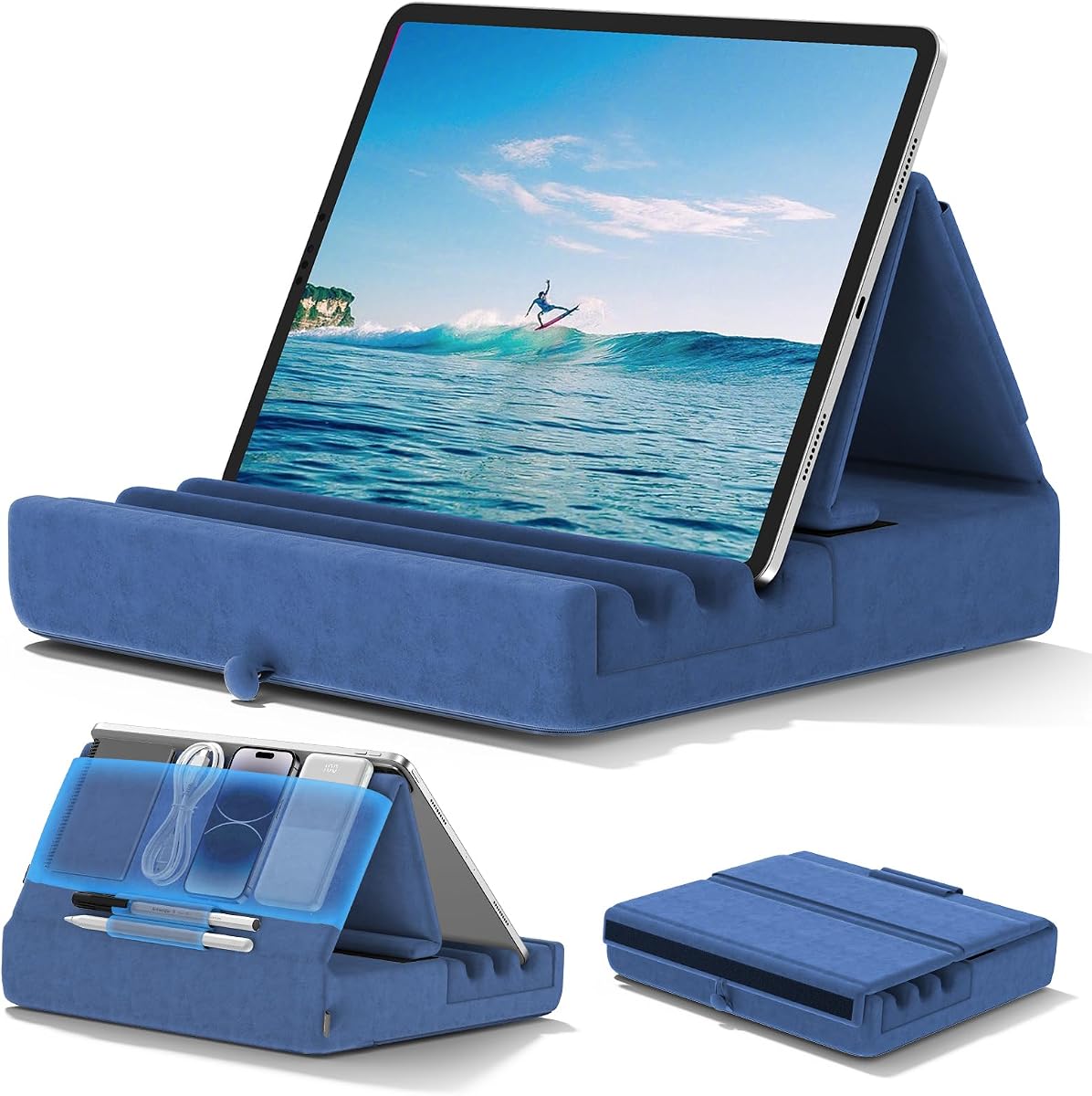
The KDD Tablet Pillow Holder is a strong choice for readers who want a soft support that can move between the bed, lap, desk, car, and airplane. It carries a 4.6 rating and stands out for its foldable construction, three viewing angles, and unusually useful storage layout. Rather than suspending a device from furniture, it cradles the tablet within a plush base.
We may earn a commission when you buy through this link, at no additional cost to you.
Wide and deep fixing grooves help keep the device from sliding, while the high-elasticity sponge base is designed to resist deformation. A large pouch holds small items such as a phone, earbuds, power bank, or charging cable, and two pen pockets provide dedicated places for styluses. The soft polyester surface can be wiped with a damp cloth, making routine maintenance straightforward.
Its most important limitation is that plush support cannot match the rigidity of a metal gooseneck or floor stand. A reader who types extensively, draws, or frequently taps the screen may find that the tablet moves more than desired. The listed three-angle system is less granular than the six positions offered by some competitors, but it is enough to accommodate common sitting and reclining postures.
The KDD is ideal for travel, casual reading, and relaxed viewing. Its foldable form is easier to pack than a rigid clamp or weighted floor stand, and the storage pockets reduce the need for a separate organizer. Choose it when portability and comfort are more important than perfectly rigid positioning.
The foldable design suits flights, road trips, and long rides. It can open into a supported viewing position and then pack down into a more compact shape.
A large central pouch and two pen pockets keep frequently used accessories within reach. This makes the holder useful for longer sessions away from a bedside table.
We may earn a commission when you buy through this link, at no additional cost to you.
The Brookstone Tablet Lap Cushion specializes in soft, portable support for reading and hands-free viewing. Its 4.6 rating makes it one of the strongest-rated options in this guide, and its memory foam construction is particularly appropriate for relaxing on a bed, during flights, or while traveling. The angled cushion places a phone or tablet where it can be viewed without being held continuously.
We may earn a commission when you buy through this link, at no additional cost to you.
The product is designed to support the device at a useful angle while resting on the reader's legs or a desk. That makes it a natural fit for passengers, commuters, and anyone who wants a lightweight reading surface without installing anything. It can also serve as a soft catcher's desk for tablets, Kindles, and phones used for streaming or entertainment.
Compared with a gooseneck or floor stand, the Brookstone offers fewer precise positioning controls. It cannot raise the screen to a fixed height or project it over the reader, so the viewing position depends on the angle of the lap and the way the user reclines. The soft format also offers less resistance than a rigid arm during intensive typing or drawing.
Readers who prize comfort and portability should consider this model their leading option. It is simple to carry, avoids clamps that could mark furniture, and creates a comfortable surface for casual reading in bed. It is less suitable for people who need a screen at a precise, elevated angle throughout long sessions.
The memory foam cushion is intended to make longer reading or streaming sessions more comfortable. Its angled support can reduce the need to hold a device over the lap.
Unlike furniture-mounted and floor-standing products, the cushion is easy to move between bed, desk, car, and airplane. It is especially useful when no suitable mounting surface is available.
We may earn a commission when you buy through this link, at no additional cost to you.
The MAGIPEA Gooseneck Tablet Holder is the Best Budget pick in this guide because it delivers the essential benefits of a bedside clamp without moving into the category of more elaborate floor or articulated systems. Its 4.2 rating is modest, but the stated design is focused and practical: a reinforced arm, a rotating holder, and a clamp suitable for a bed headboard, desk, or table.
We may earn a commission when you buy through this link, at no additional cost to you.
The arm measures approximately 30 inches when fully extended, providing meaningful reach from a headboard to the reader's preferred viewing area. A 360-degree rotating clamp allows the screen to move between portrait and landscape. The reinforced aluminum construction is intentionally stiff to minimize sagging, and EVA pads at the base plus TPE pads inside the clamp help protect both furniture and device.
The stiffness that improves support also makes initial adjustment more demanding. Both hands are recommended when bending the arm, and the manufacturer advises forming it into an S or loop when using a larger tablet. Device thickness should remain below 0.78 inches, so some bulky protective cases may need to be removed. Light movement after taps is another documented limitation.
This holder suits readers who want hands-free support for books, films, recipes, or calls without taking up floor space. It is a practical alternative to the Lamicall gooseneck for shoppers prioritizing the core clamp design. Users who type heavily, draw, or expect a perfectly rigid platform should choose a more specialized support.
The roughly 30-inch arm can bring the display closer to the reader than a short bedside mount. This is helpful in larger beds or rooms where the headboard sits some distance from the pillows.
Nonslip pads at the clamp and cradle reduce the likelihood of scratches. The arm can also be shaped to improve stability with heavier tablets.
We may earn a commission when you buy through this link, at no additional cost to you.
The Tablet Floor Stand with 5LB Metal Base provides a furniture-independent way to position an iPad beside a bed or sofa. Its 4.5 rating reflects a solid overall design, and the adjustable arm makes it useful for readers, viewers, gamers, and anyone following content on a screen. It stands on the floor rather than clamping to a headboard or resting on the lap.
We may earn a commission when you buy through this link, at no additional cost to you.
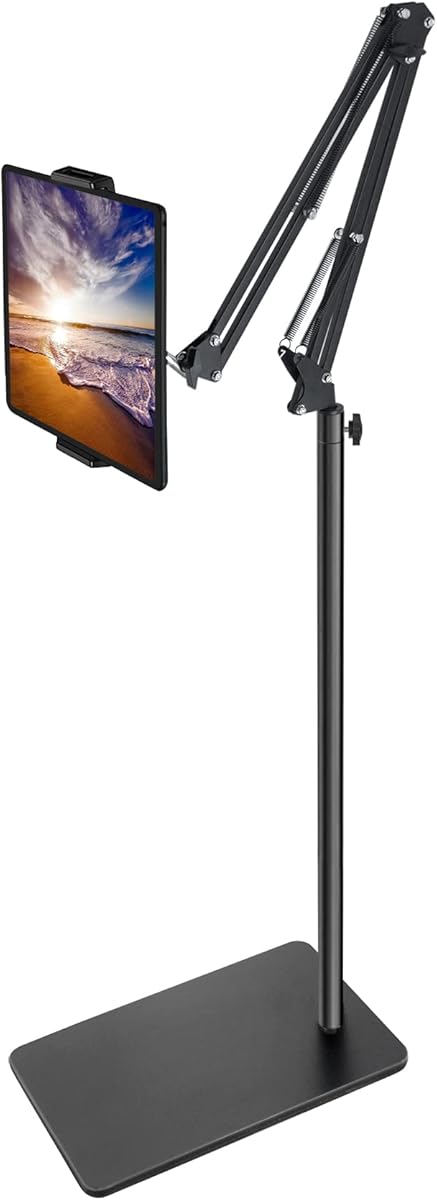
The height adjusts from 27.5 to 55 inches, allowing the screen to sit near the reader's eye level even when reclining. The bracket rotates through 360 degrees, and the tool-free installation process makes relocation manageable. Carbon steel construction and the reinforced base provide a durable platform for devices weighing less than 1.5 pounds.
The main trade-off is space and setup. A floor stand is not as discreet as a small headboard clamp and may be inconvenient in compact rooms. The manufacturer recommends adding weight to the base for heavier tablets or devices fitted with thick cases. The arm and base should also remain aligned to preserve stability.
Choose this product when the bed has no suitable mounting edge or when a high, over-the-bed view is desired. It is particularly good for gaming, streaming, music practice, recipe viewing, and video calls. It is less convenient for readers who want the iPad close to the pillow or who dislike an object standing beside the bed.
The broad height range allows the display to remain visible from a sitting or reclined position. This can reduce the need to look down repeatedly while reading.
Carbon steel components and a reinforced five-pound base create a more substantial support than lightweight plastic stands. Added base weight may help with heavier devices.
We may earn a commission when you buy through this link, at no additional cost to you.
The Lamicall Tablet Pillow Stand offers six angle settings and a soft triangular design intended for beds, sofas, and tables. Its 4.4 rating reflects a versatile approach that sits between a conventional pillow and a structured stand. It is especially attractive for shared reading sessions because the triangular form can support two tablets at once.
We may earn a commission when you buy through this link, at no additional cost to you.
The filling is designed to recover its shape after vacuum-compressed shipping, with the manufacturer recommending 6 to 24 hours of rest or a short tumble in the dryer. A detachable pillowcase simplifies care. Device compatibility extends from 4.7 to 13 inches, covering a broad range of iPads, Kindles, Galaxy tablets, phones, and other portable screens.
The soft construction offers less positional precision than a rigid clamp or floor stand. The device may also shift slightly during heavy tapping, making the pillow design better for reading and passive viewing than for extended typing. Its compact footprint is an advantage, but it does not raise the screen to a fixed height above the bed.
Readers who like to watch or read in bed with a low-profile support will appreciate the six choices and soft contact. The dual-device capability also makes it useful for couples or families. It is a strong alternative when attaching hardware to furniture is undesirable and the display does not need to be suspended overhead.
Multiple angle settings make it easier to adapt the stand to lying down, sitting up, portrait reading, and landscape viewing. The triangular form provides distinct resting positions.
Unlike most single-device pillow holders, this design can accommodate two screens. That makes it practical for couples, families, or simultaneous reading and reference viewing.
We may earn a commission when you buy through this link, at no additional cost to you.
The BluuSuuk Tablet Floor Stand is the Best Premium selection because its upgraded six-pound base, steel construction, and long extendable arm go beyond a simple bedside accessory. It earns a 4.6 rating and is designed for readers who want a screen projected over a bed, recliner, or exercise area while keeping their hands free.
We may earn a commission when you buy through this link, at no additional cost to you.
The claw can be positioned from 12 to 57 inches off the ground, making it possible to bring a phone or tablet over a user lying in bed. A ball-head wrist offers 360-degree angle adjustment, and the double-support structure is designed to keep the extended arm steady. Most major components use steel for increased durability.
The tradeoff is size, weight, and the stated device limit of 1.5 pounds. This is not a discreet accessory for a compact bedside table, and moving it around requires more effort than carrying a pillow stand. The heavy base may also be overkill for a phone in a small room, although it becomes more useful with larger tablets.
This is the most capable floor stand here for overhead viewing and multiple uses around the home. It suits movies, e-books, recipes, video calls, live streams, and following workout content. Readers with a suitably heavy tablet and enough floor space will appreciate the stability, reach, and range of movement.
The long reach allows a device to be suspended above a bed or beside a recliner. This can provide a more elevated, comfortable view than a low lap support.
The double-weight base and reinforced steel structure help control movement when the arm is extended. This is particularly valuable for larger tablets and sustained viewing.
We may earn a commission when you buy through this link, at no additional cost to you.
The SAIJI Kindle Pillow Stand offers a distinctive crescent shape intended to fit against the abdomen while the reader lies in bed. Its 4.4 rating reflects a comfortable and highly adjustable concept. Unlike a basic lap pillow, it includes an articulated support arm that can be repositioned for sitting, standing, or reclining.
We may earn a commission when you buy through this link, at no additional cost to you.
The device support uses a dual-axis arrangement: the lower axis rotates 360 degrees, the middle axis rotates 240 degrees, and the clamp rotates 360 degrees. This provides more directional control than many soft stands. The microbead pillow conforms to the lap and body, helping steady the device while the support arm handles its position.
The pillow is filled with EPS foam particles and uses PC and ABS components. It can be disassembled and placed in a washing machine, although it should be kept away from sharp objects and flames. Its filled construction is bulkier than a flat foam cushion, and the movable beads can redistribute during use.
This stand is a strong choice for a reader who wants a soft, body-conforming support with better articulation than a conventional pillow. It also accommodates an unusually broad stated device range, including larger tablets, phones, Kindles, and e-readers. It may be less convenient for minimalist travel than a foldable flat design.
The crescent shape rests against the abdomen and uses microbead filling to settle around the reader. This can create a more comfortable surface than a hard clamp during long sessions.
Rotating joints at several points let the display follow the user's position. The range supports reclining, sitting, and standing rather than one fixed angle.
We may earn a commission when you buy through this link, at no additional cost to you.
The Lamicall Kindle Pillow Stand combines a plush, extendable support with storage designed for long bedside sessions. It has a 4.6 rating and stands out for its 360-degree rotating clamp, U-shaped cushion, and organization features. It suits a reader who wants more elevation than a flat lap desk without installing a hard-mounted arm.
We may earn a commission when you buy through this link, at no additional cost to you.
The adjustable arm and rotating clamp allow the screen to be brought into a preferred orientation, while the skin-friendly U-shaped design distributes pressure around the user's lap. It is intended for reading, films, and relaxed screen use on a sofa, bed, or elsewhere in the living room. Compatibility covers 4.7 to 13-inch devices, including cases up to 0.9 inches thick.
Storage is unusually comprehensive. Front pockets and a pen loop can hold a remote, stylus, or phone, while food-safe bowls provide a place for treats. The removable pillow cover is machine washable, and the bowls wipe clean, which helps keep a frequently used bedside accessory fresh. These extras also make the product larger and less convenient to carry than a simple foldable pillow.
This Lamicall model is best for home use, particularly when the reader values organization and a slightly raised screen. It is less suitable for minimalist travel or for anyone wanting minimal bulk around the device. Even so, it balances softness, adjustability, and cleaning convenience unusually well.
The extendable arm lifts the device above the base cushion, giving the screen a more useful angle. The U-shaped support reduces concentrated pressure during extended reading.
Pockets, a pen loop, and food-safe bowls reduce clutter around the bed. They are particularly helpful for readers who also use a stylus, remote, headphones, or snacks.
We may earn a commission when you buy through this link, at no additional cost to you.
The CreaDream Tablet Pillow Stand is a compact, foldable option for readers who need a supportive platform in bed or while traveling. Its 4.6 rating is supported by a straightforward design featuring plush material, Velcro attachment, and storage for common accessories. It can be used on a bed, sofa, chair, car, or airplane.
We may earn a commission when you buy through this link, at no additional cost to you.
Velcro fastenings allow the holder to be adjusted into different angles for sitting, lying down, or semi-reclining. The soft surface is intended to remain comfortable during reading, browsing, media viewing, and general entertainment. A large pouch stores a phone, power bank, headphones, or charging cables, while a side pen pocket helps prevent a stylus from being misplaced.
Its soft and foldable construction makes it easy to carry, but it also means less rigidity than a metal clamp or weighted floor stand. A user who types continuously, draws, or values precise screen height may find the device less stable. The absence of a rigid arm also means it cannot project a display overhead.
The CreaDream is a practical pick for portable, casual reading and for users who want simple storage in one accessory. It suits short and medium sessions better than demanding work, while its foldable shape makes it easy to keep in a drawer or bag. It is also a sensible alternative when mounting hardware on furniture is not wanted.
The foldable body takes up less space than a floor stand or rigid clamp. It is easy to move from a bed to a car, chair, or airplane seat.
Velcro fastenings let the user reposition the support without tools. The approach is simple and flexible, although it does not provide the precision of a mechanical hinge.
We may earn a commission when you buy through this link, at no additional cost to you.
The best holder depends on where you read, how you position the device, and whether portability, rigid support, or plush comfort matters most. Reviewing mounting style, stability, size limits, and adjustment before purchasing can prevent an uncomfortable setup.
Furniture clamps free the reader's lap and can place a screen near eye level, but they require a suitable flat edge and may leave marks if the protective pads are not in good condition. Floor stands provide greater reach and can be moved between rooms, yet they occupy floor space and are less convenient beside a crowded bed. Lap and pillow stands are discreet and portable, but their soft structures usually provide less precise positioning. A handheld device also offers the greatest mobility but defeats the purpose of hands-free support.
A larger iPad creates more leverage than a phone, so arm strength and base weight matter. Look for reinforced arms, secure clamps, and a wide base when positioning a substantial tablet. Some floor stands specify a maximum device weight, while goosenecks may require forming the arm into a loop for additional stability. Product guidance also warns that tapping can cause slight movement even in well-supported holders, particularly when the arm is fully extended.
Screen size is only one measurement. Compare the holder's stated diagonal size range with the device's actual dimensions, and check its thickness or weight limit when those details are provided. Bulky cases can prevent a clamp from closing properly. One model accepts devices up to 0.9 inches thick, while another limits thickness to 0.78 inches, so readers who always use a protective cover should verify the specification before ordering.
Portrait orientation is usually best for books and long articles, while landscape suits films, video calls, recipes, and some magazines. A 360-degree rotating clamp simplifies the change. Pillow stands may offer only a few fixed positions, whereas articulated arms allow the display to move closer, farther away, or overhead. Consider whether you will remain still or shift position during a session, since a highly adjustable stand can be valuable in a shared bed or a room used for several activities.
Soft pillow stands distribute pressure and adapt to the body, making them comfortable for reading while reclining. Rigid arms hold the screen more precisely and perform better for touch-heavy use, but their edges and pressure points may be less comfortable if the device is low. A hybrid design with an adjustable arm above a plush base offers a middle ground. The best choice depends on whether the user's priority is a relaxed viewing surface or a stable platform for typing, drawing, and scrolling.
Pillow stands that fold or flatten are easiest to move between the bedroom, sofa, car, and airplane. A gooseneck clamp is compact when detached but still needs a suitable surface, while a weighted floor stand is more substantial and best kept in one location. Consider whether the holder will be used only at home or packed for travel. Also note whether storage compartments would improve the setup by keeping a phone, stylus, earbuds, cables, or snacks near the device.
Bedside accessories collect dust, skin oils, crumbs, and other everyday residue. A wipe-clean plush surface is convenient for routine maintenance, while a removable or machine-washable cover makes deeper cleaning easier. Rigid stands generally need only occasional surface wiping, but their moving joints and padding should also be checked. Before washing any soft component, confirm the manufacturer's care instructions and detach the electronics or support arm when required.
Passive reading requires different support from active typing, drawing, gaming, or video calls. A stable clamp or floor stand is advantageous when the device will be touched frequently, while a soft lap cushion is more appropriate for hands-free reading and streaming. Video calls benefit from a raised display at eye level, and movies often work best in landscape orientation. Identify the primary activity before choosing, then add secondary features such as pockets, pen holders, or food-safe bowls only if they genuinely improve the routine.
Begin by placing the holder in a position that matches your normal reading posture. For a furniture clamp, identify a stable, flat surface of the specified thickness and attach it firmly without tightening beyond what the product instructions permit. For pillow or lap models, position the base on the lap and adjust the screen toward your line of sight. For floor stands, place the base on level ground and keep the arm and base aligned.
Set the display at a comfortable distance and angle before beginning a long session. Use portrait orientation for most books and articles, and landscape for wide content or video. Hold the device with one hand while typing or using controls that cause significant movement. When using a gooseneck, bend the arm into an S, Z, or loop shape if additional stability is needed, and use both hands to avoid forcing the mechanism.
Clean and inspect the holder regularly. Wipe smooth surfaces with a suitable damp cloth, remove loose dust from clamp pads, and wash removable covers according to the instructions. Check that clamps remain tight, joints move smoothly, and soft fills have not shifted. Avoid sharp objects near beanbag or microbead pillows, and keep electrical devices away from spills. Periodic care helps preserve stability, protects the device, and keeps bedside use comfortable.
A pillow holder is generally more comfortable and portable because it rests on the lap or body without attaching to furniture. A gooseneck holder provides a more elevated and rigid screen position, which is better for eye-level viewing and video calls. The better choice depends on whether comfort, reach, or precise stability matters more to the reader.
Yes, every product in this guide is intended to support at least one type of reclined or relaxed screen use. Clamp and floor stands can raise the display above the pillow, while lap stands let the reader control the angle by shifting position. Test the setup before a long session so your neck does not need to turn repeatedly.
It depends on the model's clamp dimensions and weight limit. Some supports accept cases up to 0.9 inches thick, while others specify a lower limit or advise removing bulky cases. Check the physical dimensions, device weight, and opening width before buying, rather than comparing only the screen size.
Use a shorter or more supported arm position, form a gooseneck into an S or loop, and add weight to a floor stand's base if the manufacturer recommends it. Holding the device with one hand during active tapping can also reduce screen movement. Very rigid positioning is better achieved with a metal clamp or floor stand than with a soft pillow.
The KDD, Brookstone, and CreaDream pillow designs are generally the most convenient because they are soft, lightweight, and easy to fold or carry. They work in beds, cars, chairs, and airplanes without requiring a headboard or floor space. A clamp or weighted floor stand offers greater rigidity at home but is less convenient to pack.
A floor stand is better when you want the screen projected over the reader, have no suitable headboard, or need a wider range of height and reach. A headboard mount takes up less floor space and keeps the device close to the pillows. Floor stands are generally bulkier, while clamps must fit the headboard's thickness and shape.
Yes. The clamp and floor models can raise a device to a near eye-level position, which is helpful for video calls, and all three swivel or articulated designs accommodate portrait and landscape orientations. Choose a rigid model if you will type or tap during the call; a soft pillow is more appropriate for viewing the screen without much interaction.
Follow the manufacturer's specific care instructions because removable covers, foam, and microbead fillings cannot all be washed in the same way. Wipe compatible surfaces with a damp cloth, remove the electronics or arm if the design allows, and machine-wash only components specifically identified as washable. Keep liquids away from the device and avoid sharp objects that could puncture a filled cushion.
The Lamicall Gooseneck Tablet Holder is the most complete general option because it combines a reinforced arm, broad clamp compatibility, and rotation for both reading and viewing. The MAGIPEA gooseneck provides a straightforward lower-cost alternative, while the BluuSuuk floor stand leads readers who want a premium, highly stable overhead position.
Prioritize the experience you want rather than a particular category. Choose a pillow or lap stand for portability and soft comfort, a clamp for a raised bedside position without floor space, or a weighted floor stand for broad reach and overhead placement. In every case, verify device dimensions, case clearance, and weight limits before ordering.
Ratings, product configurations, and prices can change, so review the current listing and customer feedback before making a final purchase. Choosing a holder that matches your bed, posture, device size, and typical activity will provide the most satisfying reading experience over time.