
Mcbazel ODV-II Component/AV/CVBS/S-Video to Component Converter
4.1Editor score
Multiple analog input options
YPbPr component output
Zero processing delay
LED status indicators
An S Video to Component Adapter connects older analog video equipment to displays with different inputs, but the terminology can be confusing. Some products are passive cables, while others are active converters that require power, change signal direction, or add scaling. A useful adapter must match the source connector, destination connector, video format, and intended equipment.
We compared the ten products using their stated connector layouts, supported signals, resolution limits, power requirements, included accessories, and device compatibility. The guide covers passive S-Video-to-RCA cables, active converters, component-output cables, and specialized adapters designed for 7-pin or 10-pin mini-DIN equipment.
Each review explains what the product actually does, where it fits, and where it does not. Our top three emphasize useful combinations of compatibility, construction, and installation convenience. Product details and availability can change, so readers should verify the connector type and required signal direction before ordering.
4.1Editor score

4.5Editor score

4.2Editor score
As an Amazon Associate we earn from qualifying purchases.
The products below range from simple passive RCA adapters to powered analog-to-HDMI converters. Their key differences are connector type, conversion direction, supported resolution, required power, and whether they provide component, composite, S-Video, or HDMI output.



This 10-pin S-Video cable receives a 10-pin mini-DIN connection and presents six female RCA connectors for component and composite-style connections. Its 4.5 rating reflects generally positive user sentiment, while the short 30cm length makes it especially convenient for connecting nearby devices without leaving excess cable across a media cabinet.
We may earn a commission when you buy through this link, at no additional cost to you.
The six-RCA arrangement provides more connection options than a conventional four-pin S-Video lead. It is listed for receivers, televisions, monitors, projectors, and other video equipment, making it useful when a source exposes a specialized 10-pin connector and the destination accepts standard RCA video or audio connections.
The product includes a splitter-style cable with double-layer shielding intended to protect the integrity of delicate analog signals. Because it is a passive lead, it cannot independently create a true RGB component stream from a standard two-channel S-Video source. The exact pinout and signal assignment of the source equipment therefore need verification before purchase.
This is the strongest general-purpose choice in the list for buyers who specifically need a 10-pin source and multiple RCA destinations. It is less suitable for a standard 4-pin S-Video device or anyone expecting HDMI, scaling, or automatic signal conversion. Confirm the source pin count and manual first.
The six female RCA outlets can accommodate several analog connections without requiring a separate adapter at the source. That flexibility is valuable in a legacy entertainment setup where different devices may expose color, luminance, and audio through separate RCA leads.
At 30cm, the lead is best suited to equipment positioned close together. It reduces clutter while still giving the RCA ends enough freedom to reach a nearby receiver or display.
We may earn a commission when you buy through this link, at no additional cost to you.
The Mcbazel ODV-II is an active converter designed for retro gaming and video-processing setups where the goal is to feed a YPbPr component display from composite, S-Video, or component input. Its 4.1 rating indicates a generally positive reception, particularly among users who need flexible analog input selection and low-latency operation.
We may earn a commission when you buy through this link, at no additional cost to you.
Control buttons and LEDs make it possible to select an input and monitor operating status. The converter accepts composite AV, S-Video, and YPbPr, then provides a component video output. It is especially relevant to OSSC users, capture-card owners, CRT users, and anyone connecting a classic console to a display with component inputs.
Its most appealing technical feature is the absence of upscaling or other video processing, which the manufacturer states preserves original timing and introduces zero input lag. A 5V Micro USB power connection keeps the installation compact, although the stated package does not include a USB power adapter.
This is the premium pick for carefully configured retro gaming and analog video installations. It is not a general household cable and should not be chosen for 480p or higher input. It also does not accept RGB input and cannot output HDMI, so both ends of the intended signal chain must be confirmed.
Because the converter adds no upscaling or processing delay, it suits competitive or timing-sensitive retro setups. Players can route older consoles through compatible analog stages while retaining the original signal timing.
Buttons and LED indicators simplify the process of choosing among AV, S-Video, and component inputs. This makes the unit easier to integrate than an unidentified passive splitter.
We may earn a commission when you buy through this link, at no additional cost to you.
The ELECTOP cable is a 1.45-meter passive lead joining a 4-pin mini-DIN S-Video port to three male RCA plugs. Its 4.1 rating reflects a practical product for connecting a laptop or other source to a television, HDTV, DVD receiver, or projector that accepts composite video.
We may earn a commission when you buy through this link, at no additional cost to you.
The black S-Video end feeds a yellow RCA video output, while red and white RCA audio plugs are also provided for conventional AV routing. The cable's copper wire core and double shielding are intended to preserve analog signal integrity over a longer run than a very short adapter.
A key limitation is that 4-pin S-Video carries video only. The red and white audio leads are not used by the S-Video connection, and the product is not an active transformer that turns S-Video into separate RGB component signals. It also supports only one-way transmission, from S-Video to RCA.
This is a good choice when the source is a standard 4-pin device, the destination accepts composite RCA, and a longer cable is useful. It is not appropriate for a true component connection, bidirectional use, or carrying audio through the mini-DIN end. Match the source resolution and TV system before connecting.
The 4.75-foot length provides practical distance between a laptop and a nearby display or receiver. It can reduce strain on the source connector and avoid the need for an extension in basic installations.
No power or configuration is required. Once the source system and TV video standard are selected correctly, the cable provides a straightforward analog video path.
We may earn a commission when you buy through this link, at no additional cost to you.
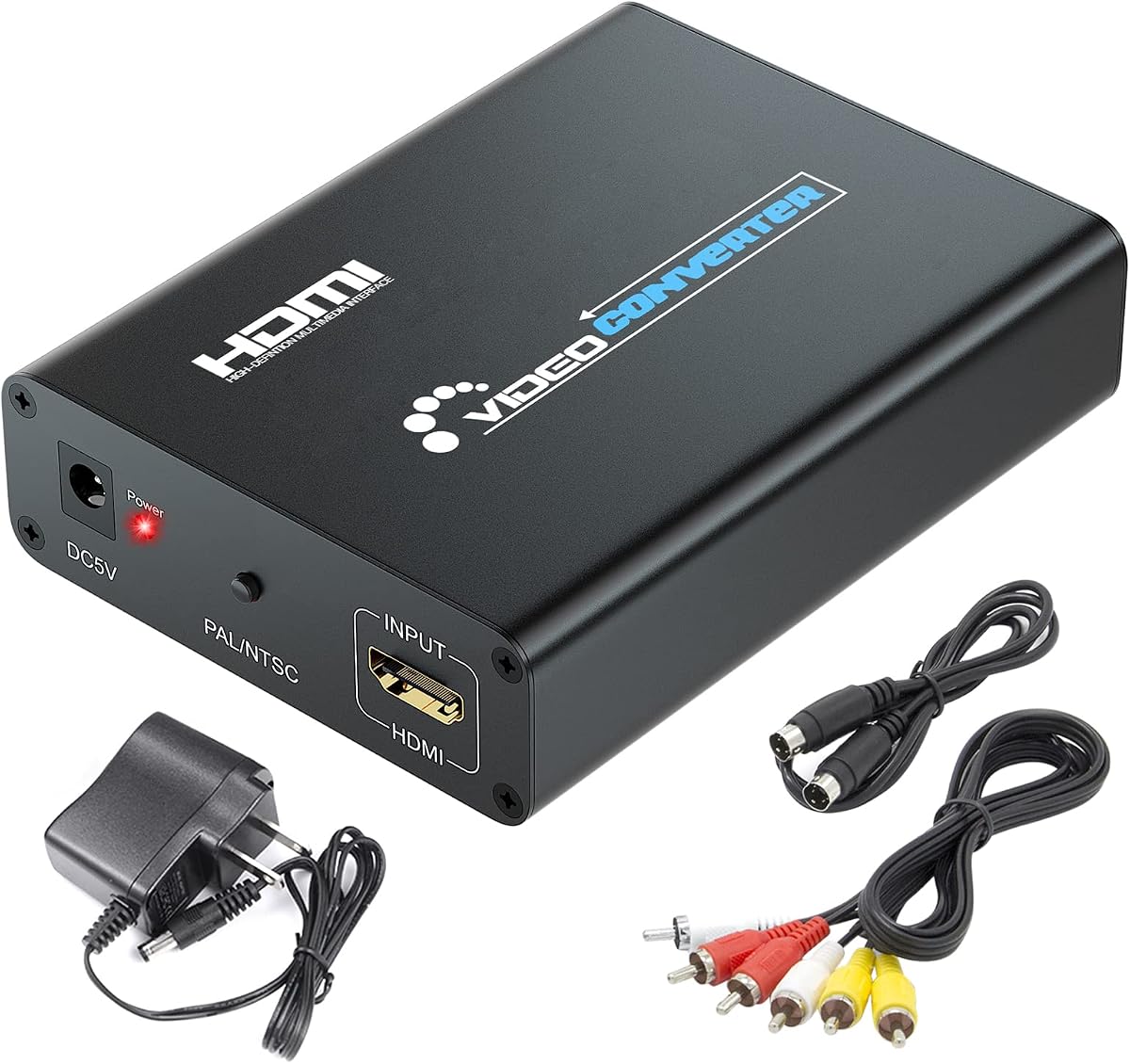
This HDMI to S-Video converter takes a digital HDMI signal and produces analog S-Video or RCA composite video with left and right audio. Its 4.4 rating makes it one of the better-reviewed options here, although it serves the opposite direction from most conventional S-Video-to-component adapters.
We may earn a commission when you buy through this link, at no additional cost to you.
The converter accepts HDMI input at 480p, 576p, 720p, 1080i, and 1080p, subject to the listed refresh-rate combinations. The S-Video and RCA video outputs are specified at 576p or 480p in interlaced form, with analog R and L audio available through the RCA connectors.
It is useful for a modern game console, laptop, disc player, or set-top box that outputs HDMI when the television or projector only accepts analog video. RCA and S-Video cables are included, making the initial setup more convenient than converters that require separate lead purchases.
Choose this product when the source is HDMI and the destination is S-Video or composite—not when you need S-Video input and RGB component output. The conversion necessarily reduces the output to analog formats, and the device requires power for reliable operation.
Modern sources often omit S-Video, while older projectors and displays often lack HDMI. This converter fills that gap and supports the two most common analog video destinations.
Left and right RCA audio outputs allow analog sound to reach a stereo amplifier or television. Users should not expect the converter to decode multichannel surround formats.
We may earn a commission when you buy through this link, at no additional cost to you.
The MEIRIYFA adapter links a male 4-pin mini-DIN S-Video connector to yellow, red, and white female RCA connectors. It holds a 4.6 rating, the highest among the listed products, and is designed as a compact extension for televisions, projectors, gaming consoles, laptops, and legacy media devices.
We may earn a commission when you buy through this link, at no additional cost to you.
Double shielding and a copper wire core are intended to maintain signal integrity. Molded strain reliefs and grip textures are also advertised, which can make repeated plugging safer and reduce damage at the connector ends in a frequently used retro gaming or media setup.
The product connects standard 4-pin S-Video video to a three-RCA arrangement. As with other passive leads, it does not turn luminance and chrominance into true red, green, and blue component signals. The yellow connector is normally used for composite video, while the red and white connectors provide familiar AV routing options.
This is an excellent compact choice for a nearby standard 4-pin S-Video source that needs RCA connections. Its female RCA end offers easy cable routing, but the short length limits placement flexibility. Buyers seeking genuine RGB component output should choose a converter or a device with a compatible 7-pin output.
Its 4.6 rating suggests broad satisfaction among buyers. The combination of shielding, compact sizing, and clearly described connectors makes it a dependable option for common legacy AV arrangements.
Female RCA connectors accept standard male AV leads, making it easy to extend the adapter with the cables commonly found in a home theater or gaming setup.
We may earn a commission when you buy through this link, at no additional cost to you.
The HTDYOO converter accepts either RCA composite or S-Video input and provides HDMI output for modern televisions and monitors. Its 4.2 rating indicates a practical solution for keeping older consoles, VCRs, projectors, and disc players useful with HDMI-only displays.
We may earn a commission when you buy through this link, at no additional cost to you.
The product includes an RCA cable, an S-Video cable, a user manual, and a USB power lead. Output can be set to 720p or 480p with support for 16:9 and 4:3 screen ratios, giving the converter some flexibility when matching a display's capabilities.
Only one analog input can be used at a time, so the RCA and S-Video connectors should not be treated as simultaneous inputs. The manufacturer also states that the unit accepts 480i but not 480p. It performs only one-way conversion from RCA or S-Video to HDMI and cannot send HDMI back to S-Video.
This converter is ideal for preserving access to classic gaming systems and analog media devices while upgrading to an HDMI television. It is not the right tool for a computer with HDMI output that needs S-Video, nor is it suitable for sources requiring 480p. Check the source output format before installation.
The listed compatibility covers several popular retro systems, along with VHS, VCR, DVD, Blu-ray, and set-top-box devices. It is a practical bridge when the original hardware lacks HDMI.
Bundled RCA and S-Video cables reduce the number of extra items needed for a basic installation. An HDMI cable is still required to reach the display.
We may earn a commission when you buy through this link, at no additional cost to you.
This 5.9-inch passive adapter connects a 4-pin mini-DIN S-Video interface to a female RCA composite-video connection. With a 4.3 rating, it is a straightforward solution for linking an S-Video-equipped computer or other source to a composite display.
We may earn a commission when you buy through this link, at no additional cost to you.
The product description says it works with VGA equipment that includes an S-Video interface, making it particularly relevant to older desktop and laptop installations. Because the adapter is passive, it requires no power, firmware, menu settings, or external converter box.
Its primary advantage is its minimal footprint. A short adapter can bridge two devices positioned almost next to one another without creating excess slack. The limitation is equally clear: it offers composite video rather than a full RGB component output, and its short length leaves little room to reposition equipment.
This adapter works best for a compact, dedicated installation using standard 4-pin S-Video and a composite RCA input. For a longer run, genuine component output, or conversion to HDMI, choose a longer cable or a more capable active converter instead.
The 5.9-inch length is suited to a computer placed immediately beside a television or compact monitor. It keeps the installation tidy and avoids unnecessary cable loops.
The passive design needs only a compatible source and display. There is no power supply to connect and no conversion process to configure.
We may earn a commission when you buy through this link, at no additional cost to you.
This short cable presents a 7-pin male S-Video connector on one end and three female RCA connectors intended for RGB component video on the other. It is aimed at PCs, DVD players, HDTV equipment, home theaters, gaming systems, and professional analog installations with compatible 7-pin outputs.
We may earn a commission when you buy through this link, at no additional cost to you.
The product listing describes the adapter as splitting the video into separate red, green, and blue component connections. That arrangement is appropriate for equipment designed to expose those signals through a specialized 7-pin mini-DIN pinout. The 30cm length is convenient for closely arranged source and display components.
Compatibility is the critical consideration. A standard 4-pin S-Video jack cannot mate with this 7-pin connector, and a standard S-Video signal does not inherently contain independent RGB information. The source therefore needs a compatible 7-pin component output, not merely a connector that looks similar.
The adapter is a specialized option rather than a universal choice. It may provide a cleaner separate-color path in properly matched equipment, but the absence of a customer rating means there is little visible user feedback to evaluate. Confirm the equipment manual, pin layout, and color assignment before buying.
Three RCA outputs are intended for red, green, and blue signals. In equipment designed for this pinout, that arrangement can offer a more direct component path than standard S-Video.
The 7-pin connector is uncommon compared with the 4-pin format found on most consumer equipment. It is best reserved for users who have confirmed the exact source model and its supported output.
We may earn a commission when you buy through this link, at no additional cost to you.
The RCA S-Video to HDMI converter is an active solution for connecting analog media devices or classic consoles to a modern HDMI television, projector, or monitor. Its 4.2 rating reflects generally favorable use, and the integrated RCA and S-Video leads plus included HDMI cable simplify setup.
We may earn a commission when you buy through this link, at no additional cost to you.
The converter detects 480i NTSC or 576i PAL input and uses integrated scaling to provide 720p or 1080p HDMI output. Signal processing handles the conversion and scaling, which differs from the zero-processing claim associated with some component converters. That makes it more appropriate for display compatibility than timing-sensitive gaming.
The listed source applications include VHS, VCR, DVD players, set-top boxes, and older consoles such as NES, Super Nintendo, N64, Wii, Wii U, Xbox, and PlayStation 2. The device is portable and requires no drivers; it operates after the included power connection is attached.
This is a good all-in-one choice for analog-to-HDMI display connections, especially when a ready-made HDMI cable is desired. It is not a component-output adapter, and it cannot reverse an HDMI signal to S-Video. Users seeking the least processed image for a CRT should choose a converter that explicitly preserves timing.
Integrated analog input leads and a bundled HDMI cable cover the essential connections. Buyers still need a suitable USB power source, but can focus on arranging the display connection.
Automatic detection of common NTSC and PAL standard-definition signals simplifies display matching. The scaled HDMI output is more convenient with many modern screens.
We may earn a commission when you buy through this link, at no additional cost to you.
The Kyper cable connects a 7-pin mini-DIN S-Video output to three female RCA sockets for red, green, and blue component signals. It carries a 4.2 rating and is designed for specialized equipment rather than the 4-pin S-Video ports found on most consumer devices.
We may earn a commission when you buy through this link, at no additional cost to you.
Gold-plated connectors are used to support dependable signal transmission and durability, while the eight-inch body keeps the connection compact. The three RCA outputs provide individual connections for component color signals, which can suit professional or specialized analog installations.
The product description strongly emphasizes that it will not work with standard 4-pin S-Video equipment. It also cannot create RGB information that is absent from the source signal. Buyers must verify that their device has a genuine 7-pin component output and confirm the correct color assignment in the equipment documentation.
This is our budget pick for a narrowly defined need: connecting compatible 7-pin source equipment to an HDTV with component inputs. It would be a poor general-purpose choice because the connector mismatch excludes most devices. The short length also makes it best for closely positioned hardware.
The explicit compatibility warning is useful in a category where visually similar mini-DIN connectors can lead to ordering errors. It helps buyers identify whether their source actually fits.
Gold-plated connector contacts suit repeated installation and removal. They also support consistent signal transfer in analog setups where corrosion or poor contact can affect image quality.
We may earn a commission when you buy through this link, at no additional cost to you.
The right choice depends first on the actual connectors and signal direction in your equipment. Once those are confirmed, resolution, audio needs, power requirements, cable length, and installation complexity become the next important considerations.
S-Video connectors are commonly described as 4-pin or 7-pin mini-DIN, but the two are not interchangeable. A 4-pin port is found on many laptops, consumer electronics, and older computers, while a 7-pin port is used by some specialized equipment and may expose additional component signals. A cable with a mismatched pin count may not physically fit, and a physically similar connector may still carry a different pinout.
Verify the source port in the device manual or by measuring and inspecting it carefully. Do not rely on the general S-Video label alone. If the equipment has a standard 4-pin port, choose a 4-pin cable or converter; if it has a documented 7-pin component output, consider one of the specialized 7-pin adapters.
A passive adapter generally routes separate conductors already present in the source signal to corresponding connectors. It does not transform S-Video luminance and chrominance into independent red, green, and blue component signals. An active converter, by contrast, accepts one or more analog formats and produces a different output through electronic processing.
Choose a passive cable only when the source and destination use compatible signal assignments. Choose a converter when the source is HDMI and the destination is S-Video or RCA, when the source is analog and the destination is HDMI, or when the device explicitly performs component conversion. This distinction prevents disappointed expectations about image quality.
Signal direction is easy to overlook because many product titles contain several connector names. An HDMI-to-S-Video converter accepts HDMI and outputs analog video, while an S-Video-to-HDMI converter accepts analog video and outputs HDMI. Neither can usually work in reverse unless the manufacturer explicitly states bidirectional support.
Write down the connector on the source first, followed by the connector on the display. Then verify that the product's input and output match that exact path. This step is especially important when searching for a general S Video to Component Adapter, because the search phrase does not necessarily describe a true component conversion.
Analog video standards differ from modern digital formats, and not every converter accepts every resolution. The Mcbazel ODV-II specifically does not support 480p or higher input. The HTDYOO unit supports 480i but not 480p, while its HDMI counterparts may accept 1080p input while producing only 480i or 576i analog output.
Review both the source and destination capabilities as well as the converter's limits. For CRT displays, timing sensitivity can matter as much as nominal resolution. For modern screens, automatic scaling may be more useful. A compatible adapter should support the exact format your source emits without requiring an unavailable conversion elsewhere in the chain.
Standard 4-pin S-Video carries video but not audio. Passive S-Video-to-RCA cables often include red and white audio connectors for convenience, but those plugs are not connected to the mini-DIN video end and require separate source and destination audio leads. Active converters may extract or carry left and right analog audio.
If the source has no separate audio output, an S-Video cable alone cannot restore sound. Check for a 3.5mm headphone jack, RCA audio sockets, or another analog output. If the destination is HDMI and audio is required, select a converter that explicitly includes stereo audio output rather than assuming the video adapter will carry it.
Passive cables need no electricity and generally introduce no active processing. Powered converters require a USB or other power source and may perform scaling, encoding, timing changes, or format conversion. The Mcbazel ODV-II emphasizes zero processing delay, while the RCA S-Video-to-HDMI option uses integrated scaling.
Low latency is especially important for competitive gaming or sensitive CRT alignment. Display compatibility is more important when connecting an old console to a modern television that cannot accept standard-definition analog video. Choose the converter whose processing behavior matches the use environment, and include the required power hardware in the installation plan.
Cable length should reflect the physical distance between devices and the need for manageable routing. The 30cm leads are useful for components positioned directly beside one another, the 8-inch Kyper cable is similarly compact, and the ELECTOP cable at 1.45 meters offers more reach for a computer-to-display arrangement.
Avoid choosing a very short lead if the devices sit on separate shelves, and avoid unnecessary excess length in a crowded cabinet. Longer analog runs can also be more sensitive to poor connections, so a snug fit, undamaged cable, and clean connectors are preferable to simply extending the distance.
A converter that includes S-Video, RCA, HDMI, or USB cables can be easier to install than a bare adapter. The HTDYOO package includes analog input cables but not an HDMI cable, while the RCA S-Video-to-HDMI converter includes an HDMI lead. The Mcbazel converter includes a component cable, an 80cm USB cable, and a manual, but its USB power adapter is not included.
Inventory the cables already in the installation before ordering. Front-panel buttons and status LEDs are especially useful on a multi-input converter because they show which source is active and whether the unit is receiving power. A clear manual is also important for specialized 7-pin and 10-pin equipment.
Begin by identifying the source output, the display input, and the signal direction required between them. Power off both devices before connecting a passive adapter, and consult the manuals when a specialized 7-pin or 10-pin connector is involved. Match red, green, and blue component leads by color and check that the source is actually configured to output component video.
For an active converter, connect the source first, attach the appropriate output to the display, and then provide the specified power. Select the correct source mode on the converter, configure the source's resolution and television standard, and adjust the display's aspect ratio if necessary. If the picture is unstable, remove the adapter and test each device independently to identify where the problem occurs.
Handle connectors by their molded shells rather than pulling on the cable. Keep the lead free from sharp bends, excessive heat, moisture, and strong interference sources, and periodically check that each plug remains fully seated. Store unused adapters in a protective bag, and do not force a connector that does not match; a different pin standard or a faulty socket can damage an otherwise usable cable.
Only when the source already provides compatible component signals through the relevant connector and pinout. A normal 4-pin S-Video cable carries separate luminance and chrominance and cannot independently generate red, green, and blue signals. An active converter or a source with a documented component output is required for that task.
No. The connectors have different physical pin counts and may also expose different signals. A 7-pin cable will not work with a standard 4-pin source, while a 4-pin cable cannot access signals assigned to extra 7-pin contacts. Check the equipment manual and inspect the source port before ordering.
Standard 4-pin S-Video carries video only. Many passive RCA adapter cables include red and white plugs, but those need separate audio connections and may remain unused. An active converter can sometimes provide analog stereo audio, so check its output specifications if sound is required.
Yes, but you need an active HDMI-to-S-Video or HDMI-to-composite converter. These devices require power and produce analog video at a lower output level than the original HDMI signal. The converter in this guide accepts several common HDMI resolutions, while its S-Video and RCA output is limited to standard-definition formats.
It depends on the console's outputs and the television's inputs. An RCA or S-Video source can use an S-Video-to-HDMI converter for a modern display, while a source with component output can connect directly. An OSSC or similar scaler may provide more control, including support for higher-quality console output and specialized RGB workflows.
Analog-to-digital and component-to-composite conversions can reduce detail, introduce noise, or change timing. The source resolution, TV standard, cable quality, and converter processing all matter. Match PAL or NTSC correctly, use shielded connections, and choose a converter that supports the source format instead of forcing an incompatible resolution.
Passive cables generally follow the direction of their signal assignments and should not be assumed to be bidirectional. Active converters are usually one-way unless specifically identified as bidirectional. Check the input and output labels, and do not connect an HDMI source to an HDMI output expecting reverse conversion to occur.
Confirm that the source has a genuine 7-pin S-Video or component output, not merely a visually similar 4-pin port. Also verify the color mapping and whether the device outputs RGB component, YPbPr, or another signal arrangement. The source manual is the safest source of this information.
The 10 Pin and Video DIN Cable stands out for buyers who need a specialized 10-pin source and several RCA destinations, while the Mcbazel ODV-II is the most capable active choice for a carefully configured retro gaming system. The Kyper 7-Pin cable serves a narrower but useful role in specialized 7-pin component installations.
Above all, prioritize connector compatibility and signal direction before considering resolution, length, or extra features. A 4-pin source requires a 4-pin solution, an HDMI source requires an appropriate active converter, and true RGB component output requires equipment that actually provides it. The other cables and converters in this guide remain useful for standard S-Video, composite RCA, and HDMI bridging.
Check the current product listing, included accessories, power requirements, and compatibility notes before ordering. Product details and availability can change, and a converter's capabilities may not match every source format. Verifying both ends of the signal path is the fastest way to avoid an adapter that cannot perform the job.