
Roku Streaming Stick HD with Voice Remote
4.6Editor score
Straightforward Roku navigation
Voice-enabled remote control
Compact HDMI-friendly design
Our expert guide compares the best Streaming Stick for Older TV options, covering setup, simplicity, 4K quality, remotes, apps, and wireless connectivity for
A streaming stick can give an older television new life by adding familiar apps, live channels, movies, and voice-controlled search through a simple HDMI connection. The best device for an older TV is not necessarily the most advanced one; it should be easy to connect, uncomplicated to operate, and compatible with the television’s capabilities and viewing habits.
We compared all ten products by examining their operating systems, supported resolution, HDR and Dolby Vision support, wireless connectivity, voice remote features, app access, physical design, and setup requirements. The list covers Roku, Android TV, and TiVo options at different capability levels, including renewed and budget-oriented models.
Each review explains who the product suits, what makes it easier to use, and where its limitations may matter. Ratings and availability can change over time, and promotional pricing also varies, so readers should confirm the current listing and compatibility details before purchasing a device for an older television.
4.6Editor score

4.7Editor score

4.4Editor score
The comparison below highlights the platform, resolution, connectivity, and remote-control features that matter most when adding streaming capability to an older television.




The Roku Streaming Stick HD is a straightforward way to add streaming services and free live programming to an older television. Its 4.6 rating reflects a generally well-regarded platform, while the uncluttered home screen and dedicated voice remote make it especially approachable for viewers who do not want to navigate a dense television interface.
We may earn a commission when you buy through this link, at no additional cost to you.
The strongest feature is the combination of a simple interface and one-remote operation. The included Roku Voice Remote can power the television, adjust its volume, search for entertainment, and control streaming, reducing the need to keep a separate television remote and streaming remote on the coffee table. The stick also has a slim design that is unlikely to block adjacent HDMI ports and can power from a compatible television without a wall outlet.
Its main limitation is output resolution. This model is designed for HD streaming rather than 4K, HDR, or Dolby Vision. That does not make it unsuitable for an older TV—many sets cannot display those formats—but viewers with a newer television may eventually want more advanced picture capabilities. Its app selection is also tied to the Roku platform rather than the Google Play Store.
This is the most broadly practical pick for an older television because it prioritizes approachable operation, compactness, and familiar navigation without adding unnecessary complexity. Choose it when the goal is dependable streaming, voice search, and fewer remotes rather than the highest possible picture quality.
A single remote that handles both television power and volume is a meaningful convenience. Voice commands also provide an alternative to typing long search terms with a small remote keypad.
The small form factor and TV-powered option reduce cable clutter. Its HD output suits many older sets that cannot display 4K or HDR content in the first place.
We may earn a commission when you buy through this link, at no additional cost to you.
The Roku Streaming Stick 4K combines a polished 4K feature set with the straightforward interface that makes Roku devices approachable. Its 4.7 rating is the highest among the products with a numerical rating in this guide, and its support for HDR10+ and Dolby Vision gives it an advantage when connected to a television capable of displaying those formats.
We may earn a commission when you buy through this link, at no additional cost to you.
It remains an easy device to recommend to older adults because setup takes minutes and the included voice remote handles search, streaming controls, television power, and volume. The redesigned long-range Wi-Fi receiver can improve reception in rooms located farther from the router, which is useful in many older houses where network coverage is uneven. Its low-profile body is also designed to sit behind the television without blocking neighboring HDMI ports.
The trade-off is that a 4K stick cannot create 4K detail on a television with a lower-resolution panel. Older sets may still benefit from the improved interface, app selection, and remote functionality, but spending on advanced picture support is most worthwhile when the television can use it. A stable home internet connection also remains essential for high-resolution streams.
For most households seeking a flexible upgrade, this model offers the strongest balance of simplicity and capability. It is especially suitable for an older television used in a bedroom, guest room, or secondary living space where a compact device and uncomplicated remote matter more than premium extras.
Four-times-HD output, HDR10+, and Dolby Vision create a clear upgrade path. Compatible content looks more detailed and vivid, although the television must support the format being viewed.
The long-range Wi-Fi receiver is designed to maintain a more dependable connection farther from the router. That makes the stick useful in secondary rooms with less favorable network placement.
We may earn a commission when you buy through this link, at no additional cost to you.
The ONN Android TV 2K FHD stick is an appealing option for an older television when access to the Play Store matters. Its 4.1 rating puts it in the middle of the group, but the combination of Android TV, built-in Chromecast, a virtual assistant, and apps such as YouTube and Play Movies & TV gives it broad flexibility.
We may earn a commission when you buy through this link, at no additional cost to you.
Its voice remote includes a microphone button for searching and controlling entertainment, reducing the need to browse manually. Built-in Chromecast lets people send photos, videos, music, and other compatible content from a phone, tablet, or computer to the television. Support for the Play Store also means users can add apps rather than being limited to a fixed ecosystem of preinstalled channels.
The main drawback is the 2K FHD output, which is below the 4K capabilities offered by several Roku and Android alternatives. The interface may also feel busier than Roku’s focused home screen. Buyers should also account for the supplied power adapter, since not every television can power the device directly through USB.
This pick is best for someone who already uses Android phones, wants to install a wide selection of apps, or regularly casts personal media. It delivers useful smart-TV functions without requiring a new television and offers a good balance of price, features, and straightforward operation.
The Google Play Store gives users flexibility to add supported streaming and utility apps. This is useful for anyone who wants more control over the software installed on the device.
The microphone-enabled remote supports spoken requests, while built-in Chromecast makes it simple to display compatible media from a personal device.
We may earn a commission when you buy through this link, at no additional cost to you.
The renewed Roku Streaming Stick Plus offers a familiar streaming interface, 4K capability, and a voice remote in a compact design. Its 3.8 rating is lower than that of the new Roku models, which may reflect renewed condition, customer experiences, or both rather than a major difference in the core platform.
We may earn a commission when you buy through this link, at no additional cost to you.
The home screen is deliberately uncluttered, and setup is described as taking only minutes. The remote can handle television power, volume, voice search, and streaming commands, so the system remains approachable for older users. The stick can also power from the television, allowing it to hide behind the display and avoid unnecessary wall connections.
Renewed products require more attention to condition and warranty details. Cosmetic wear, prior use, and included accessories can vary, so a buyer should review the listing photographs and condition statement carefully. Its 4K and HDR10+ support also cannot improve the picture of a television that lacks those capabilities.
Choose this model when a renewed Roku device is acceptable and the goal is straightforward operation with 4K support. It is most attractive to buyers who prioritize the familiar Roku interface over having the newest model or a pristine, first-owner product.
Condition and included accessories may differ from a new unit. Checking the seller’s description, photographs, return terms, and warranty information can prevent surprises.
The Plus model retains Roku’s easy-to-learn interface while adding 4K and HDR10+. It is a sensible middle ground for compatible televisions.
We may earn a commission when you buy through this link, at no additional cost to you.
The Android TV Stick 4K 2026 is a specification-rich upgrade for an older or non-smart television. It combines Android 14, a quad-core RK3518 processor, 2GB of memory, 16GB of storage, Wi-Fi 6, and Bluetooth 5.4. Its 3.6 rating is among the lower numerical scores, so buyers should weigh the unusually broad feature list against real-world user feedback.
We may earn a commission when you buy through this link, at no additional cost to you.
The supplied Bluetooth voice remote can launch apps, search for content, and adjust settings using spoken commands. Bluetooth also expands the range of compatible accessories, including wireless headphones, speakers, and game controllers. On the networking side, dual-band 2.4GHz and 5GHz Wi-Fi 6 is intended to improve stability when several devices share a household connection.
Its included accessories are unusually comprehensive: an IR extension, remote control, HDMI extension cable, power cable, and power adapter. This helps with installation, although the larger bundle may feel unnecessary for a straightforward setup. The device also advertises 8K decoding, but its native output is 4K, and older televisions may not benefit from the highest decoding capabilities.
This stick is a good fit for a technically curious buyer who wants a modern Android device, generous connectivity, and a full accessory set. It may be less suitable for someone who prioritizes a highly polished interface, established customer support, or the simplest possible ownership experience.
The processor, memory, storage, and wireless standards create a capable platform for streaming on an existing television. Native 4K output is useful when the connected set supports it.
The supplied power, HDMI, and IR components make the package more complete than many alternatives. They are particularly useful when the television port arrangement or remote signal needs extra reach.
We may earn a commission when you buy through this link, at no additional cost to you.
The Android 13.0 TV Stick 4K emphasizes portability and basic smart-TV functionality. At 4.05 inches long, 1.33 inches wide, 0.45 inches thick, and 0.35 pounds, it is small enough to move easily between televisions, projectors, hotel rooms, or other HDMI-enabled displays.
We may earn a commission when you buy through this link, at no additional cost to you.
Its quad-core processor, 2GB of RAM, and 16GB of storage provide the core resources needed for everyday navigation and installed applications. Dual-band 2.4GHz and 5GHz Wi-Fi supports a more stable connection, while 4K and HDR10 output can take advantage of compatible televisions and projectors. A Bluetooth voice remote allows users to search for programs, control playback, and launch apps without extensive keypad use.
The product’s 3.6 rating suggests that some customers may have found the overall experience less compelling than that of the leading Roku options. Android 13 is also not the newest platform in the guide, and buyers should verify that their preferred streaming services support the device and its software version.
This is a sensible pick for someone who needs a lightweight, inexpensive way to add streaming to a secondary screen or travel with a portable streamer. It is less compelling as a primary living-room system for viewers who place the highest priority on polished navigation, wide-format HDR support, or advanced remote features.
The pocket-sized enclosure is easy to conceal behind a television and simple to carry. It also works with projectors that lack a built-in application system.
The Bluetooth remote can launch apps, find programs, and control playback with voice commands. That reduces the learning curve for viewers who are uncomfortable with tiny text or complex menus.
We may earn a commission when you buy through this link, at no additional cost to you.
TiVo Stream 4K takes a different approach to television organization by bringing streaming apps into one centralized interface. Its 4.2 rating reflects a generally favorable user response, while cross-app search, unified watch lists, and recommendations are its most distinctive features for viewers who subscribe to several services.
We may earn a commission when you buy through this link, at no additional cost to you.
The device supports 4K UHD, Dolby Vision HDR, and Dolby Atmos sound through Android TV. Its integrated Google Assistant can launch applications, perform searches, and handle compatible smart-home tasks such as dimming lights. Major services including Netflix, Prime Video, Disney+, and Peacock are available directly, giving users a broad starting point without extensive setup.
The main concern is that TiVo’s centralized approach may require more initial adjustment than a simple Roku home screen. In addition, Dolby Vision and Dolby Atmos need compatible content, streaming subscriptions, applications, television, and audio equipment. An older HD television can still use the device, but it will not receive the same picture or sound benefits.
This stick is ideal for households with several streaming subscriptions that want one place to browse and discover programs. It also suits viewers who appreciate a more advanced recommendation system and smart-home voice functions without needing a separate set-top box from a cable provider.
The centralized interface lets users search, browse, and organize watch lists without learning a separate navigation system for every service. That can be especially helpful for frequent streamers.
Dolby Vision HDR and Dolby Atmos make this a capable option for modern home-theater setups. Older televisions and basic speakers will still work but cannot reproduce every format.
We may earn a commission when you buy through this link, at no additional cost to you.
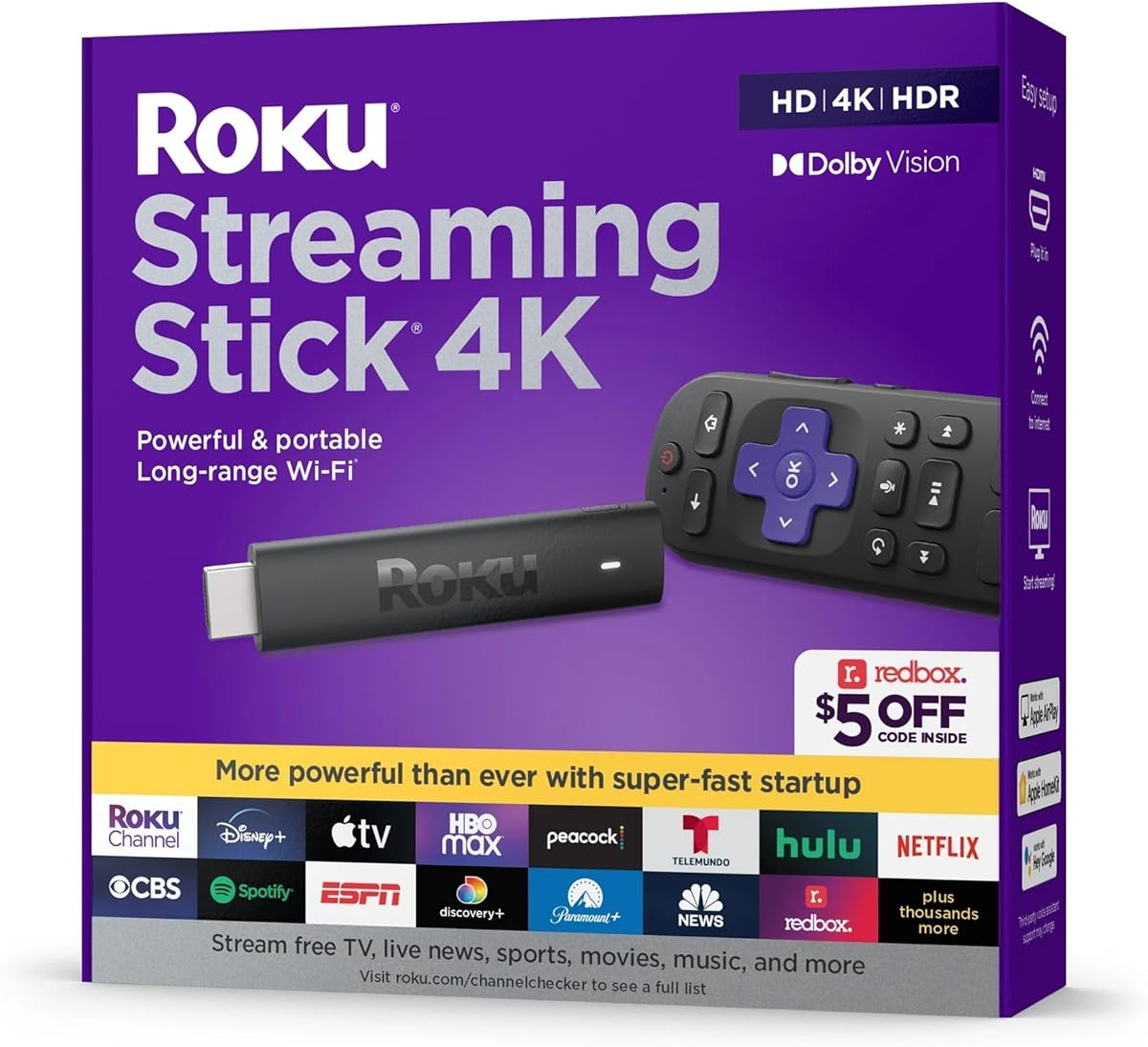
This Roku Streaming Stick 4K is a compact, capable choice for viewers who want familiar streaming navigation and modern picture formats without a large set-top box. Its 4.4 rating indicates solid customer reception, and the device is particularly easy to recommend because setup involves connecting the HDMI cable and joining the internet.
We may earn a commission when you buy through this link, at no additional cost to you.
The stick supports 4K, HDR, and Dolby Vision, while its redesigned long-range Wi-Fi receiver is intended to provide smooth streaming in rooms farther from the router. The included voice remote can control the television’s power and volume as well as streaming functions, eliminating the need to switch between two remotes for common tasks.
It is functionally similar to other 4K Roku sticks in this guide, so the choice may come down to the current listing, included accessories, and compatibility. It does not offer the rechargeable backlit remote, hands-free voice, Ethernet, or Bluetooth headphone mode offered by the Roku Ultra, making it a more modest option.
Choose this model for its balance of compact design, 4K capabilities, long-range Wi-Fi, and straightforward setup. It is a particularly good fit for an older TV that has limited HDMI space or a household that wants to hide the streaming device behind the television.
The narrow stick design can sit behind a television without occupying valuable room. Roku’s consistent interface makes it easy for multiple household members to learn.
4K, HDR, and Dolby Vision support delivers useful picture potential on compatible sets. The overall setup remains brief and approachable.
We may earn a commission when you buy through this link, at no additional cost to you.
The 2026 Android 14.0 TV Stick is designed to turn an existing television or monitor into a connected display. It runs Android 14 on a quad-core Cortex-A53 RK3518 processor, with 2GB of RAM and 16GB of storage. Because no numerical customer rating is available in the supplied data, its value has to be assessed primarily from its specifications and included features.
We may earn a commission when you buy through this link, at no additional cost to you.
The stick supports 4K output, dual-band Wi-Fi 6, and Bluetooth 5.4. A voice remote can search and launch applications, while Bluetooth permits connection of compatible keyboards, headphones, and speakers. Built-in wireless screen mirroring allows photos, videos, presentations, and games to be displayed on a larger screen without an additional video cable.
The package includes an HDMI extension cable, IR extension cable, voice remote, power cable, 5V/2A adapter, and manual. That is a helpful collection for installation, although users with a television offering USB power may not need every accessory. The absence of established user feedback also means expectations should remain tied to the stated specifications rather than a large body of reviews.
This device is a practical option for a buyer who wants modern Android software, 4K capability, and several ways to interact with the television. It is best suited to users who are comfortable with Android TV and want screen mirroring or Bluetooth peripherals as well as conventional app streaming.
Connecting the stick to an HDMI television unlocks supported streaming applications, screen mirroring, and voice navigation. It can delay the need to replace an otherwise functional display.
Bluetooth 5.4 supports compatible headphones, speakers, and keyboards. The included IR extension can also help with remote signals in setups where the television blocks direct line-of-sight reception.
We may earn a commission when you buy through this link, at no additional cost to you.
The Roku Ultra is the most premium-focused streaming stick in this guide. It retains Roku’s uncluttered interface while adding 4K, HDR10+, Dolby Vision, Dolby Atmos, Wi-Fi 6, Ethernet support, a rechargeable remote, and hands-free voice commands. Its 4.4 rating shows that the additional features do not come at the expense of a broadly favorable user experience.
We may earn a commission when you buy through this link, at no additional cost to you.
The Roku Voice Remote Pro is particularly relevant for older adults. Backlit buttons make commands easier to identify in a dim room, while the lost remote finder helps locate a misplaced device. A rechargeable battery removes the inconvenience of replacing batteries, and saying “Hey Roku” enables hands-free control from across the room.
As the most expensive option here, it is not automatically the right choice for an older HD television. Dolby Vision, HDR10+, Atmos, and high-resolution video require compatible displays, content, and audio equipment. Users without Ethernet or a strong Wi-Fi 6 network may also not benefit from every connection feature.
Choose the Roku Ultra when the television is a modern 4K set, the household wants premium picture and sound, or easier remote handling is a major priority. It is also a strong choice for a well-equipped secondary room, provided the buyer is willing to pay for capabilities that simpler sticks do not offer.
Backlit controls, a rechargeable battery, a lost remote finder, and hands-free voice commands solve several common frustrations. These are practical benefits rather than merely decorative extras.
Dolby Vision, HDR10+, and Dolby Atmos can provide a dramatic upgrade on compatible equipment. The larger benefit of Ethernet is a stable wired connection in homes where wireless service is difficult.
We may earn a commission when you buy through this link, at no additional cost to you.
The most useful streaming stick is the one that fits the television, the household’s technical comfort, and the streaming services people already use. Consider interface design, remote handling, wireless performance, picture capabilities, and installation needs before choosing.
An older television must have an HDMI input because streaming sticks rely on that connection for video and audio. Check the television’s available ports, physical spacing, and supported input format before purchasing. A crowded rear panel can make a narrow stick preferable to a wider set-top box, while some users may need an HDMI extender to reach a recessed port. Picture capabilities also matter: a 4K, HDR, or Dolby Vision-capable stick cannot deliver those formats to a television that lacks the necessary support.
A simple interface can matter more than a long feature list. Roku products are known for a focused home screen, while Android TV provides broader access to apps from the Play Store. TiVo emphasizes unified searching and recommendations across installed services. Buyers should consider whether household members will be using one familiar interface or switching among several application environments. Larger text, clear labels, logical menus, and predictable back buttons are especially useful for anyone with reduced vision or limited technology experience.
The remote is the primary point of contact with the device, so its design deserves careful attention. Voice search can reduce typing, while dedicated playback, back, and home buttons make navigation more predictable. A remote that controls television power and volume eliminates the need to switch between remotes. Backlit buttons, rechargeable batteries, a lost remote finder, and a clearly identifiable microphone button can make the experience more comfortable, particularly for users with vision or mobility limitations.
Match the streaming stick to the television rather than buying solely for the largest advertised resolution. HD is sufficient for many older sets, while 4K becomes valuable on newer displays. HDR10+, Dolby Vision, and related picture formats need compatible content and television processing to show a visible benefit. If the goal is to rescue a basic HD television, a simple HD stick may deliver a more useful and straightforward experience than a premium 4K model with unsupported features.
Streaming quality depends on a stable internet connection, and the stick’s location can be less favorable than the router’s. Dual-band Wi-Fi can improve performance, while a long-range receiver is useful in bedrooms, guest rooms, and other secondary locations. Wi-Fi 6 offers compatibility with newer routers, although it does not automatically improve every network. Premium models may also include Ethernet for a wired connection, which can be the most stable option in a home with difficult wireless coverage.
A device is only useful if it supports the services the household wants. Roku provides a curated channel-based experience, Android TV offers Play Store access, and TiVo gathers multiple services into a unified search and recommendation system. Confirm that preferred streaming, live television, news, sports, and rental apps are available and compatible with the selected platform. Some app features, account requirements, or supported video formats can vary by device and television.
Some streaming sticks can draw power from a compatible television’s USB port, while others require a separate power adapter. A television-powered option keeps the setup clean and is convenient for a permanent installation. Models that need external power may offer more consistent operation and can be easier to power from a wall. Buyers should also note the size of the remote, the need for an IR extension, and whether the included HDMI extension cable will make the connection easier to reach.
A faster processor, more memory, and adequate internal storage can make app launches and navigation feel more responsive. Android products commonly provide 2GB of RAM and 16GB of storage, while Roku models manage applications through a more controlled platform. The accessory package also matters: a power adapter, HDMI extender, IR receiver, and voice remote can improve setup, but extras add clutter if they are unnecessary. Review the complete package rather than assuming every included item will be required.
Begin by checking the television for an open HDMI input and confirming the supported resolution. Connect the streaming stick, attach the appropriate power cable, and turn on the television. Select the matching HDMI input with the original television remote before following the on-screen connection instructions.
Join the home Wi-Fi network, sign in to the required streaming accounts, and install essential apps. Use the included remote’s home button to return to the main screen and create a short list of frequently used services. If the television supports USB power and the stick is compatible, it can be powered from the television; otherwise, connect the supplied power adapter to a suitable outlet.
Keep the device ventilated and avoid placing it beneath heavy objects or inside a closed cabinet. Handle the small stick and extension cables by their connectors rather than pulling on the attached wires. For a cleaner setup, route cables behind the television, use the IR extension only if needed, and periodically check that the power connection and HDMI plug remain secure.
Most streaming sticks work with an older television that has an HDMI input, even if the set is not described as a smart TV. The stick supplies the smart functions while the television handles display and sound. Compatibility is less certain for very old sets without HDMI, and advanced formats such as 4K, HDR, and Dolby Vision require compatible television hardware.
The Roku Streaming Stick HD is among the simplest choices because it has a focused home screen, voice search, and a remote that controls both the television and streaming device. The Roku Streaming Stick 4K offers the same straightforward approach with better picture support. The most convenient option ultimately depends on which interface and remote style the household finds most familiar.
No. A 4K stick can still send video to an HD television, but the television will display the signal at its own resolution and cannot reveal the full 4K detail. The streaming platform, app selection, voice remote, and convenience features may still be useful. For the lowest unnecessary complexity, an HD model is reasonable when the television cannot support 4K or HDR.
Yes. A streaming stick is essentially a small computer that connects to a television through HDMI, so the television does not need built-in apps or a smart platform. The stick connects to the internet and sends the selected app or program to the display. You will still need accounts for any paid streaming services you choose to watch.
Buffering commonly results from an unstable Wi-Fi connection, congestion, or an internet plan that cannot sustain the selected video quality. Moving the stick closer to the router, using dual-band Wi-Fi, or connecting a compatible model by Ethernet can help. It is also useful to test other streaming devices on the same network to determine whether the issue is the stick or the home connection.
A renewed stick can be worthwhile when the savings are meaningful and the included warranty and return policy are clear. Renewed products may show signs of prior use, and the included accessories or condition can vary. Review the listing carefully, especially if the device is intended as a gift or for a less technical user who may not want to troubleshoot a physical issue.
A stick is usually the more economical choice when the existing television still produces an acceptable image and has an available HDMI input. It can add streaming, apps, live television, and voice search without replacing the display and speakers. Replacing the television makes more sense if the picture, sound, inputs, or viewing angle are poor, or if you want a larger screen or a fully integrated smart-TV design.
There is no universal distance because walls, floors, interference, router quality, and the selected device all affect performance. A stick with a long-range receiver may work farther away, while a standard model may perform better near the router. If a secondary room has weak coverage, test the connection there before buying, consider a mesh network, or check whether the streaming stick offers Ethernet.
The Roku Streaming Stick HD stands out as the most practical budget-oriented choice because it combines a simple interface, voice search, compact construction, and one-remote control. The Roku Streaming Stick 4K provides the best balance for households that want more picture capability, while the Roku Ultra serves buyers who value premium formats, backlit rechargeable controls, hands-free voice, and wired connectivity options.
Before choosing, prioritize the features that will be used every day rather than every advertised specification. An older television with limited HDMI space may benefit from a small stick, while viewers with several subscriptions may prefer a broad app platform. A clear interface, comfortable remote, dependable Wi-Fi, and sufficient output resolution usually matter more than premium extras that the television cannot display.
Finally, confirm the exact television compatibility, current customer rating, included accessories, return terms, and latest promotional offer before ordering. Product availability and prices change regularly, and a listing that looks attractive today may differ in condition or included components later.