
UGREEN SD Card Reader USB 3.0 Card Hub Adapter
4.6Editor score
Reads four cards simultaneously
Supports 2TB cards
Works with major operating systems
Our Compact Flash Card Reader guide compares ten versatile models for speed, card support, connectivity, portability, and dependable file transfers.
A compact flash card reader gives photographers, filmmakers, and camera enthusiasts a convenient way to move files from legacy and modern memory cards into computers, phones, and tablets. A worthwhile model should support the formats you actually use, provide stable connections, and transfer files without unnecessary delays or compatibility headaches.
We compared ten readers based on their supported card types, connector options, operating-system compatibility, simultaneous-reading capabilities, physical design, and advertised transfer specifications. The list covers USB-A and USB-C models, dedicated CompactFlash readers, multi-card hubs, and options for CFast, XD, and other less common formats.
Each pick reveals how it fits into a particular workflow, from a straightforward desktop reader to a multi-slot adapter for camera work. Ratings and technical details reflect the supplied product information, while prices and promotions can change at any time, so shoppers should verify current listings and compatibility before buying.
4.6Editor score

4.7Editor score

4.3Editor score
This side-by-side comparison highlights each reader's supported formats, connection style, advertised transfer capability, and multi-card functionality to help you identify the most suitable option for your devices and camera workflow.



The BENFEI 4-in-1 reader is a flexible choice for photographers who move among older and newer devices without wanting to carry several adapters. It carries a 4.5 rating and stands out because the same housing offers both USB 3.0 and USB-C connectivity. Its slots accept SD, microSD, Memory Stick, and CompactFlash cards, making it a practical bridge for mixed camera collections.
We may earn a commission when you buy through this link, at no additional cost to you.
The strongest feature is simultaneous reading and writing from four cards. That reduces the need to unplug one card and insert another when sorting footage from different shoots. The supplied information lists transfer rates up to 160MB/s in UHS-I mode through USB Type-C or USB 3.0, while final speed still depends on the memory card and the port to which the reader is connected.
There are important limitations. Standard Memory Stick and Memory Stick Micro M2 cards are not compatible, and CompactFlash Type I is excluded. Some older operating systems also cannot use the exFAT format required by SDXC cards of 64GB or larger. These restrictions make exact card-format verification essential, particularly for users with older cameras or specialized memory cards.
This is a strong recommendation for a user who wants one reader for recent USB-C laptops, USB-A desktops, and several common card types. It is particularly useful for simultaneous workflows and offers an 18-month warranty. Buyers who depend on Memory Stick variants or CF Type I should choose a model explicitly designed around those formats instead.
The integrated USB-C and USB 3.0 design lets the reader serve newer Type-C machines and traditional USB-A computers. That versatility reduces cable clutter while preserving access to the speeds available through USB 3.0 ports.
Four cards can be read and written at the same time, which is useful when a photographer is ingesting images from multiple cameras. The advertised 160MB/s ceiling adds speed, although the slowest card and host connection will influence the final result.
We may earn a commission when you buy through this link, at no additional cost to you.
The UGREEN USB 3.0 Card Hub Adapter combines useful capacity with a restrained 4.6 rating. It supports SD, microSD, CompactFlash, and Memory Stick cards, including a broad collection of SDXC, SDHC, UHS-I, and microSD variants. For photographers who regularly transfer older media while also using current camera cards, this is one of the most balanced options in the guide.
We may earn a commission when you buy through this link, at no additional cost to you.
Its defining convenience is the ability to read and write four different memory cards simultaneously. The USB 3.0 connection is advertised at up to 5Gbps, and the supplied specifications state that 2TB cards are supported. Plug-and-play operation across Windows, Mac OS, Linux, and Chrome OS makes it convenient for offices, edit suites, and shared workstations.
The main limitation is connection style. This model uses a 1.7-foot USB-A cable, so newer USB-C-only computers may require an appropriate adapter. The compact 2.17-by-2.68-by-0.59-inch housing is easy to carry, but the short lead may not reach comfortably across a large desk or workstation setup.
For buyers seeking broad card support without paying for a specialized premium adapter, the UGREEN hub is an excellent choice. It handles four card types, large capacities, and multiple operating systems in a small package. Those who need a native USB-C lead should instead consider a reader designed specifically around Type-C devices.
The reader supports numerous SD, microSD, CompactFlash, and Memory Stick standards, along with cards up to 2TB. This makes it a practical central hub for a photographer working across several generations of equipment.
Plug-and-play support for Windows, Mac OS, Linux, and Chrome OS simplifies temporary office and studio use. The four-card workflow also reduces repeated swapping when several media types need to be ingested.
We may earn a commission when you buy through this link, at no additional cost to you.
The Lexar Multi-Card 3-in-1 Reader earns the strongest overall recommendation because it pairs a 4.7 rating with focused performance for SD, microSD, and CompactFlash media. Rather than trying to accommodate every historical card format, it concentrates on three of the most relevant families for photographers and gives them high advertised transfer rates.
We may earn a commission when you buy through this link, at no additional cost to you.
The reader is listed at up to 312MB/s for SD and microSD and up to 160MB/s for CompactFlash. It remains backward compatible with UHS-I cards at speeds up to 170MB/s. USB 3.1 and USB 2.0 support gives it flexibility across recent and older computers, while the included two-year limited warranty adds reassurance for regular professional use.
Its focused design does come with trade-offs. Memory Stick and less common formats are not listed as supported, and the product information does not indicate an integrated USB-C connector. A USB-C-only laptop user may need an adapter, while photographers who regularly handle MS or XD media will need a broader reader.
This is the strongest fit for a photographer who wants fast transfers across SD, microSD, and CompactFlash and works primarily with USB-A computers. It is also a sensible choice for a general-purpose card reader because the three formats cover many modern cameras and common card-reader accessories. The combination of speed, clear format support, backward compatibility, and warranty support makes it an easy recommendation.
Advertised rates of up to 312MB/s for SD and microSD make this reader attractive for moving large photo libraries and high-resolution video. The CompactFlash rate of up to 160MB/s remains useful for older camera workflows.
Using three dedicated formats keeps the design straightforward. It is best suited to users who understand their card requirements and do not need a universal hub for every older or less common media type.
We may earn a commission when you buy through this link, at no additional cost to you.
The 6-in-1 CF/SD/TF/MS/XD/CFast reader is the most comprehensive option here, offering dedicated support for six card families. Its 4.3 rating is not the highest, but the breadth of the design makes it particularly attractive to photographers and videographers who need CFast, CompactFlash, SD, microSD, Memory Stick, and xD-Picture Card access.
We may earn a commission when you buy through this link, at no additional cost to you.
Six cards can be read simultaneously, a useful advantage for multi-camera shoots and archive sessions. The USB 3.0 interface is advertised at up to 5Gbps, and the unit includes both USB-C and USB-A connectors. That lets it connect directly to compatible iPhone 15, 16, and 17 models, iPads, MacBooks, Android devices, and traditional PCs.
The premium aspect is not merely the number of slots. The aluminum-alloy housing is designed to dissipate heat during longer transfers and provide greater durability than a basic plastic enclosure. The trade-off is a more elaborate, potentially bulkier design than a three-slot reader, while the 4.3 rating indicates fewer uniformly enthusiastic user experiences.
This reader is best for a working professional whose card collection spans modern and legacy formats. It is especially useful when multiple cameras use different media at once, and the dual connectors simplify transfers between desktop and mobile workflows. People who only need SD and microSD can find a smaller and simpler alternative, but this model provides exceptional versatility for archival and multi-camera work.
Six dedicated formats cover modern digital media, older CompactFlash and xD cards, and professional CFast media. The broad support is particularly useful for studios handling equipment from different camera generations.
Integrated USB-C and USB-A connectors make the reader useful with iPhones, iPads, MacBooks, Android devices, and PCs. It is a practical bridge for quick offloading beyond the computer desk.
We may earn a commission when you buy through this link, at no additional cost to you.
The ZIYUETEK five-slot reader is a compact multi-format hub that supports CF, SD, microSD, M2, and MS media. Its 4.5 rating reflects a balanced set of features, including a 5Gbps advertised USB 3.0 interface, simultaneous card operations, hot swapping, and broad compatibility with major desktop operating systems.
We may earn a commission when you buy through this link, at no additional cost to you.
The reader supports the full range of SDXC, SDHC, SD, microSDXC, microSD, and microSDHC cards, along with M2, Memory Stick, CompactFlash, and UHS-I media. Multiple cards can be read and written at once, which helps during a busy ingest session. Its small aluminum housing is described as durable and capable of dissipating heat more effectively than basic plastic shells.
The primary drawback is the USB-A connection. Although backward compatibility is provided for USB 2.0 and 1.1 systems, owners of USB-C-only computers will need an adapter. The product information also states that actual transfer rates depend on the connected devices, so the 5Gbps interface figure should not be interpreted as guaranteed file-transfer speed.
This model is a good middle ground for users who want more card types than a basic reader but do not need the six-format premium hub. It works especially well for Windows, Mac OS, Linux, and Chrome OS systems and suits photographers who regularly swap among CF, SD, microSD, and MS cards. Verify the physical port on your computer before choosing it for a travel kit.
The slots cover CompactFlash, full-size SD, microSD, M2, and Memory Stick media. This gives the reader broader usefulness than a reader limited to SD and microSD without expanding to six formats.
The aluminum alloy cover provides a durable, portable body and helps move heat away during transfers. Hot-swapping support also reduces interruptions when media needs to be exchanged.
We may earn a commission when you buy through this link, at no additional cost to you.
The UGREEN USB-C 4-in-1 reader is designed for modern workflows that rely on Type-C ports. It carries a 4.5 rating and supports SD, microSD, CompactFlash, and Memory Stick cards, including SDXC, SDHC, UHS-I, and numerous microSD variants. That combination makes it a useful option for photographers moving between a USB-C laptop, an iPad, and a compatible phone.
We may earn a commission when you buy through this link, at no additional cost to you.
The USB-C design is the main differentiator. The supplied information identifies compatibility with iPhone 18, 18 Pro, and 18 Pro Max, MacBook, iPad, and multiple Android devices, including several Samsung Galaxy models and Google Pixel. Transfers are advertised at up to 5Gbps, and four connected cards can be browsed, downloaded, and stored at the same time.
Because it lacks a native USB-A connector, the reader may not be the easiest option for older desktop PCs unless a suitable USB-C adapter or cable is available. Like all high-interface-speed devices, its real-world transfer rate also depends on the host, card, and file sizes being moved. Plug-and-play operation is listed for Windows, Mac OS, Linux, and Chrome OS.
This is a strong recommendation for a USB-C-centered photographer who wants broad compatibility across contemporary Apple, Android, and desktop devices. It is particularly appealing for users who would rather avoid carrying a separate card reader for each host device. Traditional USB-A users should consider the similarly capable UGREEN USB 3.0 hub instead.
A native USB-C connector directly supports compatible phones, tablets, and laptops without requiring a separate host adapter. That makes the reader convenient for mobile editing and quick camera offloading.
The four-card simultaneous-access feature is useful for sorting media from multiple cameras. With advertised 5Gbps transfer capability, the reader also targets quick movement of larger files.
We may earn a commission when you buy through this link, at no additional cost to you.
The SmartQ C368 is a straightforward four-in-one reader for SD, microSD, Memory Stick, and CompactFlash cards. Its 4.6 rating is among the strongest in the group, and the design emphasizes simple operation, broad system compatibility, and portability rather than a large collection of specialist slots.
We may earn a commission when you buy through this link, at no additional cost to you.
USB 3.0 and USB 2.0 support make it suitable for a range of computers, while Windows, Mac OS, and Linux compatibility reduces setup friction. A blue status LED indicates when the device is powered. The card slots read data independently, allowing multiple formats to be handled without constantly disconnecting and reconnecting the reader.
The reader is limited to the four common formats and does not include CFast, XD, or M2 support. It also relies on a USB-A connection, so a USB-C-only host requires an adapter. The stated 5GB-per-second transfer language refers to USB 3.0 capability and should not be interpreted as a guaranteed rate for every card.
This is a good choice for a traveler or casual photographer who wants an uncomplicated reader for standard camera media. The included cable organizer and user manual add to the travel-oriented package, and the compact design should be easy to carry. A broader multi-format or native USB-C reader is preferable for professionals with more varied equipment.
The compact body, plug-and-play behavior, and included cable organizer reduce setup time on the road. It is a uncomplicated way to access standard camera media while moving between computers.
Each card can be read independently, so the reader supports a flexible workflow with SD, microSD, MS, and CF media. A blue power light provides a quick visual confirmation that the device is active.
We may earn a commission when you buy through this link, at no additional cost to you.
The CFast 2.0 5-in-1 reader is aimed at photographers and videographers who need a dedicated CFast 2.0 slot alongside four other formats. It supports CFast, CompactFlash, SD, microSD, and xD-Picture Card media, and can read five cards at once. Its 4.4 rating makes it a highly specialized option rather than the broadest general-purpose choice.
We may earn a commission when you buy through this link, at no additional cost to you.
The included USB-A-to-USB-C cable provides connections for modern laptops, PCs, and tablets. A 5Gbps USB 3.0 interface is advertised, supporting quick movement of high-resolution images and 4K or 8K video. The aluminum housing is designed to dissipate heat during lengthy transfers, and the package includes a user manual and two-year warranty.
Memory Stick is not among the supported formats, and users should recognize that a fast interface cannot overcome limitations in the specific card. Actual CFast results will depend on the card, host port, computer, and workflow. The five-card capacity is useful, but it requires more deliberate slot planning than a three-format reader.
This is a compelling choice for a video professional whose cameras use CFast 2.0 and who also needs to move SD, microSD, CF, and XD cards. The dedicated slot, durable body, and simultaneous access can streamline a demanding offload process. Creators working mainly with standard SD and microSD cards should prioritize a simpler model.
A dedicated CFast 2.0 slot distinguishes this reader from general-purpose four-slot adapters. That focus suits high-volume video workflows using professional media and demands a host connection capable of sustained transfer rates.
The aluminum body helps dissipate heat generated during large transfers. A five-card simultaneous workflow further reduces the repeated swapping that can slow a multi-camera production day.
We may earn a commission when you buy through this link, at no additional cost to you.
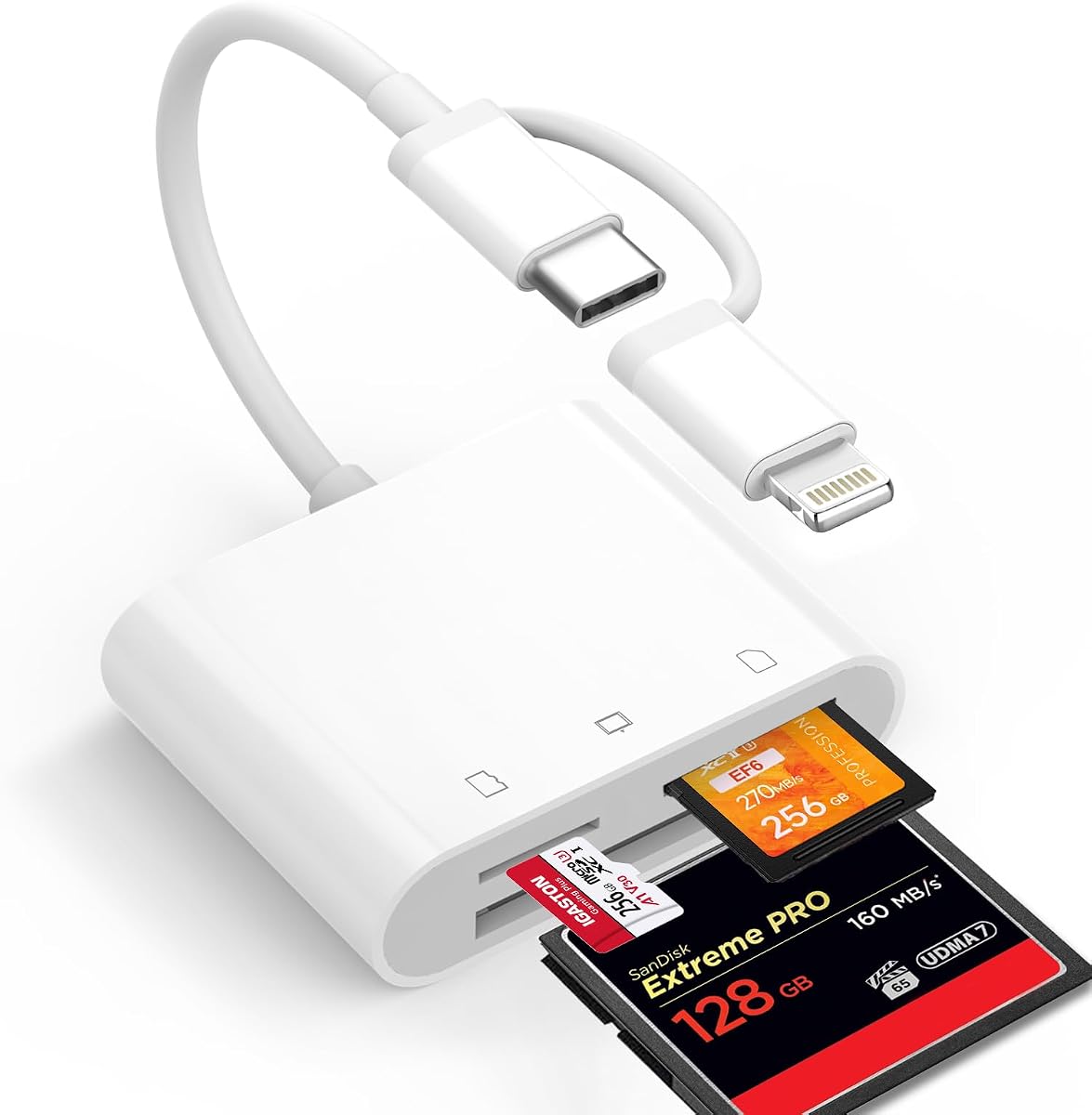
The Denlane Dual-Connector reader is built for photographers who want to move camera files directly into phones and tablets. It supports CompactFlash, SD, and microSD cards through three dedicated slots, while fixed Lightning and USB-C connectors cover a wide range of Apple and Android devices. Its 4.3 rating reflects a specialized design that prioritizes mobile access.
We may earn a commission when you buy through this link, at no additional cost to you.
The supplied information lists compatibility with iPhones 5 through 16, iPads, Macs, MacBooks, and USB-C Android devices. It requires no app, network, driver, or extra power, allowing users to view, edit, share, and transfer images and videos. Bi-directional transfer also makes it possible to move files from a phone onto a memory card, which can help free internal storage.
The two connectors cannot be used at the same time, so the reader is committed to one host connection at a time. Only three card families are supported, with no CFast, Memory Stick, M2, or XD slot. The fixed short cable is described as less prone to damage and more stable during transmission, though it leaves little room to position a device.
This is a strong option for iPhone photographers who need immediate access to CF, SD, or microSD files away from a computer. It also suits travelers who want a simple way to review and share images without installing specialist software. Professional users needing a larger format range should select a multi-slot USB reader instead.
Built-in Lightning and USB-C connectors make the adapter ready for compatible phones, tablets, and computers. The no-app design allows direct file viewing and sharing without a conventional desktop workflow.
Bi-directional transfer supports copying camera files to a device and moving files back to a memory card. This can be useful for freeing phone storage or organizing media before returning to a larger computer.
We may earn a commission when you buy through this link, at no additional cost to you.
The ChiaoPio USB-C reader is a clean three-slot adapter for CompactFlash, SD, and microSD cards. It carries a 4.5 rating and focuses on straightforward USB-C access across compatible iPhones, iPads, MacBooks, Android devices, and other modern hardware. The built-in short cable makes it especially convenient for travel and quick imports.
We may earn a commission when you buy through this link, at no additional cost to you.
Its 3-in-1 layout avoids the complexity of a large multi-format hub while retaining the three card types most commonly encountered by photographers. The reader is plug-and-play, requires no drivers, and needs no additional power. Its product information identifies broad compatibility with iPhone 15-series devices, numerous iPad Pro, Air, and Mini models, Mac computers, and several Samsung Galaxy devices.
Unlike many readers in this list, it does not advertise simultaneous multi-card access. It also uses USB-C only and explicitly does not work with Lightning ports, so users with older Apple connections need a different adapter. Compatibility should still be checked against the exact device model, particularly when using an iPad or Android product through an additional cable.
This is a good choice for someone who wants a small, uncomplicated way to view or transfer CF, SD, and microSD files on a USB-C device. Its built-in cable reduces the number of accessories to carry, and the simple construction suits quick imports away from a studio. Users who need Memory Stick, CFast, or simultaneous card workflows should choose a wider multi-slot reader.
The integrated USB-C cable means there is no separate adapter to lose or forget. Its compact form and no-power design are well suited to travel kits, field work, and quick file transfers.
CompactFlash, SD, and microSD cover a practical mix of legacy and modern camera media. The simple three-slot approach can be easier to manage than a larger adapter filled with rarely used formats.
We may earn a commission when you buy through this link, at no additional cost to you.
The right Compact Flash Card Reader depends on your camera media, host-device ports, operating systems, and workflow. Consider format support and connector design before focusing on advertised speed.
In short, list your current and planned card formats, then choose a reader that explicitly names every one.
In short, match the reader's connector directly to the device you use most often and check whether an adapter is acceptable.
In short, prioritize cards and hosts that can support high speeds, and treat every maximum rate as an upper boundary.
In short, choose multiple slots when your working set genuinely includes several formats, not merely for the larger specification.
In short, prefer plug-and-play systems and confirm that your operating system supports the file system used by your cards.
In short, balance size, cable design, durability, and heat management against how often and where you will use the reader.
In short, select the connection and workflow that match where you intend to view, copy, and manage your images.
In short, favor a clear warranty when the reader will be a regular part of your production kit, while reviewing the terms before purchase.
Begin by checking the reader's slot labels and comparing them with the format printed on your memory card. Connect the reader to the appropriate device, wait for the operating system to recognize it, and insert the card only when the reader is powered. If the card does not appear, remove it, reseat it firmly, and try another port or host device. Avoid forcing a card or using a slot whose shape appears similar but whose electrical or mechanical standard is different.
Copy or import files before formatting or erasing the card. Large transfers should be allowed to finish, and the reader should remain connected until the activity indicator confirms that the operation is complete. For important shoots, retain the original card until the copied files have been checked and backed up. Eject the card cleanly through the operating system when possible rather than pulling it out during an active transfer.
Treat the reader as an electronic accessory that can still be damaged by impact, moisture, dust, and bending. Store it in a clean, dry case, and avoid leaving memory cards inserted while it is unattended. During long transfers, allow ventilation and do not cover the housing. Keep the contacts and slots free from lint, and do not use the reader as a general-purpose USB drive unless the manufacturer explicitly permits that use.
No. CompactFlash readers may support standard CF cards but exclude specific types or professional variants. The BENFEI reader explicitly does not support CF Type I, while dedicated CFast 2.0 readers use a different slot and interface. Check the exact card standard, capacity, and physical type before purchasing.
It can be, provided the card and host device also support fast transfers. A 5Gbps interface provides ample theoretical headroom for many standard SD and microSD cards, but CFast and other specialized media may have different controller and host requirements. The Lexar reader lists card-specific maximum rates of up to 312MB/s for SD and microSD.
No. USB-C support does not apply to devices that use a Lightning port, and some iPads differ by generation and connector. The product descriptions list particular compatible models, so buyers should verify the exact device. The ChiaoPio reader is USB-C only, while the Denlane reader includes both USB-C and Lightning connectors.
Most readers in this guide are designed for plug-and-play use and are listed as requiring no driver installation. Compatibility still depends on the operating system, the card's file system, and the host port. Older systems may have trouble with exFAT used by many SDXC cards, so verify support when using legacy equipment.
Yes, if the phone has a compatible connector and the reader supports the camera's card format. USB-C models suit compatible modern phones and tablets, while the Denlane reader adds Lightning for eligible iPhones. Direct transfer is convenient for quick viewing and sharing, though a computer-based backup is still advisable for irreplaceable files.
Simultaneous reading reduces the need to unplug and replace different cards during an ingest session. It is especially helpful for photographers working with multiple cameras or combining several card formats. The final speed of each card still depends on its capabilities, the reader's controller, and the connected computer.
Only readers with a compatible CompactFlash slot can use CF media. Readers limited to SD, microSD, or USB drives will not accept them, and physically similar formats should not be force-fitted. A model that names CF or CompactFlash support is safer, but buyers should also check whether a particular CF variant is excluded.
Aluminum models can offer useful heat dissipation and durability during longer transfers, while plastic readers may be lighter and sufficient for occasional use. The housing material does not determine whether a card is supported or how fast it transfers. Format, connector, host, and card capabilities should take priority over appearance.
The UGREEN USB 3.0 Hub stands out as a budget-conscious, well-rounded option with four common card formats, simultaneous card access, broad operating-system support, and compatibility with very large cards. The Lexar 3-in-1 Reader is the strongest overall choice for photographers who prioritize speed and want a focused SD, microSD, and CompactFlash setup, while the 6-in-1 CFast reader leads the premium group in format coverage and dual-connector flexibility.
Start by matching the reader to the cards you use, then confirm that its connector suits your computer, phone, or tablet. Users handling CFast, XD, Memory Stick, or M2 media should treat explicit format support as non-negotiable. For everyone else, simultaneous access, portable construction, operating-system compatibility, and a clear warranty can provide the most practical value.
Remember that technical specifications do not always predict real-world speed, and advertised card limits can vary with the host device. Current listings, package contents, compatibility details, and promotions may change, so check the manufacturer information and seller page before purchasing. With the right match of card support and connectivity, a Compact Flash Card Reader can greatly simplify both field imports and long-term archiving.