
192-Channel DMX Board
4.3Editor score
192 DMX channels
Twelve fixture support
Twenty-three scene banks
Included DMX cable
Our guide compares the best lighting boards for theater, covering DMX capacity, scene programming, touchscreens, portability, and setup needs.
Lighting boards for theater bring precision, structure, and repeatability to stage-lighting programs, from small rehearsal spaces to demanding live venues. A capable board lets operators create scenes, build chases, adjust timing, and cue lighting reliably without repeatedly visiting individual fixtures. The right model depends on fixture count, DMX requirements, operator experience, show scale, and how much physical control the production needs.
We compared the ten boards in this guide by examining DMX channel capacity, fixture support, scene and chase programming, control surfaces, connectivity, portability, and practical theater use. The list covers conventional boards, compact DMX consoles, touchscreen systems, and command-style lighting controllers suitable for rehearsals, DJ-led events, clubs, worship spaces, and small professional stages.
Each review identifies the console's strongest capabilities and its practical limitations, while the top selections represent the best budget, overall, and premium options in this group. Product availability, features, and prices can change, so readers should verify current specifications and connectivity requirements before purchasing equipment for an active production.
4.3Editor score

5.0Editor score
The following side-by-side comparison highlights channel capacity, programming tools, connectivity, and physical-control options, making it easier to match each board with a theater, rehearsal room, event space, or touring setup.


The CHAUVET DJ Obey 70 is a universal DMX-512 controller designed for compact-to-medium stage systems, and it carries a 4.2 rating. Its most useful qualities are its 384-channel capacity, support for up to 12 intelligent lights, and organization of scenes into 30 banks of eight. It gives operators more structured playback than a basic manual dimmer while avoiding the complexity of a full touchscreen production desk.
We may earn a commission when you buy through this link, at no additional cost to you.
Scene organization is one of the board's strongest features. Each bank can hold eight scenes, allowing a maximum of 240 scenes, while six sets of chases provide room for recurring sequences. Operators can program fade and speed times into individual steps, which is especially valuable in theater because smooth transitions often matter as much as a fixture reaching its correct level. The controller also offers direct access to channels, scenes, and chases during live operation.
The principal limitation is its scale relative to larger consoles. A 384-channel universe is sufficient for many small stages, but it may be restrictive for productions with numerous moving heads, extensive LED walls, or complex multi-universe systems. Learning its button-based programming model can also take time, particularly for users accustomed to touchscreen workflows. Even so, its balance of scene capacity, timing controls, and physical operation makes it a convincing option for rehearsal rooms, cabarets, small clubs, and touring kits.
This board suits operators who need dependable scene recalls and chases but do not require advanced fixture palettes, RDM workflows, or extensive playback engines. It is particularly useful when one person must run a compact show and react quickly during performances. For those needs, the Obey 70 provides a meaningful amount of programming power in a practical traditional lighting-console format.
Thirty banks of eight scenes provide a clear hierarchy for organizing looks and transitions. This structure helps operators separate opening cues, scene changes, and recurring sequences without rebuilding the entire show.
Programmable fade and speed settings make it possible to bake transitions into a cue. That reduces manual level work and encourages more consistent changes during a live performance.
We may earn a commission when you buy through this link, at no additional cost to you.
This 512-Channel DMX Controller is a 4.5-rated option that combines extensive DMX capacity with an unusually clear control layout. Its 512-channel capability, LCD display, joystick, and divided operating areas make it suitable for theater, DJ, nightclub, festival, and party applications where an operator wants immediate visual feedback without navigating a dense touchscreen.
We may earn a commission when you buy through this link, at no additional cost to you.
The control surface is divided into lighting, channel fader, scene, chase-speed, paging, and function areas. That organization can shorten the learning curve because related commands remain close together. It can store and run 48 scenes, adjust chase speed, and manage as many as 32 fixtures at 16 channels each, although the stated specifications also note that up to four fixtures can be managed simultaneously. A robust metal casing and smooth button operation support its role as a working event console.
The included gooseneck LED lamp is especially practical in dark venues, where operators need to read the LCD and identify controls without spilling bright light onto the stage. A power cable, user manual, and three-pin DMX cable are also included, reducing the immediate setup burden. The main tradeoff is that 48 stored scenes may feel limited for a large multi-act show, and the simultaneous-fixture limitation should be checked carefully against the intended production.
This controller is best for small-to-medium productions that need more channels than a 192-channel board and prefer a conventional console with a display. It also works well for DJs who need to connect moving heads, PAR fixtures, spotlights, and fog machines. Confirm the fixture-management requirements for your show, but for straightforward cue recall and live level control, the 4.5 rating reflects a capable and approachable package.
A high-definition screen presents operating parameters while the operator works. Combined with the console lamp, it keeps menus and channel information visible in rehearsal spaces, clubs, and darkened stages.
The stated metal casing gives the controller a more substantial feel than a lightweight plastic-only board. That construction is useful for mobile DJs and productions that move equipment between venues.
We may earn a commission when you buy through this link, at no additional cost to you.
The 192-Channel DMX Board is the best budget selection in this roundup, earning a 4.3 rating for its capable scene programming and accessible physical design. It provides 192 DMX channels and can control as many as 12 fixtures with 16 channels or fewer each, making it appropriate for many small theaters, rehearsal spaces, school productions, and intimate event venues.
We may earn a commission when you buy through this link, at no additional cost to you.
The controller provides 23 banks of eight programmable scenes and supports the editing of 240 step scenes across six programmable chases. This is more scene organization than many basic boards offer and makes it possible to build structured sequences instead of relying only on manual channel operation. Faders and buttons allow operators to adjust scenes in real time, while the included 6.6-foot DMX cable provides a direct connection to compatible equipment.
Its limitations follow naturally from the 192-channel design. A production with more than 12 fixtures, or one that uses high-channel-count moving heads, may quickly exceed the available capacity. The interface is also less visually rich than a touchscreen system, so an inexperienced operator may need a printed cue sheet or careful labeling. Nevertheless, for a simple show with conventional fixtures, LED pars, and a limited number of intelligent lights, it delivers the essential tools at a restrained entry point.
Buyers should choose this board when affordability, serviceable controls, and basic scene recall matter more than advanced color palettes or multi-universe expansion. It is particularly appropriate for emerging performers, community theaters, rehearsal environments, and small DJs who need a dependable way to store and replay cues. The included cable and straightforward workflow make it a practical first dedicated lighting board.
Twenty-three scene banks and six chases create a practical framework for a compact show. Operators can assign related cues consistently and retrieve them without navigating every individual channel.
Physical faders and buttons keep the workflow direct for new operators. Labels and cue documentation can make the board easier to manage during rehearsals and performances.
We may earn a commission when you buy through this link, at no additional cost to you.
The CO-Z 192 DMX 512 Stage Light Controller is a versatile traditional console rated 4.2 by users. It handles 192 groups of channels, supports up to 12 intelligent fixtures with as many as 16 channels each, and can store up to 240 scenes. Those specifications position it as a capable central controller for small productions rather than a minimalist manual dimmer.
We may earn a commission when you buy through this link, at no additional cost to you.
Seven distinct control sections organize the interface. They cover fixture selection, scene switching, channel selection, an LED display, page selection, speed and time selection, and general functions. This separation makes the board approachable for users who need to move quickly between level adjustment and cue recall. Its upgraded buttons and precision control sticks are also intended to provide smooth operation, while a three-pin cable supports compatible fixtures and effects equipment.
Voice control is the distinctive convenience. Once configured and tested, it can allow an operator to change scenes without concentrating on the physical panel. That could be helpful in rehearsal or during a simple event, although a production should not depend on voice recognition without a dependable manual fallback. The larger constraint is the 192-channel limit, which may not be enough for a show with numerous moving heads or extensive LED infrastructure.
The board fits community theaters, weddings, churches, family gatherings, clubs, and DJ events where one person manages several fixture types. It is a good match for operators who want a feature-rich conventional interface without moving to a touchscreen workflow. Confirm that all fixtures use compatible three-pin DMX connections and keep the voice feature as a convenience rather than the sole show-control method.
Fixture selection, paging, timing, and scene switching occupy distinct areas. This helps new operators isolate a task and reduces confusion during a quick cue change.
Recognized scene commands can reduce manual interaction after a successful setup. The feature is most useful as a secondary option, with the physical controls remaining essential for live reliability.
We may earn a commission when you buy through this link, at no additional cost to you.
The American DJ Supply SCENE-SETTER is a 24-channel conventional lighting board with a 4.3 rating. It is built around two 12-channel scenes or one 24-channel scene, giving operators flexibility in how they divide their channels. Built-in programs offer immediate use, while programmable scenes and chases support productions that need to save many distinct looks.
We may earn a commission when you buy through this link, at no additional cost to you.
Its standout specification is the capacity for 4,200 programmable scenes and 48 programmable chases. That amount of storage is exceptional for a conventional board and could suit long-running community productions, schools, churches, and venues that accumulate cues for many different shows. Stacked-scene operation and immediate-use programs reduce setup time, particularly for teams that are not starting from a blank console every performance.
The important distinction is that this is a 24-channel conventional board, not a modern multi-parameter fixture console. It is intended for dimmers and basic conventional channels rather than the complex channel footprints associated with moving heads, RGB fixtures, or advanced LED engines. Operators should match fixture requirements to this limitation before assuming that the enormous scene count can compensate for limited intelligent-fixture support.
This controller is most compelling for traditional theater rigs with a modest number of dimmer-controlled channels and a large library of cues. It may also work for a basic effects setup where immediate programs and reliable scene storage are priorities. For contemporary LED-heavy productions, choose a model with wider DMX channel capacity and multi-parameter support; for conventional rigs, this board delivers exceptional program storage in a purpose-built format.
The stated 4,200-scene capacity is valuable for productions that build a substantial cue library. It allows distinct looks to remain available without constantly overwriting earlier cues.
Immediate-use programs give new users something to display before a full show is programmed. They also provide a useful reference when learning the board's scene and chase workflow.
We may earn a commission when you buy through this link, at no additional cost to you.
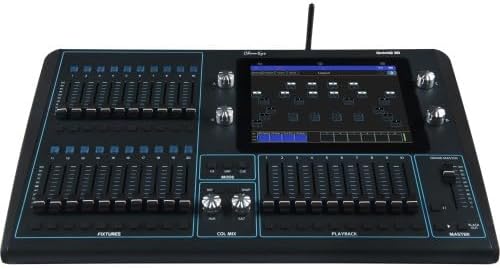
The Chamsys QuickQ 20 is the best premium choice in this roundup, offering two DMX universes and an AC input rated from 100 to 240 volts. It is aimed at operators who want a professional production platform rather than a basic board, and its defining advantage is the ability to control more of a stage through a single console.
We may earn a commission when you buy through this link, at no additional cost to you.
The QuickQ platform is designed around fast, visual operation and a compact footprint. For a theater, club, or live event that has outgrown one DMX universe, the second universe can accommodate additional fixtures, separate LED zones, or a larger conventional rig. The 100-to-240-volt AC input is also useful for productions that travel internationally or use venue power systems with different nominal supplies.
The supplied product information is brief, so buyers should not assume every feature of the wider QuickQ range applies without checking the current manufacturer documentation. In particular, users should confirm touchscreen functions, RDM behavior, playback count, output connectors, software compatibility, and included accessories for the exact QuickQ 20 configuration. That verification is especially important when a console will become the backbone of a show.
The QuickQ 20 suits a school, community theater, touring act, or production company ready to make a more capable control investment. It is a stronger fit than a 192- or 384-channel board when two-universe operation and professional workflow matter. Its premium position is justified by scale and production intent, but the purchase should be based on a complete feature and compatibility review rather than universe count alone.
Two universes provide substantially more DMX addressing room than a single-universe controller. That expansion is valuable for productions with multiple fixture groups or extensive LED inventories.
A 100-to-240-volt AC input supports use across a broad range of power systems. Mobile productions should still verify their venue power arrangement and use appropriate protection.
We may earn a commission when you buy through this link, at no additional cost to you.
The Chamsys QuickQ 10 is a one-universe DMX lighting console built around a large 9.7-inch multi-touch display. Its smartphone-style interface and gesture support distinguish it from traditional fader-heavy boards, making it a strong option for small theaters, rehearsal rooms, event spaces, and mobile operators who favor direct visual selection.
We may earn a commission when you buy through this link, at no additional cost to you.
The display allows fixtures, groups, and cues to be controlled through a graphical workflow. Built-in Wi-Fi supports connections to iOS and Android remotes, potentially allowing a producer or technician to adjust selected functions away from the console. RDM support for auto-patching can simplify fixture discovery and configuration, while the included QuickQ Designer offline software provides a separate environment for show preparation.
The board includes one cue stack and two chase playbacks, which is a modest allocation for a large, multi-act production. Its single-universe capacity similarly places it below the QuickQ 20 and command-style consoles in raw addressing capacity. The multi-function fixture faders can operate in Fixture, Group, or Cue mode, adding useful flexibility, and compatibility with the free MagicVis visualizer can assist with previsualization.
The QuickQ 10 is ideal for a compact rig with conventional fixtures, LED pars, and a manageable number of intelligent lights. It may be especially attractive to younger operators accustomed to touchscreens and mobile devices. For elaborate theater programming requiring numerous simultaneous playbacks, however, a two-universe console or command-style system will provide more room to grow.
A 9.7-inch multi-touch screen gives operators a visual route to fixtures, groups, and cues. Gestures can make common adjustments feel direct, especially on compact productions.
Built-in Wi-Fi enables compatible iOS and Android remotes. This can help a second operator monitor or adjust functions from another position within the venue.
We may earn a commission when you buy through this link, at no additional cost to you.
The MA2 Command Wing Console is the editor's choice and holds a 5.0 rating in the supplied data. It supports 2,048 real-time control parameters and can back up as many as 65,536 system parameters, providing a much larger design and control space than the traditional boards in this guide. Its command-style interface is aimed at operators who need detailed programming and responsive live control.
We may earn a commission when you buy through this link, at no additional cost to you.
The hardware includes six execution faders, 18 fader buttons, two A/B switching faders, six execution buttons, six page buttons, and four encoders. Two DMX outputs and one five-pin XLR DMX input support a professional signal chain, while independent backlighting and a dimmable mute button help the operator work around the console. The layout resembles GrandMA2, which may reduce transition time for users familiar with that command environment.
Its most important operational requirement is a connected PC. This is an advantage for productions that already rely on computer-based show files, but it can be a disadvantage when a standalone unit is needed for a rehearsal, emergency, or mobile gig. The stated weight of 6 kilograms aids portability, though the board is larger and more complex than a compact 192-channel console. The manufacturer also offers service support, but setup confidence depends on correct computer, software, and DMX configuration.
This console suits DJs, bars, weddings, live shows, clubs, and LED installations where a command-oriented workflow and substantial parameter capacity are valuable. It is particularly compelling for an operator moving from simple channel control into structured scenes, multi-fixture groups, and extensive playback management. For a larger theater with an existing computer-based lighting infrastructure, it offers a capable center for the show.
Support for 2,048 real-time parameters accommodates a broad mixture of fixture features. The much larger backup capacity also allows extensive shows to be saved and restored.
Execution faders, switching faders, page buttons, and encoders provide dedicated ways to navigate a show. The layout favors operators who want speed once they are familiar with the command structure.
We may earn a commission when you buy through this link, at no additional cost to you.
The ADJ SCENE-SETTER 48 is a 48-channel DMX dimming controller with a 3.7 rating. It provides 48 dimming switches for independent fixture control and supports a remarkably large library of 4,200 programmable scenes and 48 programmable chases, with up to 12 chases able to run simultaneously.
We may earn a commission when you buy through this link, at no additional cost to you.
The board is designed to integrate sound, lights, and fog equipment under a unified production system. MIDI input, output, and through connections, three-pin XLR, audio, remote, and five-pin DIN fog-machine connections provide several ways to coordinate the rig. A bright LED display helps operators navigate fixtures and levels more efficiently, and the lightweight, rugged design makes the controller easier to transport.
Its 3.7 rating suggests that buyers should investigate the exact product experience and expected application more carefully than they would with a higher-rated model. The 48 individual dimming switches are useful for conventional fixtures, but a live operator who frequently needs to change many parameters may find that workflow less fluid than a modern command console. The board is also explicitly oriented around standard DMX fixtures, so moving-head operation is not its primary strength.
The Scene Setter 48 is most appropriate for a portable conventional rig, traveling DJ setup, small theater, or installation that needs many stored scenes and several simultaneous chases. Its connection options make it practical for events combining conventional lighting with fog and sound-related triggers. Operators should test the physical controls against their programming style and confirm that all intended fixtures fit a conventional DMX workflow.
The ability to run 12 chases at once is useful for layered event effects. It allows several programmed patterns to operate together without requiring a larger multi-playback console.
A lightweight, rugged design is valuable for touring DJs, temporary installations, and theater groups that transport equipment. The LED display remains central for quick navigation in dark spaces.
We may earn a commission when you buy through this link, at no additional cost to you.
The HQCUZZY MA2 Command Wing Console offers 2,048 real-time parameters and backup capacity for up to 65,536 system parameters. It uses a command-oriented control layout with six execution faders, 18 execution fader buttons, two A/B switching faders, six execution buttons, six page buttons, and four encoders, making it a feature-rich alternative for complex stage programs.
We may earn a commission when you buy through this link, at no additional cost to you.
Two DMX outputs and a five-pin XLR DMX input support professional distribution and return connections. Independent backlighting and a dimmable mute button improve operation in low-light rooms, while a remote analog signal input adds another possible control path. The stated 6-kilogram weight is relatively manageable for a console in this advanced category, supporting mobile use by bands, DJs, and event technicians.
The console resembles the GrandMA2 command layout and is intended to connect to a PC. That computer dependency is central to its programming approach and should be factored into the buying decision. Users must confirm compatible operating systems, show-control software, data connections, and output settings before committing. The listing does not provide a numerical user rating, so there is no rating-based evidence to supplement the stated feature set.
This model is aimed at large-scale LED outdoor projects, DJs, bands, bars, pubs, clubs, house parties, and weddings. Despite its broad application language, it is best suited to users comfortable with command-style programming and computer-assisted workflows. For a school or small theater seeking a simple standalone board, a 192-channel model may be easier to operate; for a professional touring production, the 2,048-parameter platform and dual outputs offer more room for a sophisticated rig.
Two DMX outputs provide more distribution flexibility than a single-output compact console. They can suit broader rigs or separate conventional and effect lighting areas.
At a stated 6 kilograms, the controller is designed to be moved between venues. Its advanced command layout still calls for careful setup and organized show files.
We may earn a commission when you buy through this link, at no additional cost to you.
Choosing a theater lighting board means balancing channel capacity, programming method, show scale, operator experience, and physical logistics. The most important step is to inventory the fixtures and cues before comparing the controls, outputs, and scene features that each console provides.
DMX capacity is the first constraint because no console can operate more channels than its addressing system permits. A 192-channel board may handle a conventional rig or a modest number of LED fixtures, while 384- and 512-channel options create more room for moving heads and multi-color fixtures. Two-universe consoles extend addressing further and can organize a larger production without relying on multiple independent boards. Count each fixture's actual DMX footprint rather than estimating from the number of physical units, because a moving head may use many more channels than a basic LED par. Confirm whether a listed controller supports only one universe, multiple DMX outputs, or other expansion options.
Choose enough capacity for the present rig plus reasonable growth. Overbuying adds cost and complexity, while underbuying can prevent fixtures from being patched properly.
Not every lighting board is designed for the same fixtures. Conventional boards emphasize dimmer channels, switches, and basic scene recall, while multi-parameter consoles can expose color, movement, gobo, focus, and timing controls for intelligent fixtures. Theater productions may use both categories, so a mixed rig requires either a board that handles each fixture appropriately or a clear patch strategy across separate systems. Moving heads also benefit from RDM discovery and auto-patching, which can reduce setup time, although the feature should be verified for the exact console and fixtures. Check connector types as well: three-pin XLR is common, but five-pin DMX and other arrangements require compatible cabling or adapters.
Match the controller's operating model to the fixture inventory. More scenes cannot compensate for a board that lacks the controls or addressing room a particular fixture requires.
Scenes store a lighting look, while chases arrange scenes or steps into a sequence. The number of banks, steps, cue lists, and simultaneous playbacks determines how much complexity a production can organize without manual repetition. Small shows can work effectively with a few dozen scenes, while multi-act plays, worship services, and touring sets benefit from extensive storage and playback separation. Command-style consoles add deeper show structures, touchscreens improve visual navigation, and traditional boards often prioritize direct fader operation. Consider how a new operator will find last-minute cues, whether programs can be backed up, and whether scenes can include timed fades.
Select a programming structure that matches the team operating it. Storage is useful only when cues remain easy to locate and recall under pressure.
Physical faders and buttons are direct, durable, and familiar to many stage technicians. They can be preferable when operators must work quickly without looking away from the stage. Touchscreens offer visual feedback, fixture selection, and advanced editing, but they introduce a steeper learning curve and depend on software stability. Voice control may help with simple scene changes, though it should never be the only method in a critical performance. Command consoles reward practice and provide powerful control once the operator understands paging, selection, and playback modes. A school, community theater, or small club may favor conventional controls, while a touring production may already have staff trained in command-style workflows.
Evaluate the interface against the operator's experience. A theoretically powerful console is not effective if cue recall becomes confusing or slow.
The board's outputs determine how it connects to fixtures, powered distribution, networks, and recording or visualization systems. Three-pin XLR is widespread for DMX, but five-pin connections are also common in professional environments. Command-style consoles may require a computer, while touchscreen consoles may rely on associated software for advanced setup. Additional connections such as MIDI, audio, remote inputs, analog signals, and dedicated fog connections can make a board more versatile for DJ and event work. USB or network connectivity is not explicitly listed for every model, so verify current port and software requirements rather than assuming a particular workflow. Cable length and adapter needs should also be included in the installation plan.
Build a simple connection diagram before buying. A board that addresses the right channels is only useful if it can link reliably to the rest of the production.
A permanently installed theater may prioritize a stable console, while touring performers and mobile DJs need a board that packs efficiently and survives repeated transport. The stated weight of 6 kilograms for the command-style units is manageable, while smaller conventional boards can be even easier to carry. A gooseneck console lamp is valuable in dark environments, and a bright LED display helps an operator navigate the board without external lighting. Physical dimensions, ventilation, surface placement, and access to rear connections should be considered for fixed desks. Protective covers and dedicated road cases may be as important as the controller itself for a touring package.
Choose a console that the production can transport and set up without difficulty. Ease of deployment can be more valuable than a small increase in features.
Modern productions benefit from editable show files, offline preparation, and dependable backups. The QuickQ 10 includes offline design software, while the command-style consoles rely on a connected PC and offer extensive system-parameter backup. Offline preparation can save rehearsal time because lighting cues can be organized before arriving at the venue, but operators must verify software compatibility and transfer procedures. Automatic backups are useful, yet they should still be copied to an independent drive or cloud location. Firmware updates, show-file versioning, and recovery procedures should be established before opening night. Simple boards remain dependable because their cues live locally, while computer-based consoles provide richer management with additional setup responsibilities.
Favor a system the production can recover quickly. A well-understood backup routine is essential for any board used beyond occasional events.
The best console is the one the operator can use confidently under performance pressure. Small rehearsal rooms may be well served by a 192-channel board with clear banks and a limited number of moving heads. Larger stages need two-universe or multi-output control, advanced fixture palettes, and separated playback engines. Command-style systems suit trained operators and complex show files, while touch consoles make visual fixture management accessible to new users. Set the decision against actual show volume, not the number of fixtures alone. A simpler board used consistently is often more reliable than an advanced system whose features remain underused or misunderstood.
Match complexity to the production, not to an aspiration. Begin with the workflows your team will genuinely use and upgrade when daily operation requires it.
Begin by inventorying every fixture, recording its DMX address, channel footprint, operating mode, and required function. Connect the controller to the appropriate DMX input before energizing outputs, then power fixtures in a controlled sequence. Use the console's patch or test functions to confirm that commands reach the intended units, and verify the first dimmer, color, movement, or effect response before building a complete show. A labeled plan and a baseline test save significant time during later programming.
Program scenes in small, deliberate groups and record each cue's purpose, fade time, and trigger point. Build chases only after the underlying looks work, then test the complete sequence from a cleared state. Save and back up the show regularly, using versioned files when a computer-based system is involved. At the venue, perform a full run before the audience arrives, check the final cue, and keep a manual fallback available for simple fades or emergency blackout control.
Care for the board by keeping it dry, stable, and free from dust or obstructive liquids. Inspect DMX cables for damaged pins and flexible them only within their supported bend radius. Do not leave the console in direct sunlight, near excessive heat, or on an unstable surface. Clean the display and controls with a dry, lint-free cloth, secure rear connections before transport, and use a padded case for touring equipment. Electrical protection, proper grounding, and trained operation remain essential parts of safe lighting-system use.
A dedicated board becomes more useful as productions move beyond a few manually adjusted fixtures. It lets operators save cues, repeat scenes reliably, coordinate transitions, and reduce errors during performances. A small theater with only a few conventional channels may operate adequately with a simpler dimmer, but a board becomes valuable when fixtures include multiple LED colors, moving heads, fog effects, or repeated scene changes. Choose a console whose channel capacity matches the rig rather than selecting on price alone.
The difference is the number of individual control channels the console can address. A 192-channel board may support several basic fixtures but can fill quickly when moving heads or multichannel LED units are added. A 512-channel controller provides substantially more addressing room and may accommodate as many as 32 fixtures at 16 channels each, depending on the model and operating mode. Always calculate the real channel footprint of the intended fixtures before deciding which capacity is sufficient.
Touchscreens are often better for visual fixture selection, advanced editing, and compact command layouts, while fader consoles can be faster for direct level changes and cue recall. Touch interfaces require more software familiarity and are affected by the display workflow. Physical consoles remain valuable for operators who want tactile feedback and simple, dependable operation. The better choice depends on training, show complexity, and how the board will be used in performance.
DMX is a common control protocol, so compatible fixtures from different manufacturers can usually operate on the same board. The controller still needs enough address space and suitable outputs for the entire rig, and fixture features may differ even when their channel layouts are similar. Check the board's supported fixture types, connectors, and addressing method, as well as each light's operating instructions. A physical test of addressing and major functions is essential before the show.
The command-style consoles in this guide are designed to connect to a PC, and their advanced operation depends on the associated computer-based workflow. This makes them powerful for show design, large playback systems, and extensive parameter management. It also adds preparation, software compatibility, and backup responsibilities. A standalone traditional board may be simpler for small productions that do not need advanced programming, while a computer-based system offers greater depth for trained users.
The useful number depends on the length of the production and the number of distinct looks. A simple one-act show may work with a few dozen scenes, while multi-act performances, worship services, and touring sets can benefit from hundreds or thousands. Chases and reusable cues can reduce the number of unique scenes required, while backup capacity protects work if the show changes. Consider not only the total but also the clarity of banks, playback lists, and cue organization.
Verify the DMX output type, cable routing, power requirements, fixture addresses, and any computer or network connections before the production begins. Run a complete cue test in darkness, checking both output and unintended spill. Also establish a save and backup routine, label essential controls, and keep a known manual fallback. This preparation is especially important when the venue uses different power, signal, or networking arrangements from the rehearsal space.
The best overall choice in this group is the MA2 Command Wing Console because it combines 2,048 real-time parameters, two DMX outputs, extensive command controls, and portable construction. The 192-Channel DMX Board is the best budget option for small productions, offering twelve-fixture support, organized scenes, and chases without a complex interface. For a premium, scalable workflow, the Chamsys QuickQ 20 provides two universes and a professional production platform.
Prioritize channel capacity, fixture compatibility, and an interface the operator can learn before the performance deadline. A large scene library matters less if it is difficult to navigate, and extensive parameters are not useful without matching fixtures and a dependable show file. For small theaters, simple boards can provide excellent value; for touring acts, professional systems justify their depth when the team has time to program, back up, and operate them properly.
Finally, check current specifications, included accessories, connector requirements, and prices directly with the seller before purchasing. Lighting-board capabilities and package contents can change, and the right purchase also depends on the fixtures already in the theater. Match the controller to the actual rig, rehearse the complete workflow, and maintain redundant backups before opening night.