
HP Chromebook 14 x360 Plus
4.2Editor score
Flexible four-mode convertible
WUXGA touchscreen display
Wi-Fi 6 connectivity
A MacBook alternative should make more than a different logo the reason to buy it. The right choice depends on your operating system, software, display, battery needs, and tolerance for weight, but the best-performing laptops share thoughtful keyboards, vivid screens, dependable wireless connections, and enough processing power for everyday work.
We compared ten options using the specifications and feature details supplied for each product. The list covers ChromeOS devices for browsing and schoolwork, Windows laptops for broader application support, and premium Apple hardware for users who want to stay within the macOS ecosystem.
Each review highlights the most important use cases, practical limitations, and standout specifications so you can match a machine to your routine. Ratings and configurations can change over time, and current prices, availability, and software compatibility should be checked before making a final purchase.
4.2Editor score

4.4Editor score

4.4Editor score
As an Amazon Associate we earn from qualifying purchases.
This side-by-side comparison organizes the ten laptops by operating system, processor, memory, display, portability, and key extras, making it easier to identify the model that fits your work, study, and entertainment needs.


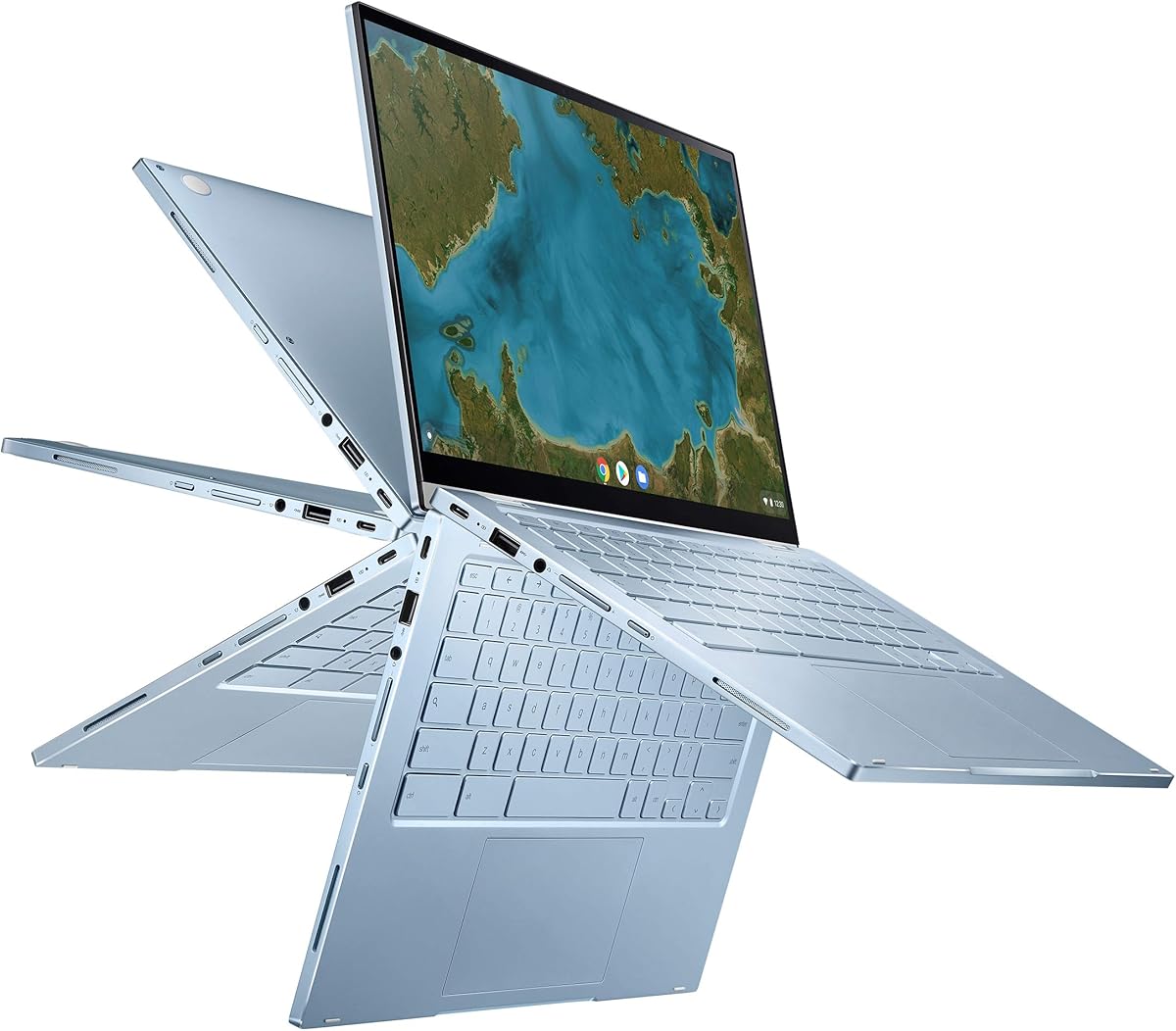


The HP Chromebook 14 x360 Plus carries a 4.2 rating and stands out as a versatile ChromeOS alternative to a conventional MacBook. Its defining feature is a 360-degree hinge that allows the display to rotate into laptop, tent, stand, and tablet modes, giving users more ways to browse, stream, present, and complete interactive tasks.
We may earn a commission when you buy through this link, at no additional cost to you.
The 14-inch WUXGA touchscreen operates at 1920 by 1200 resolution and combines narrow bezels with 300 nits of brightness and an anti-glare coating. That makes it practical for classrooms, shared workspaces, and everyday browsing. Intel N150 processing, 4GB of LPDDR5 memory, and 128GB of UFS storage target web browsing, document editing, video streaming, and light multitasking rather than demanding software.
Connectivity is a clear strength for the class. The machine includes USB-C, USB-A, a combo audio jack, Wi-Fi 6, and Bluetooth 5.4, while an FHD camera with temporal noise reduction supports clearer video calls. Its limitations are the modest 4GB memory and relatively compact 128GB storage, which may feel restrictive if you keep many large files locally or routinely work across numerous demanding applications.
This model is a strong recommendation for students, families, and casual users who prioritize flexibility, touch interaction, and simple maintenance. ChromeOS also updates automatically and includes cloud-oriented tools, making the laptop well suited to research, Google-based documents, online classes, and email. Buyers who need desktop-class software, extensive local storage, or more demanding multitasking should choose a stronger configuration.
The rotating display genuinely expands how the laptop can be used. Clamshell mode suits conventional work, tablet mode supports touch interaction, and tent or stand modes are useful for streaming, video calls, and presentations.
Wi-Fi 6, Bluetooth 5.4, a 1920 by 1200 touchscreen, and automatic ChromeOS updates provide a modern foundation. The Intel N150 and 4GB memory are best suited to lightweight productivity rather than intensive creative work.
We may earn a commission when you buy through this link, at no additional cost to you.
The ASUS Chromebook Flip CX1 earns a 4.3 rating and offers a balanced alternative for anyone who wants a larger touchscreen without moving beyond ChromeOS. Its 14-inch Full HD NanoEdge panel provides 1920 by 1080 resolution, while the 360-degree hinge allows the screen to shift among traditional laptop, tent, stand, and tablet positions.
We may earn a commission when you buy through this link, at no additional cost to you.
Unlike many entry-level Chromebooks with only 4GB of memory, this model provides 8GB of RAM alongside 128GB of eMMC storage. That additional memory can help when maintaining browser tabs and running several web applications. The Intel Celeron N4500 handles everyday productivity, while ChromeOS supports Google applications, cloud storage, and editing or conversion of Microsoft Office files through Google productivity tools.
Portability is handled well, with a stated weight of 3.59 pounds and durability tested to a US military-grade MIL-STD 810H standard. The listed battery life reaches up to 11 hours depending on working conditions. Connectivity includes two USB-C ports with display and power delivery, two USB-A ports, a microSD reader, and audio connections, along with Wi-Fi 6 and Bluetooth 5.2.
The CX1 is most compelling for students, travelers, and home users who value a full-resolution display and flexible form factor. Its Celeron processor is modest, and 128GB of local storage leaves little room for extensive offline media. For Google-centered work, online learning, document editing, and streaming, however, the extra RAM and comprehensive connectivity make this a convincing pick.
The 8GB of RAM gives the CX1 an advantage over many similarly positioned Chromebooks. It remains better suited to numerous tabs and browser-based applications than heavy desktop software or advanced creative workloads.
A 1920 by 1080 NanoEdge display delivers crisp text and useful screen area for documents, lessons, and media. The convertible hinge allows that display to serve multiple orientations without requiring a separate tablet.
We may earn a commission when you buy through this link, at no additional cost to you.
The Samsung Galaxy Book4 receives a 4.4 rating and is the most versatile traditional laptop in this group for users who need Windows application support. Its Intel Core 7 150U is a ten-core processor with two performance cores, eight efficient cores, and 12 threads, offering a more substantial foundation for multitasking than the entry-level chips in several Chromebooks.
We may earn a commission when you buy through this link, at no additional cost to you.
The configuration has been upgraded to 16GB of DDR4 memory and 512GB of NVMe solid-state storage, a combination that supports a wide range of productivity, communication, and creative workflows. Windows 11 Home supplies the full desktop software ecosystem, while Intel Wi-Fi 6E and Bluetooth 5.1 provide modern wireless connectivity.
Its 15.6-inch Full HD IPS display offers 300 nits, anti-glare treatment, 100% sRGB coverage, and thin bezels. The full-size backlit keyboard includes a numeric keypad, and a fingerprint reader offers convenient sign-in. A 54.4Wh battery is rated for up to 12 hours of non-gaming use, although actual results depend on settings and workload.
This is a strong recommendation for business users, students, and families who want a full-size Windows laptop without paying for a discrete graphics card. The 3.46-pound weight and 0.61-inch thickness remain portable, though the 15.6-inch screen is less convenient for small spaces than a 13-inch model. Overall, the Core 7 chip, upgraded memory, and large storage capacity make it the most flexible all-rounder here.
Unlike ChromeOS, Windows supports a much broader collection of desktop applications. That makes the Galaxy Book4 a practical fit for business software, specialist tools, and established academic workflows.
The backlit keyboard, numeric keypad, and 15.6-inch anti-glare screen create a comfortable environment for long typing sessions, spreadsheets, and documents. The fingerprint reader adds convenient security for daily use.
We may earn a commission when you buy through this link, at no additional cost to you.
The Google Pixelbook Go has a 4.2 rating and distinguishes itself through portability. At barely one kilogram and approximately 13 millimeters thick, it is one of the easiest laptops to carry between classes, meetings, cafes, and flights. Its 13-inch touchscreen also remains compact enough for small desks and shared workspaces.
We may earn a commission when you buy through this link, at no additional cost to you.
Battery endurance is the model’s strongest feature. Google states that the laptop can remain unplugged for up to 12 hours and deliver up to two hours of use after only 20 minutes of charging. An eighth-generation Intel Core processor supports quick startup and responsive everyday operation, while the fanless design stays cool enough for comfortable use on a lap.
Comfort and security are thoughtfully handled. The backlit keyboard, quiet Hush Keys, and accurate touchpad make extended sessions easier, while the Titan C security chip and built-in antivirus support data protection. ChromeOS updates automatically, reducing the need for manual operating-system maintenance. The display offers up to 8.3 million pixels and is paired with dual stereo speakers.
The Pixelbook Go is ideal for students, commuters, and anyone who values a light chassis over maximum local storage or demanding application support. Because it uses an older hardware generation, buyers should carefully assess current accessory compatibility and the continued availability of desired software. For cloud-based work, though, its light weight and long stated endurance remain difficult to beat.
A weight of barely one kilogram reduces the physical burden of carrying a computer every day. Its thin profile and compact touchscreen also make it convenient to use in cafés, classrooms, and aircraft tray tables.
The Titan C security chip, built-in antivirus protection, and automatic ChromeOS updates create a secure baseline. Users can focus on their work without repeatedly handling operating-system patches.
We may earn a commission when you buy through this link, at no additional cost to you.
The Lenovo Flex 14 earns a 4.4 rating by combining a traditional Windows laptop with tablet-like input options. Its 14-inch 1920 by 1080 touchscreen supports both keyboard-and-mouse productivity and direct interaction, while the included active pen adds value for handwritten notes, drawing, and annotations.
We may earn a commission when you buy through this link, at no additional cost to you.
Inside, the AMD Ryzen 5 3500U mobile processor and Radeon Vega 8 graphics provide capable performance for work, streaming, and photo or video editing. The 12GB of DDR4 memory is generous relative to many entry-level machines, while the 256GB NVMe solid-state drive supports faster storage operations and a more substantial local workspace.
Privacy is a notable strength because the Flex 14 includes a true block privacy shutter that physically covers the webcam. Connectivity includes HDMI, USB-C, and USB 3.1 inputs. The stated battery life reaches up to 10 hours, and recharge technology is designed to restore up to 80% of capacity in one hour.
This laptop is a strong fit for students, creative note-takers, and users who want a full Windows software base with a touchscreen. The main caveat is its age: it runs Windows 10 and uses an older processor generation, so future software support and accessory compatibility deserve attention. Even so, the combination of 12GB memory, NVMe storage, pen support, and physical privacy control remains unusually useful.
The included active pen removes the need to purchase a separate stylus simply to begin handwriting notes or marking up documents. Combined with the touchscreen, it makes the Flex 14 especially useful for students.
A physical webcam shutter provides direct control over image capture. HDMI, USB-C, and USB 3.1 connections also make it easier to connect the laptop to displays, accessories, and external storage.
We may earn a commission when you buy through this link, at no additional cost to you.
The ASUS Chromebook Flip C433 has a 4.3 rating and offers a compact 2-in-1 design for people who frequently work with web-based applications. Its 14-inch Full HD display uses ultra-narrow 5mm bezels, allowing a relatively large screen to fit within the footprint of a 13-inch laptop.
We may earn a commission when you buy through this link, at no additional cost to you.
The 360-degree hinge supports tent, stand, and tablet modes in addition to the standard clamshell position. An Intel Core m3-8100Y processor can operate up to 3.4GHz, while 8GB of LPDDR3 memory helps when several browser tabs and applications are active together. Storage is 64GB of eMMC, making cloud-based use particularly important.
The backlit chiclet keyboard improves comfort in dim conditions, and the selection of two USB-C and one USB-A port supports common accessories. ChromeOS provides automatic updates, built-in virus protection, rapid startup, and an interface centered on online work. This simplicity can be a major advantage for users who spend most of their time in web applications and Google services.
The C433 is a sensible recommendation for students, travelers, and users seeking a full-resolution touchscreen without a large chassis. Its decisive limitation is the 64GB storage capacity, which can fill quickly if you download large files or retain significant offline media. Users should also verify that the applications they need support ChromeOS before purchasing.
The narrow NanoEdge bezels make the 14-inch Full HD panel unusually compact. This design offers more workspace than a similarly sized traditional laptop while preserving the flexibility of a convertible.
Automatic updates and integrated security reduce routine maintenance. The 8GB memory supports browser-heavy productivity, while cloud storage helps compensate for the limited 64GB local capacity.
We may earn a commission when you buy through this link, at no additional cost to you.
The Lenovo Flagship Chromebook carries a 4.2 rating and is aimed at students, remote learners, and everyday users who want a light touchscreen. Its 14-inch Full HD IPS panel provides 1920 by 1080 resolution, wide viewing angles, an energy-efficient LED backlight, and an integrated 720p webcam with a privacy shutter.
We may earn a commission when you buy through this link, at no additional cost to you.
The MediaTek Kompanio 520 is an eight-core chip with four Cortex-A73 and four Cortex-A53 cores operating at 2.0GHz. It is designed to balance performance with battery efficiency across home, school, professional, and business activities. The Chromebook is explicitly positioned for online classes, Google Classroom, remote learning, and video communication.
Hardware includes 4GB of RAM and 64GB of eMMC storage. That memory can support several applications and browser tabs, although it is less generous than the 8GB configurations offered by some competing Chromebooks. Wi-Fi 6, Bluetooth 5.1, one USB-A port, one USB-C port, a microSD reader, and a headphone/microphone combination jack cover the essential connectivity needs.
At 2.86 pounds and 0.73 inches thick, the laptop is easy to carry, making it a compelling alternative for students and commuters. Its 4GB memory and 64GB storage require realistic expectations, especially if you want to keep large media libraries offline. For cloud-centered schoolwork, browsing, communication, and document work, the light design and polished display are compelling advantages.
A light 2.86-pound chassis is easy to carry between classes, while the touchscreen supports natural finger navigation. The 720p camera, dual-array microphone, and physical privacy shutter cover remote-learning needs.
The Kompanio 520 prioritizes efficiency, and ChromeOS adds automatic updates, cloud backup, and built-in protection. The main compromise is the modest combination of 4GB memory and 64GB storage.
We may earn a commission when you buy through this link, at no additional cost to you.
The Apple MacBook Neo has a 4.6 rating, the highest among the products in this guide, and provides a compact macOS alternative for users who want Apple features in a highly portable form. Its 13-inch Liquid Retina display supports one billion colors, helping photos and videos appear vivid while keeping text crisp for extended reading.
We may earn a commission when you buy through this link, at no additional cost to you.
The A18 Pro processor is positioned for everyday assignments, presentations, Apple Intelligence features, and Apple Arcade games. MacOS supports familiar built-in applications such as FaceTime and Messages, as well as third-party software. With 8GB of unified memory and 256GB of SSD storage, the configuration is suitable for students and general users, though memory-intensive professional workflows may benefit from more capacity.
Apple states that the recycled-aluminum enclosure reaches 60 percent recycled content by weight, and the design is available in several color options with color-coordinated keyboards. The 1080p FaceTime HD camera, dual-microphone array, and two side-firing speakers support calls, presentations, and media. Apple also advertises up to 16 hours of battery life for all-day mobile use.
This is an excellent recommendation for students, commuters, and existing iPhone users who prefer the macOS ecosystem. Apple Intelligence can assist with writing and organization, while continuity features make it possible to control an iPhone, transfer a photograph, or continue an email across devices. The compromises are the modest 8GB memory and 256GB starting storage, so demanding creative professionals should consider a higher-tier configuration.
The 13-inch Liquid Retina display provides a generous canvas without the bulk of a larger notebook. A sturdy recycled-aluminum enclosure and up to 16 hours of stated battery life support use away from an outlet.
The A18 Pro chip is designed to accelerate on-device AI features that help with writing, summarizing, and everyday organization. Continuity features create a smoother connection between a Mac and an iPhone.
We may earn a commission when you buy through this link, at no additional cost to you.
The renewed 14-inch MacBook Pro with M1 Max earns a 4.4 rating and represents the most powerful configuration in this guide. Apple’s M1 Max chip is designed to handle demanding creative workloads, intensive multitasking, and professional applications, while the generous 64GB of unified memory removes many of the constraints found in more compact laptops.
We may earn a commission when you buy through this link, at no additional cost to you.
Storage is equally substantial at 2TB of SSD capacity, which is useful for large media libraries, project files, and applications that benefit from fast local access. The 14-inch Pro display provides a large, high-quality workspace, and the QWERTY English keyboard layout suits users who do not require an alternative international layout.
Because this is a renewed product, its condition and included accessories deserve careful attention. Amazon states that the computer is professionally inspected, tested, and cleaned by qualified suppliers, and it should have no visible cosmetic imperfections when viewed from arm’s length. The battery is specified to retain more than 80% of its original capacity. Accessories may be compatible but not original, and the product may arrive in generic packaging.
This MacBook Pro is best for creative professionals, developers, and power users who need more memory and storage than ordinary ultraportables provide. It is also a compelling option for buyers comfortable with renewed electronics who can accept an older hardware generation in exchange for exceptional specifications. Check the warranty, battery statement, return eligibility, and current software support before purchasing.
With 64GB of unified memory, the machine can support extensive multitasking and memory-heavy applications. The capacity is particularly useful for high-resolution media, large project files, and professional development environments.
The listing states that qualified suppliers inspect, test, and clean each computer. A battery above 80% capacity and a stated 90-day replacement or refund eligibility period provide useful buyer protections.
We may earn a commission when you buy through this link, at no additional cost to you.
The renewed MacBook Pro with a 2.6GHz Intel Core i7 has a 3.7 rating and offers a familiar high-memory macOS configuration. Its 16GB of RAM and 512GB of storage provide a useful foundation for browsing, office applications, communication, and moderately demanding creative software.
We may earn a commission when you buy through this link, at no additional cost to you.
The supplied product title identifies a 15-inch model, while the available product detail describes a 13.3-inch Retina display. That inconsistency should be verified carefully on the listing, especially if screen size is central to your decision. The Retina display itself is presented as a sharp option for editing photos, watching media, and general productivity.
This laptop belongs to an older Intel-based generation rather than the Apple silicon models found elsewhere in the guide. That can influence battery life, performance, and the availability of features associated with newer operating systems. It may still make sense for buyers who specifically want that familiar platform, but it is less compelling for a first-time purchase unless the system and warranty terms are favorable.
The renewed format can help make a premium machine more accessible, but buyers should examine the condition report, battery health, included accessories, warranty coverage, and return terms. This recommendation is best for someone who values the 16GB memory, 512GB storage, and established macOS experience more than having the newest Apple hardware.
The combination of 16GB memory and 512GB storage remains useful for everyday professional tasks. It is a more substantial baseline than configurations equipped with only small amounts of memory and storage.
The title and supplied product details disagree on whether the screen measures 15 inches or 13.3 inches. Confirm the actual panel size, condition, and included components before completing a purchase.
We may earn a commission when you buy through this link, at no additional cost to you.
The right MacBook alternative depends heavily on your software, mobility, and display needs. Compare operating systems, processors, memory, storage, connectivity, and input options rather than focusing on a single specification.
ChromeOS is optimized for browser-based work, Google applications, online learning, and communication. It updates automatically, maintains strong built-in security, and generally asks less of a user during routine maintenance, but its application selection is less flexible than Windows or macOS. Windows laptops support a much broader collection of established desktop software, while macOS remains the natural choice for people whose applications and accessories are designed around Apple hardware.
In short, choose ChromeOS for web-centered productivity and Windows or macOS when application compatibility is the deciding factor.
Memory determines how comfortably a laptop handles numerous browser tabs, office documents, communication tools, and background applications. A Chromebook with 4GB can work well for a student focused on cloud-based tasks, but 8GB offers a more comfortable margin when several applications remain open. Windows users working with spreadsheets, communications, and browser tools simultaneously will also benefit from 16GB. The MacBook Pro M1 Max goes much further with 64GB for demanding creative and development workflows.
Choose the least memory that comfortably covers your normal workload, and avoid choosing by processor alone when multitasking is important.
Local storage determines how much media, documents, and applications you can keep available offline. The 64GB configurations in this guide emphasize cloud use and require regular attention to local files. The 128GB options offer slightly more breathing room, while 256GB and 512GB configurations suit people who retain larger libraries. The M1 Max model’s 2TB capacity is appropriate for high-resolution media and extensive project collections. For a Chromebook, understand the available cloud storage and synchronization behavior before committing.
For cloud-first users, smaller storage can be reasonable; for media libraries and offline work, choose substantially more space.
Entry-level Intel N-series and Celeron processors are designed for browsing, documents, streaming, and light productivity. They are not equivalent to Core 7, Ryzen 5, or Apple silicon processors when handling intensive multitasking, professional applications, or demanding creative workloads. Evaluate the processor against the software you actually use. A faster chip matters less when the computer is limited by only 4GB of memory, while a more capable CPU benefits from adequate memory and fast storage.
Choose a modern Core 7, Ryzen 5, or A18 Pro-class system for broader workloads, and keep a Celeron or N-series model for lighter tasks.
A 1920 by 1080 Full HD panel provides a useful baseline for text, streaming, and general productivity, while higher-resolution Retina and Liquid Retina displays sharpen the experience. Touchscreens add value for navigation, drawing, and annotations, and convertible hinges allow different orientations. A backlit keyboard improves low-light use, while touchpad accuracy becomes important when you travel or work away from a desk. Screens with anti-glare coatings are especially useful in bright classrooms and shared offices.
Prioritize a sharp, comfortable display, accurate touchpad, and keyboard that suits your work; add touch or pen support only if it serves a clear purpose.
A laptop becomes easier to recommend when it can be carried without becoming burdensome. The Google Pixelbook Go is notably light, the Lenovo Flagship Chromebook weighs 2.86 pounds, and the MacBook Neo combines a compact 13-inch format with up to 16 hours of stated battery life. Other models balance larger screens against more substantial footprints. Stated battery figures are useful for comparison, but real runtime depends on display brightness, wireless use, workload, battery condition, and power settings.
For frequent travel, prioritize weight, chassis size, and real-world endurance; for desk-based work, a larger display may matter more.
USB-C, USB-A, HDMI, a card reader, and an audio jack can reduce the need for adapters. USB-C models that support display output and power delivery are especially useful with compatible monitors and docks. Wi-Fi 6, Wi-Fi 6E, and Bluetooth 5.1 or newer provide modern wireless connectivity, but your home or office network must support the relevant standard. Consider the peripherals you use every day and whether they require adapters that are not included.
List your essential accessories, then confirm the laptop includes the right ports or plan to purchase a dependable adapter or dock.
New models typically provide clearer warranty and condition expectations, while renewed products can offer strong specifications at a lower entry point. The renewed MacBook Pro listings state that qualified suppliers inspect and test the hardware, but batteries can have reduced capacity and accessories may be generic. For a renewed computer, review the condition description, battery capacity, warranty, return period, display specifications, and included items with extra care.
Choose new hardware for maximum predictability, or choose renewed hardware only when its condition report and protections meet your needs.
Begin by completing system setup, signing into your preferred account, and confirming that your applications, files, and accessories work as expected. For ChromeOS and macOS, allow automatic operating-system updates and learn the available backup or synchronization tools. On Windows, confirm that Windows 11, security updates, and any required organization-managed software are installed before moving important files onto the machine.
Create separate working and backup locations for documents, and keep large media synchronized or stored externally. Avoid filling the system drive completely because adequate free space supports updates and application performance. Use a protective case or sleeve for frequent travelers, clean screens with a soft microfiber cloth, and keep liquids away from the keyboard and ports. Do not use harsh chemical cleaners on the display or chassis.
For battery care, follow the manufacturer’s charging and storage recommendations and avoid leaving the computer exposed to excessive heat. A ventilated surface is preferable to a bed or soft furnishing, and accessories should be connected only when their specifications are compatible. Periodically test backup restoration, confirm that important files are recoverable, and check the battery condition when purchasing a renewed system.
The best alternative depends on your software and budget. A Chromebook is well suited to browsing, documents, Google services, and online learning, while a Windows laptop supports a much wider range of desktop applications. If you already depend on an iPhone and prefer Apple services, a compact MacBook remains a logical option.
It can if your work mainly takes place in web-based applications and cloud storage. Google Docs, Sheets, and Slides can also edit and convert common Microsoft Office files. A Chromebook is less suitable when you depend on specialist desktop software, extensive offline file access, or operating systems other than ChromeOS.
A Windows laptop is generally better for professional software, gaming libraries, file management, and broader peripheral compatibility. A Chromebook is often simpler to maintain and can be less demanding on hardware. Choose Windows when application control is essential, and choose ChromeOS when your workflow is centered around the browser.
At least 4GB can support light browser-based work, though 8GB is more comfortable for multiple tabs and applications. Windows users handling office suites, communication tools, and browser workflows should consider 16GB. Creative professionals and developers benefit from considerably more memory.
A renewed MacBook Pro can be worthwhile when the condition, battery health, warranty, and return terms are favorable. The M1 Max configuration offers exceptional memory and storage, while the Intel-based model represents an older platform. Review the listing details carefully and avoid buying solely on the processor or advertised storage.
It depends on the specific model and condition. The Pixelbook Go is listed at barely one kilogram, and the Lenovo Flagship Chromebook weighs 2.86 pounds, making both highly mobile. The MacBook Neo also offers a compact 13-inch design, but battery endurance and chassis size should be compared with the applications and accessories you need.
A touchscreen is particularly useful for note-taking, drawing, presentations, and casual tablet use. The Lenovo Flex 14 includes an active pen, while several Chromebooks support direct touch interaction. If your work is primarily keyboard- and mouse-based, a traditional laptop may provide better value without a convertible design.
A 14-inch model is easier to carry and usually fits more comfortably in a bag, while a 15.6-inch screen provides additional workspace for documents, spreadsheets, and media editing. The Samsung Galaxy Book4 favors the larger display, whereas the other models here generally use 13-inch or 14-inch panels.
The Google Pixelbook Go stands out for extreme portability, the HP Chromebook 14 x360 Plus offers a flexible four-mode design, and the Samsung Galaxy Book4 provides the strongest balance of Windows performance, memory, storage, and display size. These options cover very different needs without requiring buyers to adopt a premium configuration.
Before purchasing, identify the applications you need, decide whether your files should live locally or in the cloud, and choose a screen size that suits your workspace. Memory matters for multitasking, processor capability matters for demanding applications, and touch or convertible features should solve a real workflow problem rather than simply look attractive.
Ratings, configurations, availability, and prices can change, so review the current listing before ordering. For a renewed computer, give extra attention to condition, battery health, warranty, and included accessories. For a new system, verify current software support and compare the final specification with your daily workload.