
AHGEIIY Switch 2 Dock
4.3Editor score
Up to 4K@60Hz output
100W Power Delivery
USB 3.0 data port
Broad USB-C compatibility
This guide compares the best third party Switch 2 docks for video output, charging, portability, ports, cooling, and case compatibility.
A third party Switch 2 dock can transform the console from a handheld into a flexible living-room or desktop setup, but the best option depends on how and where you play. Important differences include video modes, charging speed, port selection, physical size, cooling, and whether a protective case can remain attached.
The products in this guide were compared using their published specifications and compatibility details. The list covers compact travel docks, full-size replacements, models with game-card storage, cooling-fan designs, and an extender that lets the console remain inside a thick case while using the original dock.
Each pick highlights a different practical advantage, from integrated cables and high-refresh HDMI to broad device support and organized storage. Product listings, firmware behavior, and prices can change, so verify the current details and accessory requirements before ordering a dock for your particular setup.
4.3Editor score

4.9Editor score
4.7Editor score
This side-by-side comparison highlights each dock's principal strengths, from case-friendly extension and active cooling to integrated HDMI, game-card storage, high-refresh output, and broad compatibility with other USB-C gaming handhelds.


The JSAUX Switch 2 Dock Extender has a 4.2 rating and occupies a specialized niche: docking a Switch 2 without removing a thick protective case. Rather than replacing the original dock, it extends the console's connection to the original dock through a 35-centimeter USB-C cable and a supportive open stand. That distinction makes it especially attractive to owners who routinely use bulky cases.
We may earn a commission when you buy through this link, at no additional cost to you.
The extender is designed to preserve the established original-dock connection, which can reduce the compatibility concerns associated with a fully third-party dock. It supports PD fast charging, USB data transfer up to 10 Gbps, and video output up to 4K at 60Hz, with 2K at 120Hz stated as device- and display-dependent. The open stand also permits passive airflow, helping heat move away from the console without adding a fan, noise, or another power connection.
There are clear limits. This is not a direct replacement dock, and it is not designed for one-step drop-in docking. Its 35-centimeter cable keeps the dock close, which is useful for a tidy home setup but less suitable when the television or monitor is several feet away. A buyer who wants maximum placement flexibility or active cooling should choose a complete third-party dock instead.
The JSAUX extender is the pick for a Switch 2 owner whose protective case is too thick to fit on a conventional dock. It keeps the console protected, retains the original dock's core role, and provides the video, charging, and data connections expected from a practical desktop arrangement. It is less versatile than a standalone travel dock, but more focused for case-heavy users.
The extender's main advantage is its ability to support protective cases up to 5 centimeters thick while the console remains connected to the original dock. That avoids both removing the case for every gaming session and forcing it into a dock opening that may not fit.
The ventilated open stand uses natural airflow rather than a powered fan. This makes it quiet and straightforward to operate, although it is an auxiliary cooling aid rather than a substitute for a dock with an active cooling system.
We may earn a commission when you buy through this link, at no additional cost to you.
The Portable RGB Dock Station has a 4.7 rating and combines a broad port selection with a highly portable form. It is designed for Switch 2, Switch, and Switch OLED systems, making it useful for owners who want one dock to cover several compatible Nintendo consoles. The listing excludes Switch Lite and notes that the package contains the dock and manual but no cables or charger.
We may earn a commission when you buy through this link, at no additional cost to you.
Its central control is the one-button TV and desktop mode switch. The HDMI output supports 4K at 120Hz, 2K, 1080p, and 720p as permitted by the console, game, and display. Connectivity includes HDMI 3.0, USB 2.0, USB-C input, and USB-C output, while the stated power path permits charging while playing. Built-in safeguards are listed for overcharging, overheating, short circuits, and overcurrent.
The dock weighs 5.29 ounces and measures 6.89 by 2.60 by 1.65 inches, so it is easier to justify for travel than a bulky fixed dock. RGB lighting adds visual character and can be disabled by holding the button for a few seconds. The trade-offs are practical: owners must provide an appropriate power adapter and HDMI cable, and the dock is not intended for Switch Lite.
This is a strong general recommendation for someone who values both travel readiness and desktop flexibility. Its high-resolution output, multiple USB connections, straightforward mode control, and small footprint make it more versatile than a basic one-port adapter, while the lack of included cables should be considered before building a complete travel setup.
Support for Switch 2, the original Switch, and the OLED model makes this a practical shared dock for households with multiple Nintendo systems. Switch Lite owners should choose a different product because that model is explicitly unsupported.
HDMI handles the display connection, USB-C input supplies power, and the USB ports support accessories or data devices. This broader selection lets the dock function as a central hub rather than a simple screen adapter.
We may earn a commission when you buy through this link, at no additional cost to you.
The Aluminum Alloy Travel Dock carries a 4.4 rating and is built for more than the Switch 2. Its compatibility list includes Switch 2, Switch, Switch OLED, Steam Deck, Steam Deck OLED, MSI Claw, ROG Ally, ROG Xbox Ally, and Legion Go 1/2/S, making it one of the broadest options in this guide for USB-C gaming devices.
We may earn a commission when you buy through this link, at no additional cost to you.
Video output is advertised at 4K from 60Hz through 120Hz with HDR, along with 1080p support. The dock uses an HDMI 2.1 port, a USB data port, and a USB-C charging input rated up to 100W. The data connection supports bidirectional file transfer and compatible keyboards or mice, while charging can continue during gameplay. An integrated chip is specified with short-circuit, overcurrent, and overheat protection.
The aluminum alloy enclosure is a meaningful design choice because it is described as helping with heat dissipation. However, the port count is less generous than that of some competing docks, and the single listed USB input may be limiting for setups requiring several accessories. Users must also connect through the console's bottom USB-C port because the top port does not carry video.
This dock is best for a gamer who travels with more than one modern handheld and wants a single adapter for displays, power, and basic peripherals. It may not be the first choice for a desk that needs numerous USB devices, but its combination of aluminum construction, high-refresh output, and broad device support makes it a convincing all-purpose travel hub.
The extensive compatibility list is the defining feature. A player who alternates among a Switch 2, Steam Deck, and Ally-family device can carry one compact dock rather than maintaining a separate adapter for every system.
Aluminum alloy is intended to dissipate heat more effectively than a basic plastic enclosure. Although it does not guarantee a cool-running device under every condition, it provides a sensible thermal advantage for extended travel use.
We may earn a commission when you buy through this link, at no additional cost to you.
The AHGEIIY Switch 2 Dock has a 4.3 rating and is a compact replacement for a conventional Nintendo dock. At about 39 grams, it is designed to fit into a pocket or computer bag, offering a smaller alternative for travel, hotels, dorm rooms, and temporary desktop arrangements.
We may earn a commission when you buy through this link, at no additional cost to you.
The connection set includes 4K at 60Hz HDMI, USB 3.0, and USB-C Power Delivery up to 100W. It supports video output up to 4K at 60Hz for Switch 2 and up to 1080p for the original Switch, whose own output limitations prevent 4K. Charging while playing is supported, and the USB 3.0 port is intended for stable data transfers as well as compatible accessories.
This is a value-conscious recommendation, but the package is not all-inclusive. A wall charger, HDMI cable, and USB-C charging cable are not supplied. The product also works only with devices whose USB-C ports support DisplayPort Alt Mode, and the listing recommends the original Switch charger or another supply with an output greater than 39W. Switch Lite is excluded.
The AHGEIIY dock is well suited to buyers who need the essential features of a modern dock at a compact size: 4K video with a Switch 2, high-wattage charging, USB data, and broad compatibility. It is not the best choice for someone who wants a full accessory ecosystem or a turnkey package, but it covers the essential docking functions without unnecessary bulk.
A 39-gram enclosure still provides the three functions most temporary setups need: HDMI video, USB data, and power. That makes the dock a practical travel companion even when a larger replacement would remain at home.
The dock needs an external power source, and the listing recommends a charger with output above 39W. Users should also account for the absence of an HDMI cable and wall adapter when planning a first-time setup.
We may earn a commission when you buy through this link, at no additional cost to you.
The NEWDERY 6-in-1 Charger Dock is not a third-party TV dock in the conventional sense. It is a controller charging station, and its 4.3 rating makes it a useful companion accessory for Nintendo users who want one place to recharge and store their controllers. The stand accommodates four Joy-Cons, two Pro Controllers, or a supported Nintendo Switch and OLED console configuration.
We may earn a commission when you buy through this link, at no additional cost to you.
Each charging position has an individual LED indicator. The corresponding light changes from red while charging to green when the device is fully charged or in standby. A built-in smart chip is listed with overheat, short-circuit, and over-power protection, and the slide-in design makes placing or removing controllers straightforward.
Compatibility boundaries are important. The listing says the dock fits the Switch 2 Pro Controller but not the Switch 2 Joy-Con, and third-party controllers may not work. It also includes a charging data cable but no AC adapter, meaning the user supplies a suitable USB power source. As a result, this product cannot replace a dock for HDMI television output.
Choose the NEWDERY station when controller organization and charging are the priority. It is especially helpful for households that regularly use multiple Joy-Cons or Pro Controllers, yet its limited controller compatibility and lack of video output make it a supplement to, rather than a substitute for, a Switch 2 TV dock.
The multi-position layout can recharge four Joy-Cons or two Pro Controllers at once while keeping them accessible. This reduces cable clutter and prevents controllers from being scattered around the room during a multiplayer gaming session.
The stand does not support Switch 2 Joy-Cons and may not recognize every third-party controller. Original Switch accessories are the safest choice, so buyers with newer mixed-generation gear should verify fit and charging behavior before purchase.
We may earn a commission when you buy through this link, at no additional cost to you.
The Switch 2 TV Dock Station is a dedicated replacement base designed exclusively for the Switch 2. Its 4.2 rating reflects a straightforward approach: use Type-C for power, HDMI 2.0 for a television or monitor, and USB 3.0 for accessories. It is intended for players who want a permanent dock rather than a multi-device travel hub.
We may earn a commission when you buy through this link, at no additional cost to you.
The dock supports 4K at 60Hz or 1080p at 60Hz, with 1080p mirroring also described for big-screen use. Charging while playing is supported, and the USB port allows external controller connections. Safety features include over-voltage, over-current, and short-circuit protection, while an upgraded chip is intended to support stable operation.
Compared with more aggressively featured docks, this one has a narrower compatibility list and a modest port selection. It is only listed for the Switch 2, and its maximum advertised refresh rate is 60Hz. It also does not present the same game-card storage or multi-console convenience found in some alternatives. Those limitations matter for buyers seeking a universal accessory hub.
The Switch 2 TV Dock Station is most appropriate for a dedicated living-room or desk arrangement centered on one console. It offers the expected replacement-dock functions—display output, power, and accessory connectivity—without unnecessary travel features. Buyers wanting 120Hz, wider device support, or more ports should compare those requirements before settling on this model.
The product is designed around the Switch 2 rather than a wider ecosystem of handhelds. For a household using one modern Nintendo console in a fixed location, that focused design can provide everything required for ordinary television gaming.
The Type-C power input, HDMI 2.0 output, and USB 3.0 accessory port cover the standard display, charging, and controller needs. The listed multi-level protection adds reassurance for routine use.
We may earn a commission when you buy through this link, at no additional cost to you.
The Piranha Dock Gen 2 has a 4.3 rating and stands apart with an integrated cooling fan and controller-charging feature. Its plant-inspired enclosure is intended to function as a visible gaming-desk centerpiece rather than disappear into the background, making it a distinctive premium alternative to a conventional replacement dock.
We may earn a commission when you buy through this link, at no additional cost to you.
Video output is advertised at 4K and 60 frames per second, with screen-mirroring support for Switch 1 and Switch 2. The cooling system uses a high-performance fan to reduce heat during extended sessions. On the controller side, dedicated positions on both sides can charge up to four Switch 2 Joy-Cons, with the stated full-charge time reaching three hours.
Status lighting is unusually comprehensive. Red indicates charging, green indicates a full charge, and white identifies mirroring mode, while the lights turn off when unplugged. The chip is described as providing over-temperature, short-circuit, automatic power-off, and heat-dissipation protection. These features make the dock useful as both a cooling base and a charging station.
The key requirements are a 60W USB-C charger and an HDMI cable, neither of which is included, and the console's thick protective case must be removed. It is the best choice for long television sessions where active cooling matters, particularly for a player who also wants a dedicated place to recharge Joy-Cons. Buyers who travel frequently may prefer a smaller passive-cooled option.
Unlike a passive stand or basic metal dock, the Piranha Gen 2 actively moves air across the console. That makes it more relevant to extended play, though the fan adds mechanical complexity compared with fanless alternatives.
Four dedicated Joy-Con charging positions turn the dock into a broader charging hub. Players can keep compatible controllers topped up while the console is connected to the television.
We may earn a commission when you buy through this link, at no additional cost to you.
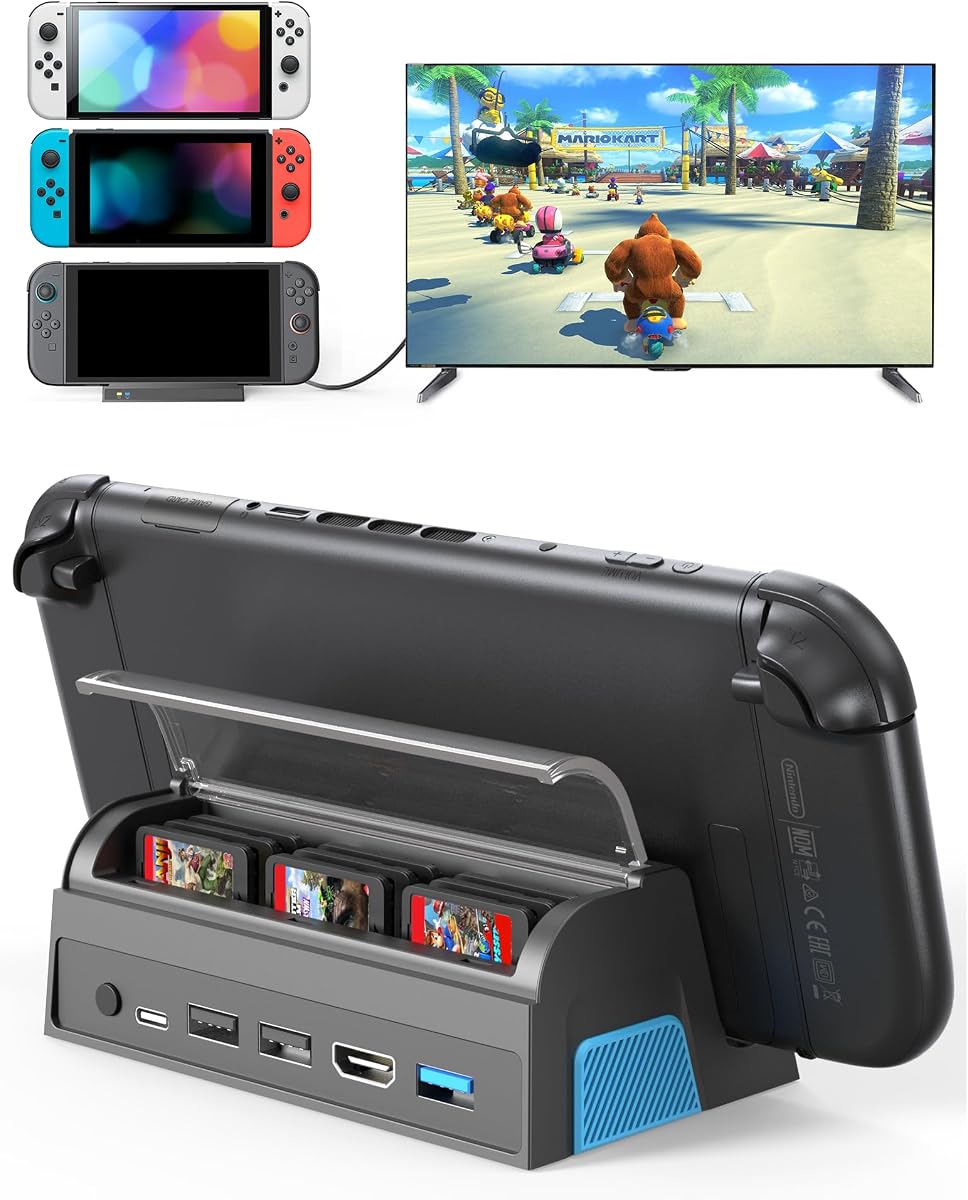
The QJYKIONE Switch 2 Dock combines a 4.7 rating with a feature that most competitors do not offer: protected storage for nine game cards. The dock is compatible with Switch 2, Switch 1, and Switch OLED systems, making it a strong choice for a physical-game library that needs to stay organized and travel together.
We may earn a commission when you buy through this link, at no additional cost to you.
Its HDMI output supports 4K at 120Hz or 1080p, though the listing clarifies that Switch 2 itself supports up to 4K at 60Hz and the original Switch and OLED models remain limited to 1080p. For the best stated performance, users are advised to use the original charging cable and an HDMI 2.1 cable. A rear TV/tabletop mode button changes the operating mode with one touch.
Port selection is notably complete for a compact unit. It includes a Type-C charging port, one USB 3.0 port, and two USB 2.0 ports in addition to HDMI. The charging stand allows play while charging, and the smart chip is listed with short-circuit, over-power, recovery, and overheating protection. The nine card slots include a dust cover, helping keep games secure during storage or transport.
The main compromises are physical: the console must be removed from a protective case, and the package does not include cables or a charger. At 149 grams and 4.9 by 2.8 by 1.8 inches, it is still highly portable. The QJYKIONE dock is the strongest recommendation for a player who values card storage, multiple ports, and polished organization as much as video performance.
Nine covered card slots turn the dock into a compact library station. This is particularly useful for physical collectors who can otherwise leave cartridges scattered near the television or lose smaller game cards while traveling.
HDMI 2.1-style high-refresh output, three USB connections, Type-C power, and one-touch display switching create a versatile desktop interface. The dock is designed to serve as the center of a television setup rather than merely pass video through.
We may earn a commission when you buy through this link, at no additional cost to you.
The Integrated HDMI Travel Dock has the highest rating in this guide at 4.9. Its defining feature is a built-in six-foot HDMI 2.1 cable, removing the need to pack or buy a separate display lead. The result is a streamlined setup for hotels, friends' homes, dorm rooms, and other locations where cable management matters.
We may earn a commission when you buy through this link, at no additional cost to you.
Video output reaches 4K at 120Hz, and the charging path supports 100W Power Delivery pass-through. A USB-A port allows compatible controllers, keyboards, and other accessories to be connected. Compatibility extends beyond Switch 2 to Steam Deck, ROG Ally, Legion Go, laptops, and other USB-C devices, making the dock a general-purpose travel adapter.
The aluminum housing is intended to improve heat dissipation while keeping the unit light enough to carry. The braided integrated cable also emphasizes durability. The design does introduce some inflexibility: a fixed six-foot cable may be too short for some furniture layouts and cannot be replaced with a different length, and only one USB-A accessory port is listed.
This dock is an excellent choice for anyone tired of carrying a loose HDMI cable and charger lead. It combines a top rating, high-refresh output, fast charging, and broad device support in a single travel package. It is especially convenient for quick hotel or temporary desktop connections, although users with multiple peripherals or unusual cable-length needs should look for a dock with more ports and a detachable lead.
The six-foot HDMI 2.1 lead remains attached to the dock, so the entire unit can be dropped into a carrying case without a separate video cable. This is a meaningful convenience improvement for frequent travelers.
The combination of up-to-120Hz HDMI and 100W PD pass-through supports a modern television setup without requiring the console to remain tethered only for power. Actual output remains dependent on the console, game, display, and power source.
We may earn a commission when you buy through this link, at no additional cost to you.
The Aluminum Universal Travel Dock also carries a 4.9 rating and distinguishes itself through a very broad compatibility list. It supports Switch 2, Switch, Switch OLED, Steam Deck, Steam Deck OLED, MSI Claw, ROG Ally, ROG Xbox Ally, ROG Xbox Ally X, and Legion Go 1/2/S, providing a single option for owners of many modern gaming handhelds.
We may earn a commission when you buy through this link, at no additional cost to you.
Its HDMI 2.1 output supports 4K resolution at 60Hz through 120Hz and 1080p, with HDR mentioned as a core feature. The listing appropriately notes that supported resolution, refresh rate, and HDR combinations depend on the connected device and display. A USB-C input supports Power Delivery up to 100W, enabling play while charging, while a USB accessory port can accommodate a compatible controller, keyboard, or mouse.
Protection against overcurrent, overvoltage, and overheating is built in. The enclosure is made from aluminum alloy to help dissipate heat, and the listed weight is only 1.7 ounces. That makes it exceptionally easy to carry, although users must still bring an HDMI cable and a suitable charger. The top USB-C port on a Switch 2 does not carry video, so the bottom port must be used.
This is the pick for a player who wants a tiny, universal travel adapter and does not need multiple USB accessory ports. Its high rating, low weight, 100W charging path, and extensive device list make it particularly convincing for frequent travelers. Those wanting an integrated cable or more peripheral connections should consider the other compact alternatives in this comparison.
The compatibility list covers major handheld families and multiple generations of Ally and Legion Go devices. This makes the dock useful for shared gaming trips where different players bring different systems.
A listed weight of 1.7 ounces and an aluminum housing make the dock easy to pack and help limit heat buildup. The compact size comes with a simpler port layout, so peripheral-heavy users should count connections carefully.
We may earn a commission when you buy through this link, at no additional cost to you.
The right third party Switch 2 dock depends on display ambitions, travel habits, case design, peripheral count, and cooling expectations. Comparing these factors before buying prevents an otherwise capable dock from becoming frustrating in daily use.
A dock advertised for 4K at 60Hz is the most practical target for Switch 2 because the console itself is limited to that mode, even when a dock supports 120Hz. The QJYKIONE, Integrated HDMI Travel Dock, Portable RGB Dock Station, and several universal aluminum docks advertise 4K at 120Hz, but that higher figure describes the dock's capability rather than a guarantee of extra Switch 2 frames. Resolution and refresh rate also depend on the game, television, settings, and the source device. For original Switch or OLED models, 1080p is the relevant ceiling.
Look for a USB-C power input with enough capacity for docked play. Products in this guide cite inputs up to 100W, while some specifically recommend a supply greater than 39W or a 60W USB-C charger. The rated dock input is only the maximum it accepts; actual charging depends on the connected console and the adapter supplied. A dock that says it charges while playing still requires a compatible power source and may not fast-charge the console. For travel, balance portability against having an adapter capable of powering both the console and any attached accessories.
A basic dock with HDMI and power serves a simple television setup, but additional USB ports allow controllers, keyboards, mice, storage, and other accessories to remain connected. The Portable RGB Dock Station offers USB 3.0, USB 2.0, and USB-C connections, while the QJYKIONE adds three USB data ports. The Integrated HDMI Travel Dock and Aluminum Universal Travel Dock each list a single USB accessory port, which keeps them compact but limits simultaneous peripherals. Consider whether you will use the dock for gaming, work, file transfer, or a combination of those activities.
Travel users should weigh both size and the accessories required to operate the dock. The Integrated HDMI Travel Dock stores its six-foot HDMI lead inside the unit, while the JSAUX extender remains close to the original dock. Several aluminum models prioritize heat dissipation and low weight. Smaller is not automatically better, however: a tiny dock may have a short built-in cable, require a separate HDMI lead, or provide too few ports for a permanent desk. Decide whether the product is primarily a carry-on accessory, a second-room dock, or a daily desktop base.
Cooling ranges from no dedicated cooling to passive airflow and an active fan. Aluminum housings can assist with heat dissipation, while the Piranha Dock Gen 2 uses a powered fan for active cooling during long sessions. The JSAUX extender's open stand provides natural ventilation without moving parts. A fan can be valuable for extended play, but it adds noise and another powered component. A metal or well-ventilated passive design may be enough for shorter sessions or a more minimalist setup. Cooling should complement—not replace—good ventilation around the console.
Case fit is one of the most consequential details because many docking stations require the console to sit in a narrow connector area. The JSAUX Dock Extender is specifically designed for cases up to 5 centimeters thick and works with the original dock. The Piranha Dock Gen 2, QJYKIONE dock, and many other replacement designs require thick protective cases to be removed. Before purchasing, measure the case and read the compatibility note. A dock that performs well but forces repeated case removal can be inconvenient for daily use.
A dock with integrated game-card slots can turn a television base into a physical-library organizer. The QJYKIONE holds nine cards and includes a dust cover, helping prevent loss and protect cartridges during transport. Other docks focus only on charging, display output, and accessories. This feature is not essential for digital-library users, but it is particularly useful for collectors, families sharing physical games, or players who travel with a larger cartridge selection. Check whether the slots accept your card size and whether the cover interferes with cable placement.
Many third party Switch 2 docks do not include an HDMI cable, USB-C cable, or wall charger. The Portable RGB Dock Station, QJYKIONE dock, and Piranha Dock Gen 2 specifically list one or more of these as excluded, while the Integrated HDMI Travel Dock is differentiated by its permanent HDMI lead. Before ordering, list what you already own and what must be purchased separately. Also check the console connection direction: for Switch 2 video output, the bottom USB-C port is used, while the top port does not support video.
Begin with the console, dock, display, and power supply disconnected. Connect the dock's USB-C charging input to an appropriate USB-C power adapter, then attach the HDMI cable to the television or monitor. If using a dock with a separate charging lead, connect that lead to the Switch 2's bottom USB-C port; this is the port that carries video for Switch 2 systems. Once the dock is powered, attach the console securely and select the appropriate input on the display.
Use the dock's mode control or the console's TV output settings to change between handheld and television presentation. Enable the matching display mode on the television or monitor, and check whether the game supports the desired output mode. For products advertising high refresh rates, remember that the console, game, cable, dock, and display must all be compatible. If the picture is blank, verify the input source, reconnect the bottom-port cable, and confirm that power reaches the dock before changing more settings.
For maintenance, keep the dock's ports and ventilation openings free of dust, and avoid placing fabric or other objects over an active fan. Route the built-in or attached cable gently rather than pulling it sideways from the connector. When using a case-compatible extender, check that the case and stand do not press against the connector. Finally, use only compatible chargers and cables, unplug the setup when it will not be used for an extended period, and remove the console before moving a dock with a connected display.
Some third party docks advertise HDMI output up to 4K at 120Hz, but that is the maximum capability of the dock and compatible devices. Switch 2 itself supports up to 4K at 60Hz, while the original Switch and Switch OLED remain limited to 1080p. A 120Hz mode may still be relevant when the same dock is used with another compatible USB-C handheld.
Most of the full docking stations in this guide support charging while the console is connected for TV play. They still require a suitable external USB-C power adapter, and the actual charging rate depends on that adapter and the console. Check whether the dock includes a charging cable or power supply, because several models include neither.
The JSAUX Dock Extender is specifically designed to support cases up to 5 centimeters thick while using the original Switch 2 dock. Most replacement-style docks require the console to be removed from a thick case before docking. Always check the individual listing because case openings and connector designs can differ.
A full third party dock can replace the original for video output, charging, and compatible accessories. The JSAUX extender is different because it works with the original dock to extend its connection. Choosing between a replacement and an extender depends on whether you prefer a compact travel hub, a feature-rich desktop base, or the ability to keep a thick case attached.
Several products in this guide support multiple USB-C gaming handhelds, including the Steam Deck, ROG Ally, ROG Xbox Ally, and Legion Go families. Compatibility requires a USB-C port with the appropriate video-output capability. Some Switch 2 models also require the bottom USB-C port, and actual resolution and refresh rate vary by device and display.
First confirm that the television or monitor is on the correct HDMI input and that the dock has power. For Switch 2, verify that the video cable is connected to the console's bottom USB-C port because the top port does not support video. Also ensure the game supports TV output, the dock and display modes are selected correctly, and the display's resolution and refresh rate are compatible with the setup.
They describe the dock's maximum output rather than additional Switch 2 performance. Switch 2 is limited to 4K at 60Hz, so a 4K60 dock fully covers the console's stated ceiling. A dock claiming 120Hz can be worthwhile if it is also intended for a newer handheld or computer that supports higher refresh rates.
An integrated cable is especially convenient for travel because it reduces loose wires and the chance of forgetting the HDMI lead. The tradeoff is that the cable has a fixed length and cannot easily be replaced if your furniture requires more distance. A separate-cable dock offers greater placement flexibility but needs one more accessory in the carrying case.
The QJYKIONE dock stands out for its nine protected game-card slots, multiple USB ports, one-touch display switching, and high 4.7 rating, making it the most complete option for physical-game owners. The Integrated HDMI Travel Dock is ideal for travelers who value a 4.9 rating, a built-in six-foot HDMI lead, 100W charging, and broad device compatibility. The AHGEIIY dock provides the essential 4K60, 100W, and USB 3.0 functions in an exceptionally light format.
The right priority depends on the setup. Keep a thick case attached by choosing the JSAUX extender; add active cooling and Joy-Con charging with the Piranha Dock Gen 2; organize a physical library with the QJYKIONE; or minimize loose travel cables with the Integrated HDMI Travel Dock. For broad handheld use, the aluminum universal docks are especially versatile, though they may require separate accessories.
Before making a final decision, verify the current listing details, the cables you already own, charger requirements, case fit, and the output limitations of your console, game, and display. Prices, availability, firmware behavior, and product configurations can change over time, so checking the latest listing can prevent surprises and ensure the selected dock fits your actual gaming setup.