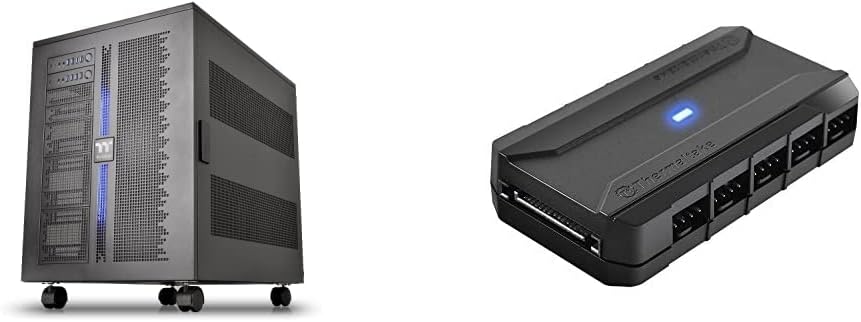
Thermaltake Core W200
Two complete back-to-back systems
Dual 600mm radiator support
Ten-fan PWM control hub
Best dual system PC cases compared for true two-PC builds, dual-chamber airflow, radiator clearance, cable routing, and easier installation options.
A dual system PC case can contain two independent computers, or reorganize a conventional build around separate cooling and cable-management chambers. The best examples combine useful airflow, straightforward installation, room for modern graphics cards, and enough flexibility for air or liquid cooling.
This guide compares ten dual system and dual-chamber cases, focusing on physical layout, cooling capacity, motherboard support, radiator clearance, cable routing, included fans, and practical features such as GPU supports and tool-free panels. The list includes both true two-system platforms and premium single-system designs built around separate chambers.
Each recommendation highlights the circumstances in which that chassis makes the most sense, from operating two mATX systems independently to managing a powerful single PC with a dedicated PSU and cable area. Product details remain subject to manufacturer revisions, and current prices, availability, and retailer listings can change over time.

4.7Editor score

4.6Editor score
The comparison below distinguishes true dual-system chassis from dual-chamber designs, then compares cooling support, graphics-card room, cable organization, and included components across all ten picks.


The Thermaltake Core W200 is the clearest choice for anyone who means it when asking for a dual system PC case. Rather than using the term for a cable-management chamber, this chassis physically supports two separate systems in a back-to-back arrangement, including two motherboards, two power supplies, and two graphics cards. Its supplied rating is listed as not available, so its recommendation rests on its documented design rather than a numerical customer score.
We may earn a commission when you buy through this link, at no additional cost to you.
Its most remarkable feature is the amount of cooling infrastructure available to two independent builds. The case supports up to two 600mm radiators, creating unusual potential for custom liquid cooling. The bundled Commander FP hub can power up to 10 PWM fans simultaneously from the power supply, giving a two-system builder centralized control and substantial expansion capacity. Five reusable ties and two velcro tabs help keep the additional wiring manageable.
The fully modular and dismantleable construction adds flexibility that is especially relevant in a chassis this specialized. Builders can remove components and reorganize the system more freely than in a conventional fixed-layout tower. That design is valuable for experimenters, developers, and enthusiasts who need two working platforms in one enclosure, although it also means the Core W200 is not a conventional replacement for a basic desktop tower.
Choose the Core W200 when the defining requirement is two independent computers rather than one PC with a tidy PSU chamber. It is especially compelling for parallel operation, compact workstation clusters, and elaborate custom-loop projects. For buyers who only need better cable routing and cooling separation, one of the dual-chamber alternatives may be simpler and more appropriate.
The back-to-back arrangement allows each system to have its own motherboard, power supply, and graphics card. That makes the chassis fundamentally different from ordinary dual-chamber models, which generally isolate components within one computer.
Support for two 600mm radiators and a ten-fan PWM hub gives advanced builders exceptional headroom. The bundle also includes reusable ties and velcro tabs for controlling the wiring demands that accompany multiple systems.
We may earn a commission when you buy through this link, at no additional cost to you.
The Cooler Master HAF II 500 combines an enormous front cooling arrangement with flexible support for high-end hardware. It carries a 4.8 rating, the highest numerical customer score in this group, and is built around two 220mm front intake fans plus a 180mm rear exhaust fan. The result is a design aimed at moving substantial air through a large ATX enclosure.
We may earn a commission when you buy through this link, at no additional cost to you.
Low airflow resistance is central to the case's design. Large front and rear ventilation openings complement the oversized Mighty40 cooling system, while the split-level cable-management layout preserves room for the rear exhaust. The MasterRail mounting system accepts multiple fan and radiator sizes at the front and top, giving builders more freedom when planning a custom configuration.
Hardware support is another strength. The Dual-Mode GPU Holder can secure one graphics card for stability or hold two cards of up to 3.6 slots, or 72mm, each. Its storage cage accepts both 3.5-inch and 2.5-inch drives and can vary their orientation according to power-supply length, although the physical scale of the chassis should be considered before installation.
This is not a true dual-computer case, but it offers the space and cooling discipline sought by many buyers searching that category. It is a strong match for a large, visually prominent gaming or performance build that prioritizes airflow, flexible fan placement, and multi-GPU capability over the smallest possible footprint.
Two large 220mm intake fans and a 180mm rear exhaust create a clear high-airflow path. The open front and rear ventilation reduce resistance while the split-level layout keeps the rear fan's operating area unobstructed.
The configurable GPU holder accommodates one card or two cards measuring up to 72mm thick. This makes the HAF II 500 relevant to specialized multi-GPU configurations rather than ordinary compact systems.
We may earn a commission when you buy through this link, at no additional cost to you.
The NZXT H9 Flow RGB+ is a refined dual-chamber ATX case for builders who want separated PSU and drive space without the complexity of installing two complete systems. It holds a 4.7 rating and pairs that functionality with a polished panoramic enclosure, extensive fan support, and a generous collection of preinstalled RGB hardware.
We may earn a commission when you buy through this link, at no additional cost to you.
The chamber separation places the power supply and drives away from the primary components, improving thermal organization and making the internal layout easier to manage. Perforated steel panels and angled front-right fans support efficient cooling, while the main chamber remains open to a wraparound tempered-glass view. The cooling configuration includes two F420 RGB Core single-frame fans, one F120 RGB Core rear fan, and an NZXT Control Hub.
Capacity is unusually broad for a dual-chamber mid-tower. The case supports up to nine 140mm fans across the top, front-right, and bottom, plus one 120mm rear fan. It also accommodates a 420mm radiator at the top or front-right and provides ample clearance for high-end graphics cards. Extra-wide routing channels, built-in velcro straps, and tie-down points support a clean interior.
The H9 Flow RGB+ is the editor's choice for buyers who want a versatile, attractive dual-chamber design with a strong balance of cooling, presentation, and organization. It is also compatible with rear-connecting motherboards such as ASUS BTF and MSI Project Zero. Those seeking two independent operating systems should instead examine the Core W200 or Capo X.
The dedicated PSU and drive chamber declutters the main build and creates distinct cooling zones. Unlike a true two-system chassis, it keeps one motherboard and one graphics card as the primary focus.
Five RGB fans, a control hub, tempered-glass panels, and extensive fan mounts create a complete starting point. A builder still needs to add a CPU cooler, memory, storage, and the rest of the system components.
We may earn a commission when you buy through this link, at no additional cost to you.
The Antec Flux Pro is a full-tower E-ATX enclosure built around abundant cooling options and a distinctive mix of metal, glass, and wood. Its 4.7 rating reflects a well-received feature set, while the included six PWM fans provide a substantial foundation for an air-cooled build.
We may earn a commission when you buy through this link, at no additional cost to you.
The multi-directional vent design supports as many as 12 fans simultaneously. Six are preinstalled: three Tranquil 140 PWM fans at the front, two P12R PWM reverse fans on the power-supply shroud, and one Tranquil 140 PWM rear fan. Removable brackets at the top, front, and PSU shroud let the builder adapt the cooling layout as the system develops.
Liquid-cooling enthusiasts receive another advantage because the case can hold a 420mm radiator and a 360mm radiator simultaneously. The innovative iShift power-supply mounting arrangement allows a 90-degree PSU position, while a CPU/GPU dual temperature display provides at-a-glance thermal information within the chassis.
The Flux Pro is a good option for a large E-ATX showcase build that values fan variety, radiator room, and an immediately usable cooling package. It is a dual-system search result in the broad sense of modern separated or compartmentalized design, not a chassis for two complete computers. Confirm that the full-tower footprint and E-ATX proportions suit the intended location before buying.
The preinstalled set mixes 140mm fans with reverse shroud fans, creating intake, exhaust, and visually interesting airflow around the GPU. Additional mounting options support up to 12 fans in total.
Supporting a 420mm radiator and a 360mm radiator at the same time gives builders an unusually broad liquid-cooling foundation. The removable top, front, and shroud brackets assist with placement.
We may earn a commission when you buy through this link, at no additional cost to you.
The ASUS TUF Gaming GT502 is the best-value pick in this guide for a builder who wants a modern dual-chamber layout. It has a 4.6 rating, divides its interior into a main chamber and rear chamber, and gives the CPU and GPU independent cooling zones. That focused design makes it a practical alternative to a true two-system case.
We may earn a commission when you buy through this link, at no additional cost to you.
Graphics-card mounting is unusually flexible. The included vertical mount lets a card stand upright in the showcase position, while a bundled support bracket handles a conventional horizontal installation and reduces visible sag. Tool-free side panels can be removed by pressing a button hidden at the rear, simplifying access when configuring or maintaining the system.
Tinted tempered-glass panels across the front and side provide a clear but restrained view of the main chamber. The front panel includes USB 3.2 Gen 2 Type-C, two USB 3.0 ports, and an RGB button. Together, these details make the GT502 feel modern without requiring a large full-tower footprint.
Choose the GT502 for a gaming build that values organized cooling zones, flexible GPU presentation, and straightforward access. It does not contain two motherboards or two complete PCs, so buyers with that specific requirement should choose a dedicated dual-system platform. For most conventional performance builds, however, the GT502 offers an excellent balance of useful features.
Separating the main and rear chambers allows the CPU and GPU to receive dedicated airflow treatment. The result is cleaner thermal organization than an undifferentiated open interior.
Builders can choose the included vertical mount or a standard slot installation with the bundled support bracket. The vertical option is particularly useful for showcase builds with tempered-glass panels.
We may earn a commission when you buy through this link, at no additional cost to you.
The ASUS ROG Strix Helios II is a premium E-ATX showcase case for builders who prioritize appearance, cable management, and room for high-end hardware. Its 4.3 rating is the lowest numerical score among the rated products here, but its documented features target a specific premium audience rather than a minimum-cost configuration.
We may earn a commission when you buy through this link, at no additional cost to you.
The front panel combines an aluminum diamond-grille design with a three-dimensional filter intended to support effective cooling. Four preinstalled 140 by 28mm performance fans provide substantial airflow out of the box, and the chassis supports radiators up to 420mm. Dual tempered-glass side panels give the finished system a broad, presentation-focused view.
Hardware compatibility is excellent for large builds. The case accepts E-ATX motherboards and graphics cards up to 450mm long. A graphics-card slot clamp helps secure the card, while a rear detachable PSU bracket improves access. The multifunction cover combines graphics-card holders, a PSU shroud, a cable cover, and rear cable clips to maintain a tidy appearance.
Its advanced I/O panel includes two USB 20Gbps Type-C ports, four USB-A 3.0 ports, an ARGB lighting control button, and a PWM fan-speed control button. This is a compelling choice for an expensive showcase build where visual finish and component access matter, although the Helios II remains a single-system design rather than a two-PC platform.
Aluminum, tempered glass, and a structured front filter create a premium exterior. The dual side windows make internal lighting and component layout central parts of the design.
Support for E-ATX boards and graphics cards up to 450mm accommodates large components. Integrated holders, a shroud, and multiple cable covers reduce clutter around those larger parts.
We may earn a commission when you buy through this link, at no additional cost to you.
The HAVN HS 420 is built for enthusiasts who want maximum flexibility around 140mm cooling hardware. Its 4.6 rating accompanies a dual-chamber ATX design with 11 fan slots, support for up to three 420mm radiators, and a PWM fan hub. The name reflects its emphasis on accommodating large radiators and multiple fans.
We may earn a commission when you buy through this link, at no additional cost to you.
The Hybrid Structure uses balanced airflow and a conventional case-size ratio to direct cool air from the bottom intake toward a centrally positioned GPU. Custom panel ventilation supports the stated 11-fan capacity, while the top, right, and bottom positions can each accept a 420mm radiator. That gives the builder several distinct routes for a substantial custom loop.
Cable organization receives equal attention. The SimpliCable routing system uses grooved guides that run from top to bottom, helping cables follow a clean path. A heat-formed UniSheet glass panel reduces visual distortion, and the three-way adjustable GPU support bracket is designed to accommodate a wide range of card shapes and sizes while remaining visually integrated.
The HS 420 also includes a VESA display mount, allowing a portable display to occupy configurable space, and flexible rubber pads on the fan brackets help isolate them from the chassis to limit resonance. It is a strong choice for a highly customized air- or liquid-cooled system, provided the builder is comfortable planning a dense fan and radiator arrangement.
Eleven 140mm positions offer considerable cooling freedom in a mid-tower. Three dedicated 420mm radiator locations make the case especially attractive to builders planning a large custom loop.
The SimpliCable guides organize wiring from top to bottom, while the integrated hub simplifies fan control. Rubber pads between the fan brackets and chassis help reduce vibration and resonance.
We may earn a commission when you buy through this link, at no additional cost to you.
The NZXT H6 RGB+ offers a compact dual-chamber approach for a standard ATX build. It has a 4.4 rating, isolates the power supply and cables in a secondary chamber, and uses angled front-right fans to direct airflow toward the hottest components. The enclosure is designed to offer organized cooling in a relatively restrained footprint.
We may earn a commission when you buy through this link, at no additional cost to you.
Its visual design is centered on a single piece of curved tempered glass bent to a tight radius for minimal distortion. Ultra-fine mesh spans the top, front-right, and right panels to support airflow, while a removable nylon filter at the bottom helps limit dust without obstructing intake. The uninterrupted glass and fine mesh create a clean, modern appearance.
The H6 supports 10 standardized 120mm fan mounts across the top, front-right, bottom, and rear. It ships without fans, allowing the builder to select every fan based on preferred airflow, acoustics, lighting, or budget. An integrated adjustable anti-sag bracket supports large modern graphics cards and keeps them aligned.
This case makes the most sense for a builder who values a compact exterior, neat internal organization, and complete control over fan selection. It is a dual-chamber single-system design, not a two-PC chassis. The lack of included fans also means the final cooling configuration and cost depend entirely on the parts chosen by the owner.
The secondary chamber isolates the PSU and cables from the main build. This keeps the visible interior cleaner while allowing angled front-right fans to target the central components.
Ten standardized 120mm positions support a custom fan selection, but the absence of included fans means the chassis is not a complete ready-to-assemble cooling solution. Compatibility with existing fan choices is a key buying benefit.
We may earn a commission when you buy through this link, at no additional cost to you.
The Thermaltake Capo X is a true dual-system case designed to operate two independent mATX platforms from one chassis. It carries a 5.0 rating, the highest numerical customer score in the group, and focuses on parallel operation while preserving a compact footprint and useful desk space.
We may earn a commission when you buy through this link, at no additional cost to you.
Its cross-platform architecture allows two mATX systems to run simultaneously, with each system receiving its own input and output controls. The top system has I/O located at the top of the chassis, while the lower system's I/O sits at the bottom-front foot. Each control set includes power, reset, HD Audio, two USB 3.0 Type-A ports, and a USB 3.2 Gen 2 Type-C port.
Cooling capacity is substantial for a dual-PC layout. The chassis supports as many as 13 120mm fans, air coolers up to 180mm high, and 420mm or 360mm radiators. Two detachable clamp GPU braces attach directly to the frame and provide top and bottom support for the graphics cards. Extra cutouts also allow hidden-connector motherboards from ASUS BTF, MSI Project Zero, and GIGABYTE Project Stealth.
The Capo X is ideal for developers, testers, or enthusiasts who need two compact independent systems and want them to remain operational without taking two full towers. Its mATX limitation makes it less universal than full-size ATX options, but its parallel architecture addresses the core purpose of a dual system case with uncommon focus.
The Capo X houses and operates two separate mATX systems in parallel. It is a genuine multi-computer enclosure rather than a conventional case with a separate cable chamber.
Each system has its own power, reset, audio, and USB controls. Separate top and bottom placement makes the two installations manageable while keeping desk space available.
We may earn a commission when you buy through this link, at no additional cost to you.
The Thermaltake View 380 TG ARGB is a more approachable dual-chamber ATX case for builders who want organized internals and an illuminated presentation. It has a 4.7 rating, and the chassis uses pillarless front and side tempered-glass panels to provide a broad view of the components inside.
We may earn a commission when you buy through this link, at no additional cost to you.
Four 120mm ARGB Lite fans with hydraulic bearings come preinstalled, offering a ready starting point for a colorful build. The front I/O includes one USB 3.2 Gen 2 Type-C port, two USB 3.0 ports, and HD Audio. Compatibility with hidden-connector motherboards is another useful feature for builds that want a cable-free appearance.
The case supports radiators up to 360mm and graphics cards up to 415mm long. Those limits position it as a capable but not extreme enclosure, particularly when compared with the 420mm and 450mm capabilities of several premium rivals. Its dual-chamber format organizes the power and drive areas separately from the primary build.
The View 380 TG ARGB is a compelling choice for a polished RGB system that includes fans and glass as standard. It does not run two independent PCs, so a buyer with that requirement should move to the Core W200 or Capo X. For a conventional single build, it offers a balanced combination of appearance, organization, and ready-made cooling.
Four ARGB Lite fans and pillarless tempered-glass panels create a strong visual foundation. The enclosure is particularly suited to builders who want lighting to be part of the design from the start.
A maximum 360mm radiator and 415mm graphics-card length leave room for substantial hardware without making the case as accommodating as larger premium alternatives. Checking these figures early can prevent an expensive mismatch.
We may earn a commission when you buy through this link, at no additional cost to you.
The most important decision is whether you need two complete computers or one system with a separated chamber. Once that requirement is clear, compare motherboard size, component clearance, cooling positions, cable paths, and the convenience of the included hardware.
A true dual-system case can operate two independent motherboards, graphics cards, power supplies, and control panels within one chassis. The Thermaltake Core W200 supports two full systems in a back-to-back arrangement, while the Capo X is designed around two mATX installations. A dual-chamber case instead separates the PSU, drives, cables, or cooling zones within one conventional computer. The H9 Flow RGB+, H6 RGB+, GT502, and View 380 TG ARGB are examples of this latter approach. Confirming the distinction early prevents an expensive mismatch.
In short, choose a true dual-system model only when both computers must operate independently. For a single powerful PC, a dual-chamber layout is usually simpler and more appropriate.
Motherboard form factor determines how much can be installed and how densely the systems must be arranged. The Core W200 accepts two separate system platforms, whereas the Capo X is specifically designed for two mATX systems. Most dual-chamber models support standard ATX boards, while the Antec Flux Pro and ASUS ROG Strix Helios II extend into E-ATX territory. Confirm the board size, number of expansion slots, graphics-card clearance, and PSU dimensions before purchasing.
Match the chassis to the board you already own or intend to buy. Do not assume a full tower will support every E-ATX layout, or that a compact dual-chamber case will accept a large board without conflict.
Cooling support should reflect the size and number of components inside the case. The Core W200 supports up to two 600mm radiators, an exceptional level of capacity for a two-system platform. The Antec Flux Pro can mount a 420mm and 360mm radiator simultaneously. The HAVN HS 420 offers three possible 420mm positions, while the H9 Flow RGB+ supports a 420mm radiator at either the top or front-right. Smaller or more compact models may cap out at 360mm.
List the radiator sizes, fan thicknesses, and pump locations you intend to use. Checking every dimension together prevents a cooler from fitting in isolation but conflicting with the board, GPU, or another fan.
A dual-chamber or dual-system layout is only beneficial if air is directed through the correct area. The HAVN HS 420 sends bottom intake air toward a centrally positioned GPU, while the NZXT H9 Flow RGB+ and H6 RGB+ use angled front-right fans aimed at the main components. The Cooler Master HAF II 500 emphasizes large front intakes and rear exhaust. Compare the documented airflow path with the location of the hot hardware rather than judging from fan quantity alone.
Prioritize cases with a clear intake, exhaust, and component-focused route. Balanced airflow is more valuable than simply filling every available mounting with a fan.
Modern graphics cards can be long, heavy, and thick, so clearance should be verified before the rest of the build is planned. The ASUS ROG Strix Helios II supports cards up to 450mm long, the Thermaltake View 380 TG ARGB supports up to 415mm, and the H9 Flow RGB+ provides ample clearance for high-end cards. The Capo X includes two detachable clamp braces, the GT502 provides both a vertical mount and support bracket, and the H6 RGB+ includes an adjustable anti-sag bracket.
Consider length, thickness, slot count, and physical support together. A case that accepts a long card but provides no suitable bracket may be less convenient than one with slightly tighter length limits and integrated support.
A dual layout creates more wiring than a conventional case, making cable management a functional issue rather than merely cosmetic. The Core W200 includes reusable ties and velcro tabs. The H9 Flow RGB+ provides wide channels, built-in velcro straps, and tie-down points. The HS 420 uses grooved SimpliCable guides, while the Helios II combines a PSU shroud, cable cover, rear clips, and graphics-card holders. Hidden-connector motherboard support is available in the H9, Capo X, and View 380 TG ARGB.
Choose a chassis that provides a defined route for every power, data, and fan cable. Good visibility is less important if the wiring cannot be concealed and separated cleanly.
Included fans can determine how much of the build is ready to assemble on the first day. The H9 Flow RGB+ includes five RGB Core fans and an NZXT Control Hub. The Antec Flux Pro includes six PWM fans, the Helios II has four 140mm performance fans, and the View 380 TG ARGB provides four ARGB Lite fans. By contrast, the H6 RGB+ ships without fans, giving buyers complete freedom to select their own cooling and lighting components.
Compare the fan specification, lighting, hub, and controller, but remember that a CPU cooler is still generally required. A larger included fan package can simplify planning without determining the case's long-term suitability.
Easy access matters because dual layouts are more complex to assemble and service. The GT502 has tool-free side panels, the Helios II includes a rear detachable PSU bracket, and the H9 has extra-wide cable channels. For presentation builds, the H9's wraparound glass, the H6's curved single-piece panel, the HS 420's low-distortion glass, and the View 380's pillarless dual-glass design provide different visual approaches. A practical design should still be easy to open, route cables within, and reach.
Balance appearance with serviceability. A striking window is useful only if the panels can be removed, the GPU can be supported, and cables can be reached without dismantling most of the system.
Before installing hardware, lay out the intended motherboard, PSU, graphics card, storage, and cooling positions. For a true dual-system model, assign the lower and upper systems clearly, then confirm that each I/O panel, power supply, and GPU support area remains accessible. For a dual-chamber case, verify that cables can move from the hidden chamber to the main chamber without crossing airflow paths.
Install the power supplies, motherboard, and storage first, followed by the graphics cards and CPU cooling hardware. Route power and data cables through the designated channels before attaching final panels. Connect fan headers to the included hub or controller where applicable, and verify that every fan spins and that the temperature display, RGB controls, and front USB ports respond correctly.
For routine care, power down and disconnect the system before opening the case. Remove dust from accessible filters and fan surfaces with a dry, soft method, and keep cables from being pinched beneath removable brackets. Check that GPU braces remain secure, vibration-isolating pads have not shifted, and radiator fittings have not moved. If both systems share a chassis, monitor each independently and investigate unusual heat, fan noise, or connection issues separately.
A dual system case can contain and operate two independent computers, usually with separate motherboards, power supplies, graphics cards, and I/O panels. A dual-chamber case contains one computer but separates areas such as the PSU, drives, cables, or CPU and GPU cooling zones. The Core W200 and Capo X provide true parallel systems, while the other recommendations primarily use separated chambers within a single build.
The Thermaltake Core W200 is designed for two separate systems in a back-to-back arrangement and supports two motherboards, two PSUs, and two graphics cards. The Thermaltake Capo X also runs two independent systems, but it is specialized for mATX boards. Choose based on board size, cooling needs, and the amount of space required by the two installations.
They can be, because the chamber separation can keep PSU heat and cable clutter away from the main components while creating dedicated airflow zones. Actual results depend on fan placement, radiator selection, and the direction of the intake and exhaust paths. Cases such as the GT502 explicitly separate CPU and GPU zones, while the HS 420 directs bottom intake air toward a centrally positioned GPU.
No. A dual-chamber case is still a single-system enclosure and can use a normal motherboard as long as it fits the supported form factor and has adequate clearance. Hidden-connector motherboards can provide a cleaner cable-free appearance, and the H9 Flow RGB+, Capo X, and View 380 TG ARGB support this type of connection.
Yes, when both the case and selected components support the required radiator size and layout. The Core W200 supports up to two 600mm radiators, the Capo X supports 420mm and 360mm radiators, and several single-system dual-chamber cases support one or more 420mm units. Check pump clearance, tubing routes, radiator thickness, and fan positions before ordering the cooling hardware.
No. The H9 Flow RGB+, Flux Pro, Helios II, and View 380 TG ARGB include fans, while the NZXT H6 RGB+ ships without them. A case without fans can be advantageous for builders who already own compatible components or want complete control over fan lighting, acoustics, and performance. Buyers starting from scratch should budget for the cooling they will need.
A true dual-system model can consolidate two complete computers into one enclosure, freeing the space normally occupied by a second tower or desktop. The Capo X specifically emphasizes parallel operation in a compact footprint. The exact amount saved depends on the two systems being replaced, the case dimensions, and whether both installations use large graphics cards or radiators.
Check motherboard form factor, maximum graphics-card length, CPU-cooler height, radiator positions, PSU length, and storage options. Also measure the available desk or floor area because full-tower and wide dual-chamber designs can be difficult to position. Finally, confirm the front I/O layout and the route required by any hidden-connector motherboard.
The Thermaltake Core W200 is the strongest recommendation for a genuine two-computer installation, offering two back-to-back systems, exceptional 600mm radiator support, and a ten-port fan hub. The Capo X serves the same fundamental need on a smaller mATX scale. For a conventional single PC, the NZXT H9 Flow RGB+ provides a polished dual-chamber package, while the ASUS TUF Gaming GT502 stands out as a well-balanced value choice.
Prioritize the layout that matches your actual need. Choose a true dual-system model for parallel computing, experimentation, or two independent PCs. Choose a dual-chamber model for better cable management, cleaner presentation, or separate cooling zones. After that, verify graphics-card clearance, motherboard size, radiator positions, included fans, and service access against the components you already own or intend to install.
Ratings, component bundles, and manufacturer specifications can evolve, and current prices and retailer availability change frequently. Review the latest product listing and fitment details before purchasing. That final check helps ensure the selected case supports your hardware, cooling plan, and intended use without creating avoidable installation compromises.